การแนะนำ
Thank you for choosing the Mars Gaming MS-H RGB Flow Gaming Speakers. These compact speakers are designed to provide an immersive audio experience with 3D Surround sound and dynamic RGB Flow lighting. This manual will guide you through the setup, operation, and maintenance of your new speakers.
เนื้อหาแพ็คเกจ
- Mars Gaming MS-H RGB Flow Gaming Speakers (2 units)
- สายไฟ USB ในตัว
- Integrated 3.5mm Auxiliary Audio Cable
- คู่มือการใช้งาน
คุณสมบัติ
- การออกแบบที่กะทัดรัด: Space-saving design suitable for any desk setup.
- แสงไฟ RGB Flow: Dynamic LED lighting for an enhanced visual experience.
- กำลังขับ 10W: มอบเสียงที่ชัดเจนและทรงพลัง
- ระบบเสียงรอบทิศทาง 3 มิติ: Immersive audio experience with an innovative inverted driver system.
- การควบคุมระดับเสียงแบบบูรณาการ: Convenient inline control box for easy volume adjustment.
- การเชื่อมต่อแบบสากล: Powered via USB and connects to audio sources via a 3.5mm auxiliary jack.
คำแนะนำการตั้งค่า
1. การจัดวาง:
Place the two speakers on a stable, flat surface, ideally on either side of your monitor or listening area for optimal stereo separation.
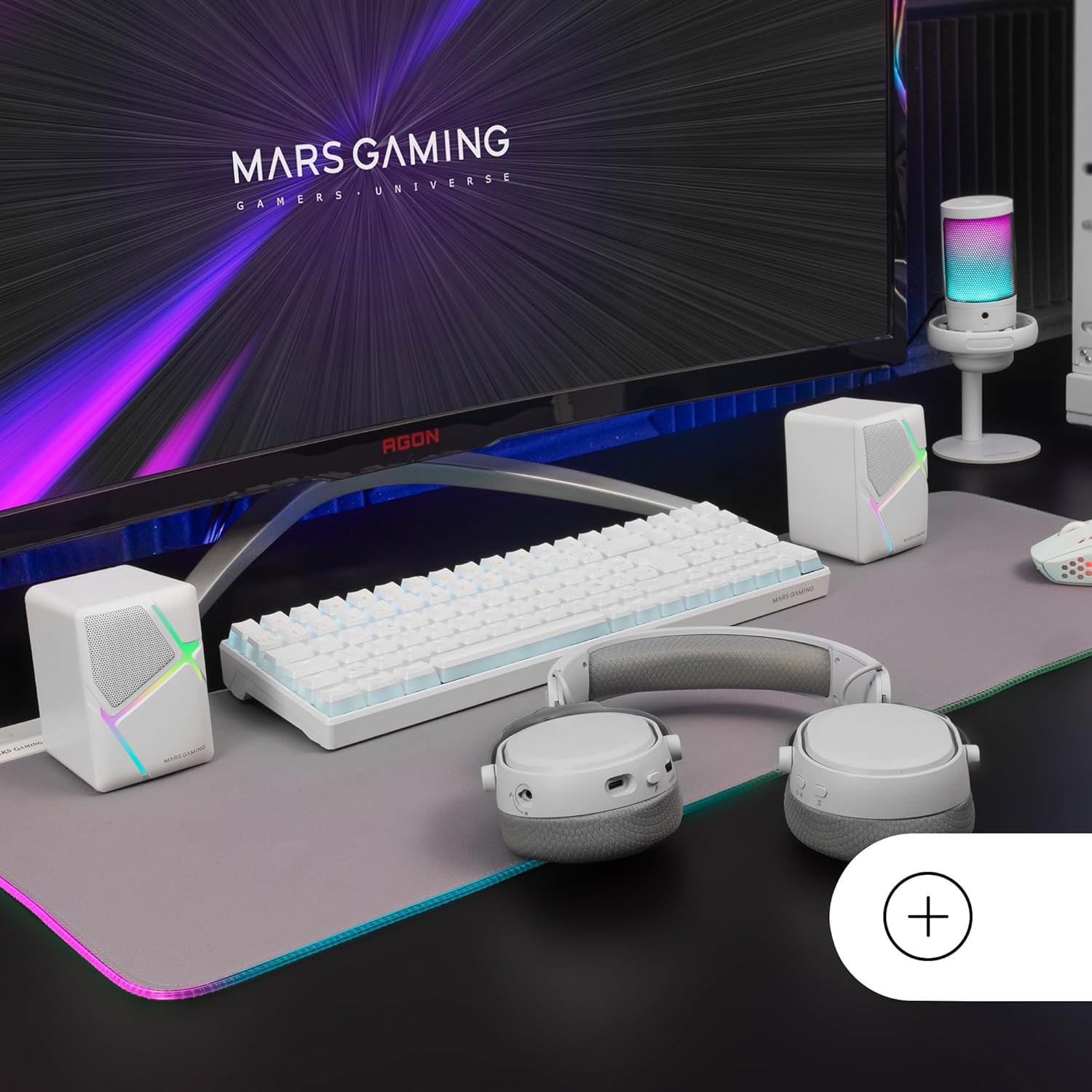
Image: Mars Gaming MS-H speakers set up on a desk with other gaming peripherals.
2. Connect Audio Cable:
Plug the 3.5mm auxiliary audio jack from the speakers into the audio output port of your computer, smartphone, tablet, or music player.

Image: Illustration showing the universal 3.5mm jack connection.
3. Connect USB Power:
Plug the USB-A connector into an available USB port on your computer, a USB wall adapter (not included), or any other compatible USB power source. The speakers will power on and the RGB lighting will activate.
Image: The Mars Gaming MS-H speakers showcasing their RGB Flow lighting feature.
คำแนะนำการใช้งาน
1. เปิด/ปิดเครื่อง:
The speakers power on automatically when the USB cable is connected to a power source. Disconnect the USB cable to power off the speakers.
2. การปรับระดับเสียง:
Use the inline volume control box to adjust the audio output level. Rotate the knob clockwise to increase volume and counter-clockwise to decrease it.

Image: The integrated volume control box with a rotary knob.
3. แสง RGB:
The RGB Flow lighting activates automatically when the speakers are powered on. The lighting pattern is pre-set and cannot be adjusted or turned off independently.
การซ่อมบำรุง
- Keep the speakers away from water, moisture, and direct sunlight.
- Clean the speaker surfaces with a soft, dry cloth. Do not use abrasive cleaners or solvents.
- Avoid placing heavy objects on the speakers or cables.
- Do not attempt to open or repair the speakers yourself. Contact qualified service personnel for assistance.
การแก้ไขปัญหา
| ปัญหา | สาเหตุที่เป็นไปได้ | สารละลาย |
|---|---|---|
| ไม่มีเสียง |
|
|
| ไฟ RGB ไม่ทำงาน |
|
|
| เสียงเพี้ยน |
|
|
ข้อมูลจำเพาะ
| แบบอย่าง | MSHW |
| กำลังขับ | 10 วัตต์ |
| เทคโนโลยีการเชื่อมต่อ | Auxiliary (3.5mm Jack), USB (for power) |
| โหมดเอาต์พุตเสียง | ล้อมรอบ |
| อิมพีแดนซ์ | 4 โอห์ม |
| การตอบสนองความถี่ | สูงถึง 20 กิโลเฮิรตซ์ |
| วิธีการควบคุม | Rotary Knob (Inline Volume Control) |
| คุณสมบัติพิเศษ | ไฟ LED RGB Flow |
| การใช้ที่แนะนำ | Music player, Computer, Smartphone or tablet |
| อุปกรณ์ที่รองรับ | Smartphones, tablets, computers, music players |
| สี | สีขาว |
| วัสดุ | อะคริโลไนไตรล์ บิวทาไดอีน สไตรีน (ABS) |
| ขนาดสินค้า (กว้าง x ยาว x สูง) | 10 x 7.9 x 7 ซม. |
| น้ำหนักสินค้า | 375 กรัม |
| ประเภทการติดตั้ง | โต๊ะวางของ |
| ประเทศต้นกำเนิด | สเปน |
การรับประกันและการสนับสนุน
สำหรับข้อมูลการรับประกันและการสนับสนุนทางเทคนิค โปรดดูที่เว็บไซต์อย่างเป็นทางการของผู้ผลิต webหรือติดต่อผู้ค้าปลีกของคุณ โปรดเก็บหลักฐานการซื้อไว้เพื่อใช้ในกรณีที่ต้องการเคลมประกัน
Manufacturer: Mars Gaming


