1. บทนำ
This manual provides detailed instructions for the installation, operation, and maintenance of your DeLOCK 42022 M.2 NVMe SSD Enclosure. This aluminum enclosure is designed to house two M.2 PCIe NVMe SSDs of various lengths (2280, 2260, 2242, 2230) and connect them to a PC or laptop via USB. Its robust metal housing features a cooling fin design to ensure optimal temperature management for your SSDs. The enclosure also supports various RAID modes when two SSDs are installed.
2. เนื้อหาบรรจุภัณฑ์
โปรดตรวจสอบว่าสินค้าทั้งหมดที่ระบุไว้ด้านล่างนี้มีอยู่ในแพ็คเกจของคุณ:
- DeLOCK 42022 M.2 NVMe SSD Enclosure (Black, Aluminum)
- อะแดปเตอร์ไฟภายนอก
- สาย USB Type-C เป็น USB Type-A
- สาย USB Type-C เป็น USB Type-C
- คู่มือการใช้งาน (เอกสารนี้)
- Thermal pads and mounting accessories (screws, rubber nipples)

Image: Contents of the DeLOCK 42022 package, including the enclosure, power adapter, USB cables, and small accessories.
3. สินค้าหมดview
The DeLOCK 42022 is a high-performance external enclosure designed for M.2 NVMe SSDs. Its robust aluminum construction not only provides durability but also aids in heat dissipation through its finned design. The enclosure features LED indicators for status and an on/off switch for convenient power management.
ภาพ: ด้านหน้า view of the DeLOCK 42022 M.2 NVMe SSD Enclosure, showcasing its black aluminum body and finned cooling design.

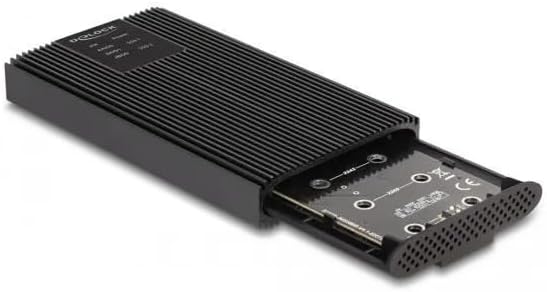
Image: The DeLOCK 42022 enclosure with the internal tray partially extended, revealing the M.2 SSD slots and tool-free mounting mechanism.

ภาพ: ด้านหลัง view of the DeLOCK 42022 enclosure, showing the USB Type-C ports, power input, and on/off switch.
4. Setup and SSD Installation
The DeLOCK 42022 enclosure features a tool-free installation mechanism for M.2 SSDs.
- เปิดสิ่งที่แนบมา: Gently push the end cap of the enclosure to slide out the internal tray.
- Insert SSD(s): Align your M.2 PCIe NVMe SSD(s) with the M.2 slot(s) on the PCB. Insert the SSD(s) firmly into the slot(s) at an angle.
- Secure SSD(s): Once inserted, gently push the SSD down. Use the provided rubber nipples to secure the SSD(s) to the PCB. No screws are required for this step.
- ติดแผ่นระบายความร้อน: For optimal heat dissipation, apply the included thermal pads to the top surface of your SSD(s) where they will make contact with the enclosure's cooling fins.
- ปิดสิ่งที่แนบมา: Carefully slide the internal tray back into the aluminum housing until it clicks securely into place.
บันทึก: Ensure your M.2 SSD is NVMe (PCIe) compatible. SATA M.2 SSDs are not supported by this enclosure.
5. คู่มือการใช้งาน
5.1. การเชื่อมต่อกับคอมพิวเตอร์
- เชื่อมต่อพลังงาน: Connect the external power adapter to the enclosure's power input and then to a wall outlet.
- เชื่อมต่อสายเคเบิลข้อมูล: Use one of the provided USB cables (USB Type-C to Type-C or USB Type-C to Type-A) to connect the enclosure to an available USB port on your computer.
- เปิดเครื่อง: Flip the on/off switch on the enclosure to the "On" position. The LED indicator(s) should illuminate.
- การจดจำระบบ: Your operating system (Windows, macOS, Linux) should automatically detect the new storage device. You may need to initialize and format the SSD(s) through your operating system's disk management utility if they are new.

Image: The DeLOCK 42022 M.2 NVMe SSD Enclosure connected to a laptop via a USB Type-C cable, demonstrating typical usage.
5.2. RAID Configuration (for two SSDs)
If you have installed two M.2 NVMe SSDs, the DeLOCK 42022 enclosure supports various RAID modes. Refer to the specific instructions provided with the enclosure's controller for detailed steps on how to configure RAID 0, RAID 1, JBOD, or other supported modes. Typically, this involves setting jumpers or using a software utility before connecting to the computer for the first time.
สำคัญ: Configuring RAID modes will erase all data on the installed SSDs. Back up any important data before proceeding with RAID configuration.
6. การบำรุงรักษา
The DeLOCK 42022 enclosure is designed for durability and efficient cooling. To ensure optimal performance and longevity:
- การทำความสะอาด: รักษาความสะอาดภายในกรงให้ปราศจากฝุ่น ใช้ผ้าแห้งนุ่มๆ ในการทำความสะอาด หลีกเลี่ยงการใช้น้ำยาทำความสะอาดชนิดเหลว
- การระบายอากาศ : Ensure the cooling fins are not obstructed to allow for proper heat dissipation.
- การจัดการ: โปรดเคลื่อนย้ายกล่องอย่างระมัดระวังเพื่อป้องกันความเสียหายทางกายภาพ
- อุณหภูมิ: Operate the enclosure within recommended environmental temperature ranges.
7 การแก้ไขปัญหา
If you encounter issues with your DeLOCK 42022 enclosure, please refer to the following common troubleshooting steps:
- Enclosure not detected:
- ตรวจสอบให้แน่ใจว่าอะแดปเตอร์ไฟฟ้าเชื่อมต่ออย่างแน่นหนาและกล่องเปิดอยู่
- ลองใช้พอร์ต USB อื่นบนคอมพิวเตอร์ของคุณ
- ลองใช้สาย USB อื่น
- Verify that the M.2 SSD(s) are correctly seated in their slots.
- Check your computer's Disk Management (Windows) or Disk Utility (macOS) to see if the drive is detected but uninitialized/unformatted.
- ความเร็วในการถ่ายโอนช้า:
- Ensure you are connected to a USB 3.0 Gen 2 (or higher) port on your computer. Older USB ports will result in lower speeds.
- Verify that your SSD is performing optimally.
- Check that the USB cable is rated for high-speed data transfer.
- บริเวณภายในอาคารมีความร้อนสูง:
- The aluminum housing is designed to dissipate heat, so it may feel warm during operation, especially under heavy load. This is normal.
- Ensure the cooling fins are not blocked and there is adequate airflow around the enclosure.
- Verify that thermal pads are correctly installed on the SSD(s).
- ปัญหาเกี่ยวกับการตั้งค่า RAID:
- Refer to the specific RAID controller instructions for proper setup.
- Ensure both SSDs are of similar capacity and type for optimal RAID performance.
8. ข้อมูลจำเพาะ
| คุณสมบัติ | รายละเอียด |
|---|---|
| ประเภทสินค้า | กล่องใส่ M.2 NVMe SSD |
| หมายเลขรุ่น | 42022 |
| ยี่ห้อ | ดีล็อค |
| วัสดุ | อลูมิเนียม |
| สี | สีดำ |
| Supported Storage Drives | 2 x M.2 PCIe NVMe SSDs |
| Supported SSD Lengths | 30, 42, 60, 80 มม. |
| อินเทอร์เฟซ | USB 3.0 รุ่นที่ 2 (3.1 รุ่นที่ 2) |
| ประเภทขั้วต่อ USB | USB Type-C (2 ports) |
| อัตราการถ่ายโอนข้อมูล | สูงสุดถึง 20 Gbps |
| รองรับ RAID | Yes (RAID 0, RAID 1, JBOD, etc. - specific modes depend on controller) |
| อะแดปเตอร์ไฟภายนอก | Input: 100-240V, 0.6A, 50-60Hz; Output: 5V, 3A |
| ไฟ LED แสดงสถานะ | ใช่ |
| สวิตซ์เปิด/ปิด | ใช่ |
| ขนาด (กว้าง x ยาว x สูง) | 120 มม. x 68 มม. x 17 มม. |
| ระบบปฏิบัติการที่รองรับ | วินโดวส์, แมคโอเอส, ลินุกซ์ |
9. การรับประกันและการสนับสนุน
For warranty information and technical support, please refer to the documentation provided with your purchase or contact your retailer. DeLOCK products typically come with a manufacturer's warranty against defects in materials and workmanship. Keep your proof of purchase for warranty claims.
For further assistance, visit the official DeLOCK webไซต์หรือติดต่อฝ่ายสนับสนุนลูกค้าของพวกเขา


