1. บทนำ
This instruction manual provides comprehensive guidance for the setup, operation, and maintenance of your WOOX R6118-4P Smart Wi-Fi Plugs. Please read this manual carefully before using the product to ensure safe and optimal performance. Keep this manual for future reference.
2. ข้อมูลด้านความปลอดภัย
Your WOOX Smart Wi-Fi Plugs are designed with safety as a priority. Adhere to the following guidelines:
- ได้รับการรับรองจาก TÜV: The product is TÜV certified, guaranteeing high safety and quality standards.
- วัสดุทนไฟ: Constructed from acrylonitrile butadiene styrene (ABS) and polycarbonate (PC), which are flame-retardant materials, to minimize fire hazards.
- ระบบป้องกันการโอเวอร์โหลด: Equipped with overload protection to prevent damage to connected appliances and the plug itself from excessive current. Do not exceed the maximum load of 16A / 3680W.
- ความปลอดภัยของเด็ก: Features child safety mechanisms to prevent accidental access to live parts.
- การติดตั้งที่เหมาะสม: Ensure the plug is fully inserted into a compatible wall socket. Do not use in wet environments.
- โหมดหน่วยความจำ: The plug includes a memory mode that restores the previous operating state after a power outage, enhancing safety and convenience.

รูปที่ 2.1: The WOOX Smart Wi-Fi Plug is designed with multiple safety features, including TÜV certification, flame-retardant materials, safe heat dissipation, overload protection, and child safety mechanisms, ensuring reliable and secure operation.
3. สินค้าหมดview
The WOOX R6118-4P Smart Wi-Fi Plug is a smart home device designed to make your electrical appliances intelligent and controllable. It allows for remote control, voice commands, scheduling, and energy consumption monitoring. This package includes four smart plugs.

รูปที่ 3.1: แผนภาพนี้แสดงภาพรวมที่ครอบคลุมview of the WOOX Smart Wi-Fi Plug's main functionalities, including energy monitoring, remote app control, voice command compatibility, safety features, and scheduling options.
4. การตั้งค่า
4.1 การติดตั้งแอพ
To control your WOOX Smart Wi-Fi Plugs, you need to install the WOOX Home app (or Tuya Smart app, as WOOX products often integrate with the Tuya platform) on your smartphone or tablet.
- ค้นหา "WOOX Home" or "Tuya Smart" in the Apple App Store (for iOS devices) or Google Play Store (for Android devices).
- ดาวน์โหลดและติดตั้งแอปพลิเคชัน
- เปิดแอปและลงทะเบียนบัญชีใหม่หรือเข้าสู่ระบบหากคุณมีบัญชีอยู่แล้ว
4.2 การจับคู่อุปกรณ์
Follow these steps to pair your WOOX Smart Wi-Fi Plug with the app:
- Plug the WOOX Smart Wi-Fi Plug into a power outlet.
- ตรวจสอบให้แน่ใจว่าสมาร์ทโฟนของคุณเชื่อมต่อกับ เครือข่าย Wi-Fi 2.4 GHz. The plugs do not support 5 GHz Wi-Fi.
- Open the WOOX Home app. Tap the "+" icon in the top right corner to add a device.
- เลือก "ไฟฟ้า" หรือ "ปลั๊กไฟ (Wi-Fi)" จากรายการอุปกรณ์
- Follow the on-screen instructions to put the plug into pairing mode (usually by pressing and holding the power button on the plug until the indicator light blinks rapidly).
- ตรวจสอบให้แน่ใจว่าไฟแสดงสถานะในแอปกะพริบเร็ว
- ป้อนรหัสผ่านเครือข่าย Wi-Fi 2.4 GHz ของคุณ
- The app will then attempt to connect to the device. Once connected, you can rename the plug for easier identification.
Bluetooth Pairing (for faster connection): The plug supports Bluetooth for a quicker initial connection to the app. Ensure Bluetooth is enabled on your phone during the pairing process. This facilitates the Wi-Fi setup but the plug operates primarily over Wi-Fi.

รูปที่ 4.1: The WOOX Smart Wi-Fi Plug supports local control via Bluetooth, allowing you to manage devices through the app even if your Wi-Fi network is unstable or temporarily disconnected, provided you are within range (approximately 30ft).
5. คู่มือการใช้งาน
5.1 การควบคุมระยะไกลผ่านแอปพลิเคชัน
Once paired, you can control your smart plugs from anywhere using the WOOX Home app:
- Tap on the device name in the app to access its control interface.
- Use the on/off toggle to switch the connected appliance's power.
- Access other features like timers, schedules, and energy monitoring from this interface.
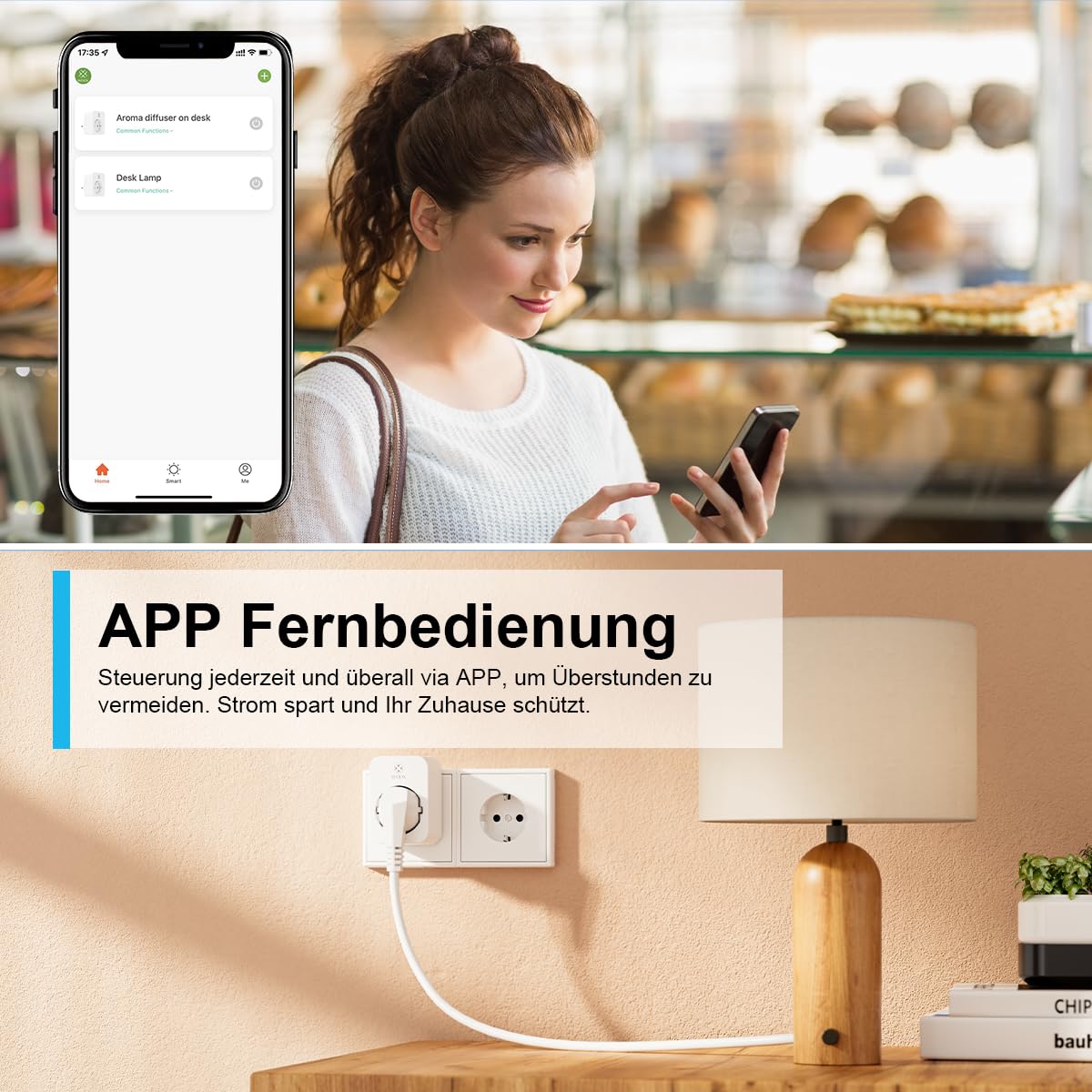
รูปที่ 5.1: Manage your WOOX Smart Wi-Fi Plugs remotely from anywhere using the dedicated mobile application. This feature allows you to turn devices on or off, set schedules, and monitor energy consumption even when you are away from home.
5.2 การควบคุมด้วยเสียง (Alexa และ Google Home)
Integrate your WOOX Smart Wi-Fi Plugs with Amazon Alexa or Google Home for hands-free control:
- In the WOOX Home app, navigate to "Me" > "More Services" (or similar) and link your Alexa or Google Home account.
- Follow the instructions in the Alexa or Google Home app to discover new devices.
- เมื่อค้นพบแล้ว คุณสามารถใช้คำสั่งเสียง เช่น:
- "อเล็กซ่า เปิดใช้งาน [ชื่ออุปกรณ์]"
- "เฮ้ Google ปิด [ชื่ออุปกรณ์]"
- "Alexa, set [device name] to [on/off]"

รูปที่ 5.2: Control your WOOX Smart Wi-Fi Plugs using voice commands through Amazon Alexa or Google Home. Simply connect the plug to your smart home assistant and use phrases like 'Alexa, turn on the TV' for convenient operation.
5.3 Timer and Scheduling Functions
The app offers 6 different modes for automating your devices:
- นับถอยหลัง: Set a timer for the device to turn on or off after a specified duration.
- กำหนดการ: Create daily or weekly schedules for automatic power on/off at specific times.
- วงจร: Set the device to repeatedly turn on and off for defined intervals.
- สุ่ม: Randomly turn the device on and off within a set timeframe, useful for simulating occupancy.
- ดาราศาสตร์: Automate based on sunrise and sunset times in your location.
- อีกนิด: Set the device to turn on for a very short, specific duration and then automatically turn off.

รูปที่ 5.3: Automate your devices with the WOOX Smart Wi-Fi Plug's versatile timer and scheduling functions. Set countdowns, create daily or weekly schedules, implement cyclical operations, or use random and astronomical timers for enhanced home automation.
5.4 การตรวจสอบพลังงาน
The WOOX Smart Wi-Fi Plug provides real-time and historical energy consumption data:
- In the device's control interface within the app, look for the "Energy Monitoring" or "Statistics" section.
- View daily, monthly, or yearly electricity usage (kWh) and current power draw (W).
- This feature helps you understand and manage the energy consumption of your appliances, potentially leading to energy savings.

รูปที่ 5.4: The WOOX Smart Wi-Fi Plug allows you to monitor the electricity consumption of connected devices. The accompanying app provides detailed statistics, helping you track usage and identify opportunities for energy savings.
5.5 การควบคุมกลุ่มและการแชร์อุปกรณ์
- การควบคุมกลุ่ม: In the app, you can create groups of smart plugs to control multiple devices simultaneously with a single command. This is useful for controlling all lights in a room or multiple appliances at once.
- การแชร์อุปกรณ์: Share control of your smart plugs with family members. They will need to download the WOOX Home app and create an account. You can then invite them to control specific devices.
6. การบำรุงรักษา
- การทำความสะอาด: ถอดปลั๊กออกจากเต้าเสียบก่อนทำความสะอาด ใช้ผ้าแห้งและนุ่มเช็ดทำความสะอาดพื้นผิว ห้ามใช้น้ำยาทำความสะอาดหรือวัสดุที่มีฤทธิ์กัดกร่อน
- อัพเดตเฟิร์มแวร์: Periodically check the WOOX Home app for available firmware updates. Keeping your device's firmware up-to-date ensures optimal performance, security, and access to new features.
- พื้นที่จัดเก็บ: When not in use for extended periods, store the plugs in a cool, dry place away from direct sunlight and moisture.
7 การแก้ไขปัญหา
| ปัญหา | สาเหตุที่เป็นไปได้ | สารละลาย |
|---|---|---|
| อุปกรณ์ไม่สามารถเชื่อมต่อ Wi-Fi ได้ | Incorrect Wi-Fi password, 5 GHz Wi-Fi network, plug too far from router, router issues. |
|
| การควบคุมด้วยเสียงไม่ทำงาน | Not linked to Alexa/Google Home, incorrect device name, internet connection issues. |
|
| ปลั๊กไม่ตอบสนอง | No power, network issue, device malfunction. |
|
8. ข้อมูลจำเพาะ
| คุณสมบัติ | รายละเอียด |
|---|---|
| หมายเลขรุ่น | R6118-4P |
| ผู้ผลิต | วูกซ์ |
| ขนาด (กว้าง x ยาว x สูง) | 7.2 x 5.1 x 7.8 ซม. |
| น้ำหนัก | น้ำหนักประมาณ 410 กรัม (น้ำหนักบรรจุภัณฑ์) |
| วัสดุ | อะคริโลไนไตรล์ บิวทาไดอีน สไตรีน (ABS), โพลีคาร์บอเนต (PC) |
| พลังสูงสุด | 3680 วัตต์ |
| แม็กซ์ปัจจุบัน | 16 Ampเอเรส |
| ปฏิบัติการฉบับที่tage | 230 โวลต์ (AC) |
| การเชื่อมต่อแบบไร้สาย | Wi-Fi 2.4 GHz (IEEE 802.11b/g/n), Bluetooth |
| ประเภทสวิตซ์ | Push-button, 1-way |
| การรับรอง | CE, TÜV, RoHS, WEEE |
| โหมดการทำงาน | เปิด/ปิด |
| รวมส่วนประกอบ | Power plug (4 units in package) |
| แบตเตอรี่ที่จำเป็น | เลขที่ |
9. การรับประกันและการสนับสนุน
WOOX ให้บริการ รับประกัน 24 เดือน for the R6118-4P Smart Wi-Fi Plugs from the date of purchase. This warranty covers manufacturing defects and ensures the product meets its specified performance standards under normal use.
For technical assistance, troubleshooting, or warranty claims, please contact WOOX customer support. They offer 24/7 phone service to assist you with any inquiries.
Please refer to the official WOOX website or your purchase documentation for specific contact details and the full warranty policy.


