1. บทนำ
The Behringer AMP800 is an ultra-compact 4-channel stereo headphone ampเครื่องขยายเสียงที่ออกแบบมาสำหรับสตูดิโอและtage applications. It provides high-quality audio amplification for up to eight pairs of headphones, allowing for individual monitoring and mix control. This manual provides essential information for the proper setup, operation, and maintenance of your AMP800 หน่วย
2. คำแนะนำด้านความปลอดภัยที่สำคัญ
- โปรดอ่านคำแนะนำเหล่านี้อย่างละเอียดก่อนใช้งานอุปกรณ์
- เก็บคำแนะนำเหล่านี้ไว้เพื่อใช้อ้างอิงในอนาคต
- โปรดใส่ใจคำเตือนทั้งหมดและปฏิบัติตามคำแนะนำทั้งหมด
- ห้ามใช้อุปกรณ์นี้ใกล้น้ำ
- ทำความสะอาดด้วยผ้าแห้งเท่านั้น
- อย่าปิดกั้นช่องระบายอากาศใดๆ ติดตั้งตามคำแนะนำของผู้ผลิต
- ห้ามติดตั้งใกล้แหล่งความร้อน เช่น หม้อน้ำ เครื่องทำความร้อน เตา หรืออุปกรณ์อื่น ๆ (รวมถึง ampเครื่องให้ความร้อน) ที่ผลิตความร้อน
- อย่าละเลยจุดประสงค์ด้านความปลอดภัยของปลั๊กแบบมีขั้วหรือแบบมีสายดิน ปลั๊กแบบมีขั้วจะมีใบมีด 2 ใบ โดยใบหนึ่งจะกว้างกว่าอีกใบ ปลั๊กแบบมีสายดินจะมีใบมีด 2 ใบและขาต่อสายดินที่สาม ขาที่กว้างหรือขาต่อสายดินที่สามนั้นมีไว้เพื่อความปลอดภัยของคุณ หากปลั๊กที่ให้มาไม่พอดีกับเต้ารับของคุณ ให้ปรึกษาช่างไฟฟ้าเพื่อขอเปลี่ยนเต้ารับที่ล้าสมัย
- ปกป้องสายไฟไม่ให้ถูกเหยียบหรือถูกหนีบ โดยเฉพาะที่ปลั๊ก เต้ารับไฟฟ้า และจุดที่สายไฟออกจากเครื่อง
- ใช้เฉพาะอุปกรณ์เสริม/สิ่งที่แนบตามที่ผู้ผลิตกำหนดเท่านั้น
- ถอดปลั๊กอุปกรณ์นี้ในระหว่างพายุฝนฟ้าคะนองหรือเมื่อไม่ได้ใช้งานเป็นเวลานาน
- แจ้งบริการทั้งหมดให้ช่างที่ผ่านการรับรองทราบ จำเป็นต้องให้บริการเมื่ออุปกรณ์ได้รับความเสียหายในลักษณะใดก็ตาม เช่น สายไฟหรือปลั๊กชำรุด ของเหลวหกหรือมีวัตถุตกลงไปในอุปกรณ์ อุปกรณ์โดนฝนหรือความชื้น ไม่สามารถทำงานได้ตามปกติ หรือตกหล่น
3. การตั้งค่า
Follow these steps to set up your Behringer AMP800 หูฟัง Ampเครื่องฟอก:
- การแกะกล่อง: แกะกล่องอย่างระมัดระวัง AMP800 and ensure all components are present. Inspect the unit for any signs of damage during transit.
- การเชื่อมต่อไฟฟ้า: เชื่อมต่ออะแดปเตอร์ไฟฟ้าที่ให้มาด้วย AMP800's power input and then to a suitable AC power outlet. The power switch is located on the front panel.
- การเชื่อมต่ออินพุตเสียง: Connect your audio source (e.g., mixer, audio interface) to the main input jacks on the rear panel of the AMP800. การ AMP800 features balanced stereo main inputs.
- การเชื่อมต่อหูฟัง: Connect up to two pairs of headphones per channel (total of eight pairs) to the 1/4-inch stereo output jacks on the front panel.
- Cascading Units (Optional): For larger setups requiring more headphone outputs, you can link multiple AMP800 units using the Parallel Link Output on the rear panel. Connect the Parallel Link Output of one unit to the main input of another.
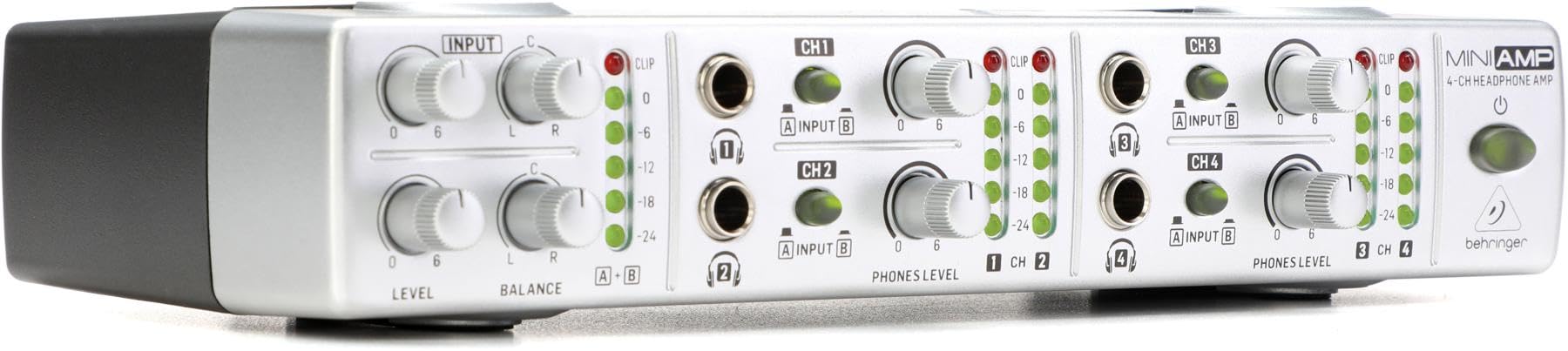
รูปที่ 3.1: แผงด้านหน้า view of the Behringer AMP800, showing input level and balance controls, individual channel controls, headphone outputs, and LED meters.
4. การดำเนินงาน AMP800
เมื่อครั้งหนึ่ง AMP800 is set up, follow these guidelines for operation:
- เปิด/ปิดเครื่อง: Press the power button on the front panel to turn the unit on or off.
- Main Input Level and Balance: Use the "LEVEL" and "BALANCE" knobs in the INPUT section to adjust the overall input signal level and stereo balance for the main input. The LED meters provide visual feedback on the input signal strength. Avoid clipping (red "CLIP" LED) to prevent distortion.
- Channel Input Selection (A/B): Each of the four headphone channels (CH1-CH4) has an "INPUT A/B" switch. This allows you to select between the main stereo input (A) or a dedicated input (B) for that specific channel, if available on the rear panel (refer to the rear panel diagram in the full manual for specific input routing).
- Individual Headphone Level: Each channel (CH1-CH4) has a "PHONES LEVEL" knob. Use these knobs to adjust the volume for the headphones connected to that specific channel.
- สัญญาณการตรวจสอบ: The LED meters for each channel provide visual indication of the signal level being sent to the headphones. Ensure the signal is strong enough for clear monitoring but avoid constant clipping.
5. การบำรุงรักษา
เพื่อให้มั่นใจถึงอายุการใช้งานที่ยาวนานและประสิทธิภาพการทำงานที่เหมาะสมที่สุดของคุณ AMP800:
- การทำความสะอาด: Disconnect the unit from power before cleaning. Use a soft, dry cloth to wipe the exterior. Do not use liquid cleaners or solvents.
- การระบายอากาศ : ตรวจสอบให้แน่ใจว่าช่องระบายอากาศไม่ถูกปิดกั้นเพื่อป้องกันความร้อนสูงเกินไป
- พื้นที่จัดเก็บ: เมื่อไม่ได้ใช้งานเป็นเวลานาน ควรเก็บเครื่องไว้ในที่แห้งและปราศจากฝุ่นละออง
6 การแก้ไขปัญหา
หากคุณพบปัญหาเกี่ยวกับ AMP800, refer to the following common problems and solutions:
- ไม่มีเสียงจากหูฟัง:
- ให้แน่ใจว่า AMP800 is powered on.
- Check all audio cable connections from the source to the AMP800 and from the AMP800 to the headphones.
- Verify that the main input "LEVEL" and individual channel "PHONES LEVEL" knobs are turned up.
- Confirm the correct input (A or B) is selected for each channel.
- Test with different headphones and audio sources to isolate the problem.
- เสียงผิดเพี้ยน:
- Check the input "LEVEL" and individual channel "PHONES LEVEL" knobs. If the "CLIP" LEDs are constantly lit, reduce the input or channel level.
- Ensure the audio source is not sending a distorted signal.
- Verify that all cables are in good condition and properly connected.
- One Channel Not Working:
- Check the "PHONES LEVEL" knob for that specific channel.
- Ensure the headphones are fully plugged into the correct jack.
- Test with a different pair of headphones on that channel.
- Verify the input selection (A/B) for the affected channel.
7. ข้อมูลจำเพาะ
| คุณสมบัติ | ข้อมูลจำเพาะ |
|---|---|
| แบบอย่าง | AMP800 |
| พิมพ์ | 4-channel Stereo Headphone Ampชีวิต |
| น้ำหนักสินค้า | 2.15 ปอนด์ |
| ขนาดสินค้า | 15.6 x 6.8 x 4.1 นิ้ว |
| ข้อมูลอินพุต | Balanced stereo main inputs |
| เอาท์พุต | 8 x 1/4-inch stereo headphone outputs (2 per channel) |
| Cascading | Parallel Link Output for connecting multiple units |
8. การรับประกันและการสนับสนุน
สำหรับข้อมูลการรับประกันโดยละเอียดและการสนับสนุนทางเทคนิค โปรดดูที่ Behringer อย่างเป็นทางการ webเยี่ยมชมเว็บไซต์หรือติดต่อตัวแทนจำหน่าย Behringer ในพื้นที่ของคุณ เก็บใบเสร็จรับเงินไว้เป็นหลักฐานการซื้อสำหรับกรณีการเรียกร้องการรับประกัน
You can visit the official Behringer store for more information: ร้านเบห์ริงเกอร์


