1. บทนำ
Thank you for choosing the DAITSU ADD-20XB Dehumidifier. This manual provides essential information for the safe and efficient operation, installation, and maintenance of your appliance. Please read this manual thoroughly before using the dehumidifier and retain it for future reference.
The DAITSU ADD-20XB is designed to reduce excess humidity in your indoor environment, contributing to a more comfortable and healthier living space. It features a compact design, an integrated display, and various functions for optimal humidity control.
2. ข้อมูลด้านความปลอดภัย
โปรดปฏิบัติตามข้อควรระวังด้านความปลอดภัยต่อไปนี้เพื่อป้องกันการบาดเจ็บหรือความเสียหายต่อเครื่องใช้ไฟฟ้า:
- Always connect the dehumidifier to a grounded power outlet with the correct voltage.
- อย่าใช้งานเครื่องด้วยสายไฟหรือปลั๊กที่ชำรุด
- ควรเก็บเครื่องใช้ไฟฟ้าให้ห่างจากน้ำและของเหลวอื่นๆ ห้ามจุ่มลงในน้ำ
- ตรวจสอบให้แน่ใจว่ามีการระบายอากาศที่เพียงพอรอบๆ เครื่อง อย่าปิดกั้นช่องรับอากาศหรือช่องระบายอากาศ
- ห้ามสอดสิ่งของเข้าไปในช่องระบายอากาศ
- ถอดปลั๊กเครื่องก่อนทำความสะอาด บำรุงรักษา หรือเมื่อไม่ได้ใช้งานเป็นเวลานาน
- เครื่องใช้ไฟฟ้าตัวนี้ไม่ได้มีวัตถุประสงค์เพื่อให้บุคคล (รวมทั้งเด็ก) ที่มีความบกพร่องทางร่างกาย ทางประสาทสัมผัส หรือทางจิตใจ หรือขาดประสบการณ์และความรู้ ใช้งาน เว้นแต่จะมีการดูแลหรือคำแนะนำเกี่ยวกับการใช้เครื่องใช้ไฟฟ้าโดยบุคคลที่รับผิดชอบด้านความปลอดภัยของบุคคลดังกล่าว
- ควรมีผู้ดูแลเด็กเพื่อให้แน่ใจว่าไม่ได้เล่นกับเครื่องใช้ไฟฟ้าดังกล่าว
3. สินค้าหมดview
The DAITSU ADD-20XB Dehumidifier is a white, compact, floor-standing unit designed for efficient moisture removal. It features an intuitive control panel on the top surface and a large capacity water tank.

รูปที่ 3.1 : ด้านหน้า view of the DAITSU ADD-20XB Dehumidifier. This image shows the sleek white design and the DAITSU brand logo prominently displayed on the front panel.
3.1. ส่วนประกอบหลัก
- แผงควบคุม: Located on the top surface, with an integrated digital display and touch buttons.
- ช่องอากาศเข้า/ออก: Vents for drawing in humid air and expelling dry air.
- ถังเก็บน้ำ: ถังเก็บน้ำกลั่นตัวที่ถอดออกได้
- ช่องระบายน้ำต่อเนื่อง: สำหรับต่อสายยางเพื่อระบายน้ำอย่างต่อเนื่อง
- รับมือ: Integrated handle for easy mobility.

รูปที่ 3.2: ระยะใกล้ view of the control panel. This image highlights the digital display and various control buttons for operating the dehumidifier.
3.2. ฟังก์ชั่นแผงควบคุม
- ปุ่มเปิด/ปิด: เปิดหรือปิดเครื่อง
- ปุ่มโหมด: Selects operating modes (e.g., Dehumidification, Laundry Mode).
- Humidity Adjustment Buttons: เพิ่มหรือลดระดับความชื้นที่ต้องการ
- ปุ่มตั้งเวลา: ตั้งเวลาเปิดอัตโนมัติหรือปิดอัตโนมัติ
- ปุ่มปรับความเร็วพัดลม: ปรับความเร็วพัดลม
- จอแสดงผลแบบบูรณาการ: แสดงค่าความชื้นปัจจุบัน ค่าความชื้นที่ตั้งไว้ การตั้งค่าตัวจับเวลา และรหัสข้อผิดพลาด
4. การตั้งค่า
4.1. การแกะกล่อง
- นำเครื่องลดความชื้นออกจากบรรจุภัณฑ์อย่างระมัดระวัง
- ถอดวัสดุบรรจุภัณฑ์ทั้งหมดออก รวมถึงฟิล์มหรือเทปป้องกันด้วย
- ตรวจสอบตัวเครื่องว่ามีร่องรอยความเสียหายหรือไม่ หากพบความเสียหาย ห้ามใช้งานและติดต่อฝ่ายบริการลูกค้า
4.2 การวาง
- วางเครื่องลดความชื้นบนพื้นผิวที่มั่นคงและเรียบเสมอกัน ซึ่งสามารถรับน้ำหนักของเครื่องได้
- Ensure there is at least 20 cm (8 inches) of clear space around the air inlet and outlet for proper airflow.
- Avoid placing the unit near heat sources, in direct sunlight, or in areas with excessive dust.
- เพื่อให้ได้ประสิทธิภาพสูงสุด โปรดปิดประตูและหน้าต่างทุกบานในห้องที่กำลังใช้งานเครื่องลดความชื้น
4.3. การเชื่อมต่อไฟฟ้า
เสียบสายไฟเข้ากับเต้ารับไฟฟ้าที่มีสายดินที่เหมาะสม ตรวจสอบให้แน่ใจว่าได้ปรับแรงดันไฟฟ้าให้เหมาะสมแล้วtage ตรงตามข้อกำหนดของหน่วย
5. คู่มือการใช้งาน
5.1. การทำงานพื้นฐาน
- กดปุ่ม ปุ่มเปิดปิด เพื่อเปิดเครื่องลดความชื้น หน้าจอจะแสดงระดับความชื้นในห้องปัจจุบัน
- ใช้ Humidity Adjustment Buttons (Up/Down arrows) to set your desired humidity level. The recommended range is typically between 40% and 60% relative humidity.
- The unit will automatically start dehumidifying until the set humidity level is reached, then it will cycle on and off to maintain it.
5.2. การเลือกโหมด
กดปุ่ม ปุ่มโหมด to cycle through available operating modes:
- โหมดลดความชื้น: Standard operation to reduce room humidity.
- Laundry Mode (Dry Clothes): Designed to quickly dry clothes by continuously running the dehumidifier at a high fan speed.
5.3. ฟังก์ชั่นจับเวลา
กดปุ่ม ปุ่มจับเวลา to set an auto-on or auto-off time. Use the humidity adjustment buttons to set the desired hours (1-24). The timer indicator will illuminate when active.
5.4. การปรับความเร็วพัดลม
กดปุ่ม ปุ่มปรับความเร็วพัดลม to select between different fan speeds (e.g., Low, High). Higher fan speed results in faster dehumidification but may produce more noise.
5.5. Water Tank and Continuous Drainage
- ถังเก็บน้ำ: When the water tank is full, the unit will automatically shut off, and a การแจ้งเตือนถังเต็ม will activate. Carefully remove the tank, empty the collected water, and reinsert it securely.
- การระบายน้ำอย่างต่อเนื่อง: For extended operation without emptying the tank, connect a suitable drainage hose (not included) to the continuous drainage port at the back of the unit. Ensure the hose is sloped downwards to allow gravity drainage into a floor drain or larger container.
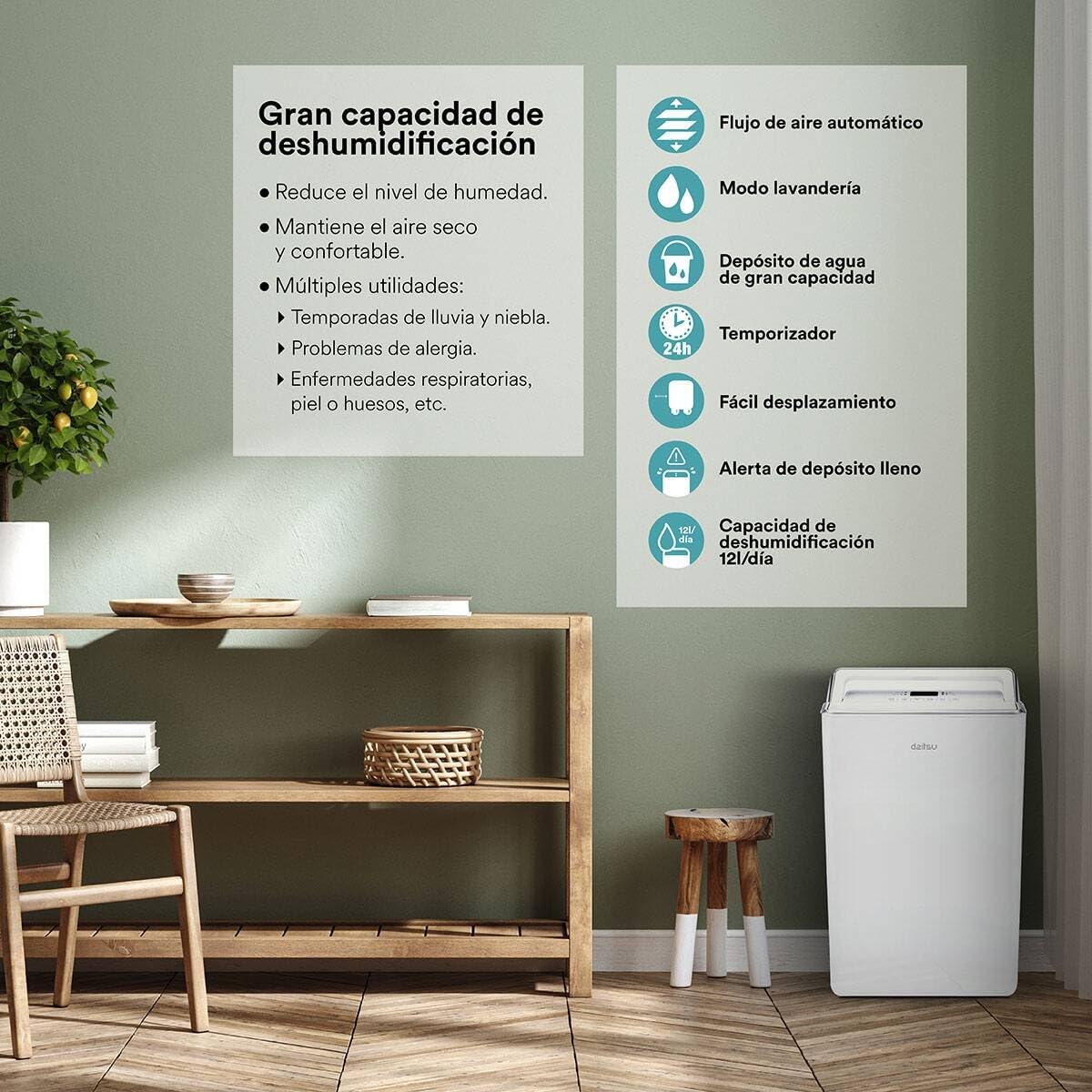
รูปที่ 5.1: เกินview of key features including high dehumidification capacity (20L/day), automatic airflow, laundry mode, large capacity water tank, timer, easy mobility, and full tank alert.
6. การบำรุงรักษา
การบำรุงรักษาตามปกติจะช่วยให้เครื่องลดความชื้นทำงานได้อย่างเหมาะสมที่สุดและยืดอายุการใช้งานของเครื่องลดความชื้นของคุณ
6.1. การทำความสะอาดตัวกรองอากาศ
ควรทำความสะอาดตัวกรองอากาศทุกสองสัปดาห์หรือบ่อยกว่านั้น ขึ้นอยู่กับการใช้งานและคุณภาพอากาศ
- ปิดเครื่องลดความชื้นและถอดปลั๊ก
- ค้นหาและถอดแผ่นกรองอากาศ (โดยทั่วไปจะอยู่ด้านหลังหรือด้านข้างของเครื่อง)
- ล้างตัวกรองด้วยน้ำอุ่นผสมสบู่ ล้างให้สะอาดและปล่อยให้แห้งสนิทก่อนใส่กลับเข้าไปใหม่
- Do not use a dishwasher or expose the filter to direct sunlight for drying.
6.2. การทำความสะอาดถังน้ำ
ทำความสะอาดถังน้ำเป็นประจำเพื่อป้องกันการเกิดเชื้อราและราดำ
- ถอดถังน้ำออกจากเครื่อง
- ล้างถังด้วยผงซักฟอกอ่อนๆ และน้ำอุ่น
- ล้างให้สะอาดและเช็ดให้แห้งก่อนวางกลับเข้าไปในเครื่องลดความชื้น
6.3. ทำความสะอาดภายนอก
เช็ดด้านนอกของตัวเครื่องด้วยผ้านุ่มdamp ใช้ผ้าเช็ดทำความสะอาด ห้ามใช้สารเคมีรุนแรง น้ำยาทำความสะอาดที่มีฤทธิ์กัดกร่อน หรือตัวทำละลาย
6.4. การจัดเก็บ
หากจัดเก็บเครื่องไว้เป็นเวลานาน:
- ล้างถังน้ำและทำความสะอาด
- ทำความสะอาดตัวกรองอากาศ
- พันสายไฟให้เรียบร้อย
- ควรเก็บเครื่องในแนวตั้งในที่แห้งและเย็น หลีกเลี่ยงแสงแดดโดยตรงและอุณหภูมิที่สูงหรือต่ำเกินไป
7 การแก้ไขปัญหา
ก่อนติดต่อฝ่ายบริการลูกค้า โปรดดูคู่มือการแก้ไขปัญหาต่อไปนี้สำหรับปัญหาทั่วไป:
| ปัญหา | สาเหตุที่เป็นไปได้ | สารละลาย |
|---|---|---|
| เครื่องไม่เปิด | ไม่มีแหล่งจ่ายไฟ เสียบสายไฟไม่แน่น | ตรวจสอบเต้ารับไฟฟ้าและการเสียบปลั๊ก ตรวจสอบให้แน่ใจว่าปลั๊กไฟใช้งานได้ |
| ไม่มีการเก็บน้ำ | Room humidity is too low ไส้กรองอากาศอุดตัน อุณหภูมิต่ำเกินไป ติดตั้งถังเก็บน้ำไม่ถูกต้อง | Increase desired humidity setting ทำความสะอาดไส้กรองอากาศ Operate in a warmer environment (above 5°C) Ensure water tank is correctly seated |
| หน่วยมีเสียงดัง | หน่วยไม่อยู่บนพื้นผิวระดับ ไส้กรองอากาศอุดตัน ส่วนประกอบภายในสั่นสะเทือน | วางบนพื้นผิวเรียบและมั่นคง ทำความสะอาดไส้กรองอากาศ This may be normal during operation; if excessive, contact support |
| ไฟแสดงสถานะถังน้ำเต็มติดอยู่ แต่ถังน้ำยังไม่เต็ม | สวิตช์ลูกลอยทำงานผิดปกติ ถังไม่ติดตั้งอย่างถูกต้อง | Remove and reinsert the water tank firmly โปรดติดต่อฝ่ายบริการลูกค้าหากปัญหายังคงอยู่ |
| Automatic defrost function active | Coils are freezing due to low temperature | This is normal operation. The unit will pause dehumidification and run the fan to melt frost. Dehumidification will resume automatically. |
8. ข้อมูลจำเพาะ
| คุณสมบัติ | ข้อมูลจำเพาะ |
|---|---|
| หมายเลขรุ่น | ADD-20XB (3NDA0044) |
| ยี่ห้อ | ไดทสึ |
| ลดความชื้นความจุ | 20 ลิตร/วัน |
| สี | สีขาว |
| วัสดุ | เหล็กอัลลอยด์ |
| น้ำหนัก | 13 กิโลกรัม |
| คุณสมบัติพิเศษ | Adjustable Humidity Control, Automatic Defrost, Water Level Indicator, Continuous Drainage |
| ชั้นพลังงาน | A++ ถึง E |
9. การรับประกันและการสนับสนุน
สำหรับข้อมูลการรับประกัน โปรดดูเอกสารที่ให้ไว้ตอนซื้อสินค้า เก็บหลักฐานการซื้อไว้เพื่อใช้ในการเรียกร้องการรับประกัน
If you encounter issues not covered in this manual or require further assistance, please contact DAITSU customer support. Contact details can typically be found on the manufacturer's webไซต์หรือใบเสร็จรับเงินการซื้อของคุณ


