การแนะนำ
The Homedics Smart Air Purifier C500 is designed to improve indoor air quality in extra-large rooms. It features a comprehensive 4-in-1 filtration system, including True HEPA filtration, UV-C technology, an activated carbon odor filter, and a prefilter. This manual provides essential information for setting up, operating, and maintaining your air purifier.

Image: The Homedics Smart Air Purifier C500, a white rectangular unit with wooden legs, shown next to a smartphone displaying its control app.
คุณสมบัติหลัก:
- 4-in-1 Purification: True HEPA filtration captures up to 99.97% of airborne allergens as small as 0.3 microns.
- Total Clean: UV-C technology reduces bacteria, mold, fungus, and viruses. An activated carbon filter minimizes odors and VOCs, while a prefilter captures larger particles.
- การควบคุมอัจฉริยะ: Digital particle sensor provides real-time numerical and color-coded indoor air quality status. Features a replace filter indicator.
- การเชื่อมต่อ: Wi-Fi enabled for control via the Homedics app and voice commands with Amazon Alexa or Google Assistant-enabled devices.
- ความครอบคลุมของห้อง: Ideal for extra-large rooms, purifying air in a 553 sq. ft. room every 12.5 minutes or a 2679 sq. ft. room once per hour.

Image: A visual representation of the air purifier's effectiveness in removing various airborne allergens and particles.
การตั้งค่า
แกะกล่องและติดตั้งตัวกรอง
Before first use, ensure all packaging materials are removed from the filters inside the unit. The Homedics Smart Air Purifier C500 comes with two True HEPA filters that include a built-in prefilter and activated carbon odor filter.
- Carefully remove the back cover of the air purifier.
- Locate the filters inside the unit.
- นำบรรจุภัณฑ์พลาสติกทั้งหมดออกจากตัวกรอง
- Insert the filters back into their designated slots.
- ใส่ฝาหลังกลับคืนให้แน่น
Video: A demonstration of how to set up the air purifier, including removing and installing the filters.
การเชื่อมต่อไฟฟ้า
เสียบสายไฟเข้ากับเต้ารับไฟฟ้ามาตรฐาน เครื่องก็พร้อมใช้งานแล้ว
App Connection (Wi-Fi)
To unlock smart features and remote control, connect your air purifier to the Homedics app.
- Download the Homedics app from your smartphone's app store.
- เปิดแอปแล้วทำตามคำแนะนำบนหน้าจอเพื่อเพิ่มอุปกรณ์ใหม่
- Ensure your air purifier is powered on and in pairing mode (refer to the app for specific instructions on activating pairing mode).
- Connect the air purifier to your home Wi-Fi network.
Video: Instructions on how to link the air purifier to the CleanForce app for smart control.
คำแนะนำการใช้งาน
แผงควบคุมโอเวอร์view
The control panel on top of the unit allows for manual operation. It features buttons for power, fan speed, and mode selection.
วิดีโอ: จบแล้วview of the Homedics Smart Air Purifier, highlighting its 4-in-1 features and controls.
โหมดและการตั้งค่า
- เปิด/ปิดเครื่อง: กดปุ่มเปิด/ปิดเพื่อเปิดหรือปิดเครื่อง
- ความเร็วพัดลม: Cycle through multiple fan speeds (e.g., Low, Medium, High) to adjust purification intensity.
- โหมดอัตโนมัติ: The air purifier automatically adjusts fan speed based on real-time air quality readings from the digital particle sensor.
- โหมดสลีป: Activates a quiet operation mode with dimmed display lights for undisturbed rest.
- ตัวจับเวลา: Set a timer for the unit to operate for a specific duration before automatically turning off.
- การควบคุมด้วยเสียง: Use Amazon Alexa or Google Assistant-enabled devices to control the air purifier with voice commands.
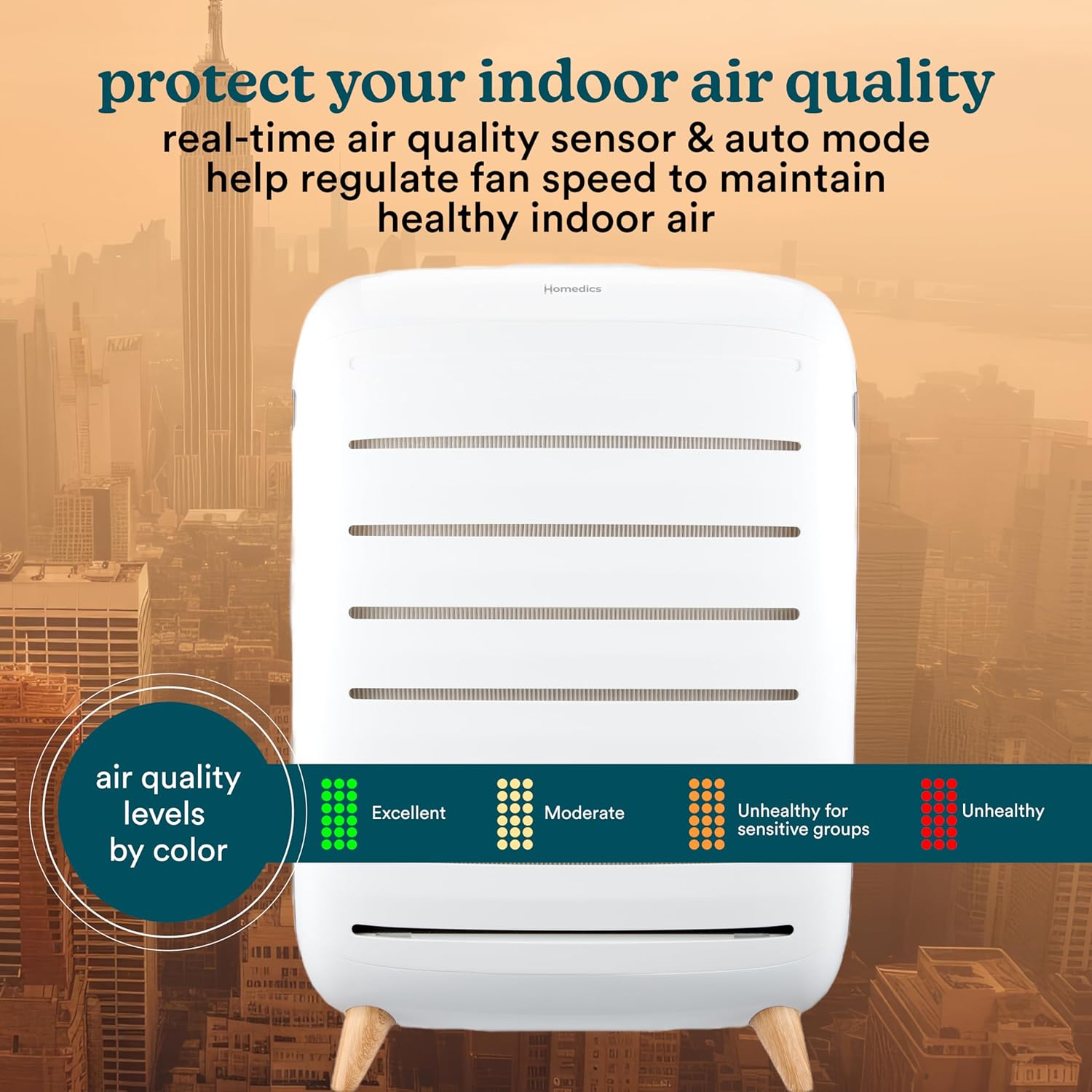
Image: The air purifier's display showing different air quality levels indicated by color codes.
ถาดน้ำมันหอมระเหย
The air purifier includes an essential oil pad tray. Add a few drops of your favorite essential oil to the pad to diffuse fragrance into the air during operation.
การซ่อมบำรุง
การเปลี่ยนตัวกรอง
The air purifier features a filter replacement indicator that will alert you when it's time to change the filters. Replacement filters (AP-C500FL) are sold separately. Filters are designed to last approximately 12 months based on 12 hours per day of use.
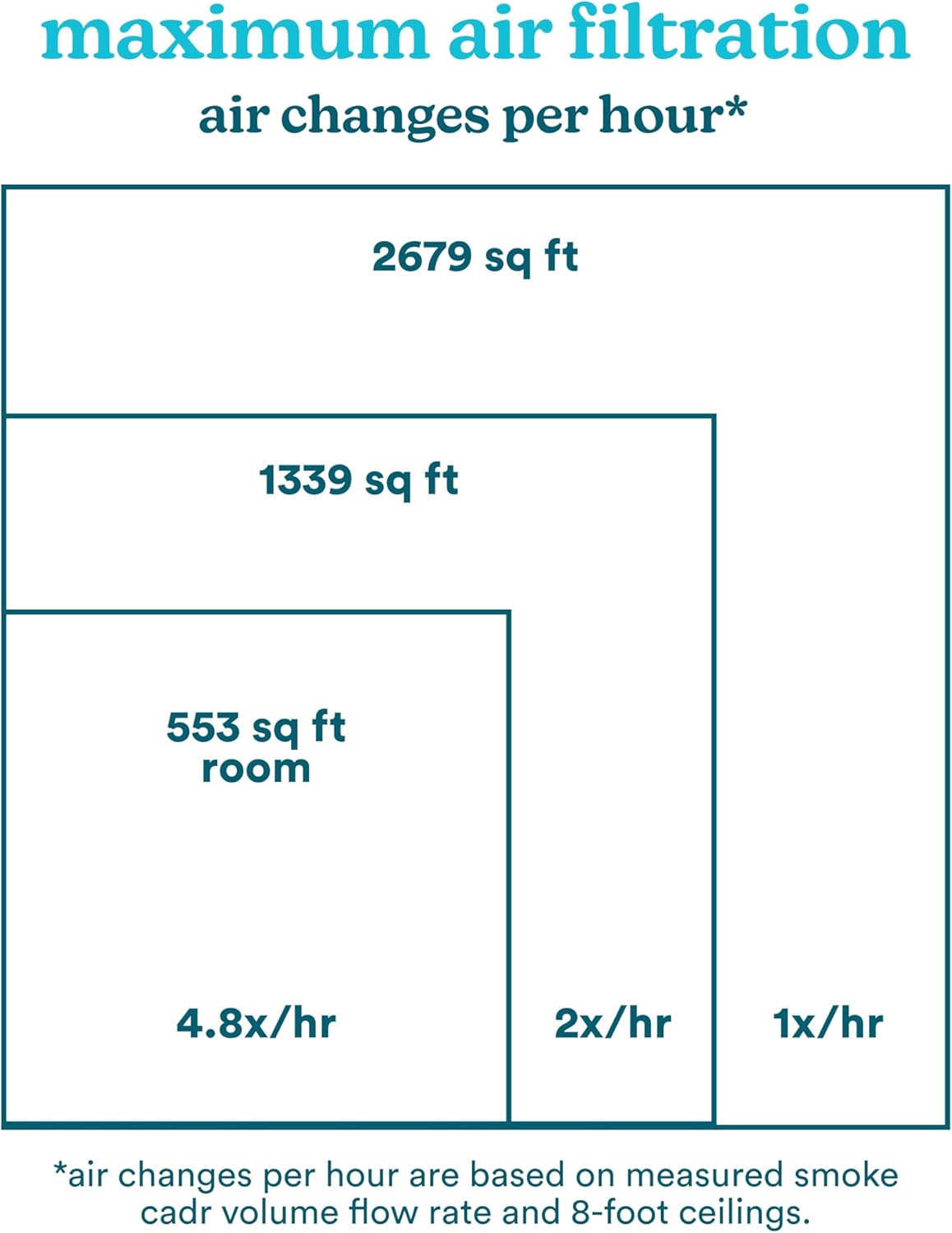
Image: Two True HEPA filters, highlighting their 12-month lifespan and the option to reorder via the app.
- ปิดและถอดปลั๊กเครื่องฟอกอากาศ
- ถอดฝาครอบด้านหลังออก
- Carefully remove the old filters.
- Insert new AP-C500FL replacement filters, ensuring they are free of plastic packaging.
- เปลี่ยนฝาหลัง
- Reset the filter indicator (refer to app or control panel instructions).
การแก้ไขปัญหา
If you encounter any issues with your Homedics Smart Air Purifier C500, please refer to the following common troubleshooting steps:
- หน่วยไม่เปิด: ตรวจสอบให้แน่ใจว่าเสียบสายไฟเข้ากับเต้ารับไฟฟ้าที่ใช้งานได้แน่นดีแล้ว ตรวจสอบว่าได้กดปุ่มเปิด/ปิดเครื่องแล้วหรือไม่
- ระบบฟอกอากาศไม่ดี: Verify that the filters are correctly installed and free of plastic packaging. Check the filter replacement indicator; if lit, replace the filters. Ensure the unit is placed in an open area, not obstructed.
- ปัญหาการเชื่อมต่อ Wi-Fi: Confirm your home Wi-Fi network is active and the password is correct. Ensure the air purifier is within range of your Wi-Fi router. Try restarting both the air purifier and your router.
- เสียงรบกวนที่ผิดปกติ: Check for any obstructions in the air intake or exhaust vents. Ensure filters are properly seated.
For further assistance, please contact Homedics customer support.
ข้อมูลจำเพาะ
| ยี่ห้อ | โฮมดิกส์ |
| หมายเลขรุ่น | AP-C500 |
| ขนาดสินค้า | ลึก 11.25 นิ้ว x กว้าง 28.5 นิ้ว x สูง 19.88 นิ้ว |
| การครอบคลุมพื้นที่ | 2679 Square Feet (1 air change per hour) |
| ชั้นกรอง | HEPA แท้ |
| คุณสมบัติพิเศษ | Programmable, Wi-Fi, Voice Control, UV-C Technology |
| ประเภทตัวควบคุม | ผู้ช่วย Google, Amazon Alexa |
| น้ำหนักสินค้า | 21.5 ปอนด์ |
| ส่วนประกอบที่รวมอยู่ | (1) Homedics Smart Air Purifier C500, (2) True HEPA Filters with Built-in Prefilter and Activated Carbon Odor Filter, (3) Essential Oil Pads |
การรับประกันและการสนับสนุน
This product is covered by a manufacturer's warranty. For specific details regarding your warranty coverage, please refer to the documentation included with your purchase or visit the official Homedics website. For technical support, troubleshooting, or to order replacement parts, please contact Homedics customer service.
Optional protection plans are available for purchase, including 3-Year and 4-Year Protection Plans, and a Complete Protect monthly plan.
ข้อมูลด้านความปลอดภัยที่สำคัญ
- Always unplug the air purifier before cleaning or replacing filters.
- อย่าใช้งานเครื่องด้วยสายไฟหรือปลั๊กที่ชำรุด
- Keep the air purifier away from water or wet surfaces.
- ตรวจสอบให้แน่ใจว่ามีการระบายอากาศที่เหมาะสมรอบๆ เครื่อง อย่าปิดกั้นช่องรับอากาศหรือช่องระบายอากาศ
- เครื่องใช้ไฟฟ้าตัวนี้ไม่ได้มีวัตถุประสงค์เพื่อให้บุคคล (รวมทั้งเด็ก) ที่มีความบกพร่องทางร่างกาย ทางประสาทสัมผัส หรือทางจิตใจ หรือขาดประสบการณ์และความรู้ ใช้งาน เว้นแต่จะมีการดูแลหรือคำแนะนำเกี่ยวกับการใช้เครื่องใช้ไฟฟ้าโดยบุคคลที่รับผิดชอบด้านความปลอดภัยของบุคคลดังกล่าว


