
Sharp ES-NIH814BWA-EN
คู่มือการใช้งานเครื่องซักผ้าแบบติดตั้งในตัว Sharp รุ่น ES-NIH814BWA-EN
Model: ES-NIH814BWA-EN | Capacity: 8kg | Spin Speed: 1400 rpm
1. บทนำ
1.1 ผลิตภัณฑ์เกินview
Thank you for choosing the Sharp ES-NIH814BWA-EN Integrated Washing Machine. This appliance is designed to provide efficient and reliable laundry care for your home. With an 8kg capacity and a 1400 rpm spin speed, it offers powerful cleaning performance while integrating seamlessly into your kitchen or utility space.

รูปที่ 1.1 : ด้านหน้า view of the Sharp ES-NIH814BWA-EN Integrated Washing Machine, showing its sleek design and integrated panel.
1.2 ข้อมูลด้านความปลอดภัย
Before operating your washing machine, please read all safety instructions carefully. Keep this manual for future reference. Improper installation, maintenance, or use can cause serious injury or damage. Always disconnect the appliance from the power supply before cleaning or maintenance.
- ตรวจสอบให้แน่ใจว่าเครื่องได้ต่อสายดินอย่างถูกต้อง
- อย่าให้เด็กเล่นเครื่องใช้ไฟฟ้า
- Do not open the detergent dispenser during the wash cycle.
- ห้ามสัมผัสอุปกรณ์ขณะที่มือเปียก
- เก็บวัสดุบรรจุภัณฑ์ให้พ้นมือเด็ก
2. การตั้งค่าและการติดตั้ง
2.1 การแกะกล่อง
Carefully remove all packaging materials. Check for any transport damage. Remove all transit bolts from the rear of the machine before installation. These bolts are essential for safe transport but must be removed for operation to prevent vibration and damage.
2.2 Location and Levelling
Place the washing machine on a firm, level floor. Adjust the adjustable feet to ensure the machine is perfectly level and stable. This prevents excessive vibration and noise during operation.
2.3 การเชื่อมต่อน้ำ
Connect the water inlet hose to a cold water tap with a 3/4-inch thread. Ensure all connections are tight to prevent leaks. The drain hose should be securely placed into a standpipe or connected to a suitable drain system, ensuring it is not kinked.

รูปที่ 2.1: ด้านหลัง view ภาพประกอบแสดงส่วนประกอบของเครื่องซักผ้า โดยแสดงการเชื่อมต่อท่อน้ำเข้าและท่อระบายน้ำ
2.4 การเชื่อมต่อไฟฟ้า
เสียบสายไฟเข้ากับเต้ารับไฟฟ้าที่มีสายดิน ตรวจสอบให้แน่ใจว่าระดับเสียงtage and frequency match the specifications on the rating plate of the appliance. Do not use extension cords or multiple adapters.
2.5 การใช้งานครั้งแรก
Before the first wash, run an empty cycle with a small amount of detergent at 60°C to clean the drum and remove any manufacturing residues.
3. คู่มือการใช้งาน
3.1 แผงควบคุมโอเวอร์view
The control panel consists of a program selection dial, a digital display, and function buttons for customizing your wash cycle.
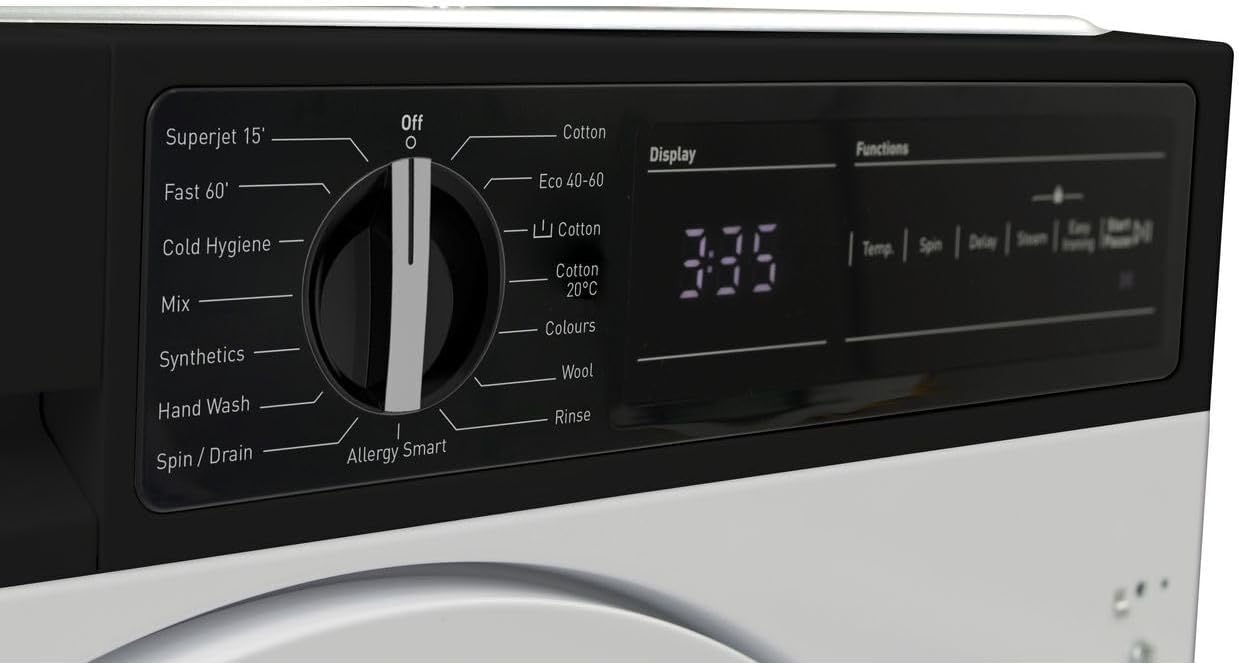
รูปที่ 3.1: รายละเอียด view of the program selection dial and digital display.

Figure 3.2: Close-up of the digital display showing time remaining and function buttons for Temp, Spin, Delay, Steam, and Easy Ironing.
3.2 การโหลดผ้าซัก
Open the washing machine door and load your laundry. Do not overload the machine; leave enough space for clothes to tumble freely. Close the door firmly until it clicks.

Figure 3.3: The washing machine door open, revealing the drum for loading laundry.

รูปที่ 3.4: ภายใน view of the stainless steel drum, designed for effective washing.
3.3 การเติมผงซักฟอกและสารเติมแต่ง
Pull out the detergent dispenser drawer. Add the appropriate amount of detergent to the main wash compartment and fabric softener to its designated compartment. Refer to your detergent packaging for dosage recommendations.

Figure 3.5: The detergent dispenser drawer, showing compartments for detergent and fabric softener.
3.4 การเลือกโปรแกรมการซัก
Turn the program selection dial to choose your desired wash program. Available programs include:
- Superjet 15': Quick wash for lightly soiled items.
- Fast 60': A faster cycle for everyday loads.
- Cold Hygiene: For hygienic washing at lower temperatures.
- ผสม: For mixed fabric loads.
- สารสังเคราะห์: For synthetic fabrics.
- ล้างมือ: Gentle cycle for delicate items.
- ปั่น / ระบาย: To spin and drain water from laundry.
- Allergy Smart: Designed to remove allergens.
- ฝ้าย: Standard program for cotton items.
- อีโค่ 40-60: Energy-efficient program for cottons and mixed items at 40-60°C.
- ผ้าฝ้าย 20°C: Low-temperature cotton wash.
- สีสัน: For colored garments to preserve vibrancy.
- ขนสัตว์: Gentle program for woolens.
- ล้าง: To rinse laundry without washing.
3.5 การปรับการตั้งค่า
After selecting a program, you can customize settings using the function buttons:
- ชั่วคราว: Adjust wash temperature.
- หมุน: Change spin speed.
- ล่าช้า: Set a delayed start time.
- ไอน้ำ: Add a steam function for better hygiene or wrinkle reduction.
- รีดง่าย: Reduces creasing เพื่อให้รีดง่ายขึ้น
3.6 การเริ่มรอบการซัก
กดปุ่ม เริ่ม/หยุดชั่วคราว button to begin the selected wash cycle. The display will show the remaining time.
3.7 การสิ้นสุดรอบการซัก
Once the cycle is complete, the machine will signal. The door will unlock after a short delay. Remove your laundry promptly.
4. การบำรุงรักษาและการดูแล
การบำรุงรักษาตามปกติจะช่วยให้เครื่องซักผ้าของคุณทำงานได้อย่างเหมาะสมที่สุดและยืดอายุการใช้งาน
4.1 การทำความสะอาดเครื่องจ่ายผงซักฟอก
ควรนำลิ้นชักใส่ผงซักฟอกออกมาล้างใต้น้ำไหลเป็นระยะ เพื่อป้องกันคราบผงซักฟอกสะสม
4.2 การทำความสะอาดกลอง
Run a maintenance wash (e.g., a hot cycle with a washing machine cleaner or vinegar) monthly to clean the drum and remove any odors or residue.
4.3 การทำความสะอาดตัวกรอง
Locate the drain pump filter, usually at the bottom front of the machine. Open the cover, drain any residual water, and carefully remove and clean the filter. This should be done regularly to prevent blockages.
4.4 การทำความสะอาดภายนอก
เช็ดพื้นผิวภายนอกด้วยผ้านุ่ม damp ผ้า ห้ามใช้สารทำความสะอาดที่มีฤทธิ์กัดกร่อนหรือตัวทำละลาย
5 การแก้ไขปัญหา
If you encounter issues with your washing machine, refer to the following common problems and solutions before contacting customer service.
| ปัญหา | สาเหตุที่เป็นไปได้ | สารละลาย |
|---|---|---|
| เครื่องไม่เริ่มทำงาน | ไม่มีไฟเข้า; ประตูไม่ได้ปิด; ไม่ได้เลือกโปรแกรม; ไม่ได้กดปุ่มเริ่ม/หยุดชั่วคราว | Check power supply; Ensure door is latched; Select a program; Press Start/Pause. |
| ไม่มีการบริโภคน้ำ | ก๊อกน้ำปิด ท่อน้ำเข้าหักงอ แรงดันน้ำต่ำเกินไป | เปิดก๊อกน้ำ; ยืดท่อ; ตรวจสอบแรงดันน้ำภายในบ้าน |
| น้ำไม่ระบายออก | ท่อระบายน้ำบิดงอ; ตัวกรองปั๊มระบายน้ำอุดตัน | Straighten drain hose; Clean drain pump filter. |
| การสั่นสะเทือน/เสียงรบกวนมากเกินไป | ไม่ได้ถอดสลักยึดในการขนส่ง เครื่องจักรไม่อยู่ในระดับ โหลดไม่เท่ากัน | Remove transit bolts; Adjust feet to level machine; Redistribute laundry. |
| คราบผงซักฟอกตกค้างในเครื่องจ่าย | ใส่ผงซักฟอกมากเกินไป; แรงดันน้ำต่ำ; ช่องใส่ผงซักฟอกอุดตัน | ลดปริมาณผงซักฟอก ตรวจสอบแรงดันน้ำ ทำความสะอาดช่องใส่ผงซักฟอก |
6. ข้อมูลจำเพาะทางเทคนิค
| คุณสมบัติ | ข้อมูลจำเพาะ |
|---|---|
| ยี่ห้อ | คม |
| แบบอย่าง | ES-NIH814BWA-EN |
| ความจุ | 8 กิโลกรัม |
| ความเร็วการหมุนสูงสุด | 1400 รอบต่อนาที |
| ประเภทการติดตั้ง | บูรณาการ |
| คอนโซลควบคุม | Buttons, Dial, Digital Display |
| เข้าถึงตำแหน่ง | โหลดด้านหน้า |
| วัสดุ (ถัง) | สแตนเลส |
| เล่มที่tage | 2.2E+2 โวลต์ (กระแสสลับ) |
| สี | สีขาว |
7. การรับประกันและการสนับสนุนลูกค้า
Your Sharp ES-NIH814BWA-EN Washing Machine comes with a manufacturer's warranty. Please refer to the separate warranty card provided with your appliance for specific terms and conditions, including warranty period and coverage.
For technical assistance, spare parts, or to schedule a service appointment, please contact Sharp customer support. Contact details can typically be found on the Sharp official webไซต์หรือในเอกสารการรับประกันของคุณ
When contacting support, please have your model number (ES-NIH814BWA-EN) and serial number ready. The serial number is usually located on a sticker inside the door frame or on the back of the appliance.
Ask a question about this manual
Ask about setup, troubleshooting, compatibility, parts, safety, or missing instructions. Manuals+ will review the question and use this page’s manual context to help answer it.