คู่มือการใช้งาน
AXIS M5000-G 5 Megapixel Network Camera
Model: M5000-G | Brand: AXIS
1. บทนำ
This manual provides comprehensive instructions for the installation, operation, and maintenance of the AXIS M5000-G 5 Megapixel Network Camera. Please read this manual thoroughly before using the product to ensure proper functionality and safety.
The AXIS M5000-G is a high-performance network camera designed for surveillance applications, offering 5-megapixel resolution and PTZ capabilities for enhanced monitoring.
2. ข้อมูลด้านความปลอดภัย
โปรดปฏิบัติตามข้อควรระวังด้านความปลอดภัยต่อไปนี้ เพื่อป้องกันความเสียหายต่อผลิตภัณฑ์หรือการบาดเจ็บต่อตัวคุณเอง:
- ตรวจสอบให้แน่ใจว่าแหล่งจ่ายไฟตรงกับข้อกำหนดของกล้อง
- Do not expose the camera to extreme temperatures or humidity.
- หลีกเลี่ยงการสัมผัสกับแหล่งกำเนิดแสงที่แรงโดยตรง เพราะอาจทำให้เซ็นเซอร์รับภาพเสียหายได้
- การติดตั้งควรดำเนินการโดยบุคลากรที่มีคุณสมบัติเหมาะสมและเป็นไปตามข้อกำหนดด้านไฟฟ้าของท้องถิ่น
- ถอดสายไฟก่อนทำความสะอาดหรือซ่อมบำรุง
3. เนื้อหาบรรจุภัณฑ์
ตรวจสอบว่ามีรายการทั้งหมดอยู่ในแพ็คเกจ:
- AXIS M5000-G Network Camera Unit
- ชุดอุปกรณ์ติดตั้ง (สกรู, พุก)
- Installation Guide (Quick Start)
- อะแดปเตอร์ไฟฟ้า (ถ้ามี)
Note: Specific components may vary based on region or package version.
4. สินค้าหมดview
The AXIS M5000-G is a dome-style network camera designed for discreet and effective surveillance. It features a robust housing suitable for outdoor use and a PTZ (Pan-Tilt-Zoom) mechanism for flexible viewมุมการเอียง

รูปที่ 4.1: ด้านหน้า view of the AXIS M5000-G Network Camera. This image shows the camera's dome shape, with the lens visible through the dark transparent cover. The main body is white.
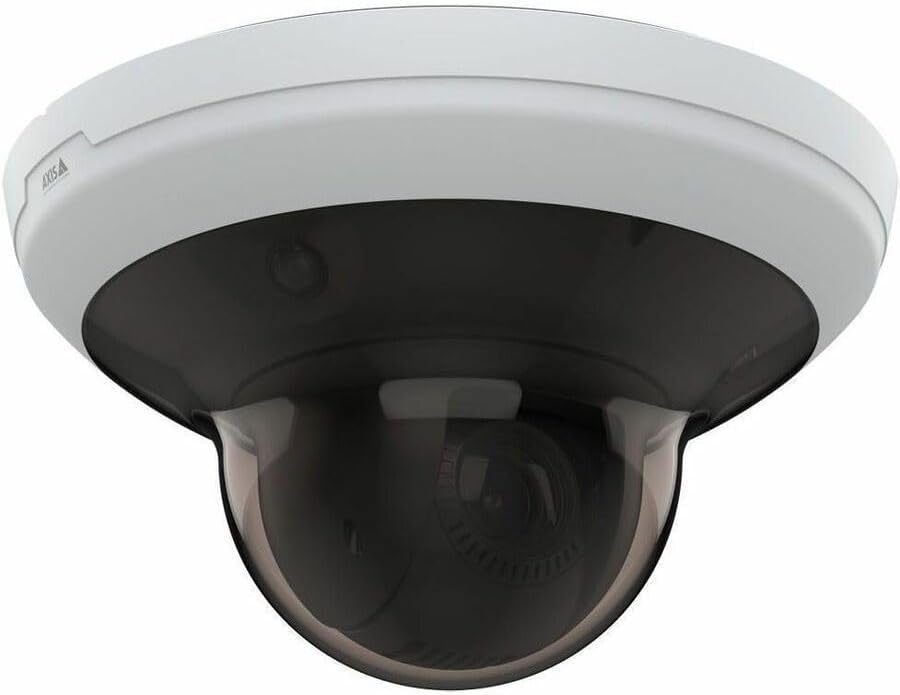
รูปที่ 4.2: มุม view of the AXIS M5000-G Network Camera. This perspective highlights the camera's compact design and the subtle AXIS logo on the side of the white base.

รูปที่ 4.3: อีกมุมหนึ่ง view of the AXIS M5000-G Network Camera. Similar to Figure 4.2, this image provides a slightly different angle, emphasizing the smooth contours of the camera's housing.
5. การตั้งค่าและการติดตั้ง
The AXIS M5000-G is designed for wall mount installation and requires a wired connection for network and power.
5.1 การติดตั้งกล้อง
- เลือกตำแหน่ง: Select an outdoor location that provides the desired field of view and is within reach of a power source and network connection. Ensure the mounting surface is sturdy enough to support the camera's weight (approximately 5.7 pounds).
- ทำเครื่องหมายจุดเจาะ: Use the provided mounting template (if applicable) or the camera base to mark the drilling points on the wall.
- เจาะรู: เจาะรูนำร่องตามจุดที่ทำเครื่องหมายไว้ ใส่พุกยึดผนังหากจำเป็น
- ยึดฐานให้แน่น: Attach the camera's mounting base to the wall using the provided screws.
- Attach Camera Unit: Secure the main camera unit to the mounted base, ensuring it clicks into place or is fastened according to the quick start guide.
5.2 การเชื่อมต่อพลังงานและเครือข่าย
- การเชื่อมต่อไฟฟ้า: Connect the provided power adapter to the camera's power input and then to a suitable electrical outlet. The camera operates on corded electric power.
- การเชื่อมต่อเครือข่าย: Connect an Ethernet cable from your network router or switch to the camera's network port. The camera uses wired connectivity technology.
- การบูตครั้งแรก: Allow the camera a few minutes to power on and establish a network connection.
6. การใช้งานกล้อง
The AXIS M5000-G camera is controlled primarily through a dedicated application or network video recorder (NVR) software.
6.1 การกำหนดค่าเริ่มต้น
- ค้นพบกล้องถ่ายรูป: Use the AXIS IP Utility or your network's device discovery tools to find the camera's IP address on your network.
- เข้าถึง Web อินเทอร์เฟซ: เปิด web เบราว์เซอร์และป้อนที่อยู่ IP ของกล้องเพื่อเข้าถึง web อินเทอร์เฟซ
- เข้าสู่ระบบ: Enter the default username and password (refer to the quick start guide or manufacturer's documentation for default credentials). Change default credentials immediately for security.
- การตั้งค่าเครือข่าย: Configure network settings (e.g., static IP, DHCP) as required by your network environment.
- วันที่และเวลา: Set the correct date and time for accurate video timestamps.
6.2 สด View และการควบคุม PTZ
- สด View: เข้าถึงฟีดวิดีโอสดผ่านทาง web interface or a compatible surveillance application. The camera provides 1080p video capture resolution and 5 MP effective still resolution.
- Pan, Tilt, Zoom (PTZ): Utilize the PTZ controls within the application to adjust the camera's viewing angle and zoom level. This feature allows for dynamic monitoring of large areas.
- ตำแหน่งที่กำหนดไว้ล่วงหน้า: Configure and save specific PTZ positions for quick navigation to frequently monitored areas.
6.3 การตรวจจับการเคลื่อนไหวและการแจ้งเตือน
- Motion Only Alert Type: Configure motion detection zones and sensitivity settings within the camera's interface.
- Alert Actions: Set up actions to be triggered upon motion detection, such as recording video, sending email notifications, or uploading images to an FTP server.
7. การบำรุงรักษา
Regular maintenance ensures optimal performance and longevity of your AXIS M5000-G camera.
- การทำความสะอาดเลนส์: Gently wipe the camera lens and dome cover with a soft, clean, lint-free cloth. For stubborn dirt, use a mild lens cleaning solution applied to the cloth, not directly to the lens.
- อัพเดตเฟิร์มแวร์: ตรวจสอบแกนหมุนเป็นระยะ website for firmware updates. Keeping the firmware updated ensures access to the latest features and security patches.
- การตรวจสอบสายเคเบิล: Regularly inspect all cables (power and network) for any signs of wear, damage, or corrosion, especially in outdoor installations.
- การตรวจสอบสิ่งแวดล้อม: ตรวจสอบให้แน่ใจว่าสภาพแวดล้อมของกล้องยังคงอยู่ภายในอุณหภูมิการทำงานและช่วงความชื้นที่กำหนด
8 การแก้ไขปัญหา
This section addresses common issues you might encounter with the AXIS M5000-G camera.
| ปัญหา | สาเหตุที่เป็นไปได้ | สารละลาย |
|---|---|---|
| ไม่มีฟีดวิดีโอ | Power disconnected, network issue, incorrect IP address. | Check power connection. Verify network cable is securely connected. Confirm camera's IP address and network settings. Restart camera. |
| คุณภาพของภาพไม่ดี | Dirty lens, low light, incorrect resolution settings. | Clean the lens. Ensure adequate lighting. Adjust video resolution settings in the camera's web อินเทอร์เฟซ |
| ระบบควบคุม PTZ ไม่ตอบสนอง | Network latency, software issue, camera malfunction. | Check network connection stability. Restart the camera and the control application. If issue persists, contact support. |
| การตรวจจับการเคลื่อนไหวไม่ทำงาน | Incorrect sensitivity settings, detection zones not configured. | Review and adjust motion detection sensitivity. Ensure detection zones are properly defined in the camera's settings. |
9. ข้อมูลจำเพาะ
| คุณสมบัติ | รายละเอียด |
|---|---|
| ชื่อรุ่น | M5000-G Network Camera |
| ยี่ห้อ | แกน |
| การใช้งานภายใน/ภายนอกอาคาร | กลางแจ้ง |
| แหล่งพลังงาน | สายไฟ |
| เทคโนโลยีการเชื่อมต่อ | มีสาย |
| ความละเอียดในการจับภาพวิดีโอ | 1080p |
| ความละเอียดของภาพนิ่งที่มีประสิทธิภาพ | 5 MP |
| ประเภทการติดตั้ง | ติดผนัง |
| ประเภทการแจ้งเตือน | การเคลื่อนไหวเท่านั้น |
| ขนาดรายการ (ยาว x กว้าง x สูง) | 11.9 x 12 x 8.4 นิ้ว |
| น้ำหนักสินค้า | 5.7 ปอนด์ |
| ผู้ผลิต | AXIS COMMUNICATION INC |
10. การรับประกันและการสนับสนุน
For warranty information, please refer to the documentation included with your purchase or visit the official AXIS website. AXIS provides support resources, including FAQs, troubleshooting guides, and contact information for technical assistance.
You can typically find more information and support on the AXIS Store on Amazon หรือเจ้าหน้าที่ของผู้ผลิต webเว็บไซต์.


