1. บทนำ
The LAUNCH Creader Elite V2.0 is an advanced OBD2 diagnostic scanner specifically designed for BMW, Mini, and Rolls-Royce vehicles. This tool provides comprehensive system diagnostics, bi-directional control, ECU coding, and a wide range of special service functions. This manual will guide you through the setup, operation, and maintenance of your device to ensure optimal performance and accurate vehicle diagnostics.

Image 1.1: The LAUNCH Creader Elite V2.0 OBD2 Scanner displaying its main interface with options for Diagnose, OBD II, Upgrade, Mall, and Settings.
2. สินค้าหมดview
The Creader Elite V2.0 features a 4-inch touchscreen, runs on Android 8.1 OS, and includes a 3000mAh battery. It is equipped with 2GB RAM and 16GB internal memory for efficient operation and data storage. The device supports 11 languages, making it accessible to a broad user base.
คุณสมบัติหลัก:
- การวินิจฉัยระบบอย่างครบถ้วน: Access all available vehicle modules to read/clear fault codes, view ข้อมูลแบบเรียลไทม์ และดึงข้อมูล ECU
- Bi-Directional Control (Active Test): Perform active tests on various components to verify their functionality.
- การเขียนโค้ด ECU ขั้นสูง: Customize OE-settings, match components, and activate hidden features.
- All Service Functions: Includes Battery Registration, Oil Reset, EPB Service, SAS Calibration, ABS Bleeding, Injector Coding, and more.
- Lifetime Free WiFi Updates: Ensures the software is always up-to-date with the latest vehicle models and functions.
- 4-in-1 Live Data Graphing: Visualize multiple data streams simultaneously for in-depth analysis.
- Auto VIN & DTC Lookup: Quickly identify vehicle information and understand diagnostic trouble codes.

Image 2.1: High-level specifications of the LAUNCH Creader Elite V2.0, including its 4-inch touchscreen, Android 8.1 operating system, 3000mAh battery, HD display, WiFi connectivity, and 16GB internal memory.
3. การตั้งค่า
3.1. อะไรอยู่ในกล่อง
เมื่อแกะกล่อง ตรวจสอบว่ามีส่วนประกอบทั้งหมดครบถ้วน:
- 1 x LAUNCH Creader Elite V2.0 OBD2 Scanner for BMW
- 1 x OBD2 Diagnostic Cable
- คู่มือเริ่มต้นอย่างรวดเร็ว 1 ชุด
- 1 x คู่มือผู้ใช้

Image 3.1: The standard contents included with the LAUNCH Creader Elite V2.0 package.
3.2. Initial Power-On and Connection
- Connect the OBD2 diagnostic cable to the scanner's port.
- ค้นหาพอร์ต OBD2 ของรถ โดยทั่วไปจะอยู่ใต้แผงหน้าปัดฝั่งคนขับ
- Plug the other end of the diagnostic cable into the vehicle's OBD2 port. The scanner will power on automatically.
- Follow the on-screen prompts to select your preferred language and set up Wi-Fi connectivity.
3.3. การอัปเดตซอฟต์แวร์
It is recommended to update the software immediately after initial setup to ensure you have the latest features and vehicle coverage.
- ตรวจสอบให้แน่ใจว่าอุปกรณ์เชื่อมต่อกับเครือข่าย Wi-Fi ที่เสถียรแล้ว
- From the main menu, tap on the "Upgrade" icon.
- The system will check for available updates. Select and download all necessary updates.
- Allow the device to install the updates. This process may take some time and the device may restart.

Image 3.2: The device's interface highlighting the 'Upgrade' function for lifetime free WiFi updates.
4. คู่มือการใช้งาน
4.1. Basic OBD2 Functions
The device supports standard OBD2 functions for all OBD2 compliant vehicles.
- อ่าน/ล้างรหัส: Access the "OBD II" menu to read Diagnostic Trouble Codes (DTCs) and clear them after repairs.
- สตรีมข้อมูลสด: View real-time sensor data in text or graph format.
- ตรึงกรอบ: จับภาพสภาพของยานพาหนะเมื่อมีรหัสข้อผิดพลาดเกิดขึ้น
- ความพร้อมของ I/M: ตรวจสอบสถานะของอุปกรณ์ตรวจสอบที่เกี่ยวข้องกับการปล่อยมลพิษ
- การค้นหา DTC: Use the built-in DTC library to understand code definitions.

Image 4.1: The 'Code Search' feature allows users to look up definitions for Diagnostic Trouble Codes.
4.2. Full System Diagnostics (BMW, Mini, Rolls-Royce)
For BMW, Mini, and Rolls-Royce vehicles, the device offers in-depth diagnostics across all available modules.
- From the main menu, tap on "Diagnose".
- Select the vehicle brand (BMW/Mini/Rolls-Royce).
- Choose "Automatically Search" or manually select the vehicle model. The Auto VIN feature can quickly identify the vehicle.
- Perform a full system scan to identify issues across engine, transmission, ABS, SRS, and other control units.

ภาพที่ 4.2: จบแล้วview of OE-level all system diagnostic functions, including Auto VIN, code reading, live data, freeze frame, and ECU information retrieval.
4.3. การควบคุมแบบสองทิศทาง (การทดสอบเชิงรุก)
ฟังก์ชันนี้ช่วยให้คุณสามารถส่งคำสั่งไปยังระบบต่างๆ ของรถยนต์เพื่อทดสอบการทำงานของชิ้นส่วนต่างๆ ได้
- After selecting the vehicle and system, navigate to the "Active Test" or "Bi-Directional Control" option.
- Select the specific component or system you wish to test (e.g., radiator fan, fuel pump, windows).
- Execute the test and observe the component's response to diagnose issues.
4.4. การเขียนโค้ด ECU ขั้นสูง
ECU Coding allows for customization and adaptation of vehicle settings.
- การจับคู่ส่วนประกอบ: Match new components after replacement (e.g., steering angle calibration, transmission adaptation).
- การปรับแต่ง: Activate or deactivate specific vehicle features (e.g., auto mirror folding, changing dashboard brightness, disabling auto start-stop).
- Modification & Retrofit: Adapt settings for newly installed modules or upgrades (e.g., adaptive cruise control, retrofitting headlampส).
Note: Coding functions vary by vehicle model and chassis. Always verify compatibility before performing coding operations.

Image 4.3: Advanced ECU Coding features for customizing vehicle settings and adapting components.
4.5. หน้าที่บริการพิเศษ
The device provides numerous maintenance and reset functions:
- Battery Registration/Replacement: Register a new battery with the vehicle's power management system. Supports both same-type and different-type/capacity batteries.
- น้ำมันแอลamp รีเซ็ต: Reset the oil service light and maintenance interval.
- Parking Brake Reset (EPB): Deactivate and activate the electronic parking brake system for pad replacement.
- การสอบเทียบ SAS: ปรับเทียบเซ็นเซอร์มุมพวงมาลัย
- เลือดออกบริเวณ ABS: Perform bleeding procedures for the ABS system.
- การเข้ารหัสหัวฉีด: Code new injector numbers after replacement.
- Throttle Body Adaptation: Initialize throttle actuators to default settings.
- บริการอื่นๆ: Includes Suspension Reset, Seat Calibration, Idle Speed Relearn, Transmission Adaptation, Sunroof Initialization, and more.
To access these functions: Navigate to "Diagnose" > "Car Brand" > "System Selection" > "Special Function".

Image 4.4: A selection of the available service functions for BMW, Mini, and Rolls-Royce vehicles.
4.6. การจัดการข้อมูล
The device offers robust data management features for analysis and reporting.
- 4-in-1 Live Data Graphing: Display up to four live data streams simultaneously for comparative analysis.
- การบันทึกและเล่นข้อมูล: Record live data sessions for later review และการวิเคราะห์
- รายงานการวินิจฉัย: Generate and share detailed diagnostic reports in PDF format. These reports can be printed for client records or shared with technicians.
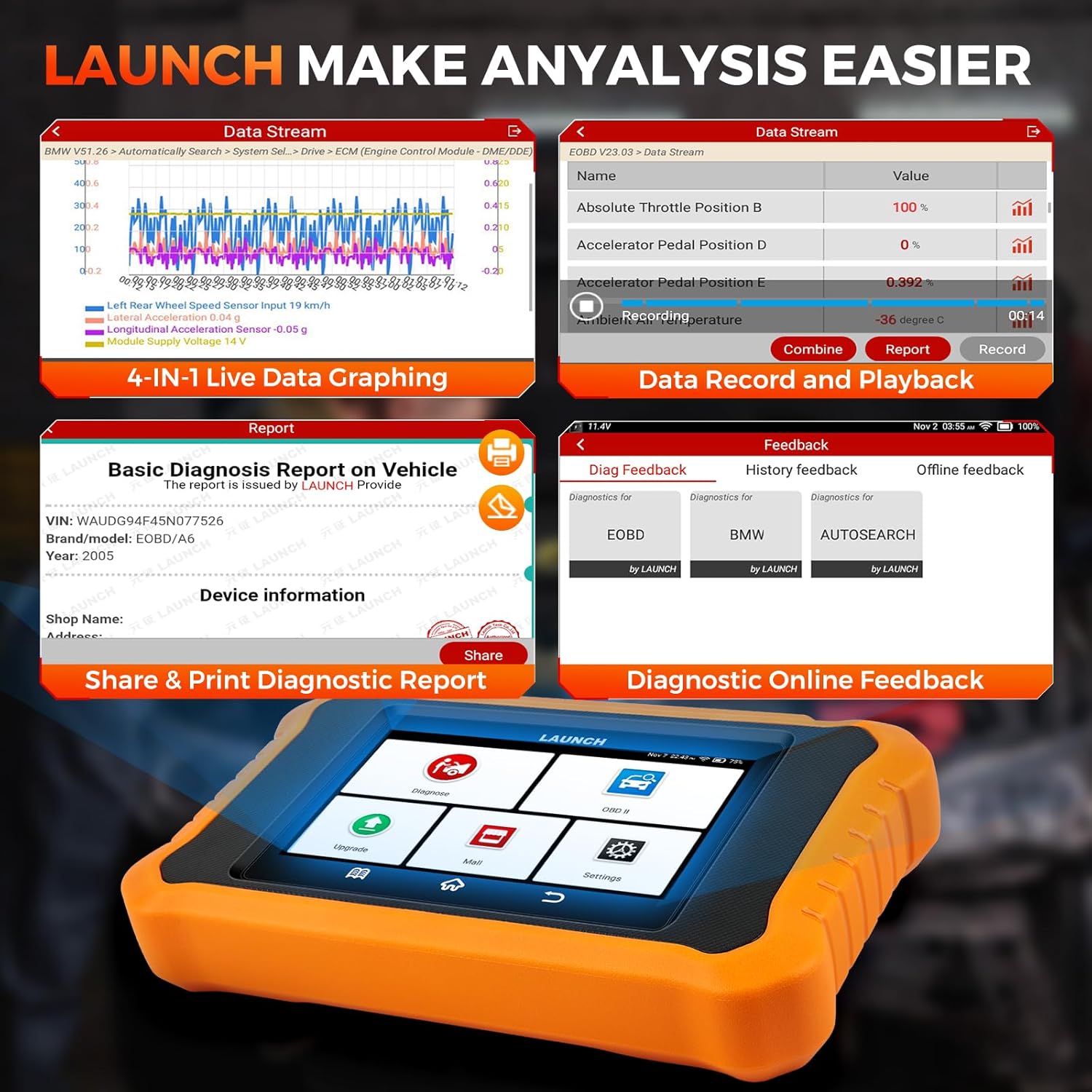
Image 4.5: Features for data analysis, including multi-graph display, recording, and report generation.
5. การบำรุงรักษา
5.1. การอัปเดตซอฟต์แวร์
Regular software updates are crucial for maintaining compatibility with new vehicle models and ensuring access to the latest diagnostic functions. The LAUNCH Creader Elite V2.0 offers lifetime free WiFi updates. Connect the device to a stable internet connection and navigate to the "Upgrade" section to check for and install updates.
5.2. การทำความสะอาดอุปกรณ์
To ensure the longevity of your device, clean it regularly with a soft, damp cloth. Avoid using abrasive cleaners or solvents. Keep the screen free of dust and fingerprints for optimal touch response.
5.3. การจัดเก็บ
Store the device in a cool, dry place away from direct sunlight and extreme temperatures. Disconnect the OBD2 cable when not in use.
6 การแก้ไขปัญหา
This section addresses common issues you might encounter with your LAUNCH Creader Elite V2.0.
6.1. อุปกรณ์ไม่เปิดเครื่อง
- ตรวจสอบให้แน่ใจว่าสาย OBD2 เชื่อมต่อกับทั้งเครื่องสแกนและพอร์ต OBD2 ของรถอย่างแน่นหนาแล้ว
- Verify that the vehicle's ignition is turned on (at least to the accessory position).
- ตรวจสอบระดับแบตเตอรี่รถยนต์tage. The scanner draws power from the vehicle.
6.2. ข้อผิดพลาดในการสื่อสาร
- Confirm the OBD2 cable is not damaged.
- ตรวจสอบให้แน่ใจว่ากุญแจรถเปิดอยู่
- ลองเชื่อมต่อกับรถคันอื่นเพื่อตรวจสอบว่าปัญหาไม่ได้เกิดจากตัวรถเพียงอย่างเดียว
- Verify that the software is up-to-date.
6.3. Software Freezes or Slow Performance
- รีสตาร์ทอุปกรณ์
- Ensure there is sufficient storage space.
- ดำเนินการอัปเดตซอฟต์แวร์
6.4. Issues with Specific Functions (e.g., Coding, Special Services)
- Functionality can vary by vehicle model, year, and specific configuration. Always check compatibility before attempting advanced functions.
- Ensure the vehicle's battery is adequately charged before performing critical operations like ECU coding.
- If a function fails, try restarting the process or contacting technical support with detailed information.

Image 6.1: The 'Diag Feedback' feature allows users to submit issues directly to technical support for troubleshooting.
7. ข้อมูลจำเพาะ
| คุณสมบัติ | ข้อมูลจำเพาะ |
|---|---|
| แบบอย่าง | LAUNCH Creader Elite V2.0 for BMW |
| ระบบปฏิบัติการ | แอนดรอยด์ 8.1 |
| แสดง | หน้าจอสัมผัสขนาด 4 นิ้ว |
| โปรเซสเซอร์ | CPU 1.3GHz แบบ Quad-core |
| หน่วยความจำ | แรม 2GB + รอม 16GB |
| แบตเตอรี่ | แบตเตอรี่ลิเธียมโลหะ 3000mAh (มีมาให้ในชุด) |
| การเชื่อมต่อ | ไวไฟ |
| น้ำหนักสินค้า | 1.5 ปอนด์ |
| ขนาดแพ็คเกจ | 8 x 7.5 x 1.63 นิ้ว |
| ภาษาที่รองรับ | 11 Languages (including English, German, Japanese, etc.) |
| หมายเลขชิ้นส่วนของผู้ผลิต | LAUNCH X431 Elite 2.0 PRO BMW Scanner |
| ยูพีซี | 884508000034 |
8. การรับประกันและการสนับสนุน
8.1. ข้อมูลการรับประกัน
The LAUNCH Creader Elite V2.0 comes with a 5-Year Quality Backup. For specific warranty terms and conditions, please refer to the documentation included with your product or contact customer support.
8.2. ความช่วยเหลือทางเทคนิค
LAUNCH offers 24/7/365 technical assistance. If you encounter any issues or have questions regarding the operation of your device, please contact support directly via email at obdbox21@163.com. When contacting support, please provide your device's serial number and a detailed description of the issue for faster resolution.
Note: For Amazon customers, it is recommended to contact the provided email address for support rather than LAUNCH Tech USA, as they may not offer direct assistance for Amazon purchases.


