สินค้าเกินview
The RisoPhy Gaming Mouse PC257A is a high-performance wired gaming mouse designed for precision and customization. It features a 32-bit ARM processor, 11 programmable buttons, adjustable RGB backlighting, and a tunable weight system to enhance your gaming experience. Its ergonomic design ensures comfort during extended use, and its durable construction provides a long lifespan.

Image: The RisoPhy Gaming Mouse PC257A, showcasing its ergonomic shape and the included tunable weights for personalized feel.
คู่มือการติดตั้ง
Follow these steps to set up your RisoPhy Gaming Mouse PC257A:
- แกะกล่อง: Carefully remove the mouse and any accessories from the packaging. Ensure all components are present, including the mouse and the tunable weights.
- เชื่อมต่อกับพีซี: Plug the USB connector of the RisoPhy Gaming Mouse into an available USB port on your computer. The mouse is plug-and-play compatible with Windows and Linux operating systems.
- การติดตั้งไดรเวอร์ (ทางเลือกแต่แนะนำ): For full customization, including programmable buttons, RGB lighting modes, and DPI settings, install the dedicated driver software. The product images indicate a "Drive Disk Included". If a physical disk is not provided, check the RisoPhy official webเว็บไซต์สำหรับดาวน์โหลดซอฟต์แวร์
- การปรับน้ำหนัก: The mouse features a tunable weight system. To adjust, locate the weight compartment on the underside of the mouse. Open the compartment and insert or remove the 2.4g weights as desired to achieve your preferred mouse feel and balance.

Image: The underside of the RisoPhy Gaming Mouse showing the compartment for the 8x 2.4g tunable weights.
คำแนะนำการใช้งาน
Understanding the features and functions of your RisoPhy Gaming Mouse PC257A:
การออกแบบตามหลักสรีรศาสตร์
The RisoPhy PC257A is designed for comfort during long gaming sessions, featuring a thumb rest paddle, non-slip sides, and soft rubber rollers for the scroll wheel. This ergonomic shape helps reduce hand fatigue.
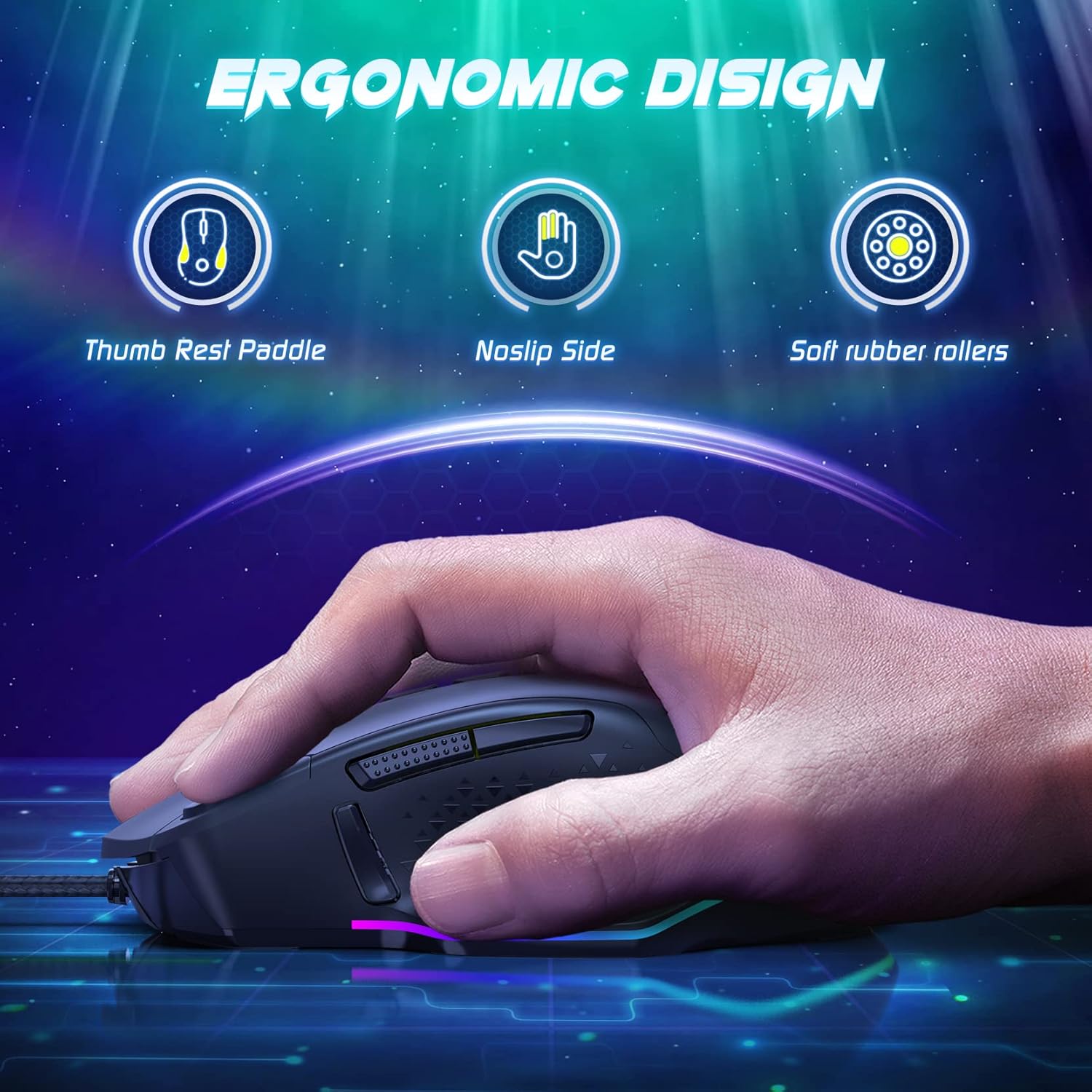
Image: A hand holding the RisoPhy Gaming Mouse, illustrating its ergonomic features including a thumb rest paddle, non-slip side, and soft rubber rollers.
DPI Settings and Adjustment
The mouse supports multiple DPI levels for precise control, up to 12000 DPI. Use the dedicated DPI adjustment buttons (usually located near the scroll wheel) to cycle through preset DPI stages. The software allows for custom DPI configuration and fine-tuning.
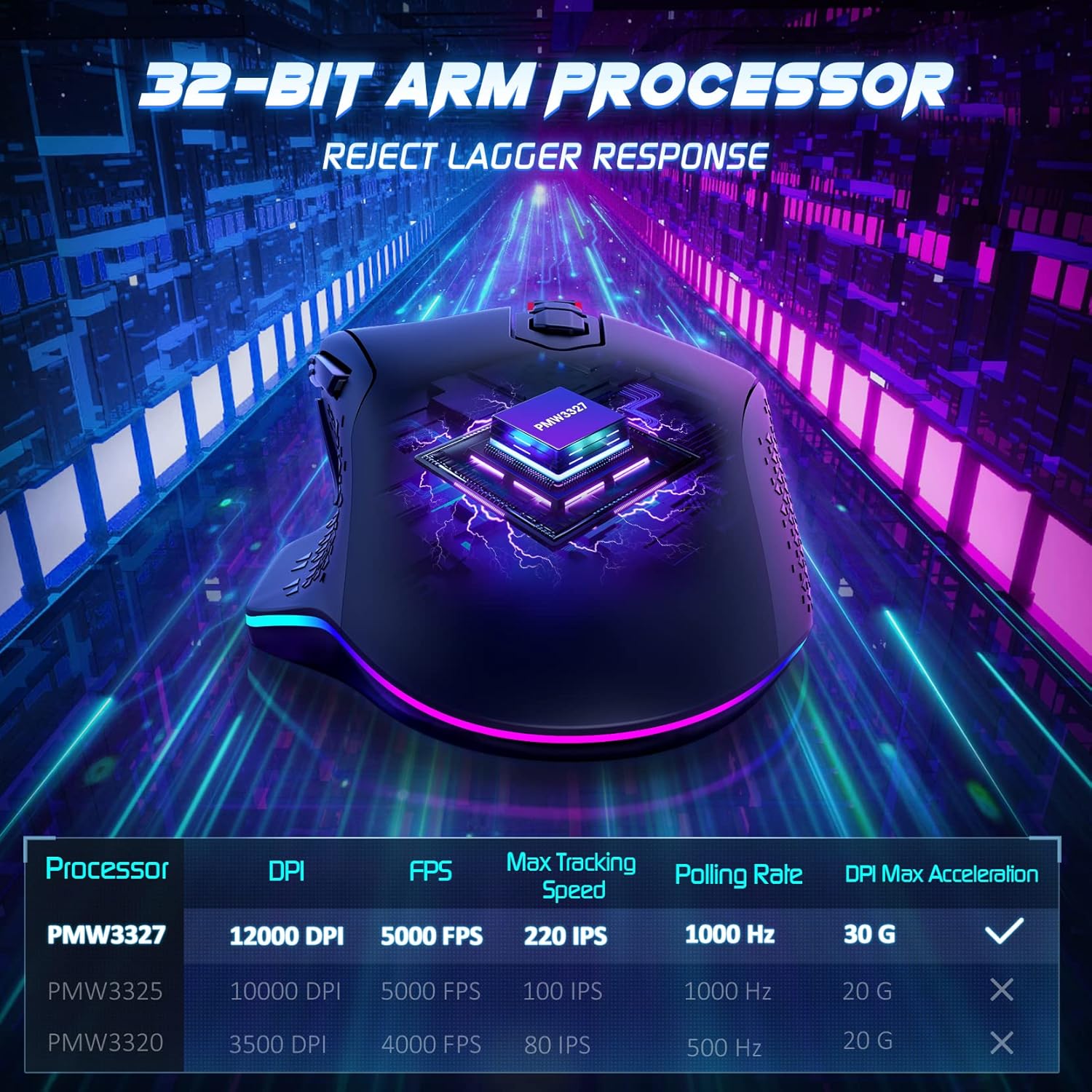
Image: Diagram illustrating the 32-bit ARM processor and a table detailing performance metrics like DPI, FPS, Max Tracking Speed, and Polling Rate.
ปุ่มที่สามารถตั้งโปรแกรมได้
The RisoPhy PC257A features 11 programmable buttons. These buttons can be assigned various functions, macros, or key combinations using the mouse's software. This allows for personalized control in gaming and productivity tasks.

Image: Screenshot of the RisoPhy mouse software interface, demonstrating options for lighting, DPI, macro settings, and button assignments.
ไฟแบ็คไลท์ RGB
The mouse is equipped with brilliant RGB backlights offering 7 adjustable light modes and 16.8 million customizable colors. Use the software or dedicated buttons on the mouse to switch between lighting effects, adjust brightness, or turn the lights on/off.

Image: The RisoPhy Gaming Mouse highlighting its RGB backlighting, with icons indicating 16.8 million colors, 7 RGB lighting modes, and a light switch function.
คุณสมบัติขั้นสูง
- หน่วยความจำออนบอร์ด: บันทึกโปรไฟล์แบบกำหนดเองของคุณfiles directly to the mouse's on-board memory. This allows you to use your personalized settings on any computer without needing to reinstall the software.

Image: The RisoPhy mouse software displaying options to save and manage custom profiles, indicating the presence of on-board memory.
- Triple Click Function: A dedicated button provides a triple-click function, useful in FPS games for rapid firing.

Image: The RisoPhy Gaming Mouse in a gaming context, highlighting a button labeled "Click=Triple Click" for enhanced gameplay.
- ความทนทาน: The mouse is built for longevity, featuring switches rated for 30 million clicks, ensuring reliable performance over time.

Image: The RisoPhy Gaming Mouse with text indicating "Strong Durability" and "30 Million Times Wheel & Switch Life".
การซ่อมบำรุง
To ensure the longevity and optimal performance of your RisoPhy Gaming Mouse PC257A, follow these maintenance guidelines:
- การทำความสะอาด: ใช้ผ้านุ่มและแห้งเช็ดพื้นผิวของเมาส์ สำหรับสิ่งสกปรกฝังแน่น ให้เช็ดเบาๆampชุบผ้าด้วยน้ำ หลีกเลี่ยงการใช้สารเคมีรุนแรงหรือวัสดุที่มีฤทธิ์กัดกร่อน
- การทำความสะอาดเซ็นเซอร์: ควรทำความสะอาดเซ็นเซอร์รับภาพที่อยู่ด้านล่างของเมาส์เป็นระยะด้วยสำลี เพื่อป้องกันปัญหาการติดตามการเคลื่อนไหว
- การดูแลสายเคเบิล: Avoid sharp bends or excessive pulling on the mouse cable to prevent damage.
- พื้นที่จัดเก็บ: เมื่อไม่ได้ใช้งาน ให้เก็บเมาส์ไว้ในสภาพแวดล้อมที่สะอาดและแห้ง ห่างจากอุณหภูมิที่สูงหรือต่ำเกินไป
การแก้ไขปัญหา
Common issues and their solutions for the RisoPhy Gaming Mouse PC257A:
| ปัญหา | สาเหตุที่เป็นไปได้ | สารละลาย |
|---|---|---|
| เมาส์ไม่ตอบสนอง | การเชื่อมต่อ USB หลวม, พอร์ต USB ชำรุด, มีปัญหากับไดรเวอร์ |
|
| Inaccurate tracking or cursor jumpiness | เซ็นเซอร์ออปติคอลสกปรก พื้นผิวแผ่นรองเมาส์ไม่เหมาะสม |
|
| ปุ่มไม่ทำงานหรือฟีเจอร์ที่ตั้งโปรแกรมไม่ได้ใช้งาน | Software not installed or configured correctly, corrupted profile. |
|
| ไฟ RGB ไม่ทำงานหรือค้าง | Software glitch, lighting mode selection. |
|
ข้อมูลจำเพาะ
Key technical specifications for the RisoPhy Gaming Mouse PC257A:
- ยี่ห้อ: ริโซฟี
- แบบอย่าง: PC257A
- เทคโนโลยีการเชื่อมต่อ: มีสาย
- เทคโนโลยีการตรวจจับการเคลื่อนไหว: ออฟติคอล
- จำนวนปุ่ม: 11
- การวางแนวมือ: ขวา
- คุณสมบัติพิเศษ: Ergonomic Design, Programmable Buttons, RGB Backlighting, Tunable Weights, On-board Memory
- การใช้ที่แนะนำ: การเล่นเกม
- อุปกรณ์ที่รองรับ: เครื่องคอมพิวเตอร์ส่วนบุคคล
- ระบบปฏิบัติการ: Linux, Windows 7, Windows XP (and likely newer Windows versions)
- น้ำหนักสินค้า: 4 grams (Note: This value from the source data seems to be for a component, not the full mouse. The mouse includes 8x 2.4g weights for customization.)
- ขนาดการจัดส่ง: 14 x 10.3 x 5.1 ซม.
การรับประกันและการสนับสนุน
For warranty information, technical support, or further assistance with your RisoPhy Gaming Mouse PC257A, please refer to the official RisoPhy webหรือติดต่อฝ่ายบริการลูกค้า เก็บใบเสร็จรับเงินไว้เป็นหลักฐานการซื้อสำหรับการเรียกร้องการรับประกัน
สำหรับการสอบถามทั่วไป คุณสามารถเยี่ยมชมได้ที่ RisoPhy brand page on Amazon.


