1. บทนำ
This manual provides instructions for the Macally Wired Keyboard for Mac with an integrated USB Hub (Model: UCAMINIZHUB). This compact keyboard is designed for Apple computers, offering a familiar MacOS layout, convenient shortcut keys, and a built-in 3-port USB hub for connecting additional peripherals. Its 2-in-1 USB-C and USB-A plug ensures broad compatibility.

ภาพ: เหนือview of the Macally Wired Keyboard for Mac, showcasinด้วยดีไซน์ที่กะทัดรัดและสายเคเบิลแบบรวมอยู่ในตัว
2. การตั้งค่า
2.1 เนื้อหาบรรจุภัณฑ์
- Macally Wired Keyboard (UCAMINIZHUB)
- คู่มือการใช้งาน (เอกสารนี้)
2.2 การเชื่อมต่อคีย์บอร์ด
- Locate the integrated USB cable on the Macally keyboard. This cable features a unique 2-in-1 plug, allowing connection to either a USB-A or USB-C port.
- Connect the appropriate end of the keyboard's USB cable to an available USB-A or USB-C port on your Mac computer (MacBook Pro/Air, Mac mini, iMac).
- Your Mac should automatically detect the keyboard. Follow any on-screen prompts to identify the keyboard type if necessary. No additional drivers are required for basic functionality.

ภาพ: ระยะใกล้ view of the keyboard's 2-in-1 USB-A and USB-C plug, demonstrating its versatility for different port types.
3. การดำเนินการ
3.1 MacOS Layout and Shortcut Keys
The Macally UCAMINIZHUB keyboard features a 78-key MacOS layout, providing a familiar typing experience for Mac users. It includes 12 convenient shortcut keys for quick access to common functions such as screen brightness, volume control, media playback, and Mission Control.
- F1-F2: การปรับความสว่างหน้าจอ
- F3: การควบคุมภารกิจ
- F4: แท่นปล่อยจรวด
- F7-F9: Media Playback Controls (Previous, Play/Pause, Next)
- F10-F12: Volume Control (Mute, Volume Down, Volume Up)

Image: The Macally keyboard positioned next to an iMac, highlighting its MacOS-specific layout and shortcut keys.
3.2 Integrated USB Hub
The keyboard includes a built-in 3-port USB hub, consisting of two USB-C ports and one USB-A port. This allows you to connect additional peripherals directly to your keyboard, such as a mouse, flash drive, or external hard drive, providing convenient access and reducing cable clutter.
- 2x USB-C Ports: สำหรับเชื่อมต่ออุปกรณ์ที่รองรับ USB-C
- 1x USB-A Port: For connecting standard USB-A compatible devices.
To use the USB hub, simply plug your peripheral devices into the available ports on the side of the keyboard.

ภาพ: ภาพระยะใกล้ view of the side of the Macally keyboard, clearly showing the integrated USB-C and USB-A ports of the built-in hub.
3.3 Scissor Switch Keys
The keyboard utilizes scissor-switch key technology, providing a tactile and responsive typing experience similar to Apple's native keyboards. This design ensures comfortable and efficient typing.
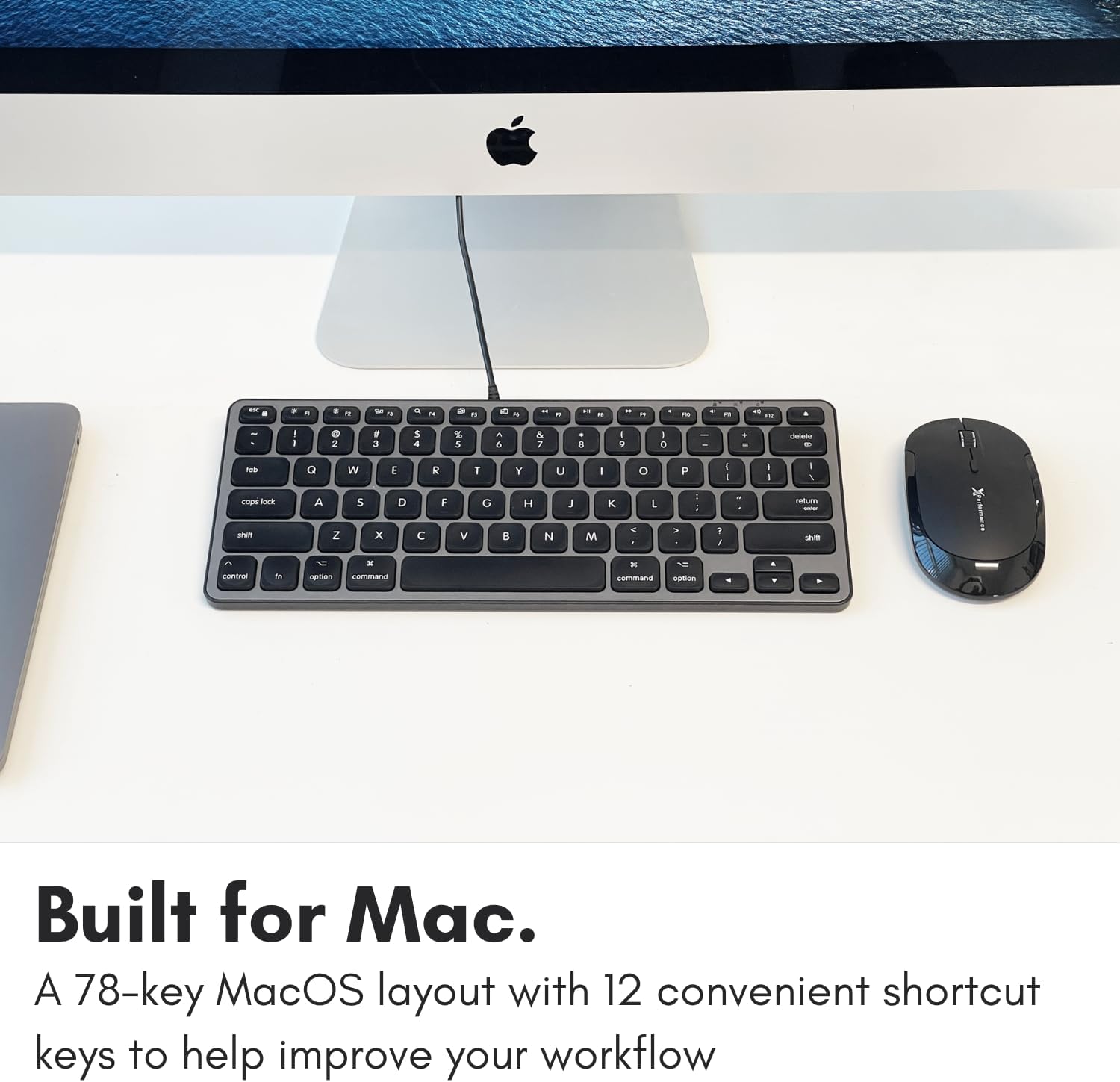
Image: A close-up of the keyboard keys, illustrating the low-profile design and keycap structure indicative of scissor-switch technology.
3.4 การออกแบบตามหลักสรีรศาสตร์และความสะดวกในการพกพา
The keyboard features an integrated kickstand that angles the keyboard slightly, enhancing typing comfort. Its compact size makes it suitable for various desk setups and easy to transport.
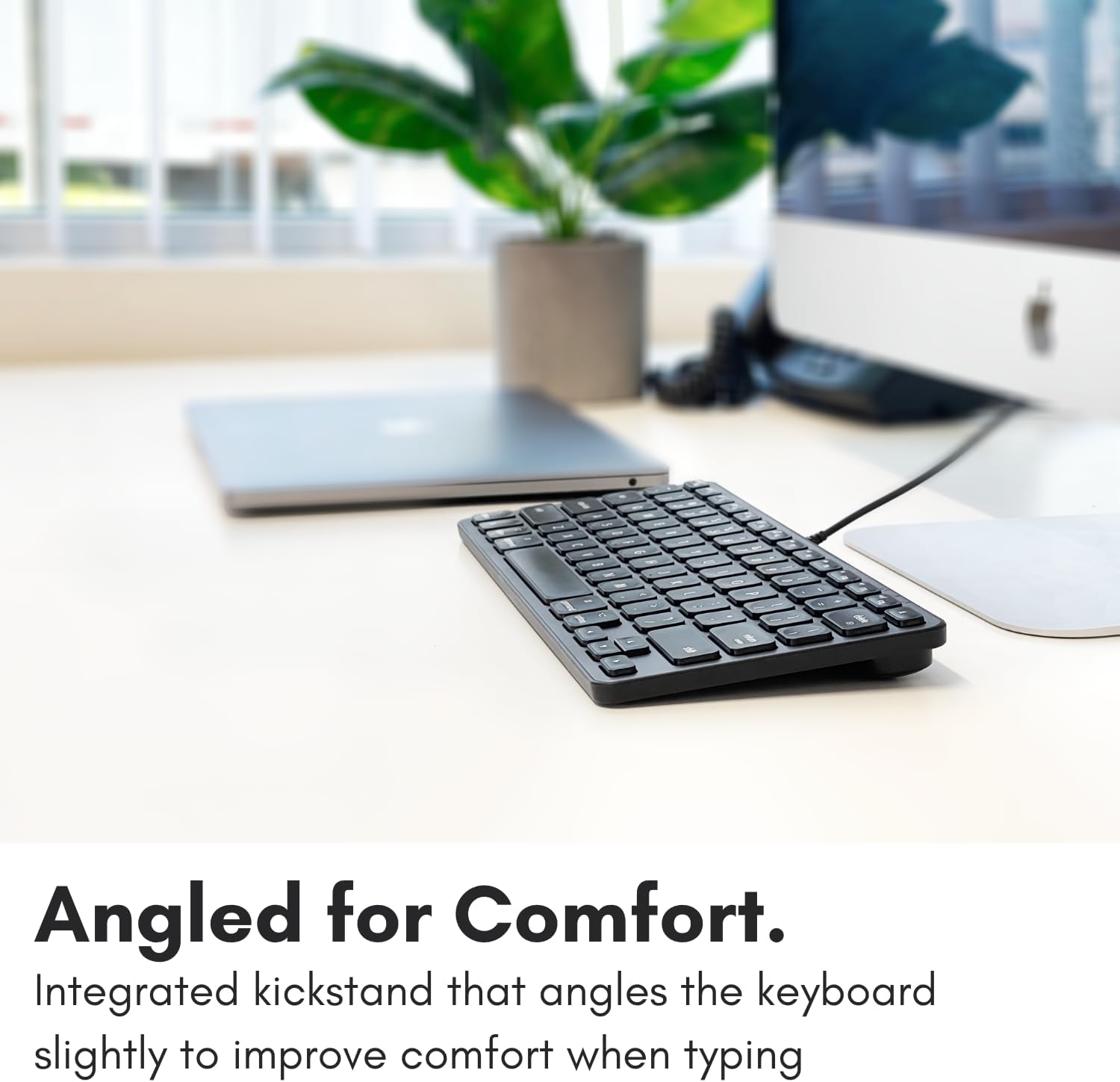
Image: The Macally keyboard shown from a side angle, highlighting the slight incline provided by its integrated kickstand for ergonomic typing.

Image: The compact Macally keyboard on a desk, demonstrating how its small footprint helps save desk space.
4. การบำรุงรักษา
To ensure the longevity and optimal performance of your Macally keyboard, follow these maintenance guidelines:
- การทำความสะอาด: ใช้ผ้านุ่มไม่เป็นขุยเช็ดเล็กน้อยampเช็ดทำความสะอาดพื้นผิวแป้นพิมพ์ด้วยน้ำเปล่าหรือน้ำยาทำความสะอาดอ่อนๆ หลีกเลี่ยงสารเคมีรุนแรง น้ำยาทำความสะอาดที่มีฤทธิ์กัดกร่อน หรือความชื้นมากเกินไป
- การกำจัดฝุ่น: ใช้ลมอัดเพื่อกำจัดฝุ่นละอองและเศษต่างๆ ออกจากระหว่างปุ่ม
- พื้นที่จัดเก็บ: เมื่อไม่ใช้งาน ควรเก็บแป้นพิมพ์ไว้ในที่สะอาดและแห้ง หลีกเลี่ยงอุณหภูมิที่สูงหรือต่ำเกินไป และแสงแดดโดยตรง
- การดูแลสายเคเบิล: ควรหลีกเลี่ยงการงอหรือบีบสาย USB มากเกินไปเพื่อป้องกันความเสียหาย
5 การแก้ไขปัญหา
If you encounter issues with your Macally keyboard, refer to the following common troubleshooting steps:
- แป้นพิมพ์ไม่ตอบสนอง:
- Ensure the USB cable is securely connected to your Mac's USB-A or USB-C port.
- Try connecting the keyboard to a different USB port on your Mac.
- รีสตาร์ทคอมพิวเตอร์ Mac ของคุณ
- Check System Settings/Preferences > Keyboard to ensure the keyboard is recognized and configured correctly.
- ฮับ USB ไม่ทำงาน:
- Ensure the keyboard itself is properly connected and functioning.
- Verify that the peripheral device connected to the hub is working correctly when plugged directly into your Mac.
- Some high-power devices may require direct connection to your Mac or a powered USB hub. The keyboard's hub is designed for low-power peripherals.
- Shortcut Keys Not Working:
- Ensure your Mac's operating system is up to date.
- Check System Settings/Preferences > Keyboard > Keyboard Shortcuts to ensure no conflicts exist.
6. ข้อมูลจำเพาะ
| หมายเลขรุ่น | UCAMINIZHUB |
| เทคโนโลยีการเชื่อมต่อ | Wired (USB-A, USB-C) |
| อุปกรณ์ที่รองรับ | MacBook Pro/Air, Mac mini, iMac, Laptop, PC, Smartphone, Tablet (with appropriate USB port) |
| เค้าโครงแป้นพิมพ์ | 78-key MacOS layout with 12 shortcut keys |
| ประเภทสวิตช์กุญแจ | สวิตช์กรรไกร |
| ฮับ USB ในตัว | 2x USB-C ports, 1x USB-A port |
| ขนาดสินค้า | 11.81 x 5.91 x 0.79 นิ้ว (30 x 15 x 2 ซม.) |
| น้ำหนักสินค้า | 1.08 ปอนด์ (0.49 กก.) |
| วัสดุ | โลหะ, พลาสติก |
| สี | สีดำ |
7. การรับประกันและการสนับสนุน
Macally products are designed for reliability and performance. This product comes with a รับประกันจำกัด 2 ปี ตั้งแต่วันที่ซื้อสินค้า
For technical support, warranty claims, or further assistance, please contact Macally customer support. US-based support is available to assist you with any questions or issues you may have.
Please visit the official Macally website for the most current contact information and support resources: www.maally.com


