การแนะนำ
This manual provides instructions for the AVATTO GW16-W Zigbee and Bluetooth Gateway. It covers setup, operation, maintenance, and troubleshooting to ensure optimal performance and safe use of your device. The GW16-W acts as a central hub, enabling communication between various smart home devices using both Zigbee 3.0 and Bluetooth protocols.
ข้อมูลด้านความปลอดภัย
- อ่านคำแนะนำทั้งหมดอย่างละเอียดก่อนใช้งาน
- อย่าให้อุปกรณ์สัมผัสกับอุณหภูมิ ความชื้น หรือแสงแดดโดยตรง
- Use only the specified power adapter (5V DC/1A).
- เก็บให้พ้นจากมือเด็ก
- อย่าพยายามถอดประกอบหรือซ่อมแซมอุปกรณ์ด้วยตัวเอง
- ตรวจสอบให้แน่ใจว่ามีการระบายอากาศที่เหมาะสมรอบๆ อุปกรณ์เพื่อป้องกันความร้อนสูงเกินไป
เนื้อหาแพ็คเกจ
ตรวจสอบว่ามีรายการทั้งหมดอยู่ในแพ็คเกจ:
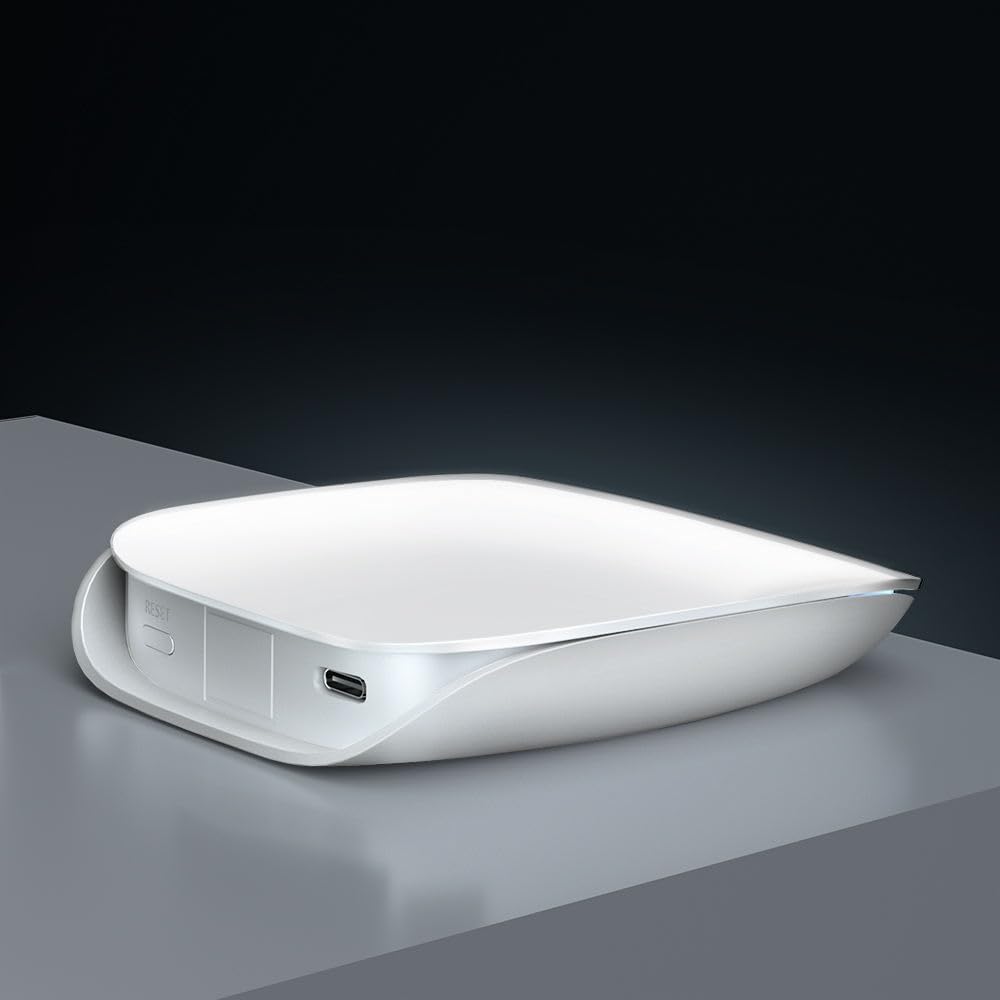
- Smart Gateway (GW16-W) x 1
- สายเคเบิลข้อมูล USB x 1
- User Manual x 1 (often a QR code or link to digital version)
สินค้าเกินview
The AVATTO GW16-W is a dual-protocol gateway that combines Zigbee and Bluetooth connectivity, allowing it to manage a wide range of smart home devices efficiently.
ส่วนประกอบของอุปกรณ์
- ตัวบ่งชี้สถานะ: Displays the current operational status of the gateway.
- สวิตช์รีเซ็ต: ใช้เพื่อรีเซ็ตอุปกรณ์เป็นการตั้งค่าจากโรงงาน
- พอร์ต Type-C: For power input (5V DC/1A).
ข้อมูลจำเพาะ
| คุณสมบัติ | รายละเอียด |
|---|---|
| ชื่อสินค้า | ZigBee/Bluetooth Wireless Gateway |
| หมายเลขรุ่น | GW16-W |
| ขนาด | 85มม. * 100มม. * 23มม. |
| กำลังไฟเข้า | กระแสตรง 5V/1A |
| เทคโนโลยีไร้สาย | Zigbee 3.0/Bluetooth |
| อุณหภูมิในการทำงาน | -20°C ~ 45°C |
| อุณหภูมิในการจัดเก็บ | 5°ซ ~ 30°ซ |
| ความชื้นในการทำงาน | 10% ~ 90% RH (ไม่มีการควบแน่น) |
| ความชื้นในการเก็บรักษา | ความชื้นสัมพัทธ์ 30% ~ 70% |
การตั้งค่า
1. เปิดเครื่อง
Connect the provided USB data cable to the Type-C port on the gateway and plug the other end into a 5V DC/1A power adapter (not included). The status indicator light will illuminate, indicating the device is powered on.
2. การติดตั้งแอปพลิเคชันและการเชื่อมต่อเครือข่าย
- ดาวน์โหลด ตุยย่า สมาร์ท or ชีวิตที่ชาญฉลาด app from your mobile device's app store (available on iOS and Android).
- ลงทะเบียนหรือเข้าสู่ระบบบัญชีของคุณภายในแอป
- Follow the in-app instructions to add the GW16-W gateway. This typically involves selecting "Gateway" or "Hub" from the device list and following the pairing prompts. Ensure your phone is connected to a 2.4GHz Wi-Fi network during setup, as the gateway does not support 5GHz Wi-Fi.
3. Adding Sub-Devices (Zigbee/Bluetooth Devices)
Once the gateway is successfully connected to the app, you can add compatible Zigbee and Bluetooth sub-devices to expand your smart home system.

- In the Tuya Smart/Smart Life app, navigate to the gateway's control interface and select "Add sub-device" or a similar option.
- Put your Zigbee or Bluetooth device into pairing mode (refer to the sub-device's individual manual for specific instructions).
- The gateway will discover and add the device. Once added, you can rename it and assign it to a room within the app.
คำแนะนำการใช้งาน
การควบคุมระยะไกลผ่านแอพ
After adding sub-devices, you can control them remotely through the Tuya Smart or Smart Life app from anywhere with an internet connection.

The app allows you to monitor device status, set schedules, create automation routines, and manage all connected smart devices from a single interface.
บูรณาการการควบคุมด้วยเสียง
The AVATTO GW16-W gateway is compatible with popular voice assistants like Amazon Alexa and Google Assistant, providing hands-free control of your smart devices.

- To enable voice control, link your Tuya Smart/Smart Life account to your Alexa or Google Home app.
- Once linked, you can use voice commands such as "Alexa, turn on the light" or "Hey Google, set the thermostat to 22 degrees" to control your connected devices.
การซ่อมบำรุง
- รักษาความสะอาดของอุปกรณ์ด้วยการเช็ดด้วยผ้าแห้งเนื้อนุ่ม
- Avoid using harsh chemicals or abrasive cleaners, which can damage the device's surface.
- ตรวจสอบให้แน่ใจว่ามีการระบายอากาศที่เหมาะสมรอบๆ อุปกรณ์เพื่อป้องกันความร้อนสูงเกินไป
- Regularly check for firmware updates through the Tuya Smart/Smart Life app to ensure optimal performance, security, and compatibility with new devices.
การแก้ไขปัญหา
เกตเวย์ไม่เชื่อมต่อกับ Wi-Fi:
- Ensure your Wi-Fi network is 2.4GHz. The gateway does not support 5GHz Wi-Fi.
- ตรวจสอบว่ารหัสผ่าน Wi-Fi ที่ป้อนในแอปถูกต้องหรือไม่
- ย้ายอุปกรณ์เกตเวย์ให้ใกล้กับเราเตอร์ Wi-Fi มากขึ้น เพื่อเพิ่มความแรงของสัญญาณ
- Restart your router and the gateway, then attempt the connection process again.
อุปกรณ์ย่อยไม่จับคู่:
- Ensure the sub-device is in pairing mode (refer to its specific manual).
- Check if the sub-device is compatible with Zigbee 3.0 or Bluetooth standards.
- Move the sub-device closer to the gateway to ensure it's within range.
- Reset the sub-device to factory settings and try pairing again.
การควบคุมด้วยเสียงไม่ทำงาน:
- Verify that your Tuya Smart/Smart Life account is correctly linked to your Alexa or Google Home app.
- Ensure your voice assistant device (e.g., Amazon Echo, Google Home speaker) is online and functioning correctly.
- Check the device names in the Tuya app and ensure they are recognized by Alexa/Google. Try re-discovering devices in the voice assistant app.
การรับประกันและการสนับสนุน
For warranty information and technical support, please refer to the purchase platform or contact AVATTO customer service directly. Keep your purchase receipt or proof of purchase for any warranty claims or support inquiries.


