1. บทนำ
This manual provides essential information for the proper installation, operation, and maintenance of your GAMEMAX RGB-1050 1050W ATX 3.0 & PCIe 5.0 Power Supply. Please read this manual thoroughly before installation and retain it for future reference.

Image 1.1: The GAMEMAX RGB-1050 1050W ATX 3.0 & PCIe 5.0 Power Supply, showcasing its white chassis and addressable RGB fan.
2. ข้อมูลด้านความปลอดภัย
ปฏิบัติตามคำแนะนำด้านความปลอดภัยต่อไปนี้เพื่อป้องกันการบาดเจ็บและความเสียหายต่ออุปกรณ์ของคุณ:
- ตรวจสอบให้แน่ใจว่าได้ตัดการเชื่อมต่อแหล่งจ่ายไฟจากเต้ารับไฟฟ้า AC ก่อนการติดตั้งหรือการจัดการ
- อุปกรณ์นี้มีปริมาณเสียงสูงtagส่วนประกอบต่างๆ ห้ามเปิดแหล่งจ่ายไฟasinก. ส่งต่อการบริการทั้งหมดให้กับบุคลากรที่มีคุณสมบัติเหมาะสม
- ติดตั้งแหล่งจ่ายไฟในบริเวณที่มีการระบายอากาศที่ดี ห่างจากแหล่งความร้อนและความชื้น
- ใช้เฉพาะสายเคเบิลโมดูลาร์ที่มาพร้อมกับแหล่งจ่ายไฟนี้เท่านั้น การใช้สายเคเบิลที่เข้ากันไม่ได้อาจทำให้เกิดความเสียหายได้
- ตรวจสอบให้แน่ใจว่าระบบคอมพิวเตอร์ของคุณต่อสายดินอย่างถูกต้อง
3. เนื้อหาบรรจุภัณฑ์
ตรวจสอบว่ามีรายการทั้งหมดอยู่ในแพ็คเกจ:
- GAMEMAX RGB-1050 1050W Power Supply
- Modular Cable Set (refer to Image 3.1 for details)
- สายไฟ AC
- สกรูยึด
- คู่มือการใช้งาน (เอกสารนี้)
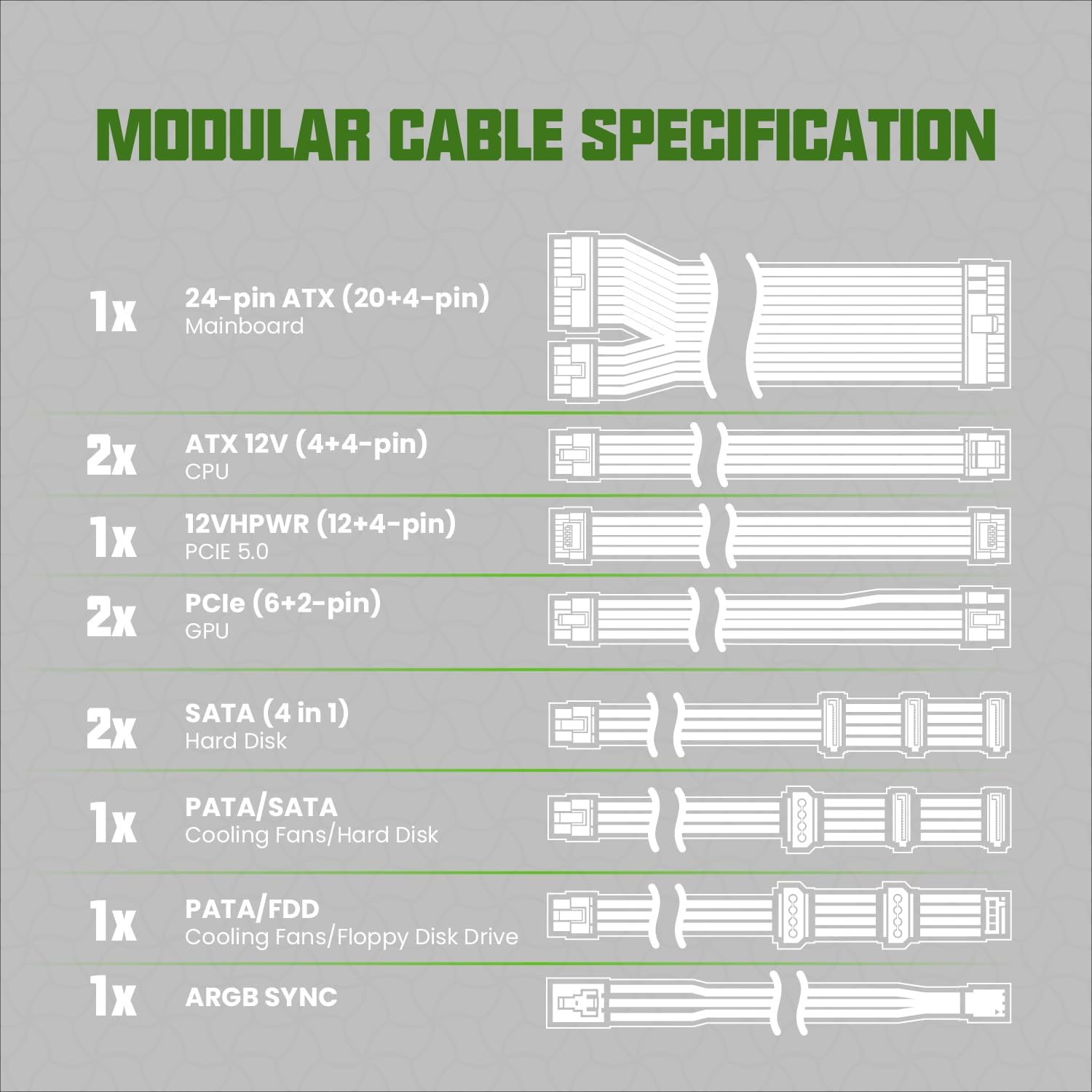
Image 3.1: Diagram illustrating the modular cable specifications included with the power supply, detailing connector types and quantities such as 24-pin ATX, ATX 12V (4+4-pin) CPU, 12VHPWR (12+4-pin) PCIe 5.0, PCIe (6+2-pin) GPU, SATA, PATA/SATA, PATA/FDD, and ARGB Sync cables.
4. สินค้าหมดview และคุณสมบัติ
The GAMEMAX RGB-1050 is a high-performance power supply designed for modern gaming systems, offering efficiency, stability, and customizable aesthetics.
4.1. คุณสมบัติหลัก
- ได้รับการรับรอง 80 Plus Gold: Achieves 90% or higher efficiency under typical loads, reducing energy consumption and heat generation.
- Stable & Safe Output: Features a DC-DC structure, LLC resonance assist, and 12V synchronous rectification for consistent and reliable power delivery.
- รองรับ ATX 3.0 และ PCIe 5.0: Equipped with a 12VHPWR 16-pin connector, capable of delivering up to 600W to power-hungry graphics cards. Supports up to 2x total power excursion and 3x GPU power excursion, ensuring compatibility with future high-performance components.
- การควบคุมแสง ARGB: Addressable RGB lighting can synchronize with motherboard ARGB software, offering 25 smart lighting modes and an RGB memory function.
- Ultra-quiet & Durable Fan: A 140mm fan with hydraulic bearing provides efficient heat dissipation while maintaining low noise levels.
- การออกแบบโมดูลาร์เต็มรูปแบบ: Allows for cleaner cable management by connecting only the necessary cables.
- ตัวเก็บประจุญี่ปุ่น 100%: Ensures long-term reliability and stability.

ภาพที่ 4.1: โอเวอร์view of the power supply highlighting key features such as 80 Plus Gold certification, 100% Japanese capacitors, ARGB Addressable lighting, ATX 3.0 compatibility, 12VHPWR connector, and DC-DC conversion.

ภาพที่ 4.2: ภาพระยะใกล้ view emphasizing the PCIe 5.0 readiness with a 12VHPWR connector capable of 600W output, alongside icons representing various protection features: Over Power Protection (OPP), Over Current Protection (OCP), Over Voltage Protection (OVP) ภายใต้ฉบับที่tage Protection (UVP), Short Circuit Protection (SCP), and Over Temperature Protection (OTP).

ภาพที่ 4.3: รายละเอียด view of a Japanese capacitor inside the power supply, indicating its role in providing durability and stability.

Image 4.4: Illustration of the 140mm fan, highlighting features such as PWM temperature control, quiet operation, 50,000-hour hydraulic bearing lifespan, and 9-blade design for enhanced airflow.
5. ข้อมูลจำเพาะ
| คุณสมบัติ | คำอธิบาย |
|---|---|
| แบบอย่าง | RGB1050-สีขาว |
| เอาท์พุต วัดtage | 1050วัตต์ |
| การรับรองประสิทธิภาพ | 80 พลัสโกลด์ |
| ฟอร์มแฟกเตอร์ | เอทีเอ็กซ์ |
| การออกแบบแหล่งจ่ายไฟ | โมดูลาร์เต็มรูปแบบ |
| การสนับสนุน PCIe | PCIe 5.0 (12VHPWR 16-pin connector) |
| วิธีการทำความเย็น | พัดลม (พัดลมแบริ่งไฮดรอลิกขนาด 140 มม.) |
| ไฟ RGB | Addressable RGB with Motherboard Sync |
| ตัวเก็บประจุ | ตัวเก็บประจุญี่ปุ่น 100% |
| ขนาดสินค้า (กว้าง x ยาว x สูง) | 11.41 x 10.28 x 5.24 นิ้ว |
| น้ำหนักสินค้า | 6.87 ปอนด์ |
| อุปกรณ์ที่รองรับ | PC Systems, Gaming Components |
| คะแนนปัจจุบัน | 12 Amps |
6. คู่มือการติดตั้ง
Follow these steps for installing your GAMEMAX power supply:
6.1. การติดตั้งทางกายภาพ
- เตรียมระบบของคุณ: ตรวจสอบให้แน่ใจว่าคอมพิวเตอร์ของคุณปิดอยู่และถอดปลั๊กออกจากเต้ารับที่ผนัง เปิดเคสคอมพิวเตอร์ของคุณ
- ถอด PSU เก่าออก (ถ้ามี): ถอดสายไฟทั้งหมดออกจากแหล่งจ่ายไฟเก่าของคุณ และถอดสกรูยึดออก ค่อยๆ เลื่อนออกจากเคส
- Mount New PSU: Slide the GAMEMAX RGB-1050 power supply into the designated PSU bay in your computer case. Ensure the fan is oriented correctly (typically facing downwards for bottom-mounted PSUs, or upwards if your case has no bottom vent). Secure it with the provided mounting screws.
6.2. การเชื่อมต่อสายเคเบิล
Utilize the fully modular design to connect only the necessary cables. Refer to Image 3.1 for cable identification.
- พลังงานของเมนบอร์ด: Connect the 24-pin ATX cable to the corresponding port on your motherboard and the power supply.
- พลังซีพียู: Connect the ATX 12V (4+4-pin) CPU cable(s) to your motherboard's CPU power connector(s) and the power supply.
- พลัง GPU: For modern graphics cards, use the 12VHPWR (12+4-pin) PCIe 5.0 cable if your GPU supports it. Otherwise, use the appropriate PCIe (6+2-pin) GPU cables for your graphics card(s). Connect them to the GPU and the power supply.
- พลังงานต่อพ่วง: Connect SATA cables for SSDs/HDDs and PATA cables for older devices or case fans as needed.
- ARGB Sync Cable: If you wish to synchronize the power supply's RGB lighting with your motherboard, connect the ARGB Sync cable from the power supply to an available 5V Addressable RGB header on your motherboard.
- การจัดการสายเคเบิล: Route cables neatly behind the motherboard tray or in designated channels to improve airflow and aesthetics.
- การตรวจสอบขั้นสุดท้าย: ตรวจสอบการเชื่อมต่อทั้งหมดอีกครั้งเพื่อให้แน่ใจว่าแน่นหนาดี ปิดเคสคอมพิวเตอร์ของคุณ
- เชื่อมต่อไฟ AC: เสียบสายไฟ AC เข้ากับแหล่งจ่ายไฟแล้วเสียบเข้ากับเต้ารับที่ผนัง
7. Operation (ARGB Lighting)
The GAMEMAX RGB-1050 features addressable RGB lighting for aesthetic customization.
7.1. Motherboard ARGB Sync
If you connected the ARGB Sync cable to your motherboard's 5V ARGB header, you can control the power supply's lighting effects directly through your motherboard's RGB software (e.g., ASUS Aura Sync, GIGABYTE RGB Fusion, MSI Mystic Light Sync, ASRock Polychrome RGB).

Image 7.1: An illustration demonstrating the A-RGB Sync capability, showing the power supply's lighting synchronized with other components in a PC build via motherboard software from brands like ASUS, GIGABYTE, MSI, and ASRock.
7.2. Built-in Lighting Modes
If your motherboard does not have a 5V ARGB header or you prefer not to use software control, the power supply has built-in lighting modes. These can typically be cycled through using a dedicated button on the power supply itself or a connected case button (if applicable and wired correctly). Refer to your case manual for external RGB control options.
8. การบำรุงรักษา
การบำรุงรักษาอย่างสม่ำเสมอจะช่วยให้แหล่งจ่ายไฟของคุณมีอายุการใช้งานยาวนานและทำงานได้อย่างมีประสิทธิภาพสูงสุด
- การทำความสะอาดฝุ่น: ควรทำความสะอาดฝุ่นจากพัดลมและตะแกรงระบายอากาศของแหล่งจ่ายไฟเป็นระยะ โดยใช้ลมเป่าอัดแรงดันสูง ตรวจสอบให้แน่ใจว่าระบบปิดเครื่องและถอดปลั๊กออกก่อนทำความสะอาด
- การตรวจสอบสายเคเบิล: ตรวจสอบการเชื่อมต่อสายเคเบิลโมดูลาร์ทั้งหมดเป็นครั้งคราวเพื่อให้แน่ใจว่ามีความปลอดภัยและไม่มีความเสียหาย
- สภาพแวดล้อม : ควรใช้งานแหล่งจ่ายไฟภายในช่วงอุณหภูมิและความชื้นที่แนะนำ หลีกเลี่ยงสภาวะที่รุนแรง
9 การแก้ไขปัญหา
หากคุณพบปัญหาเกี่ยวกับแหล่งจ่ายไฟ โปรดดูขั้นตอนการแก้ไขปัญหาทั่วไปต่อไปนี้:
- ไม่มีไฟฟ้า:
- ตรวจสอบให้แน่ใจว่าสายไฟ AC เสียบเข้ากับแหล่งจ่ายไฟและเต้ารับที่ผนังอย่างแน่นหนา
- Check the power switch on the back of the power supply; it should be in the 'ON' position.
- Verify all modular cables are correctly and firmly connected to both the power supply and the components.
- ทดสอบเต้ารับไฟที่ผนังด้วยอุปกรณ์อื่นเพื่อยืนยันว่ามีไฟอยู่
- ความไม่เสถียรของระบบ/การขัดข้อง:
- ตรวจสอบให้แน่ใจว่าความต้องการพลังงานของระบบของคุณไม่เกินความจุ 1050W ของ PSU
- Check for loose cable connections, especially to the motherboard and graphics card.
- If overclocking, return to default settings to rule out power-related instability.
- เสียงพัดลม:
- A certain level of fan noise is normal under load. If the noise is excessive or unusual, check for dust accumulation and clean the fan.
- Ensure no cables or obstructions are interfering with the fan blades.
- ไฟ RGB ไม่ทำงาน/ไม่ซิงค์:
- Verify the ARGB Sync cable is correctly connected to a 5V ARGB header on your motherboard.
- ตรวจสอบให้แน่ใจว่าได้ติดตั้งและอัปเดตซอฟต์แวร์ RGB ของเมนบอร์ดแล้ว
- Check if the lighting can be controlled via the power supply's built-in modes (if applicable).
If issues persist after following these steps, contact GAMEMAX customer support.
10. การรับประกันและการสนับสนุน
The GAMEMAX RGB-1050 1050W Power Supply comes with a รับประกัน 10 ปี ตั้งแต่วันที่ซื้อ การรับประกันนี้ครอบคลุมถึงข้อบกพร่องในวัสดุและฝีมือการผลิตภายใต้การใช้งานปกติ
For warranty claims or technical support, please visit the official GAMEMAX website or contact their customer service department. You may be required to provide proof of purchase.


