1. บทนำ
The GIMA SP80B Portable Spirometer is a compact and professional medical device designed for examining pulmonary function. It provides high accuracy and repeatability, making it suitable for use in hospitals, clinics, and for routine home monitoring. This manual provides essential information for the safe and effective operation, maintenance, and troubleshooting of your SP80B Spirometer.
The device features a high-definition screen that directly displays measured parameters, offering clear visualization of flow-volume and volume-time graphs, as well as trend charts. It also includes patient information management capabilities (height, age, sex, etc.) and a health status indicator with a calibration function.
2. ข้อมูลด้านความปลอดภัย
Please read all safety instructions carefully before using the GIMA SP80B Spirometer. Failure to follow these instructions may result in inaccurate readings or device malfunction.
- ใช้อุปกรณ์ตามที่อธิบายไว้ในคู่มือนี้เท่านั้น
- อย่าพยายามถอดประกอบหรือซ่อมแซมอุปกรณ์ด้วยตนเอง แนะนำให้ส่งช่างผู้ชำนาญการไปรับบริการทั้งหมด
- เก็บอุปกรณ์ให้ห่างจากน้ำและของเหลวอื่นๆ
- หลีกเลี่ยงการให้อุปกรณ์สัมผัสกับอุณหภูมิ ความชื้น หรือแสงแดดโดยตรง
- Ensure the device is calibrated regularly as per the maintenance section to maintain accuracy.
- Consult a medical professional for interpretation of results and any health concerns. This device is for monitoring purposes and does not replace professional medical diagnosis.
3. เนื้อหาบรรจุภัณฑ์
ตรวจสอบว่ามีรายการทั้งหมดอยู่ในแพ็คเกจ:
- Spirometer (GIMA SP80B)
- คู่มือการใช้งาน
- Mouthpiece (if included, typically disposable)
- USB Cable (for data transfer/charging, if applicable)
- Software CD/Download Link (if applicable)
4. สินค้าหมดview
The GIMA SP80B Spirometer is designed for ease of use and portability. Familiarize yourself with its components:
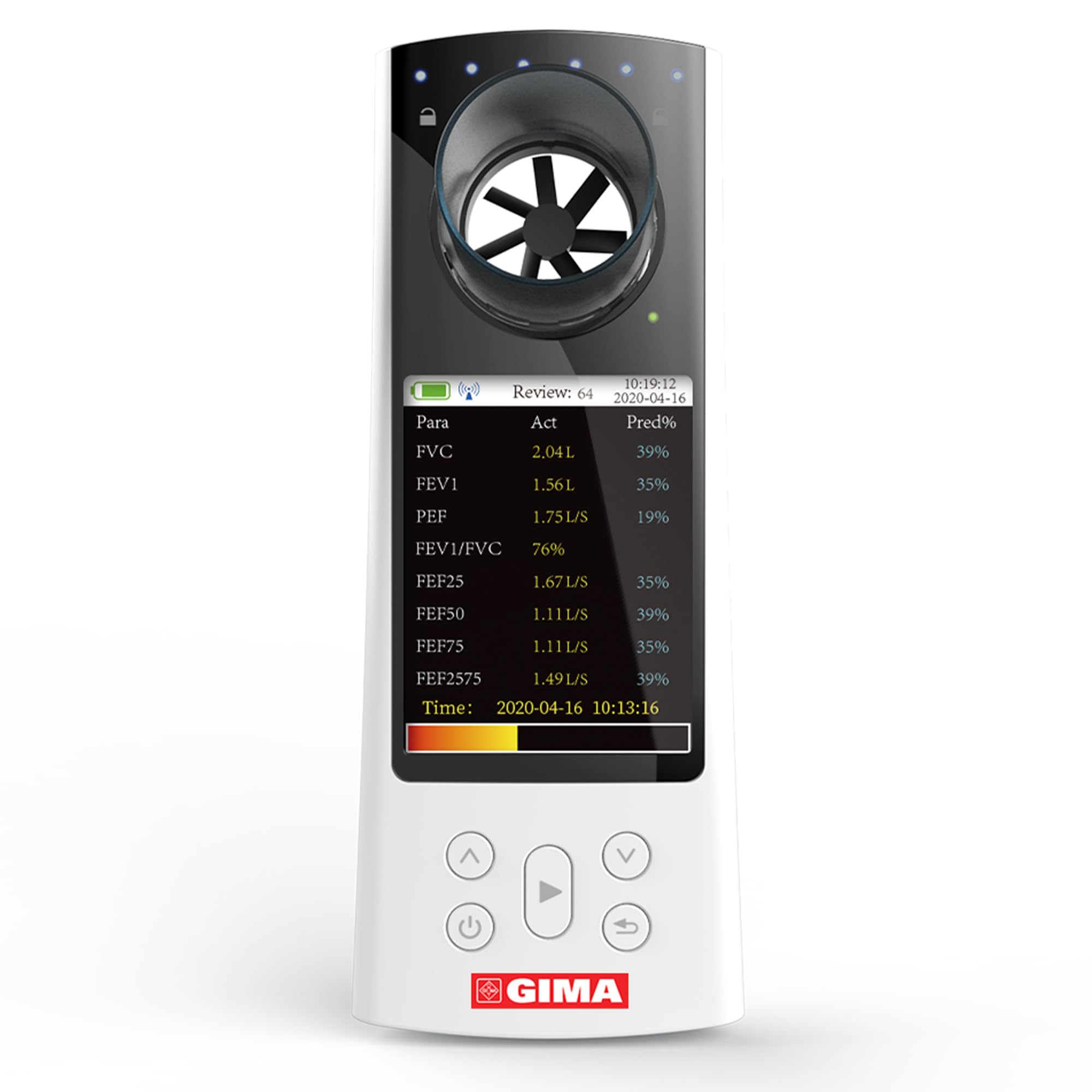
Figure 4.1: GIMA SP80B Portable Spirometer. This image shows the complete device with the mouthpiece inserted, displaying the screen and the control buttons at the bottom.
- Mouthpiece Port: Where the disposable mouthpiece is attached for testing.
- หน้าจอแสดงผล: High-definition screen showing measurement parameters, graphs, and device status.
- ปุ่มควบคุม: Power button, navigation buttons (up/down), select/start button, and back/return button.
- Sensor/Turbine: Internal component that measures airflow.

Figure 4.2: Close-up of the Spirometer's Turbine Sensor. This image highlights the internal turbine mechanism responsible for measuring airflow during a test.

Figure 4.3: Spirometer Display Screen. This image illustrates the high-definition display showing key pulmonary function parameters and their corresponding values.

Figure 4.4: Control Buttons. This image provides a detailed view of the device's control buttons, including power, navigation, and selection functions.
5. การตั้งค่า
- การแกะกล่อง: Carefully remove the spirometer and all accessories from the packaging. Inspect for any damage.
- การติดตั้ง/ชาร์จแบตเตอรี่:
If the device uses replaceable batteries, insert them according to the polarity markings. If it has a rechargeable battery, connect the USB cable to the device and a power source to charge it fully before first use. The battery indicator on the screen will show charging status.
- เปิดเครื่อง: กดปุ่มเปิด/ปิดค้างไว้ (⏻) จนกว่าหน้าจอจะสว่างขึ้น
- การตั้งค่าเริ่มต้น:
Upon first power-on, you may be prompted to set the date, time, and language. Use the navigation buttons (⌃ และ ⌄) to select options and the select button (▶) เพื่อยืนยัน.
- Patient Information Setup:
Before performing a test, it is crucial to input patient information such as height, age, and sex. This data is used to calculate predicted values for pulmonary function parameters. Navigate to the patient management section using the control buttons and enter the required details.
6. คู่มือการใช้งาน
Follow these steps to perform a pulmonary function test:
- เตรียมอุปกรณ์:
- Ensure the device is powered on and fully charged or has sufficient battery.
- Attach a clean, disposable mouthpiece securely to the mouthpiece port.
- การจัดตำแหน่งผู้ป่วย:
Instruct the patient to sit upright comfortably. Ensure they understand the breathing maneuvers required for the test.
- ทำการทดสอบ:
- Select the desired test mode (e.g., FVC - Forced Vital Capacity) from the device menu.
- Instruct the patient to take a deep breath, filling their lungs completely.
- Place the mouthpiece in their mouth, sealing their lips tightly around it.
- Instruct the patient to exhale as hard and fast as possible, emptying their lungs completely. This exhalation should be sustained for at least 6 seconds (or as instructed by a medical professional).
- Repeat the test as necessary, typically three times, to ensure reproducible results.
- Viewผลลัพธ์:
After each test, the device will display the measured parameters (e.g., FVC, FEV1, PEF) and their predicted percentage values on the high-definition screen. You can navigate through different views, including flow-volume graphs, volume-time graphs, and trend charts, using the navigation buttons.
- การจัดการข้อมูล:
The device allows for the management of patient information and test results. You can review past tests, compare results, and potentially transfer data to a computer via USB for further analysis and record-keeping.
7. การบำรุงรักษา
Proper maintenance ensures the longevity and accuracy of your GIMA SP80B Spirometer.
- การทำความสะอาด:
- After each use, dispose of the mouthpiece properly.
- เช็ดด้านนอกของอุปกรณ์ด้วยผ้านุ่มdamp ผ้า. อย่าใช้น้ำยาทำความสะอาดที่มีฤทธิ์กัดกร่อนหรือจุ่มอุปกรณ์ลงในน้ำ
- Ensure the mouthpiece port and sensor area are free from debris.
- การสอบเทียบ:
The spirometer includes a calibration function to maintain accuracy. Refer to the device's menu for calibration procedures. Regular calibration, as recommended by GIMA or your medical institution, is essential.
- พื้นที่จัดเก็บ:
Store the device in a clean, dry place, away from direct sunlight and extreme temperatures. Keep it in its original packaging or a protective case when not in use.
8 การแก้ไขปัญหา
If you encounter issues with your GIMA SP80B Spirometer, refer to the following common problems and solutions:
| ปัญหา | สาเหตุที่เป็นไปได้ | สารละลาย |
|---|---|---|
| อุปกรณ์ไม่เปิดเครื่อง | แบตเตอรี่อ่อนหรือแบตเตอรี่หมด | Charge the device fully. If using replaceable batteries, check if they are inserted correctly or replace them. |
| การอ่านที่ไม่ถูกต้อง | Device needs calibration; improper mouthpiece attachment; patient technique error; sensor obstruction. | Perform calibration. Ensure mouthpiece is securely attached. Review operating instructions for correct breathing technique. Check sensor for debris and clean if necessary. |
| หน้าจอว่างเปล่าหรือค้าง | Software error; device malfunction. | Press and hold the power button to force a restart. If the problem persists, contact customer support. |
| ปัญหาการถ่ายโอนข้อมูล | Incorrect cable connection; software not installed or outdated; driver issues. | Ensure USB cable is properly connected. Install the latest version of the companion software and drivers. Try a different USB port or computer. |
If the problem persists after attempting these solutions, please contact GIMA customer support for further assistance.
9. ข้อมูลจำเพาะ
| คุณสมบัติ | รายละเอียด |
|---|---|
| หมายเลขรุ่น | 33551 |
| ขนาด | 24 x 13.9 x 6.7 ซม. |
| น้ำหนัก | 420 กรัม |
| ผู้ผลิต | QINHHUANGDAO CONTEC MEDICAL SYSTEMS |
| ประเทศต้นกำเนิด | อิตาลี |
| แสดง | High-definition screen for direct parameter visualization, flow-volume, and volume-time graphs. |
| ฟังก์ชั่น | Patient information management, health status indication, calibration function. |
10. ข้อมูลการรับประกัน
GIMA products are manufactured to high-quality standards. For specific warranty terms and conditions, please refer to the warranty card included with your product or visit the official GIMA webไซต์นี้ โปรดเก็บหลักฐานการซื้อไว้เพื่อใช้ยืนยันการรับประกัน
11. ข้อมูลสนับสนุนและการติดต่อ
For technical support, service, or inquiries regarding your GIMA SP80B Spirometer, please contact GIMA customer service:
- Webเว็บไซต์: www.gimaiitaly.com (or refer to your product documentation for specific regional contact details)
- อีเมล: อ้างถึงเจ้าหน้าที่ webเว็บไซต์สำหรับติดต่ออีเมล์
- โทรศัพท์: อ้างถึงเจ้าหน้าที่ webเว็บไซต์สำหรับใส่เบอร์โทรศัพท์ติดต่อ
When contacting support, please have your product model (SP80B) and article number (33551) ready.


