การแนะนำ
Thank you for choosing the FLEXISPOT Electric Standing Desk. This manual provides essential information for the safe assembly, operation, and maintenance of your new adjustable height desk. Please read this manual thoroughly before beginning assembly or operation to ensure proper use and to maximize the lifespan of your product.
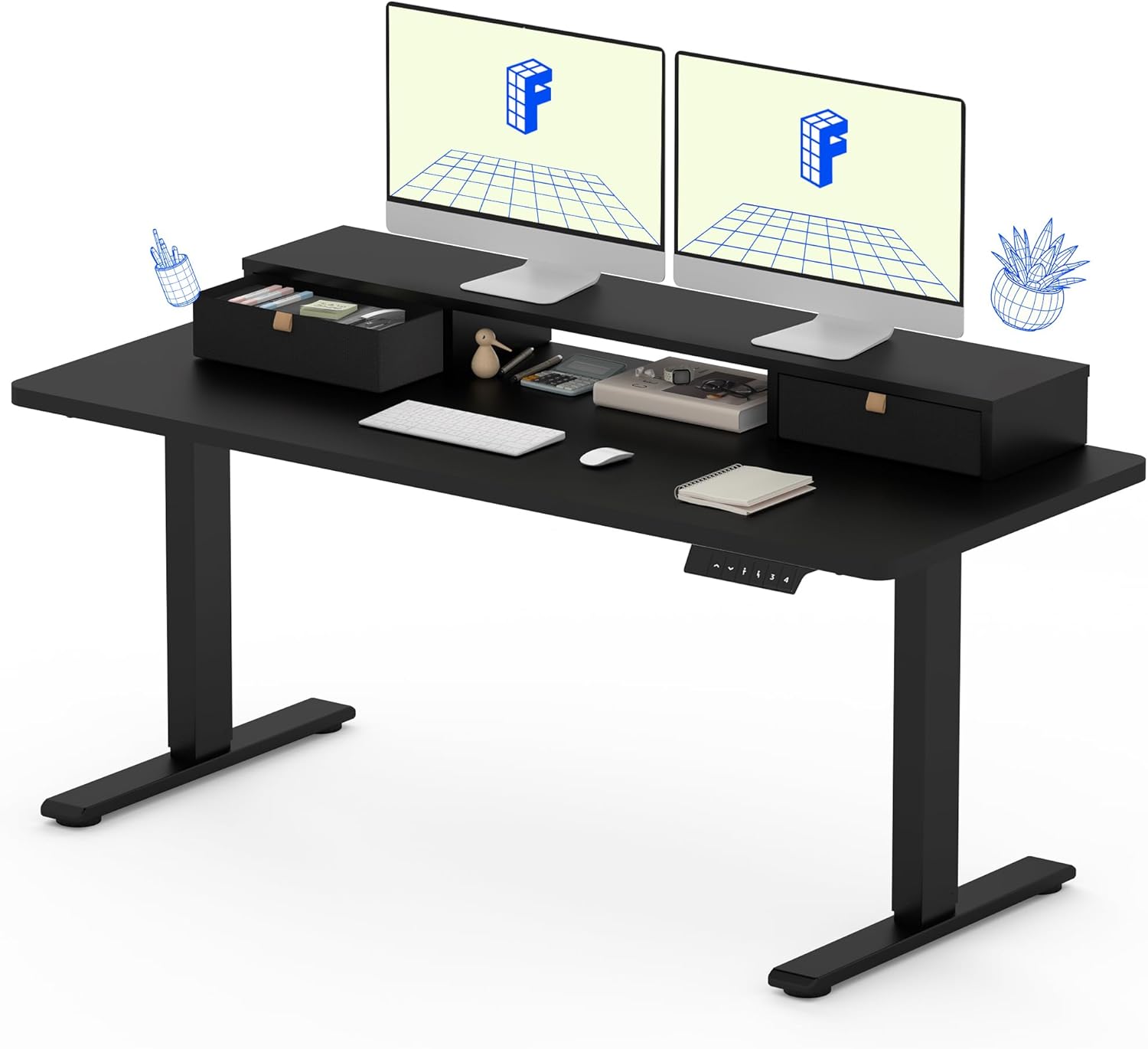
The FLEXISPOT Electric Standing Desk, featuring a solid one-piece top, integrated storage, and an ergonomic monitor stand.
ข้อมูลด้านความปลอดภัย
เพื่อความปลอดภัยของคุณและป้องกันความเสียหายต่อผลิตภัณฑ์ โปรดปฏิบัติตามคำแนะนำต่อไปนี้:
- ปฏิบัติตามคำแนะนำในการประกอบอย่างเคร่งครัดเสมอ
- Use appropriate tools for assembly. A drill may be required for some steps and is not included with the product.
- Keep the work area clear of debris and other hazards during assembly and use.
- ตรวจสอบให้แน่ใจว่าการเชื่อมต่อทั้งหมดแน่นหนาดีแล้วก่อนใช้งานโต๊ะควบคุม
- อย่าบรรทุกของหนักเกินไปบนโต๊ะ น้ำหนักที่แนะนำสูงสุดคือ 150 ปอนด์
- ควรกันเด็กและสัตว์เลี้ยงให้อยู่ห่างจากโต๊ะทำงานขณะทำการผ่าตัด เพื่อป้องกันการบาดเจ็บ
- Avoid placing liquids directly on the desk surface without proper coasters or protection.
เนื้อหาแพ็คเกจ
Your FLEXISPOT Electric Standing Desk will be shipped in two separate packages, which may arrive at different times. Please verify all components are present before beginning assembly.

The desk components are shipped in two separate boxes, which may arrive independently.
Expected components include:
- Desktop (Solid One-Piece) with integrated monitor stand and drawers
- Desk Frame (Legs and Crossbar)
- มอเตอร์ไฟฟ้าและกล่องควบคุม
- Control Panel (Keypad)
- สายไฟ
- อุปกรณ์ประกอบ (สกรู ประแจหกเหลี่ยม ฯลฯ)
- คู่มือการใช้งาน
คำแนะนำในการประกอบ
Assembly typically requires one person, but having a second person can be helpful for certain steps, especially when handling the desktop. Ensure you have a clear, flat workspace.
- แกะส่วนประกอบ: Carefully remove all parts from the packaging. Check against the package contents list to ensure nothing is missing or damaged.
- ประกอบโครงโต๊ะ: Follow the detailed diagrams in the included instruction manual to assemble the desk legs and crossbar. Ensure all screws are tightened securely.
- แนบเดสก์ท็อป: Carefully place the desktop upside down on a soft, protected surface. Align the assembled desk frame with the pre-drilled holes on the underside of the desktop. Secure the frame to the desktop using the provided screws. Note that the desktop is a seamless, solid one-piece design for enhanced stability.
- ติดตั้งกล่องควบคุมและมอเตอร์: Mount the electric motor and control box to the designated areas on the desk frame, following the manual's instructions. Connect all necessary cables.
- ติดตั้งแผงควบคุม: Attach the control panel (keypad) to the front edge of the desktop in the specified location. Connect its cable to the control box.
- การจัดการสายเคเบิล: Organize and secure all cables using any provided cable ties or clips to prevent tangling and ensure smooth operation.
- เปิดเครื่องและทดสอบ: Connect the power cable to the control box and then to a power outlet. Test the desk's height adjustment functions to ensure it operates smoothly.

The FLEXISPOT desk features a smooth, single-piece desktop for enhanced stability compared to two-piece designs.
คำแนะนำการใช้งาน
Your FLEXISPOT Electric Standing Desk offers smooth and precise height adjustment, along with memory presets for convenience.
การปรับความสูง
ใช้ขึ้น (▲) และลง (▼) arrows on the control panel to adjust the desk height. The desk can be adjusted freely within the range of 28.1 inches to 45.7 inches.
หน่วยความจำที่ตั้งไว้ล่วงหน้า
The control panel allows you to save up to four favorite height settings. To save a preset:
- ปรับความสูงของโต๊ะตามต้องการโดยใช้ปุ่มลูกศรขึ้น/ลง
- Press the "M" button (Memory) followed by one of the numbered preset buttons (1, 2, 3, or 4). The display will confirm the setting is saved.
- To recall a saved height, simply press the corresponding numbered preset button. The desk will automatically move to that height.

The control panel features an LCD screen and four memory buttons for convenient height adjustments.
Integrated Storage and Monitor Stand
The desk is equipped with two drawers and a two-tier shelf stand, providing ample storage and an ergonomic way to view your monitors. The monitor stand can easily hold dual monitors.

The integrated storage includes dual drawers and an open cubicle, with the top serving as a monitor riser.
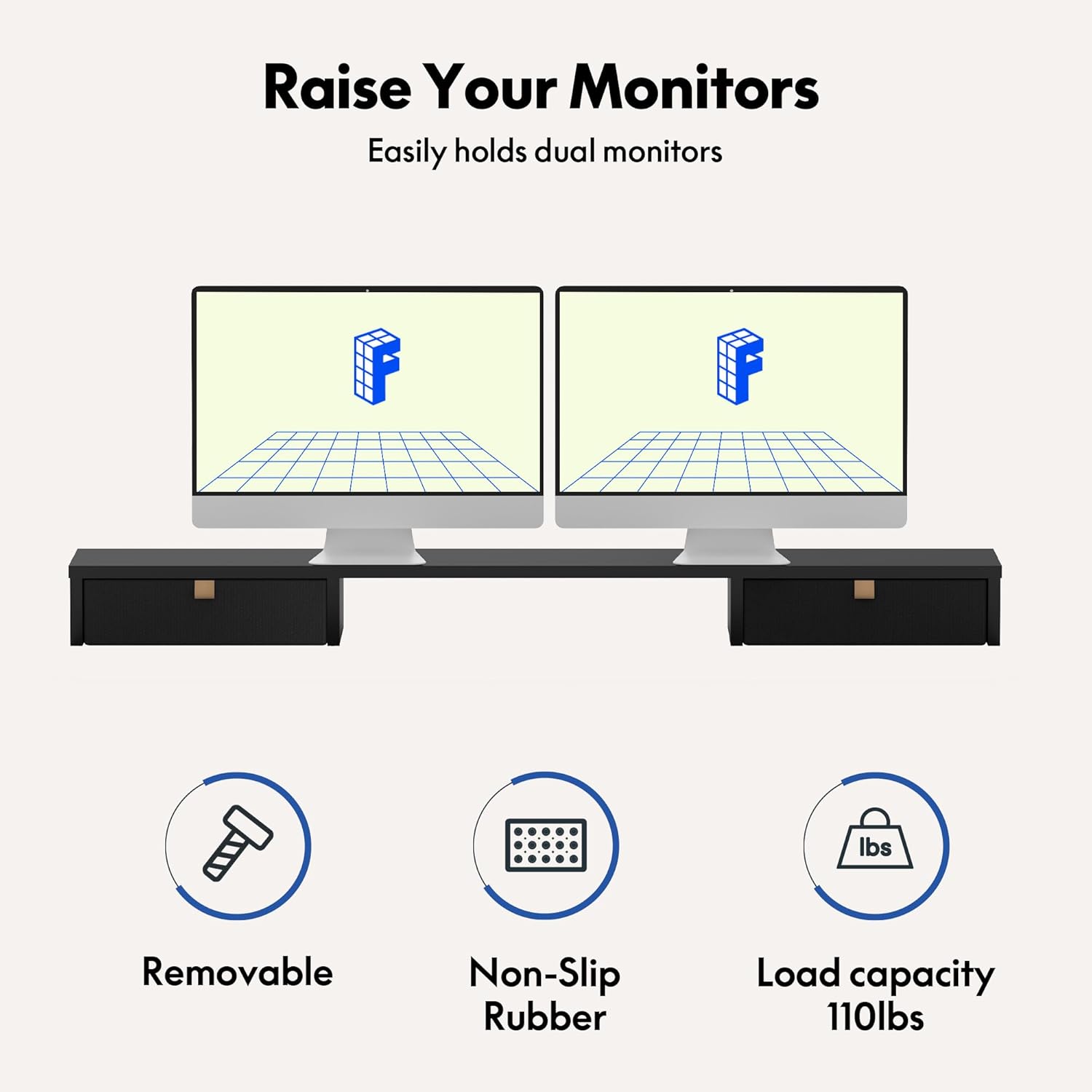
The monitor riser is designed to hold up to 110 lbs and features non-slip rubber for stability.
การซ่อมบำรุง
Regular maintenance will help ensure the longevity and smooth operation of your FLEXISPOT Electric Standing Desk.
- การทำความสะอาด: เช็ดพื้นโต๊ะและกรอบโต๊ะด้วยผ้าเนื้อนุ่มและแห้งamp ผ้า หลีกเลี่ยงสารเคมีรุนแรงหรือน้ำยาทำความสะอาดที่มีฤทธิ์กัดกร่อนซึ่งอาจทำลายพื้นผิวได้
- ตรวจสอบการเชื่อมต่อ: Periodically check all screws and electrical connections to ensure they are secure. Tighten any loose fasteners.
- การจัดการสายเคเบิล: Ensure cables remain tidy and are not pinched or tangled, which could affect desk movement or cause damage.
- การดูแลมอเตอร์: The enhanced motor is designed for durability, having undergone over 20,000 cycle tests. No specific user maintenance is required for the motor itself.

The desk's motor is built for durability, tested for over 20,000 cycles.
การแก้ไขปัญหา
If you encounter issues with your FLEXISPOT Electric Standing Desk, refer to the following common problems and solutions:
| ปัญหา | สาเหตุที่เป็นไปได้ | สารละลาย |
|---|---|---|
| โต๊ะไม่ขยับหรือไม่ตอบสนองต่อปุ่มควบคุม | Power cable disconnected, control box issue, or motor overload. | Check power cable connection. Ensure it's plugged into a working outlet. Unplug and replug the control box. Reduce weight on the desk if overloaded. |
| โต๊ะเคลื่อนไหวไม่สม่ำเสมอหรือมีเสียงผิดปกติ | Loose connections, uneven load, or obstruction. | Check all assembly screws and tighten if loose. Redistribute weight evenly on the desktop. Check for any obstructions under or around the desk legs. |
| Height presets are not working correctly. | Presets not saved properly or control panel malfunction. | Re-save your desired height presets following the operating instructions. If the issue persists, try resetting the desk (refer to the full manual for specific reset procedures if available). |
If these solutions do not resolve the issue, please contact FLEXISPOT customer support for further assistance.
ข้อมูลจำเพาะ
Key specifications for your FLEXISPOT Electric Standing Desk (Model: B0CKW8222V):
| คุณสมบัติ | รายละเอียด |
|---|---|
| ยี่ห้อ | เฟล็กซิสพอท |
| หมายเลขรุ่น | B0CKW8222V |
| ขนาดสินค้า | ลึก 55 นิ้ว x กว้าง 24 นิ้ว x สูง 33.2 นิ้ว |
| สี | Black Frame/Black Top |
| สไตล์ | ไฟฟ้า |
| วัสดุฐาน | เหล็กอัลลอยด์ |
| ประเภทวัสดุยอดนิยม | ไม้แปรรูป |
| น้ำหนักสินค้า | 100 ปอนด์ |
| ความสูงขั้นต่ำ | 28.1 นิ้ว |
| ความสูงสูงสุด | 45.7 นิ้ว |
| คำแนะนำน้ำหนักสูงสุด | 150 ปอนด์ |
| จำนวนลิ้นชัก | 2 |
| จำนวนชั้นวาง | 2 (Monitor Stand) |
| การประกอบที่จำเป็น | ใช่ |
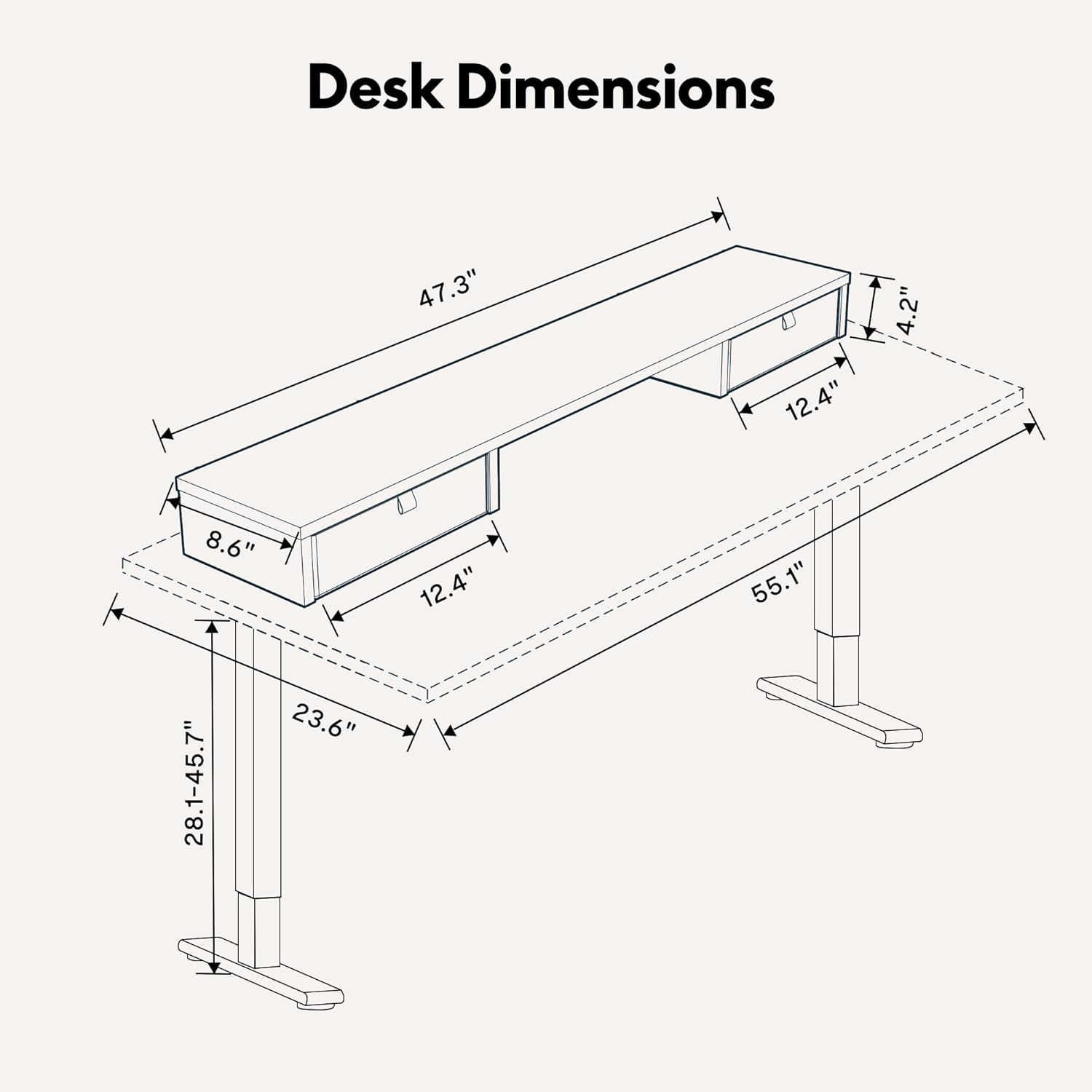
Detailed dimensions of the FLEXISPOT Electric Standing Desk.

The desk frame and desktop are certified for stability and safety.
การรับประกันและการสนับสนุน
Your FLEXISPOT Electric Standing Desk comes with a Limited Warranty. For specific terms and conditions, please refer to the warranty card included with your product or visit the official FLEXISPOT webเว็บไซต์.
For customer support, technical assistance, or warranty claims, please contact FLEXISPOT directly through their official website or the contact information provided in your product packaging. When contacting support, please have your model number (B0CKW8222V) and purchase date ready.
You can visit the official FLEXISPOT store on Amazon for more information and products: ร้านเฟล็กซิสพอท


