1. บทนำ
Thank you for choosing the Takstar MS-189 Table Conference Microphone. This manual provides detailed instructions for the proper setup, operation, and maintenance of your microphone. The MS-189 is a unidirectional condenser microphone designed for clear vocal pickup in conference settings, computer use, and other desktop applications. Please read this manual thoroughly before use to ensure optimal performance and longevity of the product.
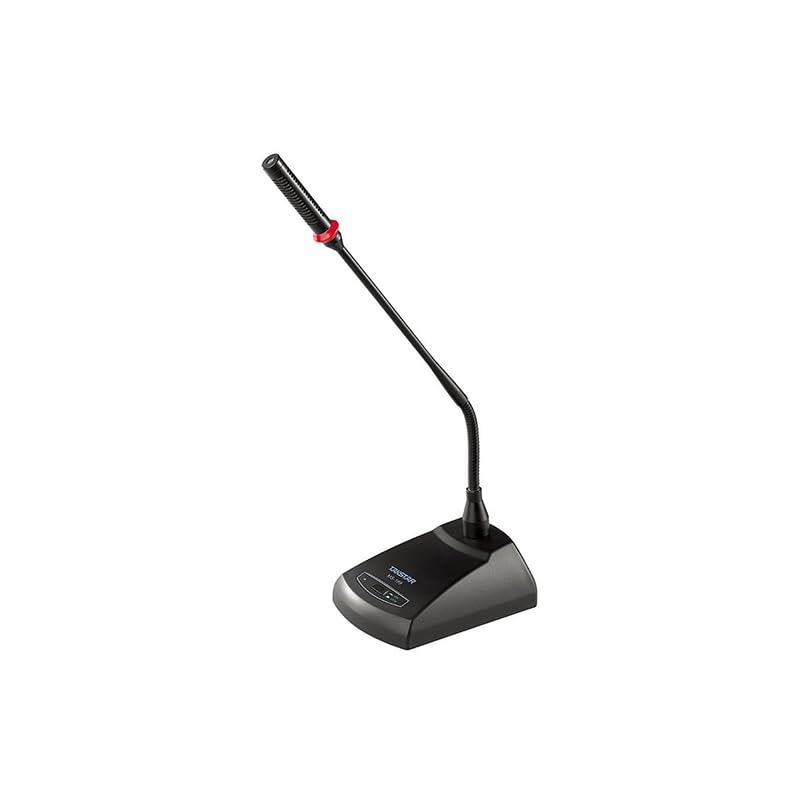
ภาพที่ 1.1: The Takstar MS-189 Table Conference Microphone. This image displays the microphone with its gooseneck design and base unit, ready for desktop placement.
2. คุณสมบัติของผลิตภัณฑ์
- Back Electret Condenser Transducer: Ensures high-quality audio capture.
- High Sensitivity and Low Noise: Delivers clear and crisp sound reproduction.
- Clear and Bright Vocal Pick-up: Optimized for speech and vocal applications.
- ปุ่มเปิด/ปิดพร้อมไฟ LED แสดงสถานะ: Located on both the base and gooseneck for easy control and status indication.
- ตัวเลือกพลังงานที่ยืดหยุ่น: Can be powered by 9-52V phantom power or two 1.5V AA batteries.
- รูปแบบขั้วเดียว: เน้นเสียงจากด้านหน้า ลดเสียงรบกวนรอบข้าง
- Durable Gooseneck Design: Allows for flexible positioning and adjustment.
3. เนื้อหาบรรจุภัณฑ์
กรุณาตรวจสอบสิ่งของภายในบรรจุภัณฑ์เมื่อแกะกล่องเพื่อให้แน่ใจว่ามีสินค้าครบทั้งหมด:
- Takstar MS-189 Table Conference Microphone (Gooseneck and Base Unit)
- คู่มือการใช้งาน (เอกสารนี้)
Note: XLR cable and AA batteries are typically sold separately and may not be included.
4. คำแนะนำในการตั้งค่า
4.1 การจ่ายไฟให้ไมโครโฟน
The MS-189 microphone offers two power options:
- Phantom Power (9-52V): If your audio mixer, interface, or computer sound card provides phantom power, connect the microphone using an XLR cable. The microphone will draw power directly from the connected device. Ensure phantom power is enabled on your device.
- AA Batteries (2 x 1.5V): If phantom power is not available, insert two 1.5V AA batteries into the battery compartment located on the underside of the microphone base. Ensure correct polarity (+/-) when inserting batteries.
Note: Do not use both phantom power and batteries simultaneously. The microphone will prioritize phantom power if both are connected.
4.2 การเชื่อมต่อกับอุปกรณ์
The MS-189 connects via an XLR connector.
- Locate the XLR output port on the microphone base.
- Connect one end of a standard XLR cable (not included) to the microphone's XLR output.
- Connect the other end of the XLR cable to an available XLR input on your audio mixer, audio interface, or computer sound card. Ensure the input is compatible with a condenser microphone.
4.3 การจัดวางตำแหน่งไมโครโฟน
Place the microphone on a stable, flat surface. Position the gooseneck so the microphone head is approximately 15-30 cm (6-12 inches) from the speaker's mouth, pointing directly towards them for optimal sound capture.
5. คู่มือการใช้งาน
5.1 เปิด/ปิดเครื่อง
Press the ON/OFF button located on the microphone base. The LED indicator will illuminate when the microphone is active. Press the button again to turn off the microphone.
5.2 Adjusting the Gooseneck
Gently bend the flexible gooseneck to adjust the microphone's position and angle. Avoid excessive force to prevent damage.
5.3 การใช้งานที่เหมาะสมที่สุด
- For best results, speak directly into the microphone from a consistent distance.
- Minimize background noise in the environment to enhance clarity.
- Monitor audio levels on your connected device to prevent clipping or distortion.
6. การบำรุงรักษา
- การทำความสะอาด: Use a soft, dry cloth to clean the microphone's exterior. Do not use liquid cleaners or solvents.
- พื้นที่จัดเก็บ: When not in use, store the microphone in a dry, dust-free environment. Avoid extreme temperatures and humidity.
- การเปลี่ยนแบตเตอรี่: If using battery power, replace AA batteries when the LED indicator dims or audio quality degrades. Remove batteries if the microphone will not be used for an extended period to prevent leakage.
7 การแก้ไขปัญหา
| ปัญหา | สาเหตุที่เป็นไปได้ | สารละลาย |
|---|---|---|
| ไม่มีเสียงออก |
|
|
| Poor sound quality (low volume, distortion) |
|
|
| ไฟแสดงสถานะ LED ไม่สว่างขึ้น |
|
|
8. ข้อมูลจำเพาะ
| แบบอย่าง | เอ็มเอส-189 |
| หลักการของเครื่องแปลงกระแสไฟฟ้า | กลับ Electret Condenser |
| Directivity Characteristic (Polar Pattern) | ทิศทางเดียว |
| การตอบสนองความถี่ | 100เฮิรตซ์-16กิโลเฮิรตซ์ |
| ความไวต่อความรู้สึก | -33dB±3dB (0dB=1V/Pa ที่ 1kHz) |
| อิมพีแดนซ์เอาต์พุต | 340Ω±30% (ที่ 1kHz) |
| ความต้องการด้านพลังงาน | 9-52V phantom power or 2 x 1.5V AA battery |
| เทคโนโลยีการเชื่อมต่อ | เอ็กซ์แอลอาร์ |
| ประเภทขั้วต่อ | เอ็กซ์แอลอาร์ |
| อุปกรณ์ที่รองรับ | แล็ปท็อป, คอมพิวเตอร์ส่วนบุคคล |
| ปัจจัยรูปแบบไมโครโฟน | Gooseneck, Table Array |
| ขนาดรายการ (ยาว x กว้าง x สูง) | 15 x 15 x 15 ซม. |
| น้ำหนักสุทธิ | 500กรัม |
| สี | สีดำ |
9. การรับประกันและการสนับสนุน
For warranty information and technical support, please refer to the warranty card included with your product or visit the official Takstar webคุณสามารถติดต่อตัวแทนจำหน่ายหรือร้านค้าปลีกในพื้นที่ของคุณเพื่อขอความช่วยเหลือได้เช่นกัน
เยี่ยมชมร้าน Takstar บน Amazon สำหรับข้อมูลผลิตภัณฑ์และทรัพยากรสนับสนุนเพิ่มเติม


