1. สินค้าหมดview
The Baseus Qpow 2 Dual Cable Power Bank is a versatile and portable charging solution designed to keep your devices powered on the go. With a high capacity of 10,000 mAh and 22.5W fast charging capabilities, it can charge multiple devices simultaneously using its integrated Lightning and USB-C cables, as well as additional USB-A and USB-C ports.
This power bank features advanced multi-layer protection against overcurrent, overvoltage, overcharge, high temperatures, and electromagnetic interference, ensuring safe and reliable charging for your devices. Its compact and lightweight design, coupled with an easy-to-read battery status display, makes it an ideal companion for daily use and travel.
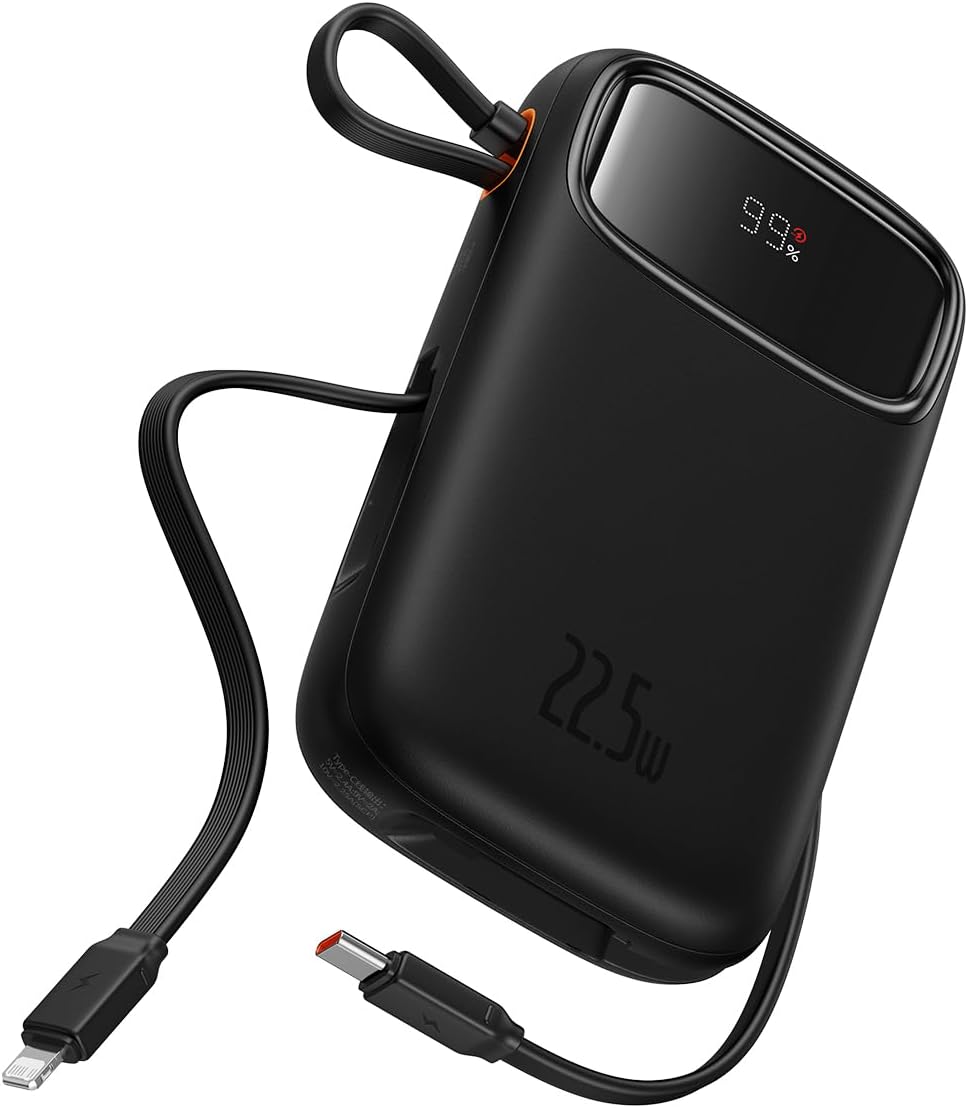
Figure 1: The Baseus Qpow 2 Dual Cable Power Bank, showcasing its compact design, integrated cables, and digital battery percentagอี แสดงผล

Figure 2: The power bank's slim and pocket-friendly dimensions (4.52*2.83*0.78 inches, 8.5 oz) compared to a standard soda can.

Figure 3: The portable lanyard-cable design, allowing users to pull out the cable for charging and pull it back for easy carrying.
2. คู่มือการติดตั้ง
2.1 การชาร์จ Power Bank ครั้งแรก
Before first use, it is recommended to fully charge your Baseus Qpow 2 Power Bank.
- Connect the integrated USB-C cable or an external USB-C cable to the power bank's USB-C input port.
- เชื่อมต่อปลายสายอีกด้านหนึ่งเข้ากับเครื่องชาร์จไฟติดผนัง USB ที่ใช้งานร่วมกันได้ (ไม่รวมอยู่ด้วย)
- The digital display on the power bank will show the charging progress. Charge until the display shows "100%".

Figure 4: The power bank supports two-way USB-C charging, with 20W output and 18W input capabilities.
3. คู่มือการใช้งาน
3.1 การชาร์จอุปกรณ์ของคุณ
The Baseus Qpow 2 Power Bank offers multiple ways to charge your devices:
- การใช้สายเคเบิลแบบรวม:
- For Apple devices: Pull out the integrated Lightning cable and connect it to your iPhone, iPad, or AirPods.
- For USB-C devices: Pull out the integrated USB-C cable and connect it to your Android phone, tablet, or other USB-C compatible device.
- Using External Ports:
- Connect your device's charging cable to the USB-A output port or the USB-C output port on the power bank.
The power bank can charge up to four devices simultaneously. Charging will begin automatically once a device is connected.

Figure 5: The power bank's capability to charge four devices at once using its integrated USB-C and Lightning cables, and external USB-C and USB-A ports.
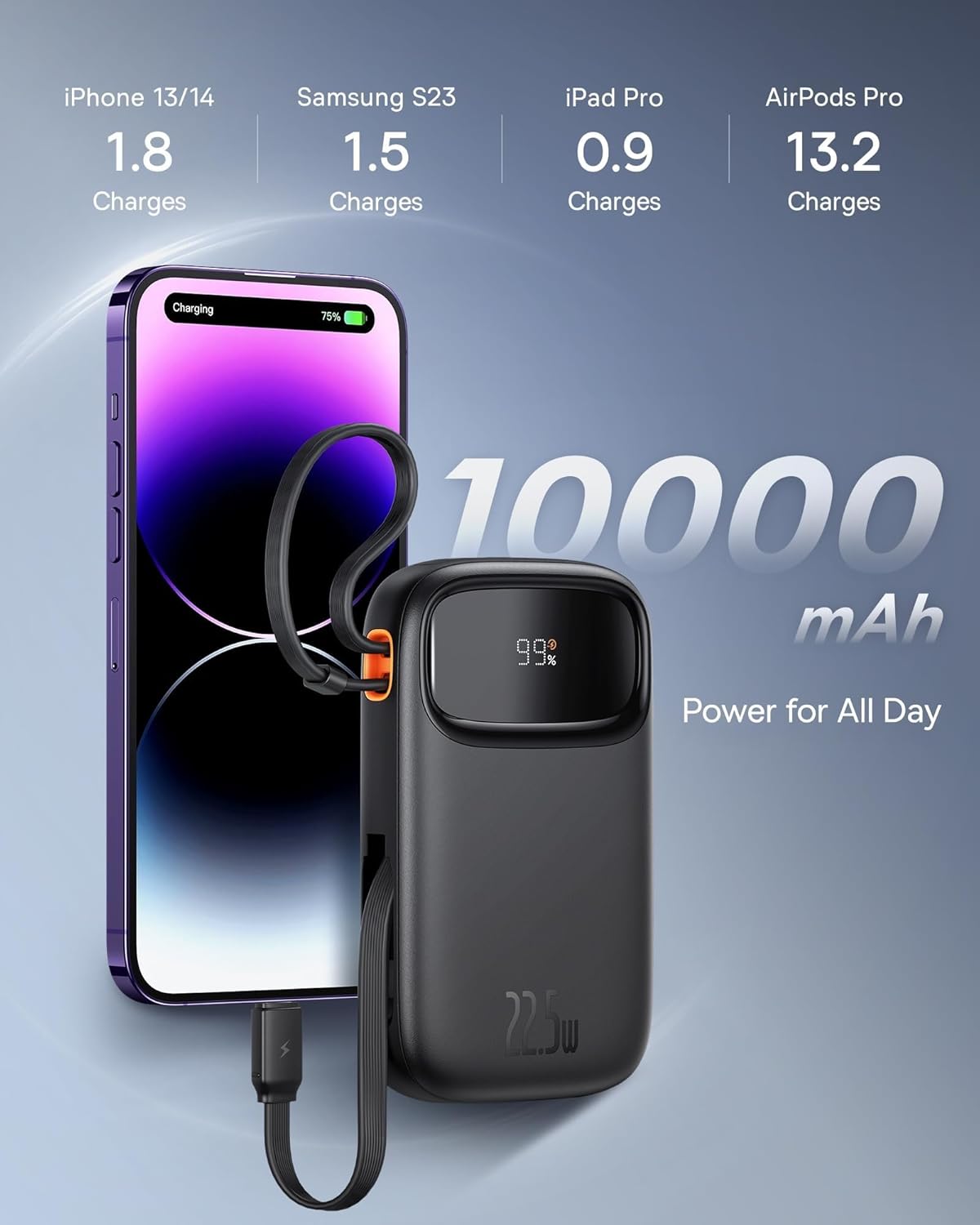
Figure 6: Illustrates the 10,000 mAh capacity, capable of charging an iPhone 13/14 approximately 1.8 times, Samsung S23 1.5 times, iPad Pro 0.9 times, and AirPods Pro 13.2 times.

Figure 7: The power bank features two built-in fast charging cables: one Lightning and one USB-C, supporting PD 22.5W fast charging.
3.2 การตรวจสอบสถานะแบตเตอรี่
The digital display on the power bank shows the remaining battery percentage, allowing you to easily monitor its charge level.
4. การบำรุงรักษา
- ควรเก็บพาวเวอร์แบงค์ให้ห่างจากอุณหภูมิที่สูงจัด แสงแดดโดยตรง และสภาพแวดล้อมที่มีความชื้นสูง
- หลีกเลี่ยงการทำพาวเวอร์แบงค์ตกหรือกระแทกแรงๆ
- ทำความสะอาดพื้นผิวด้วยผ้านุ่มและแห้ง ห้ามใช้สารเคมีรุนแรงหรือวัสดุขัดถู
- Store the power bank in a cool, dry place when not in use for extended periods. It is recommended to charge it to about 50% before long-term storage.
5 การแก้ไขปัญหา
| ปัญหา | สาเหตุที่เป็นไปได้ | สารละลาย |
|---|---|---|
| พาวเวอร์แบงค์ชาร์จไม่เข้า | Cable not properly connected; Wall charger not working; Power bank faulty. | Ensure cables are securely connected. Try a different wall charger or cable. If issue persists, contact support. |
| อุปกรณ์ไม่ได้ชาร์จจากพาวเวอร์แบงค์ | Power bank battery low; Device cable faulty; Device not compatible; Power bank in protection mode. | Check power bank battery level. Try a different charging cable. Ensure device is compatible. Disconnect and reconnect the device. |
| ชาร์จช้า | Using a non-fast charging cable/port; Device not supporting fast charging; High ambient temperature. | Ensure you are using the integrated fast charging cables or a compatible fast charging port. Check device's charging specifications. Charge in a cooler environment. |
| จอแสดงผลดิจิตอลไม่ทำงาน | Power bank is off; Display malfunction. | Press the power button (if any) to activate the display. If it remains off, contact support. |
6. ข้อมูลจำเพาะ
| ยี่ห้อ | เบสอุส |
| แบบอย่าง | Qpow 2 |
| ความจุของแบตเตอรี่ | 10,000 มิลลิแอมป์ |
| กำลังขับ | 22.5W (สูงสุด) |
| กำลังไฟเข้า (USB-C) | 18วัตต์ |
| สี | สีดำ |
| คุณสมบัติพิเศษ | Lightweight, Integrated Dual Cables (Lightning & USB-C) |
| เล่มที่tage | 5 โวลต์ |
| องค์ประกอบของแบตเตอรี่ | ลิเธียมไอออน |
| การใช้ที่แนะนำ | Charging mobile phones, tablets, and other portable electronic devices. |
| แหล่งพลังงาน | ใช้พลังงานจากแบตเตอรี่ |
| น้ำหนักสินค้า | 320 กรัม |
| Ampอีเรจ | 3 ก |
7. การรับประกันและการสนับสนุน
7.1 ข้อมูลการรับประกัน
ผลิตภัณฑ์ของ Baseus โดยทั่วไปมาพร้อมกับการรับประกันแบบจำกัด โปรดดูรายละเอียดในบัตรรับประกันที่มาพร้อมกับผลิตภัณฑ์ของคุณ หรือเยี่ยมชมเว็บไซต์อย่างเป็นทางการของ Baseus webเข้าชมเว็บไซต์เพื่อดูรายละเอียดข้อกำหนดและเงื่อนไขการรับประกันที่เฉพาะเจาะจงสำหรับภูมิภาคและวันที่ซื้อของคุณ เก็บหลักฐานการซื้อไว้เพื่อใช้ในการเรียกร้องการรับประกัน
7.2 การสนับสนุนลูกค้า
For technical assistance, troubleshooting, or any inquiries regarding your Baseus Qpow 2 Power Bank, please contact Baseus customer support through their official webโปรดติดต่อฝ่ายสนับสนุนผ่านทางเว็บไซต์หรือข้อมูลติดต่อที่ระบุไว้ในบรรจุภัณฑ์ของผลิตภัณฑ์ เมื่อติดต่อฝ่ายสนับสนุน โปรดเตรียมรุ่นผลิตภัณฑ์และรายละเอียดการสั่งซื้อให้พร้อม


