การแนะนำ
Thank you for choosing the ttec AirBeat Go True Wireless Bluetooth Earphones. This manual provides detailed instructions for setting up, operating, and maintaining your earphones to ensure optimal performance and longevity. Please read this manual carefully before use and retain it for future reference.
เนื้อหาแพ็คเกจ
- ttec AirBeat Go True Wireless Earphones (Left and Right)
- เคสชาร์จไฟ
- สายชาร์จ USB-C
- คู่มือการใช้งาน
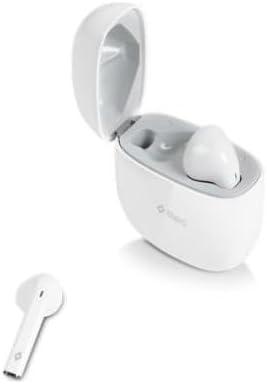
Image: The ttec AirBeat Go True Wireless Earphones, with one earbud removed from the open charging case, showcasing ดีไซน์กะทัดรัด
การตั้งค่า
1. การชาร์จหูฟังและเคส
Before first use, fully charge the earphones and the charging case. The charging case acts as a portable power bank for your earphones.
- การชาร์จหูฟัง: Place both earphones into the charging case. Ensure they are correctly seated; magnetic contacts will hold them in place. The indicator lights on the earphones will illuminate to show charging status.
- การชาร์จเคส: Connect the provided USB-C charging cable to the charging port on the back of the case and the other end to a USB power adapter (not included) or a computer's USB port. The indicator light on the case will show charging status and turn off when fully charged.

ภาพ: ด้านหลัง view of the ttec AirBeat Go charging case, highlighting the USB-C charging port at the bottom.

Image: The ttec AirBeat Go earphones securely placed inside their open charging case, ready for charging or storage.
2. การจับคู่กับอุปกรณ์บลูทูธ
The earphones will automatically enter pairing mode when removed from the charging case.
- เปิดเครื่อง: Open the charging case and remove both earphones. They will automatically power on and attempt to connect to each other.
- เปิดใช้งานบลูทูธ: On your smartphone or other Bluetooth-enabled device, enable Bluetooth.
- เลือกอุปกรณ์: In the Bluetooth device list, search for "ttec AirBeat Go" and select it to connect.
- การยืนยัน: Once connected, you will hear an audible confirmation from the earphones, and the indicator lights will change (e.g., turn off or flash slowly).
หากการจับคู่ล้มเหลว ให้ใส่หูฟังกลับเข้าไปในเคส ปิดฝา รอสองสามวินาที แล้วทำซ้ำขั้นตอนอีกครั้ง
คำแนะนำการใช้งาน
The ttec AirBeat Go earphones feature touch controls for easy management of music and calls.
เปิด/ปิดเครื่อง
- เปิดเครื่อง: Remove the earphones from the charging case. They will power on automatically.
- หมดแรง: ใส่หูฟังกลับเข้าไปในกล่องชาร์จและปิดฝา หูฟังจะปิดเครื่องโดยอัตโนมัติและเริ่มชาร์จ
การเล่นเพลง
- เล่น/หยุดชั่วคราว: แตะที่หูฟังข้างใดข้างหนึ่งหนึ่งครั้ง
- เพลงถัดไป: แตะหูฟังข้างขวา 2 ครั้ง
- แทร็กก่อนหน้า: แตะหูฟังข้างซ้ายสองครั้ง
การจัดการการโทร
- รับ/วางสาย: แตะที่หูฟังข้างใดข้างหนึ่งหนึ่งครั้ง
- ปฏิเสธสาย: กดหูฟังข้างใดข้างหนึ่งค้างไว้ 2 วินาที
ผู้ช่วยเสียง
- เปิดใช้งาน Voice Assistant: Triple-tap either earphone.

Image: The left and right ttec AirBeat Go earphones displayed individually, highlighting their ergonomic design and touch control areas.
การซ่อมบำรุง
Proper care ensures the longevity and performance of your earphones.
การทำความสะอาด
- ใช้ผ้าแห้งเนื้อนุ่มที่ไม่เป็นขุยเช็ดทำความสะอาดหูฟังและกล่องชาร์จ
- ห้ามใช้สารทำความสะอาดที่มีฤทธิ์กัดกร่อน ตัวทำละลาย หรือสเปรย์แอโรซอล
- Gently clean the charging contacts on both the earphones and the case with a dry cotton swab if necessary.
พื้นที่จัดเก็บ
- ควรเก็บหูฟังไว้ในกล่องชาร์จเมื่อไม่ได้ใช้งานเพื่อปกป้องหูฟังและชาร์จไฟอยู่เสมอ
- เก็บไว้ในที่แห้งและเย็น หลีกเลี่ยงอุณหภูมิที่สูงและแสงแดดโดยตรง
- Avoid exposing the earphones or case to water or excessive moisture.
การแก้ไขปัญหา
If you encounter issues with your ttec AirBeat Go earphones, refer to the following common solutions:
| ปัญหา | วิธีแก้ปัญหาที่เป็นไปได้ |
|---|---|
| หูฟังไม่สามารถเชื่อมต่อกับอุปกรณ์ได้ |
|
| ไม่มีเสียงจากหูฟังข้างหนึ่งหรือทั้งสองข้าง |
|
| เคสชาร์จไม่ชาร์จ |
|
| หูฟังไม่ชาร์จในกล่อง |
|
ข้อมูลจำเพาะ
| ยี่ห้อ | ทีเทค |
| ชื่อรุ่น | AirBeat Go |
| สี | สีขาว |
| ฟอร์มแฟกเตอร์ | ทรูไวร์เลส |
| เทคโนโลยีการเชื่อมต่อ | ไร้สาย (Bluetooth) |
| คุณสมบัติหลัก | Superior sound, deep bass, advanced microphone |
การรับประกันและการสนับสนุน
The ttec AirBeat Go earphones come with a standard manufacturer's warranty. For detailed warranty information, please refer to the warranty card included in your product packaging or visit the official TTEC website. For technical support or customer service inquiries, please contact TTEC customer support through their official channels.
Official TTEC Webเว็บไซต์: www.ttec.com


