1. สินค้าหมดview
The PELADN Mini PC WI-6 is a compact and powerful desktop computer designed for various applications, including light office work, 4K video playback, online education, and design tasks. It features the latest 12th Gen Alder Lake-N100 Processor, 16GB DDR4 RAM, and a 512GB M.2 PCIe SSD, offering efficient performance in a small form factor.

รูปที่ 1.1 : ด้านหน้า view of the PELADN Mini PC WI-6, showcasing its compact design and sleek blue finish.
คุณสมบัติหลัก:
- โปรเซสเซอร์อันทรงพลัง: Equipped with the 12th Gen Alder Lake-N100 Processor (4C/4T, up to 3.4GHz) for enhanced performance.
- Ampหน่วยความจำและที่เก็บข้อมูล: 16GB DDR4 RAM and 512GB M.2 SSD, with upgrade friendly options.
- 4K Dual Screen Display: Supports 4K video playback and dual 4K@60Hz displays via two HD 2.0 ports.
- การเชื่อมต่อที่หลากหลาย: Features Gigabit Ethernet, 2.4G+5.0G dual-band WiFi, and Bluetooth 4.2.
- การออกแบบที่กะทัดรัด: Lightweight and portable, measuring 124mm x 112mm x 35mm, with VESA mount support.
- การระบายความร้อนที่มีประสิทธิภาพ: Built-in fan cooling system to prevent overheating during multitasking.

Figure 1.2: Diagram illustrating the key features of the PELADN Mini PC, including processor, memory, storage, graphics, and connectivity options.
2. เนื้อหาบรรจุภัณฑ์
โปรดตรวจสอบสิ่งของภายในบรรจุภัณฑ์เมื่อแกะกล่องเพื่อให้แน่ใจว่าสินค้าทั้งหมดอยู่ในกล่องและอยู่ในสภาพดี
- 1 x PELADN Mini PC WI-6
- อะแดปเตอร์ไฟฟ้า 1 ตัว
- สาย 1 x HD
- 1 x คู่มือผู้ใช้
- 1 x Wall-Mounted Bracket (VESA mount)
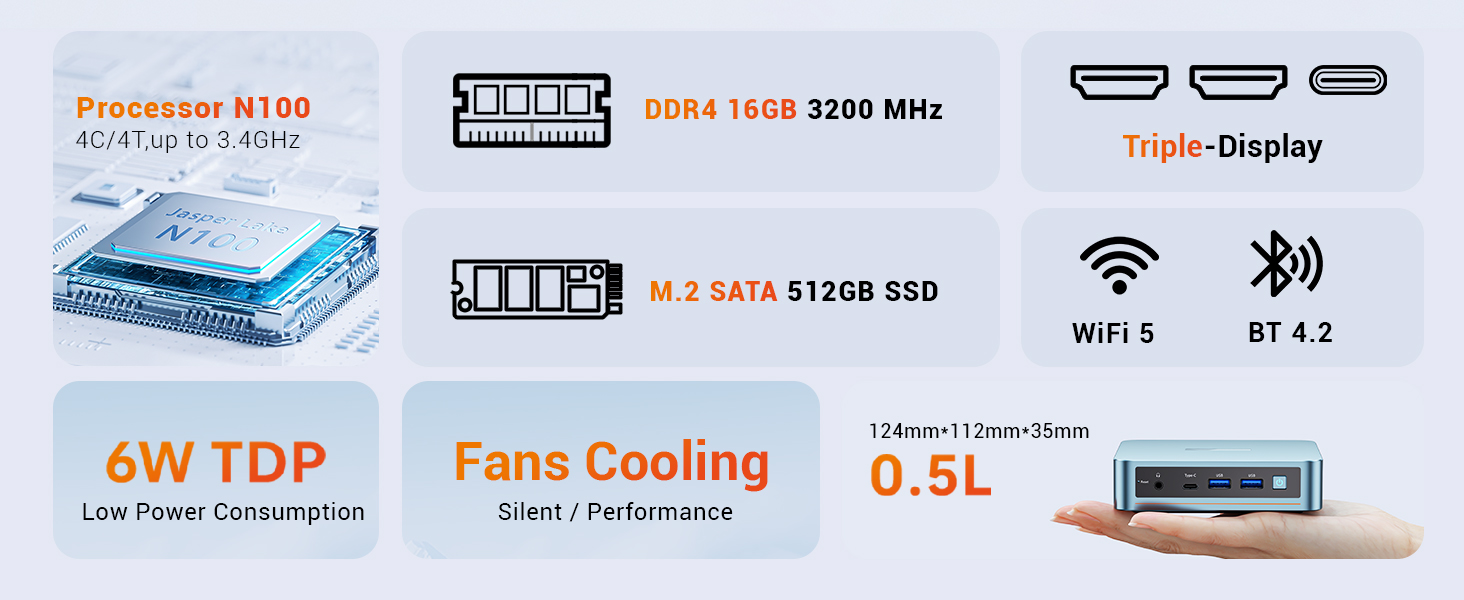
Figure 2.1: An illustration of the items included in the PELADN Mini PC package, such as the PC unit, power adapter, HD cable, user manual, and VESA mount.
3. คู่มือการติดตั้ง
3.1 การเชื่อมต่ออุปกรณ์ต่อพ่วง
Before powering on your Mini PC, connect the necessary peripherals.
- เชื่อมต่อจอแสดงผล: Use the provided HD cable to connect your monitor(s) to the HD ports on the back of the Mini PC. The device supports dual 4K@60Hz displays.
- เชื่อมต่อคีย์บอร์ดและเมาส์: Plug your wired or wireless keyboard and mouse into the available USB ports (USB 2.0 or USB 3.0). For initial setup, a wired keyboard and mouse are recommended.
- เชื่อมต่อเครือข่าย: For a wired connection, plug an Ethernet cable into the RJ45 LAN port. For wireless, ensure your WiFi network is available.
- เชื่อมต่อพลังงาน: Plug the power adapter into the DC 12V port on the Mini PC, then connect the adapter to a power outlet.

รูปที่ 3.1: รายละเอียด view of the PELADN Mini PC's front and rear ports, including HD, USB 2.0, RJ45 LAN, DC 12V, Earphone, Type-C, and USB 3.0 ports.
3.2 การเปิดเครื่องและการตั้งค่าเริ่มต้น
Once all peripherals are connected:
- Press the Power Button located on the front of the Mini PC.
- The device will boot up. As Windows 11 is pre-installed, you will be guided through the initial Windows setup process, including language selection, network configuration, and user account creation.
- ปฏิบัติตามคำแนะนำบนหน้าจอเพื่อดำเนินการตั้งค่าให้เสร็จสมบูรณ์
3.3 การติดตั้ง VESA Mount (ทางเลือก)
ตัวยึด VESA ที่ให้มาช่วยให้คุณสามารถติดตั้งมินิพีซีไว้ด้านหลังจอภาพหรือทีวีที่รองรับได้ ช่วยประหยัดพื้นที่บนโต๊ะทำงาน
- Secure the VESA bracket to the Mini PC using the provided screws.
- Attach the Mini PC with the bracket to the VESA mounting holes on the back of your display, securing it with screws.

Figure 3.2: Step-by-step guide on how to install the PELADN Mini PC using the VESA mount, showing attachment to the back of a monitor.
4. คู่มือการใช้งาน
4.1 การใช้งานพื้นฐาน
The PELADN Mini PC is optimized for everyday computing tasks.
- แอปพลิเคชันสำนักงาน: Run Microsoft Office suite and other productivity software smoothly.
- Web การเรียกดู: Enjoy fast and responsive internet browsing.
- การเล่นวิดีโอ 4K: Stream and play 4K content with ease, ideal for home theater setups.
- การทำงานหลายอย่างพร้อมกัน: The N100 processor and 16GB RAM allow for efficient switching between multiple applications.

Figure 4.1: An image depicting the PELADN Mini PC in an office setting, demonstrating its suitability for business and everyday use.
4.2 การกำหนดค่าการแสดงผล
Utilize the dual HD 2.0 ports for extended desktop or mirrored display setups.
- Connect two monitors to the HD ports for a dual-screen workspace.
- Adjust display settings (resolution, orientation) through Windows Display Settings.
4.3 เครือข่ายและบลูทูธ
The Mini PC offers flexible connectivity options:
- ไวไฟ : Connect to 2.4G or 5.0G wireless networks for internet access.
- อีเธอร์เน็ต: For a stable and fast connection, use the Gigabit Ethernet port.
- Bluetooth 4.2: Pair Bluetooth-enabled devices such as headphones, speakers, or input devices.
5. การบำรุงรักษา
5.1 การดูแลทั่วไป
- Keep the Mini PC in a clean, dry environment, away from direct sunlight and extreme temperatures.
- Avoid placing objects on top of the unit that could obstruct airflow.
- ทำความสะอาดภายนอกด้วยผ้านุ่มและแห้ง ห้ามใช้น้ำยาทำความสะอาดชนิดน้ำ
5.2 ระบบทำความเย็น
The PELADN Mini PC features a built-in cooling fan to maintain optimal operating temperatures. Ensure the ventilation holes are not blocked to allow proper airflow.

รูปที่ 5.1: การระเบิด view of the PELADN Mini PC, highlighting the internal components including the cooling fan and SSD, which contribute to its silent and efficient performance.
5.3 การอัปเดตซอฟต์แวร์
Regularly update your Windows operating system and drivers to ensure system stability, security, and optimal performance.
- ไปที่ การตั้งค่า Windows > การอัปเดตและความปลอดภัย > การอัปเดต Windows
- Check for and install any available updates.
6 การแก้ไขปัญหา
This section addresses common issues you might encounter with your PELADN Mini PC.
| ปัญหา | สาเหตุที่เป็นไปได้ | สารละลาย |
|---|---|---|
| ไม่มีไฟ/ไม่เปิด | ไม่ได้เชื่อมต่ออะแดปเตอร์ไฟอย่างถูกต้อง ปัญหาเต้าเสียบไฟ | Ensure power adapter is securely connected to both the PC and the power outlet. Try a different outlet. |
| ไม่มีการแสดงผลบนจอภาพ | HD cable loose or faulty; Incorrect input selected on monitor. | Check HD cable connections. Ensure monitor is set to the correct input source (e.g., HDMI 1, HDMI 2). Try a different HD cable or monitor. |
| ไม่มีการเชื่อมต่ออินเทอร์เน็ต (Wi-Fi) | Wi-Fi ถูกปิดใช้งาน; รหัสผ่านไม่ถูกต้อง; เราเตอร์มีปัญหา | ตรวจสอบการตั้งค่า Wi-Fi ใน Windows ยืนยันรหัสผ่าน Wi-Fi รีสตาร์ทเราเตอร์ของคุณ |
| No internet connection (Ethernet) | Ethernet cable loose or faulty; Network driver issue. | Ensure Ethernet cable is securely connected. Try a different cable. Check network adapter status in Device Manager. |
| ระบบช้าหรือไม่ตอบสนอง | มีแอปพลิเคชันเปิดใช้งานมากเกินไป; พื้นที่จัดเก็บข้อมูลเหลือน้อย; เครื่องร้อนเกินไป | Close unnecessary applications. Free up disk space. Ensure proper ventilation around the PC. |
For more advanced troubleshooting or persistent issues, please refer to the official PELADN support resources or contact customer service.
คุณสมบัติขั้นสูง:
- เปิดเครื่องอัตโนมัติ: Configure in BIOS for automatic startup.
- Wake on LAN (WoL): Enable in BIOS and network adapter settings to wake the PC remotely.
- บูต PXE: Preboot Execution Environment support for network booting.
7. ข้อมูลจำเพาะ
| คุณสมบัติ | รายละเอียด |
|---|---|
| ยี่ห้อ | เปลเดน |
| หมายเลขรุ่น | WI-6 |
| โปรเซสเซอร์ | 12th Gen Intel Alder Lake-N100 (4C/4T, up to 3.4GHz, 6W TDP) |
| แรม | 16GB DDR4 (Max 3200MHz) |
| พื้นที่จัดเก็บ | SSD M.2 PCIe ขนาด 512GB |
| กราฟฟิก | Intel UHD Graphics (750MHz max), Integrated |
| การแสดงผลเอาท์พุต | 2 x HD 2.0 (Supports 4K@60Hz Dual Display) |
| พอร์ต USB | 2 x USB 3.0, 2 x USB 2.0, 1 x Type-C (Data/Video) |
| เครือข่าย | Gigabit Ethernet (RJ45), Wi-Fi 2.4G+5.0G |
| บลูทูธ | บลูทูธ 4.2 |
| เสียง | 1 x Audio Jack (HP&MIC) |
| ระบบปฏิบัติการ | Windows 11 Pro (ติดตั้งไว้ล่วงหน้า) |
| ขนาด (กxยxส) | 4.88 x 4.41 x 1.38 นิ้ว (124 มม. x 112 มม. x 35 มม.) |
| น้ำหนัก | 1.76 ปอนด์ |
| สี | สีฟ้า |
8. การรับประกันและการสนับสนุน
PELADN is committed to providing high-quality products and excellent customer service.
- การรับประกัน: The PELADN Mini PC comes with a 12-month (1 year) warranty from the date of purchase.
- การส่งคืน: Enjoy a 30-day no-reason return and exchange policy.
- การสนับสนุนด้านเทคนิค: Professional technical staff are available to assist you.
- เวลาตอบสนอง: เรามุ่งมั่นที่จะตอบคำถามทั้งหมดภายใน 24 ชั่วโมง
For support, please visit the official PELADN store or contact their customer service directly. You can find more information and contact details at the PELADN Store on Amazon.
Figure 8.1: An image detailing PELADN's customer support offerings, including technical support, 24-hour reply, 30-day return policy, and 12-month warranty.


