1. บทนำ
This manual provides comprehensive instructions for the setup, operation, and maintenance of your Yealink VCM35 Microphone. Please read this manual thoroughly before using the device to ensure proper functionality and to maximize its lifespan. Keep this manual for future reference.
2. เนื้อหาบรรจุภัณฑ์
Verify that all items are present in your package. If any item is missing or damaged, please contact your vendor.
- Yealink VCM35 Microphone
- สาย USB (รวมอยู่ด้วย)
- คู่มือการใช้งาน (เอกสารนี้)
3. สินค้าหมดview
The Yealink VCM35 is a high-quality boundary microphone designed for clear audio capture in conference environments. It features a compact design and integrated noise reduction technology to enhance voice clarity.
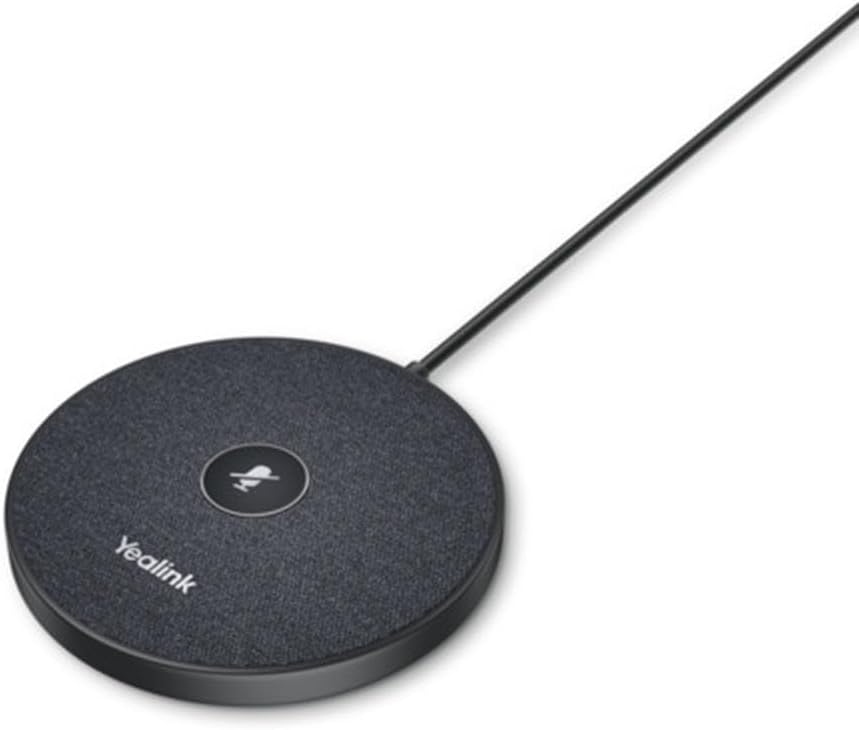
รูปที่ 3.1: ด้านบน view of the Yealink VCM35 Microphone. This image displays the circular microphone unit with a central mute button and the 'Yealink' brand name printed on its surface. A cable extends from the unit.

รูปที่ 3.2: มุม view of the Yealink VCM35 Microphone. This image shows the microphone from a slightly elevated side angle, emphasizing its sleek, low-profile design and the integrated USB cable extending from its rear.
4. การตั้งค่า
- การจัดวาง: Position the Yealink VCM35 Microphone on a flat, stable surface in the center of your meeting area for optimal audio capture. Ensure no obstructions are blocking the microphone's pickup area.
- การเชื่อมต่อ: Connect the integrated USB cable from the VCM35 Microphone to an available USB port on your laptop or personal computer.
- การติดตั้งไดร์เวอร์: The microphone is typically plug-and-play. Your operating system should automatically detect and install the necessary drivers. No manual driver installation is usually required.
- การตั้งค่าเสียง: After connecting, verify that the Yealink VCM35 is selected as the default microphone input device in your computer's sound settings or your conferencing software's audio preferences.
5. คู่มือการใช้งาน
The Yealink VCM35 Microphone is designed for simple operation.
- ปิดเสียง/เปิดเสียง: The microphone features a central button for muting and unmuting. Press the button once to mute the microphone. The LED indicator on the button will change color (e.g., red) to indicate that the microphone is muted. Press the button again to unmute. The LED indicator will return to its active state (e.g., green or off).
- การรับเสียง: The VCM35 is a unidirectional boundary microphone, optimized to pick up sound from a specific direction while minimizing background noise. Ensure participants are within the microphone's effective range for clear communication.
6. การบำรุงรักษา
Proper maintenance ensures the longevity and performance of your Yealink VCM35 Microphone.
- การทำความสะอาด: Use a soft, dry cloth to clean the exterior of the microphone. Do not use liquid cleaners, aerosols, or solvents, as these may damage the device.
- พื้นที่จัดเก็บ: When not in use, store the microphone in a clean, dry environment away from extreme temperatures and direct sunlight. Avoid coiling the cable too tightly.
- การจัดการ: Handle the microphone with care. Avoid dropping it or subjecting it to strong impacts, which could damage internal components.
7 การแก้ไขปัญหา
If you encounter issues with your Yealink VCM35 Microphone, refer to the following common problems and solutions:
| ปัญหา | สาเหตุที่เป็นไปได้ | สารละลาย |
|---|---|---|
| ไม่มีเสียงอินพุต | ไมโครโฟนถูกปิดเสียง Incorrect input device selected การเชื่อมต่อ USB หลวม | Press the mute button to unmute Check computer/software audio settings เชื่อมต่อสาย USB อีกครั้ง |
| คุณภาพเสียงไม่ดี | Microphone too far from speaker High background noise ตำแหน่งไม่ถูกต้อง | Move microphone closer Reduce ambient noise Ensure optimal placement on a flat surface |
| อุปกรณ์ไม่ได้รับการรู้จัก | พอร์ต USB ผิดพลาด ปัญหาไดรเวอร์ Operating system conflict | ลองใช้พอร์ต USB อื่น รีสตาร์ทคอมพิวเตอร์ของคุณ Check for OS updates |
8. ข้อมูลจำเพาะ
Key technical specifications for the Yealink VCM35 Microphone:
| คุณสมบัติ | รายละเอียด |
|---|---|
| หมายเลขรุ่น | 1303144 |
| น้ำหนักสินค้า | 8 ออนซ์ (0.5 ปอนด์) |
| ขนาด (กว้าง x ยาว x สูง) | 3.94 x 3.54 x 0.79 นิ้ว |
| ปัจจัยรูปแบบไมโครโฟน | เขตแดน |
| แหล่งพลังงาน | สายไฟ |
| วัสดุ | พลาสติก |
| อัตราส่วนสัญญาณต่อเสียงรบกวน | 60 เดซิเบล |
| จำนวนช่องสัญญาณ | 3 |
| เทคโนโลยีการเชื่อมต่อ | มีสาย |
| ประเภทขั้วต่อ | ยูเอสบี |
| คุณสมบัติพิเศษ | การลดเสียงรบกวน |
| อุปกรณ์ที่รองรับ | แล็ปท็อป, คอมพิวเตอร์ส่วนบุคคล |
| รูปแบบขั้ว | ทิศทางเดียว |
| ความไวเสียง | 54 เดซิเบล |
9. การรับประกันและการสนับสนุน
The Yealink VCM35 Microphone comes with a standard manufacturer's warranty. For detailed warranty information, please refer to the warranty card included with your product or visit the official Yealink website. For technical support, product inquiries, or service requests, please contact Yealink customer support through their official channels.
Yealink อย่างเป็นทางการ Webเว็บไซต์: www.yealink.com


