1. บทนำ
This manual provides comprehensive instructions for the installation, operation, and maintenance of your EZVIZ CS-HB8/SP 2K+ 4MP PT Battery-Powered Wi-Fi Camera with Solar Panel. Please read this manual carefully before using the product to ensure proper functionality and safety. Keep this manual for future reference.
The EZVIZ HB8 is a battery-powered security camera designed for outdoor use, offering 360-degree pan and tilt capabilities with 2K+ resolution. It features an ultra-long battery life and can be optionally powered by a solar panel for continuous operation. The camera includes on-device storage for recording activity and advanced detection features.
2. เนื้อหาบรรจุภัณฑ์
Verify that all components are present and in good condition upon opening the package. If any items are missing or damaged, contact your retailer.
- EZVIZ CS-HB8/SP 2K+ 4MP PT Camera
- แผงโซล่าเซลล์
- เทมเพลตการติดตั้ง
- ชุดสกรู
- Power Adapter (for initial charging)
- สาย USB
- คู่มือเริ่มต้นอย่างรวดเร็ว
- ข้อมูลด้านกฎระเบียบ
3. สินค้าหมดview
Familiarize yourself with the camera's components before installation.
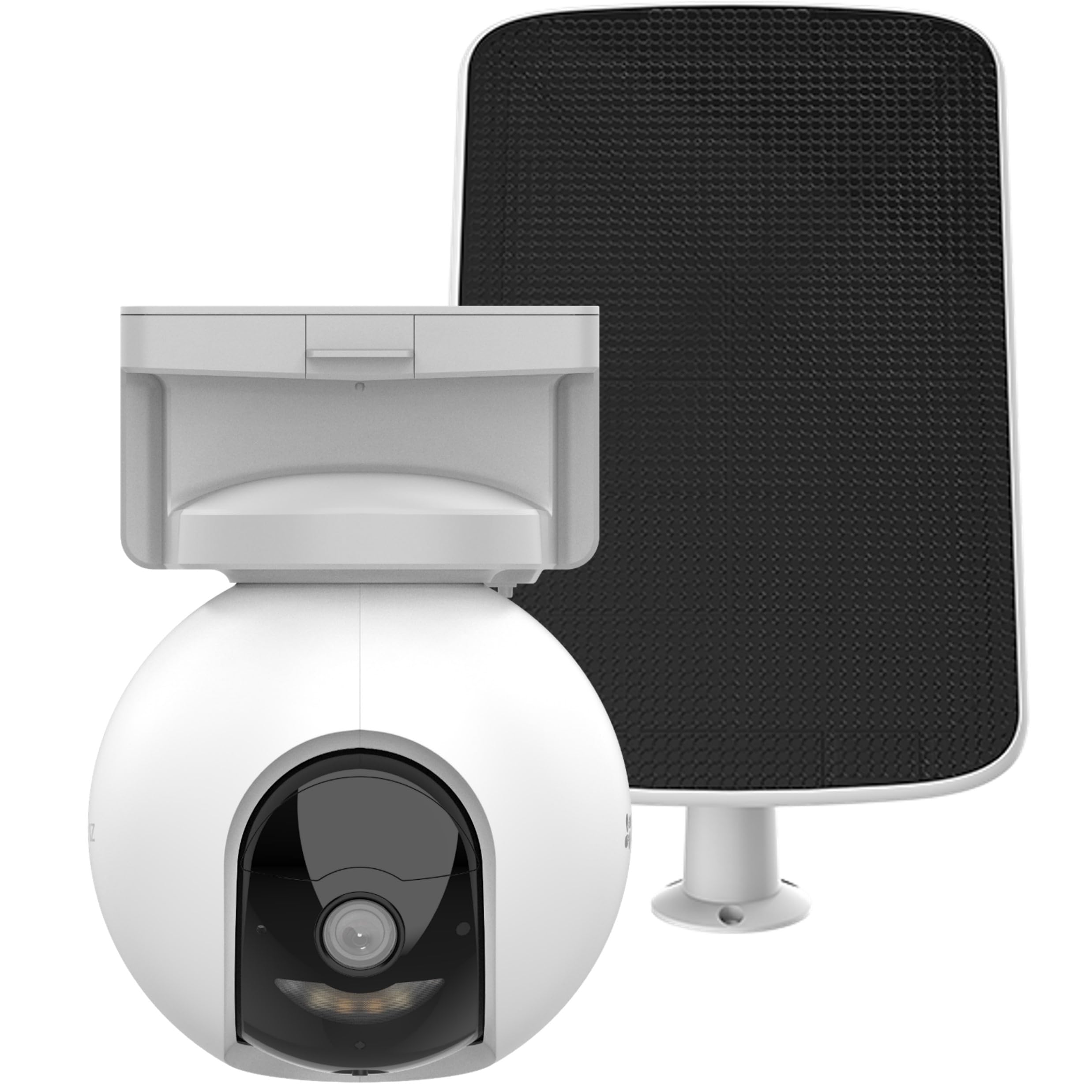
Image 1: EZVIZ CS-HB8/SP Camera and Solar Panel. This image displays the main camera unit with its pan-tilt base and the accompanying solar panel, highlighting their design and connection points.
ส่วนประกอบของกล้อง:
- เลนส์: จับภาพวิดีโอ footage.
- ไฟ LED อินฟราเรด: มีฟังก์ชันการมองเห็นในเวลากลางคืน
- ไมโครโฟน: สำหรับรับสัญญาณเสียงและการสนทนาสองทาง
- ผู้บรรยาย: สำหรับระบบเสียงออกและสนทนาสองทาง
- เซ็นเซอร์ PIR: Detects passive infrared motion.
- ตัวบ่งชี้สถานะ: Displays camera status (e.g., charging, connected).
- ปุ่มรีเซ็ต: ใช้เพื่อรีเซ็ตกล้องให้กลับเป็นการตั้งค่าจากโรงงาน
- ช่องเสียบการ์ด MicroSD: สำหรับการจัดเก็บวิดีโอในเครื่อง
- พอร์ต USB-C: For charging and connecting the solar panel.
Solar Panel Components:
- พลังงานแสงอาทิตย์: Convert sunlight into electrical energy.
- ตัวยึด: For securing the solar panel.
- สาย USB-C: Connects the solar panel to the camera.
4. การตั้งค่า
4.1 การชาร์จเริ่มต้น
Before first use, fully charge the camera battery using the provided power adapter and USB cable. The status indicator will show a solid red light during charging and turn off when fully charged. This process may take several hours.
4.2 การติดตั้งแอปพลิเคชัน EZVIZ
- ดาวน์โหลดแอป EZVIZ จาก App Store (iOS) หรือ Google Play Store (Android)
- ลงทะเบียนเพื่อสร้างบัญชี EZVIZ หรือเข้าสู่ระบบหากคุณมีบัญชีอยู่แล้ว
4.3 การจับคู่กล้อง
- Power on the camera by pressing and holding the power button (if applicable, or it powers on automatically after charging).
- Open the EZVIZ app, tap the "+" icon on the home screen to add a device.
- สแกนคิวอาร์โค้ดที่อยู่บนตัวกล้องหรือบรรจุภัณฑ์
- Follow the on-screen instructions in the app to connect the camera to your Wi-Fi network. Ensure your Wi-Fi network is 2.4 GHz.
4.4 การติดตั้งกล้องและแผงโซลาร์เซลล์
เลือกตำแหน่งติดตั้งที่มองเห็นได้ชัดเจน view and good Wi-Fi signal strength. For the solar panel, select a spot that receives direct sunlight for most of the day.
- Use the mounting template to mark screw holes on the desired surface.
- Drill pilot holes and insert wall anchors if mounting on masonry or stucco.
- Secure the camera mounting base and solar panel bracket using the provided screws.
- Attach the camera to its base and adjust the angle as needed.
- Connect the solar panel's USB-C cable to the camera's USB-C port. Ensure the connection is secure and weatherproof.
บันทึก: Ensure the solar panel is positioned to maximize sun exposure for optimal charging performance.
5. คู่มือการใช้งาน
5.1 สด View และการเล่น
- Open the EZVIZ app and select your camera from the device list.
- Tap on the live view to see real-time footage.
- Use the pan and tilt controls within the app to adjust the camera's viewมุมอิง
- Access the playback feature to review recorded events stored on the MicroSD card.
5.2 การตรวจจับการเคลื่อนไหวและการแจ้งเตือน
The camera features intelligent motion detection with auto-tracking.
- In the EZVIZ app, navigate to camera settings.
- Enable motion detection and customize sensitivity levels.
- Set up alert notifications to receive instant alerts on your mobile device when motion is detected.
- Configure auto-tracking to allow the camera to follow detected subjects.
5.3 การสนทนาสองทาง
Use the two-way talk feature to communicate with visitors or deter intruders.
- ขณะถ่ายทอดสด view, tap the microphone icon in the EZVIZ app to speak.
- Release the icon to listen.
5.4 การมองเห็นตอนกลางคืน
The camera automatically switches to night vision mode in low-light conditions, providing clear footage even in darkness. It supports vivid color night vision.
6. การบำรุงรักษา
6.1 การทำความสะอาด
- ทำความสะอาดเลนส์กล้องและพื้นผิวแผงโซลาร์เซลล์เป็นประจำด้วยผ้าเนื้อนุ่มและแห้งamp ผ้าเพื่อขจัดฝุ่นและเศษซาก
- อย่าใช้สารเคมีรุนแรงหรือน้ำยาทำความสะอาดที่มีฤทธิ์กัดกร่อน
6.2 การจัดการแบตเตอรี่
- Monitor the battery level through the EZVIZ app.
- Ensure the solar panel receives adequate sunlight to maintain battery charge.
- If the camera is not receiving enough sunlight, occasional manual charging with the power adapter may be necessary.
การอัปเดตเฟิร์มแวร์ 6.3 รายการ
Keep your camera's firmware updated to ensure optimal performance and access to new features. Firmware updates can be initiated through the EZVIZ app.
7 การแก้ไขปัญหา
| ปัญหา | สาเหตุที่เป็นไปได้ | สารละลาย |
|---|---|---|
| กล้องไม่เชื่อมต่อกับ Wi-Fi | รหัสผ่าน Wi-Fi ไม่ถูกต้อง; กล้องอยู่ไกลจากเราเตอร์เกินไป; เครือข่าย Wi-Fi 5GHz | Verify password; Move camera closer to router; Ensure 2.4GHz Wi-Fi is used. |
| แบตเตอรี่ไม่ชาร์จผ่านแผงโซลาร์เซลล์ | Insufficient sunlight; Dirty solar panel; Loose connection. | Relocate panel to direct sunlight; Clean panel surface; Check USB-C connection. |
| ไม่มีการแจ้งเตือนการตรวจจับการเคลื่อนไหว | Detection disabled; Sensitivity too low; App notifications off. | Enable detection in app; Increase sensitivity; Check app notification settings. |
| คุณภาพวิดีโอไม่ดี | Dirty lens; Weak Wi-Fi signal; Low light conditions. | Clean lens; Improve Wi-Fi signal; Ensure adequate lighting or rely on night vision. |
If you encounter issues not listed here, please refer to the EZVIZ app's help section or contact customer support.
8. ข้อมูลจำเพาะ
| คุณสมบัติ | รายละเอียด |
|---|---|
| หมายเลขรุ่น | CS-HB8/SP (OB03698) |
| ปณิธาน | 2K+ (4MP) |
| แพน/เอียง | ครอบคลุม 360 องศา |
| แหล่งพลังงาน | Battery-powered with optional Solar Panel |
| อายุการใช้งานแบตเตอรี่ | Up to 210 days (without solar panel) |
| พื้นที่จัดเก็บ | On-device storage (MicroSD card slot) |
| การมองเห็นตอนกลางคืน | การมองเห็นกลางคืนแบบสี |
| การเชื่อมต่อ | Wi-Fi (2.4 GHz) |
| น้ำหนักสินค้า | 1.74 กิโลกรัม |
| ขนาดสินค้า | 10 x 5 x 1.27 ซม. |
| วัดtage | 10 Watts (Solar Panel) |
| ประเภทการติดตั้ง | Ceiling mount base |
| ส่วนประกอบที่รวมอยู่ | กล้องพร้อมแผงโซล่าเซลล์ |
| ประเทศต้นกำเนิด | จีน |
9. การรับประกันและการสนับสนุน
EZVIZ products come with a limited warranty. For detailed warranty information, please refer to the warranty card included in your package or visit the official EZVIZ webเว็บไซต์.
For technical support, troubleshooting assistance, or to report issues, please contact EZVIZ customer service through the EZVIZ app or their official website. Ensure you have your product model number and purchase details ready when contacting support.
EZVIZ อย่างเป็นทางการ Webเว็บไซต์: www.ezviz.com


