สินค้าเกินview
The Cisco Catalyst 1200-48T-4X Smart Switch is designed to provide robust network performance, security, and reliability for small to medium-sized businesses. This switch features 48 Gigabit Ethernet ports and 4x10GE SFP+ uplinks, offering flexible connectivity options.
คุณสมบัติที่สำคัญ ได้แก่:
- 48 ports 10/100/1000 + 4x 10GE SFP+ for high-speed connectivity.
- Intuitive management via the Cisco Business mobile app and local web อินเทอร์เฟซ
- Integrated IEEE 802.1X port security, Denial-of-Service (DoS) attack prevention, and Access Control Lists (ACLs).
- Energy-efficient design compliant with IEEE 802.3az.
- Limited lifetime hardware warranty with complimentary 1-year technical support.
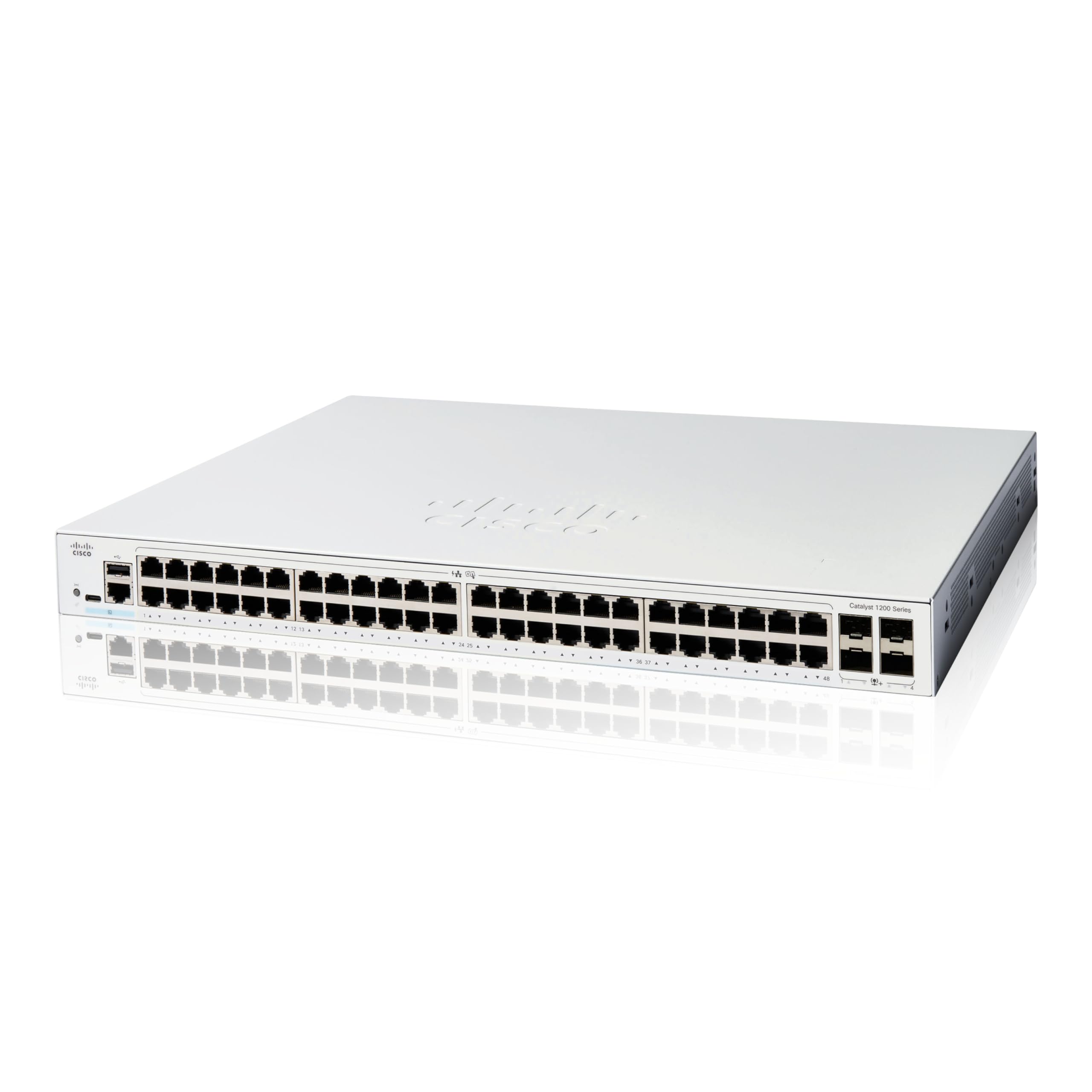
Image: Various models of the Cisco Catalyst 1200 Series Smart Switches, showcasing different port configurations.
Cisco Catalyst Series Introduction
วิดีโอ: บทนำview of the Cisco Catalyst 1200 and 1300 Series Switches, highlighting seamless connectivity and simple management across different business environments.
การติดตั้งและการตั้งค่า
Unboxing the Switch
Before beginning installation, ensure all components are present. The package typically includes:
- สวิตช์อัจฉริยะ Cisco Catalyst 1200-48T-4X
- สายไฟหรืออะแดปเตอร์
- สาย USB Type-C
- ฮาร์ดแวร์สำหรับติดตั้ง

ภาพ: ด้านหน้า view of the Cisco Catalyst 1200-48T-4X Smart Switch, showing the 48 Gigabit Ethernet ports and 4 SFP+ uplink ports.
Cisco Catalyst 1200 Series Switches Unboxing Video
Video: A detailed unboxing and initial setup guide for the Cisco Catalyst 1200 Series Switches, demonstrating how to connect the switch to power and a router, and how to use the mobile app for configuration.
การเชื่อมต่อเบื้องต้น
- การเชื่อมต่อไฟฟ้า: Connect the provided power cord or adapter to the switch and a power outlet.
- การเชื่อมต่อเราเตอร์: Connect an Ethernet cable from your router's LAN port to any of the Gigabit Ethernet ports on the switch.
- การเชื่อมต่ออุปกรณ์: Connect your network devices (computers, servers, access points) to the remaining Gigabit Ethernet ports on the switch.
การตั้งค่าแอพมือถือ
The Cisco Business mobile app simplifies setup and management:
- ดาวน์โหลดแอป: Download the Cisco Business mobile app from your device's app store (available for Android and iOS).
- สร้างเว็บไซต์: Launch the app and create a new site, providing your site's name and address.
- Configure Credentials: Answer a few questions to configure site credentials (username and password).
- เพิ่มอุปกรณ์: Follow the in-app instructions to add your wired and wireless devices to the network.

Image: A person interacting with the Cisco Business mobile app on a smartphone, demonstrating the ease of network management.
การใช้งานสวิตช์
The Cisco Catalyst 1200-48T-4X Smart Switch offers flexible management options to monitor and configure your network.
Cisco Business Mobile App
The mobile app allows you to monitor your network from anywhere. It provides real-time device status, allows you to perform actions like rebooting devices or upgrading firmware, and gives insights into connected clients and network usage.
Web User Interface (UI) and Cisco Business Dashboard
For advanced configuration and comprehensive network management, utilize the local web UI or the Cisco Business Dashboard. These tools provide detailed settings for VLANs, QoS, security, and other network parameters.

ภาพ: บุคคลสองคนviewing network data on a computer screen, illustrating collaborative use of the Cisco Business Dashboard for network management.
การบำรุงรักษาและความปลอดภัย
Maintaining your switch ensures optimal performance and network security.
ประสิทธิภาพการใช้พลังงาน
The switch is designed with energy-efficient features, compliant with IEEE 802.3az Energy Efficient Ethernet, to help reduce operational costs. Ensure proper ventilation to maintain efficient cooling.
ความปลอดภัยเครือข่าย
The Cisco Catalyst 1200-48T-4X includes robust security features:
- ความปลอดภัยพอร์ต IEEE 802.1X: Controls access to your network by authenticating devices connected to switch ports.
- การป้องกันการโจมตีแบบปฏิเสธการให้บริการ (DoS): Increases network uptime by protecting against common DoS attacks.
- รายการควบคุมการเข้าถึง (ACL): Protects the network from unauthorized users and traffic by filtering packets based on defined rules.
รีเป็นประจำview and update your security configurations to protect your network from evolving threats.
การแก้ไขปัญหา
If you encounter issues with your Cisco Catalyst 1200-48T-4X Smart Switch, consider the following basic troubleshooting steps:
- ตรวจสอบการเชื่อมต่อทางกายภาพ: Ensure all power and Ethernet cables are securely connected.
- วงจรไฟฟ้า: Disconnect the power, wait 10 seconds, and then reconnect the power to restart the switch.
- ตรวจสอบไฟแสดงสถานะ LED: Consult the Quick Start Guide or the Documentation Portal (accessible via QR code on the product packaging) to understand the meaning of LED indicators, which can help diagnose connection or operational issues.
- Review การกำหนดค่า: ใช้แอปพลิเคชันมือถือ Cisco Business หรือ web UI to check your network configuration settings.
- โปรดศึกษาเอกสารประกอบ: Refer to the comprehensive documentation available on the Cisco webไซต์สำหรับคำแนะนำการแก้ไขปัญหาโดยละเอียด
ข้อมูลจำเพาะ
| คุณลักษณะ | ค่า |
|---|---|
| หมายเลขรุ่น | C1200-48T-4X |
| จำนวนพอร์ต | 48 |
| ประเภทอินเทอร์เฟซ | เอสเอฟพี+ |
| อัตราการถ่ายโอนข้อมูล | 1000 เมกะบิตต่อวินาที |
| เล่มที่tage | 13.6 โวลต์ (AC) |
| น้ำหนักสินค้า | 9.83 ปอนด์ (4.47 กิโลกรัม) |
| ขนาดสินค้า (กxยxส) | 17.5 x 11.34 x 1.73 นิ้ว |
| ส่วนประกอบที่รวมอยู่ | สวิตช์ สายไฟหรืออะแดปเตอร์ สาย USB Type C และฮาร์ดแวร์สำหรับติดตั้ง |
| ผู้ผลิต | ซิสโก้ |
| ยูพีซี | 889728521772 |
การรับประกันและการสนับสนุน
Cisco provides comprehensive support for the Catalyst 1200-48T-4X Smart Switch.
- Limited Lifetime Hardware Warranty: The product is covered by a limited lifetime hardware warranty.
- Complimentary Technical Support: Enjoy one year of complimentary technical support to assist with any operational queries or issues.
For further assistance, please refer to the official Cisco support channels or the Cisco Business mobile app.

Image: A Cisco support professional wearing a headset, smiling while working at a computer, symbolizing available technical assistance.


