การแนะนำ
This manual provides detailed instructions for the installation, operation, and maintenance of your Feit Electric 46-inch LED Utility Light. This fixture features a motion sensor, multiple operating modes, a timer, and remote control functionality, designed for use in various indoor environments such as garages, workshops, and storage areas.

Image: The Feit Electric 46-inch LED Utility Light, shown with hanging chains attached.
ข้อมูลด้านความปลอดภัย
Please read and understand all safety instructions before installing or operating this product. Failure to do so may result in electric shock, fire, or other hazards.
- ตรวจสอบให้แน่ใจว่าได้ตัดกระแสไฟฟ้าออกก่อนการติดตั้งหรือการบำรุงรักษา
- ผลิตภัณฑ์นี้มีวัตถุประสงค์สำหรับใช้ภายในอาคารเท่านั้น
- อย่าพยายามปรับเปลี่ยนอุปกรณ์ติดตั้ง
- หากไม่แน่ใจเกี่ยวกับส่วนใดส่วนหนึ่งของการติดตั้ง โปรดปรึกษาช่างไฟฟ้าที่มีคุณสมบัติเหมาะสม
เนื้อหาแพ็คเกจ
ตรวจสอบว่าส่วนประกอบทั้งหมดมีอยู่ก่อนเริ่มการติดตั้ง:
- 1 x Feit Electric 46" LED Utility Light
- 1 x รีโมทคอนโทรล
- Mounting Hardware (chains, screws, anchors)

Image: A collection of mounting hardware including chains, screws, and anchors.
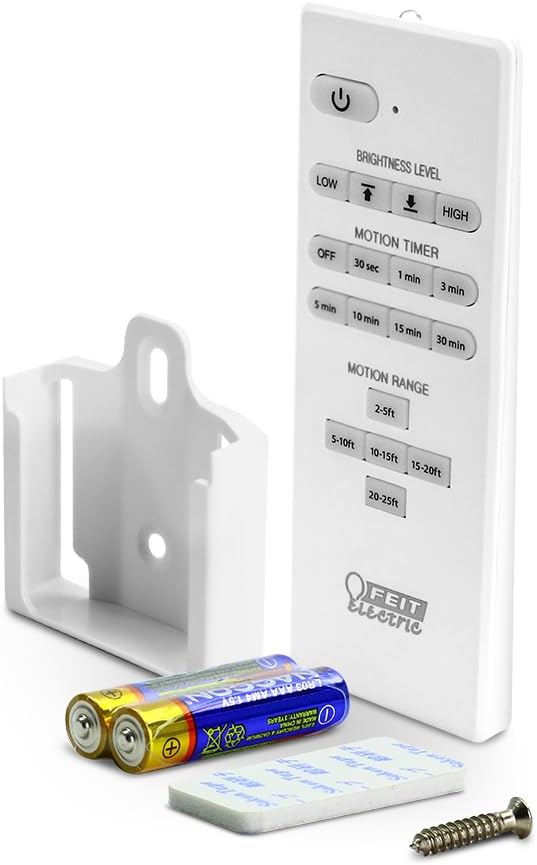
Image: The remote control, a wall mount bracket, and batteries for the utility light.
ข้อมูลจำเพาะ
| คุณสมบัติ | ข้อมูลจำเพาะ |
|---|---|
| หมายเลขรุ่น | SHOP/4/840/MM |
| ขนาด (กว้าง x ยาว x สูง) | 46.2" x 2.1" x 2.2" |
| วัดtage | 55วัตต์ |
| ความสว่าง | 5000 ลูเมน |
| อุณหภูมิสี | 4000K สีขาวเย็น |
| เล่มที่tage | 120 โวลต์ |
| อายุการใช้งาน | นานถึง 50,000 ชั่วโมง |
| คุณสมบัติพิเศษ | Motion Sensor, Remote Controlled |
| ประเภทการติดตั้ง | Flush Mount, Hanging |
| การใช้งานภายใน/ภายนอกอาคาร | ในร่ม |
| วัสดุ | พลาสติก |
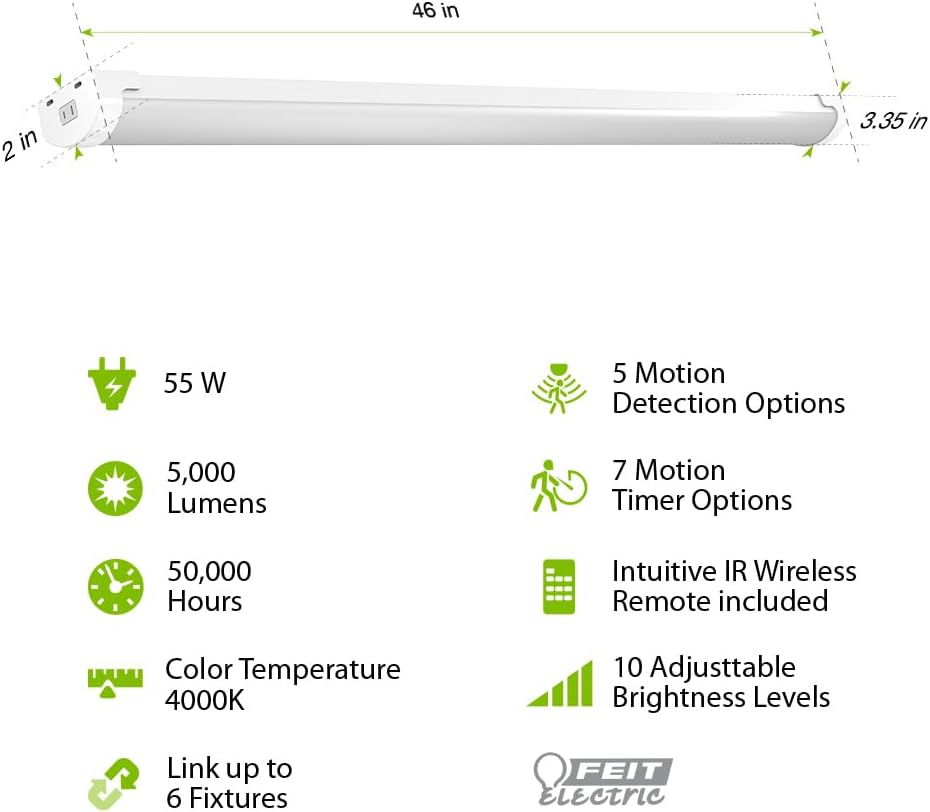
Image: Diagram illustrating the 46-inch length, 2-inch width, and 3.35-inch height of the light, along with icons for 55W, 5000 Lumens, 50,000 Hours, 4000K Color Temperature, Link up to 6 Fixtures, 5 Motion Detection Options, 7 Motion Timer Options, Intuitive IR Wireless Remote included, and 10 Adjustable Brightness Levels.
การติดตั้งและการตั้งค่า
The Feit Electric LED Utility Light offers versatile installation options: hanging or flush mount. Ensure the power source is off before installation.
การติดตั้งแบบแขวน
- Attach the hanging chains to the designated points on the fixture.
- Securely fasten the other end of the chains to a sturdy ceiling structure using the provided hooks and screws.
- Adjust the chain length to achieve the desired height.
การติดตั้งแบบฝังเรียบ
- Position the fixture against the ceiling at the desired location.
- Mark the mounting points through the fixture's mounting holes.
- เจาะรูนำและใส่พุกยึดผนังหากจำเป็น
- ยึดโคมไฟกับเพดานโดยใช้สกรูที่ให้มา
After mounting, plug the 5-ft. cord into a standard electrical outlet.

Image: A visual comparison showing how to perform a flush mount installation with screws and a hanging installation with chains and hooks.
คำแนะนำการใช้งาน
The utility light can be operated manually or via the included remote control.
ฟังก์ชั่นการควบคุมระยะไกล
The remote control allows for comprehensive management of the light's features:
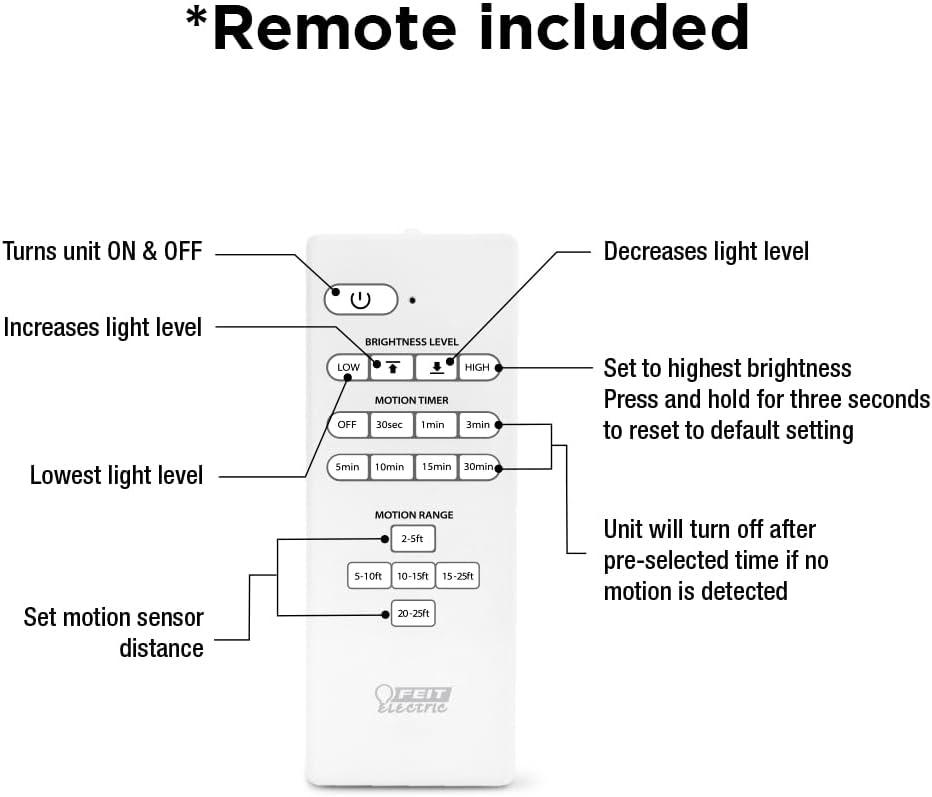
Image: A detailed diagram of the remote control, labeling buttons for ON/OFF, increasinกรัม/ลดลงasing light level, setting to highest brightness, resetting to default, setting lowest light level, motion timer options (30s, 1min, 3min, 5min, 10min, 15min, 30min), and motion range settings (2-5ft, 5-10ft, 10-15ft, 15-25ft, 20-25ft).
- ปุ่มเปิด/ปิด: เปิดหรือปิดเครื่อง
- ระดับความสว่าง: Use the up/down arrows to increase or decrease light intensity.
- สูงต่ำ: Quickly set to highest or lowest brightness. Press and hold HIGH for three seconds to reset to default settings.
- Motion Timer: Select from 30 seconds, 1 minute, 3 minutes, 5 minutes, 10 minutes, 15 minutes, or 30 minutes. The light will turn off after the pre-selected time if no motion is detected.
- ช่วงการเคลื่อนไหว: Set the motion sensor detection distance to 2-5ft, 5-10ft, 10-15ft, 15-25ft, or 20-25ft.
การทำงานของเซนเซอร์จับความเคลื่อนไหว
The built-in PIR motion sensor detects movement and can automatically activate the light. There are 5 convenient lighting modes:
- เปิดตลอดเวลา: Light remains on continuously.
- Motion Sensor On/Off: Light turns on when motion is detected and off when no motion is detected for a set period.
- Motion Sensor with Timer: Light turns on with motion and stays on for the selected timer duration.
- โหมดลดแสง: Light operates at a reduced brightness level.
- โหมดกลางคืน: Specific setting for low-light conditions.
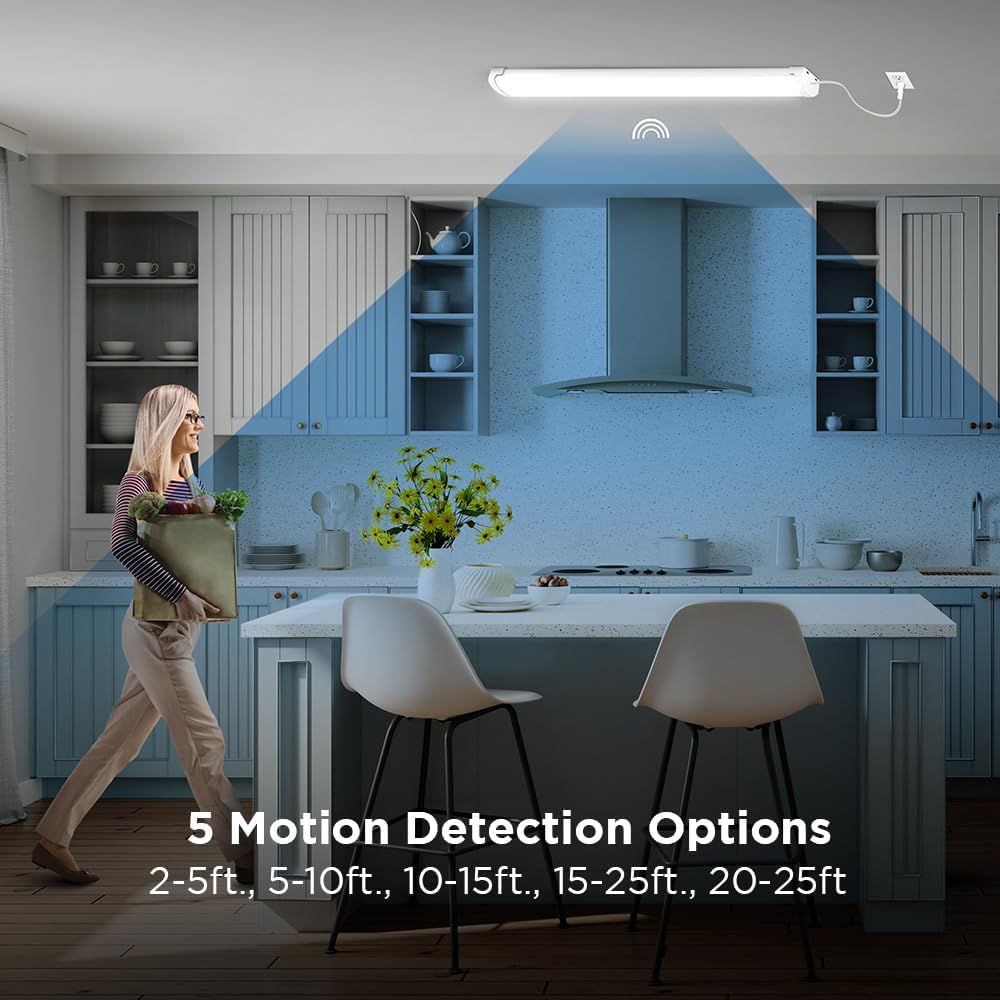
Image: A woman walking in a kitchen, illustrating the motion detection range with options from 2-5ft to 20-25ft.
การซ่อมบำรุง
This LED utility light is designed for long-lasting, maintenance-free operation. To ensure optimal performance:
- การทำความสะอาด: ถอดปลั๊กไฟออกก่อนทำความสะอาด เช็ดอุปกรณ์ด้วยผ้านุ่ม แห้ง หรือผ้านุ่มๆ เช็ดเบาๆamp ผ้า ห้ามใช้สารทำความสะอาดที่มีฤทธิ์กัดกร่อนหรือตัวทำละลาย
- การเปลี่ยนหลอดไฟ: The integrated LEDs are designed to last up to 50,000 hours and are not user-replaceable.
- การตรวจสอบ: Periodically check the mounting hardware for tightness and ensure the power cord is free from damage.
การแก้ไขปัญหา
If you experience issues with your utility light, refer to the following common solutions:
| ปัญหา | สาเหตุที่เป็นไปได้ | สารละลาย |
|---|---|---|
| ไฟไม่ติด | No power, loose connection, remote battery dead | Check power outlet, ensure cord is securely plugged in, replace remote batteries. |
| เซ็นเซอร์ตรวจจับความเคลื่อนไหวไม่ทำงาน | Incorrect motion range setting, obstruction, ambient light too high | Adjust motion range on remote, clear obstructions, ensure sensor is not in direct bright light. |
| แสงกะพริบหรือหรี่ลงโดยไม่คาดคิด | Unstable power supply, faulty unit | Check power source. If problem persists, contact customer support. |
การรับประกัน
This Feit Electric LED Utility Light is covered by a การรับประกันจากผู้ผลิต 5 ปี. Please retain your proof of purchase for warranty claims. For detailed warranty information, refer to the official Feit Electric webไซต์หรือติดต่อฝ่ายสนับสนุนลูกค้า
การสนับสนุนลูกค้า
For 24/7 customer support and additional resources, please visit the Feit Electric help center:

Image: A graphic indicating 24/7 help and directing users to feit.com/help, accompanied by a QR code.


