Surge Gamepad Pro (Pillars of Creation)
Wireless Pro Controller Instruction Manual
Model: Gamepad Pro (Pillars of Creation) | Brand: Surge
การแนะนำ
This manual provides detailed instructions for the setup, operation, maintenance, and troubleshooting of your new Surge Gamepad Pro (Pillars of Creation) Wireless Controller. Designed for multi-platform compatibility, this controller offers advanced features including dynamic lighting, programmable macro buttons, rumble vibration, and motion controls to enhance your gaming experience.
สินค้าเกินview
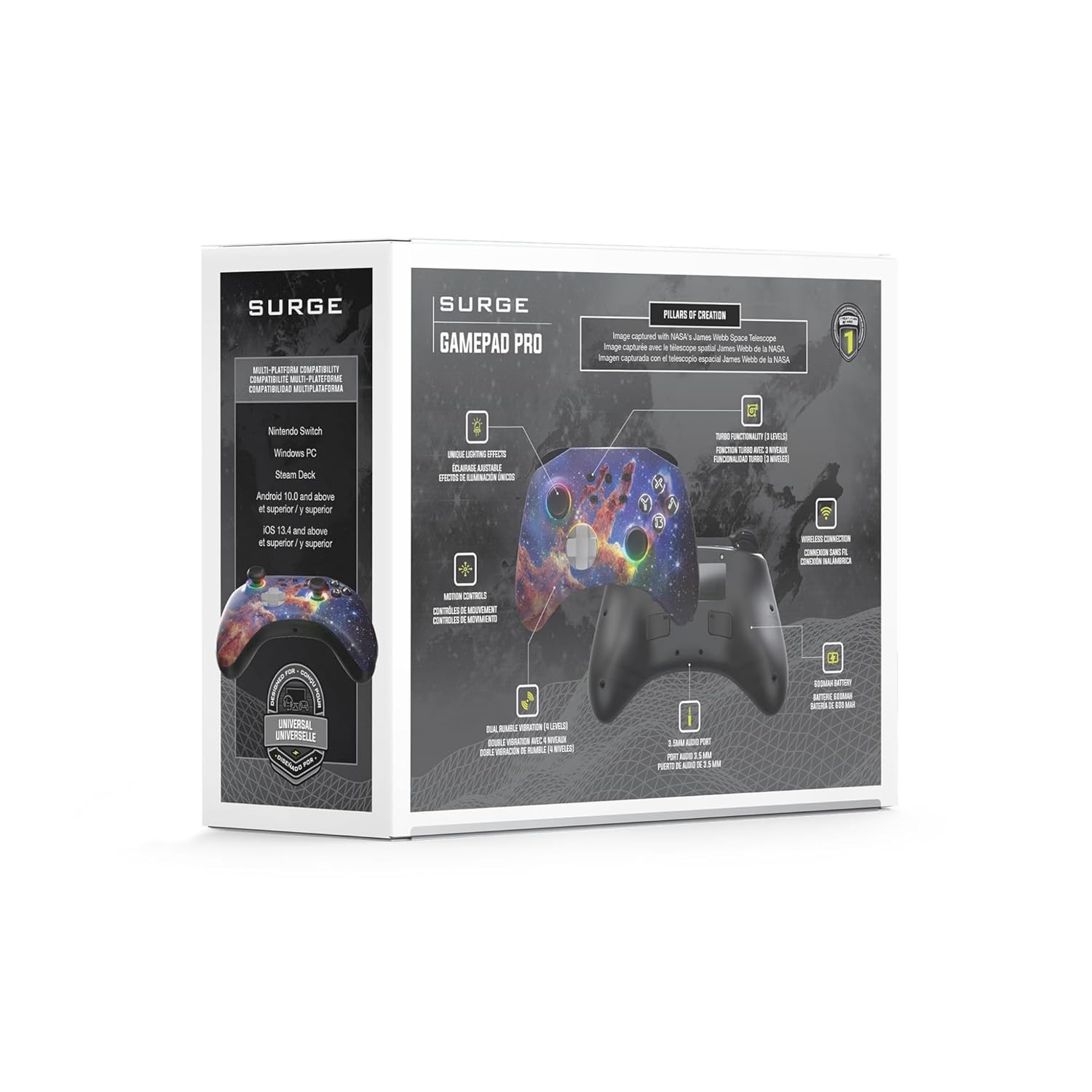
The Surge Gamepad Pro is engineered for extended gameplay and immersive experiences. Key features include:
- แบตเตอรี่ 600mAh: Enjoy up to 18 hours of gameplay on a single charge.
- ความเข้ากันได้กับหลายแพลตฟอร์ม: Seamlessly connect with Nintendo Switch, Windows PC, Steam Deck, Android 10.0+, and iOS 13.4+ devices.
- Translucent Shell: A unique semi-transparent design with dynamic LED rings creates a captivating visual effect.
- โหมดแสงไดนามิก 3 โหมด: Choose from Aurora wave pattern, breathing effect, and stick follow for stunning visuals.
- ไฟ LED แบบปรับได้: Customize your controller's look with 8 color options and independent intensity control for button and thumbstick LEDs.
- ปุ่มมาโครที่ตั้งโปรแกรมได้: Two rear macro buttons allow for custom button combinations.
- การสั่นสะเทือนดังก้อง: Four levels of dual rumble vibration provide immersive feedback.
- การควบคุมการเคลื่อนไหว: Integrated 6-axis motion control for enhanced gameplay.
- พอร์ตเสียง 3.5 มม.: Connect your headset directly to the controller for audio.

ด้านหน้า view of the Surge Gamepad Pro (Pillars of Creation) Wireless Controller, showcasing its unique cosmic design and illuminated thumbsticks.

หลัง view of the controller, highlighting the programmable macro buttons (MR and ML) and the USB-C charging port.

An illustrative graphic demonstrating the 8 available LED colors and 3 dynamic lighting modes (Aurora Wave, Breathing Effect, Stick Follow) of the controller.
A graphic detailing key specifications: two macro buttons, a 20-foot wireless play range, and a 600mAh rechargeable battery.
วิดีโอผลิตภัณฑ์อย่างเป็นทางการ
Video demonstrating the "Aurora Wave" lighting mode on the Surge Gamepad Pro, showcasing the dynamic color transitions around the thumbsticks and buttons.
Video illustrating the "Stick Follow" lighting mode, where the LED colors change in response to thumbstick movements.
การตั้งค่า
การชาร์จคอนโทรลเลอร์
Before first use, fully charge the controller using the provided USB-C cable. Connect the USB-C end to the controller's charging port (located on the top edge) and the USB-A end to a compatible USB power source (e.g., console, PC, USB wall adapter). The LED indicators will show charging status and turn off when fully charged.
จับคู่กับอุปกรณ์
The Surge Gamepad Pro supports Bluetooth connectivity across multiple platforms:
- นินเทนโดสวิตช์: From the HOME Menu, select "Controllers" > "Change Grip/Order". While the screen is displaying "Press L + R on the controller", press and hold the SYNC button on the top of the Gamepad Pro until the player LEDs begin to flash. Once paired, the player LED(s) corresponding to the controller number will remain lit.
- Windows PC / Steam Deck: Ensure your PC or Steam Deck has Bluetooth enabled. Go to Bluetooth settings and select "Add a device". Press and hold the SYNC button on the controller until it appears in the list of available devices. Select "Surge Gamepad Pro" to pair.
- Android / iOS Devices: Enable Bluetooth on your mobile device. Press and hold the SYNC button on the controller. Select "Surge Gamepad Pro" from the Bluetooth device list on your phone or tablet to connect.
คำแนะนำการใช้งาน
Adjusting LED Lighting
The controller features customizable LED lighting. Use the dedicated lighting control buttons (refer to the controller diagram in the packaging) to cycle through 8 color options and 3 dynamic lighting modes (Aurora Wave, Breathing Effect, Stick Follow). You can also adjust the intensity or turn off the button and thumbstick LEDs independently.
Programming Macro Buttons
The two rear macro buttons (MR and ML) can be programmed to execute complex button sequences. Refer to the detailed programming instructions in the full user manual (usually included in the product packaging) for specific steps on how to record and assign macros.
Turbo Settings and Rumble Vibration
The controller offers 3 adjustable turbo settings for rapid-fire input and 4 levels of dual rumble vibration for enhanced haptic feedback. Consult the full user manual for instructions on how to adjust these settings to your preference.
การซ่อมบำรุง
To ensure the longevity and optimal performance of your Surge Gamepad Pro:
- ควรทำความสะอาดตัวควบคุมเป็นประจำด้วยผ้าแห้งเนื้อนุ่ม หลีกเลี่ยงการใช้สารเคมีรุนแรงหรือวัสดุที่มีฤทธิ์กัดกร่อน
- เก็บตัวควบคุมไว้ในที่แห้งและเย็น ห่างจากแสงแดดโดยตรงและอุณหภูมิที่สูงหรือต่ำมาก
- หลีกเลี่ยงการทำคอนโทรลเลอร์ตกหรือได้รับแรงกระแทกรุนแรง
- อย่าพยายามถอดประกอบหรือดัดแปลงตัวควบคุม เนื่องจากจะทำให้การรับประกันเป็นโมฆะ
การแก้ไขปัญหา
If you encounter issues with your Surge Gamepad Pro, try the following steps:
- ตัวควบคุมไม่ได้เชื่อมต่อ: Ensure Bluetooth is enabled on your device. Try re-pairing the controller by holding the SYNC button. Make sure the controller is charged.
- ความล่าช้าของอินพุตหรือการตัดการเชื่อมต่อ: Move closer to your device to reduce interference. Ensure no other strong wireless signals are present nearby.
- ปุ่มไม่ตอบสนอง: Check if the controller is fully charged. Try resetting the controller (refer to the full manual for reset procedure, if available).
- LEDs not working: Ensure the lighting features are enabled and not set to minimum intensity.
For persistent issues, please refer to the official Surge support resources or contact customer service.
ข้อมูลจำเพาะ
| คุณสมบัติ | รายละเอียด |
|---|---|
| ยี่ห้อ | ไฟกระชาก |
| แบบอย่าง | Gamepad Pro (Pillars of Creation) |
| ASIN | B0CHZ6NHT4 |
| ความจุของแบตเตอรี่ | แบตเตอรี่ลิเธียม 600mAh |
| อายุการใช้งานแบตเตอรี่ | นานถึง 18 ชั่วโมง |
| การเชื่อมต่อ | Bluetooth (up to 20ft wireless range) |
| ความเข้ากันได้ | Nintendo Switch, Windows PC, Steam Deck, Android 10.0+, iOS 13.4+ |
| การควบคุมการเคลื่อนไหว | การควบคุมการเคลื่อนที่ 6 แกน |
| การสั่นสะเทือน | Dual rumble (4 levels) |
| พอร์ตเสียง | 3.5มม. |
| ขนาดสินค้า | 5.91 x 4.72 x 2.76 นิ้ว |
| น้ำหนักสินค้า | 0.63 ออนซ์ |
| ประเทศต้นกำเนิด | จีน |
การรับประกันและการสนับสนุน
For warranty information, product registration, or technical support, please visit the official Surge website or contact their customer service. You can find more products and information at the Surge Store on Amazon.
โปรดเก็บหลักฐานการซื้อไว้เพื่อใช้ในกรณีเรียกร้องการรับประกัน


