1. บทนำ
This manual provides detailed instructions for the operation and maintenance of your Landtek Decibel Meter Sound Level Meter with Data Logging, Model B0CHYSJBK2. This device is designed for accurate measurement and recording of sound levels in various environments.
คุณสมบัติหลัก:
- 13-inch Large LCD Display for clear readings.
- Integrated Data Logging function with PC connectivity.
- 16.4 ft (5m) corded sound sensor for flexible placement.
- Audible and Visual Alarm with adjustable thresholds and external output.
- Multiple mounting options: desktop, wall mount, hanging, tripod attachment.
2. เนื้อหาบรรจุภัณฑ์
ตรวจสอบว่ามีรายการทั้งหมดอยู่ในแพ็คเกจ:
- Landtek Decibel Meter Main Unit
- Corded Sound Sensor (16.4 ft / 5m cable)
- สาย USB
- อะแดปเตอร์ไฟฟ้า (DC 5V/1A)
- Mounting Hardware (screws, wall anchors, hanging hooks)
- คู่มือการใช้งาน

Image: Contents of the Landtek Decibel Meter package, including the main unit, sensor, cables, mounting hardware, and manual.
3. สินค้าหมดview
The Landtek Decibel Meter features a large display and a remote sensor for versatile noise monitoring.

ภาพ: ด้านหน้า view of the Landtek Decibel Meter, displaying a sound level reading and showing the connected remote sound sensor.
ส่วนประกอบ:
- จอ LCD ขนาดใหญ่: 13-inch screen for clear visibility of decibel readings.
- เซนเซอร์เสียง: A 6mm condenser microphone sensor attached via a 16.4 ft (5m) cable for flexible placement away from the main unit.
- ปุ่มควบคุม: Includes 'SEL' for selection, arrow buttons for adjustment, and a power button.
- ตัวบ่งชี้: REC (recording), USB (connection), and Alarm indicators.
- พอร์ต: DC 5V/OUT for power and external alarm, USB for PC connection.

Image: Diagram illustrating the dimensions of the 13-inch display and the approximate 196-inch (16.4 ft) length of the sound probe cable.
4. การตั้งค่า
4.1 การเปิดเครื่อง
- Connect the power adapter to the DC 5V/OUT port on the side of the decibel meter.
- Plug the power adapter into a standard electrical outlet. The device will power on automatically.
4.2 PC Software Installation and Synchronization
To utilize the data logging features and configure advanced settings, the device must be connected to a PC with the dedicated software. The software is compatible with Windows 7, 8, 10, and 11 (64-bit versions).

Image: Step-by-step instructions for downloading software via QR code, connecting the device to a PC, and synchronizing for data logging.
- ดาวน์โหลดซอฟต์แวร์: Scan the QR code provided in the physical manual or visit https://cd50.net/389/ เพื่อดาวน์โหลดซอฟต์แวร์พีซี
- เชื่อมต่ออุปกรณ์: Use the provided USB cable to connect the decibel meter to your PC.
- เปิดตัวซอฟต์แวร์: Open the downloaded software on your PC. The software should display "Connected" once the device is recognized.
- การซิงโครไนซ์: Press the "SYNC" button within the software to synchronize the device. Wait for the save confirmation.
Important Note: The device requires a continuous power supply to retain settings. If power is disconnected, settings may revert to default, requiring re-synchronization with the PC software.
5. คู่มือการใช้งาน
5.1 การวัดพื้นฐาน
Once powered on, the device will immediately begin measuring ambient sound levels and display the decibel (dB) value on the large LCD screen.
5.2 ทำความเข้าใจกับจอแสดงผล
The display shows the current decibel reading. An analog bar level indicator on the right side provides a quick visual reference of the noise level range.

Image: Close-up of the decibel meter display, accompanied by a chart explaining the color-coded analog bar level indicator and corresponding dB ranges.
5.3 การบันทึกข้อมูล
The device can record sound level data at 2-second intervals for up to one year. This data can be retrieved and analyzed using the PC software.
- เริ่ม/หยุดการบันทึก: Press the '▼' (down arrow) button for 2 seconds to start or stop recording. The 'REC' indicator light will flash when active.
- การดึงข้อมูล: Connect the device to your PC and use the software to view, export, and analyze recorded data.
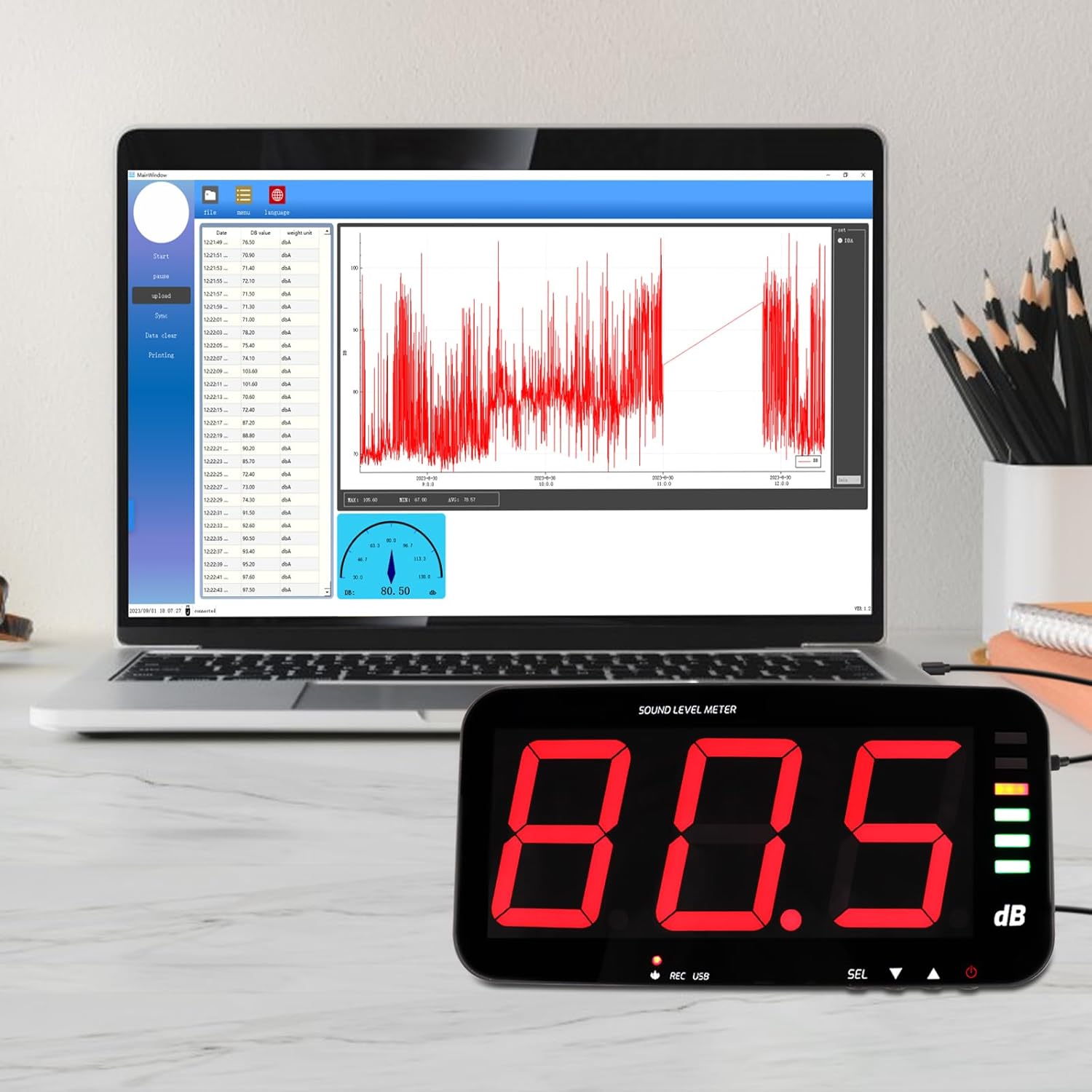
Image: The decibel meter connected to a laptop, displaying the data logging software interface with a graph of recorded sound levels.
5.4 ฟังก์ชั่นปลุก
The meter features audible and visual alarms when a predefined decibel threshold is exceeded. The default alarm threshold is 120dB.
- Setting Thresholds: Long press the 'SEL' button to enter alarm settings. Use the arrow buttons to adjust the decibel threshold and alarm duration.
- สัญญาณเตือนภาพ: The alarm indicator light will illuminate or flash when the threshold is met.
- เสียงปลุก: An internal buzzer will sound.
- External Alarm Output: The device includes a 3.5mm jack port for connecting an external 12V alarm speaker (not included).

Image: The decibel meter displaying a sound level with the alarm indicator light active, signifying an audio and visual alarm condition.

ภาพ: ด้านข้าง view of the decibel meter showing the DC 5V/OUT port connected to an external red alarm speaker, demonstrating the external alarm output interface.
6. ตัวเลือกการติดตั้ง
The Landtek Decibel Meter offers several flexible mounting solutions to suit various environments.
- ตำแหน่งเดสก์ท็อป: Use the integrated stand for discreet tabletop placement.
- ติดผนัง: Utilize the provided mounting hardware to secure the unit to a wall.
- แขวน: The device can be hung using hooks or chains (not included) from a ceiling or overhead structure.
- สิ่งที่แนบมากับขาตั้งกล้อง: A standard tripod screw hole allows for attachment to a camera tripod (tripod not included).

Image: A collage demonstrating four different ways to mount the decibel meter: wall mount, hanging, tabletop placement, and attachment to a tripod.
7. ข้อมูลจำเพาะ
| คุณสมบัติ | ข้อมูลจำเพาะ |
|---|---|
| ช่วงการวัด | 30 ~ 130 เดซิเบล |
| ความแม่นยำ | ±1.5 dB (at 94dB@1KHz) |
| ปณิธาน | 0.1 dB (<100dB); 1 dB (>100dB) |
| การถ่วงน้ำหนักความถี่ | การถ่วงน้ำหนัก |
| การตอบสนองความถี่ | 31.5 เฮิร์ต ~ 8.5 กิโลเฮิร์ตซ์ |
| Sampลิงอัตรา | 2 ครั้ง / วินาที |
| การถ่วงน้ำหนักตามเวลา | FAST, 0.5 seconds |
| เซ็นเซอร์ | 6mm condenser microphone sensor |
| Test Probe Cable Length | 5 meters (approx. 16.4 ft) |
| แสดง | LED digital tube, single character 4 inches |
| เอาท์พุตสัญญาณเตือน | 12V high level |
| การแจ้งเตือนภัย | เสียงและแสง |
| แหล่งจ่ายไฟ | ซี 5V / 1A |
| ขนาด | 323 x 173 x 40 มม. (ประมาณ 12.7 x 6.8 x 1.6 นิ้ว) |
| น้ำหนัก | Approx. 980 grams (2.16 lbs) |
8. การบำรุงรักษา
To ensure the longevity and accuracy of your decibel meter, follow these maintenance guidelines:
- การทำความสะอาด: เช็ดหน้าจอและคasinเช็ดด้วยผ้านุ่มและแห้ง ห้ามใช้น้ำยาทำความสะอาดที่มีฤทธิ์กัดกร่อนหรือตัวทำละลาย
- พื้นที่จัดเก็บ: เก็บอุปกรณ์ไว้ในที่แห้งและเย็น หลีกเลี่ยงแสงแดดโดยตรงและอุณหภูมิที่สูงหรือต่ำเกินไป
- การดูแลเซ็นเซอร์: Keep the microphone sensor clean and free from dust or debris to maintain measurement accuracy.
- แหล่งจ่ายไฟ: Always use the provided power adapter to prevent damage to the device.
9 การแก้ไขปัญหา
- Device loses settings after power off: This device requires continuous power to retain custom settings. If the power supply is interrupted, settings may revert to default. Reconnect to PC and re-synchronize using the software to restore desired settings.
- จอแสดงผลว่างเปล่า: ตรวจสอบให้แน่ใจว่าได้เสียบอะแดปเตอร์แปลงไฟเข้ากับอุปกรณ์และเต้ารับไฟฟ้าที่ใช้งานได้สนิทแล้ว
- No data logging on PC: Verify that the USB cable is properly connected and the PC software is running. Ensure the device is synchronized with the software (refer to Section 4.2). Check that recording is active on the device (REC indicator flashing).
- สัญญาณเตือนไม่ทำงาน: Check the alarm threshold settings via the PC software or by long-pressing the 'SEL' button. Ensure the threshold is set appropriately for the noise levels being monitored.
- Slow update intervals: The device updates approximately once per second. This is normal operation. For very short, transient sounds, the meter may not register the peak value instantly.