1. บทนำ
The Zebronics Astra 30 is a portable Bluetooth speaker designed for a versatile audio experience. It features 14W output, dual 52mm drivers, dual passive radiators for enhanced bass, and multiple connectivity options including Bluetooth v5.3, FM radio, AUX, USB, and mSD card support. This manual provides instructions for setting up, operating, and maintaining your speaker.
2. เนื้อหาบรรจุภัณฑ์
กรุณาตรวจสอบแพ็คเกจสำหรับรายการต่อไปนี้:
- Speaker - 1 unit
- สายชาร์จ - 1 ชิ้น
- User manual - 1 unit
3. สินค้าหมดview
ทำความคุ้นเคยกับส่วนประกอบและการควบคุมของลำโพง

ภาพที่ 3.1: ด้านหน้า view of the Zebronics Astra 30 speaker, showcasing its sleek black design and speaker grille.
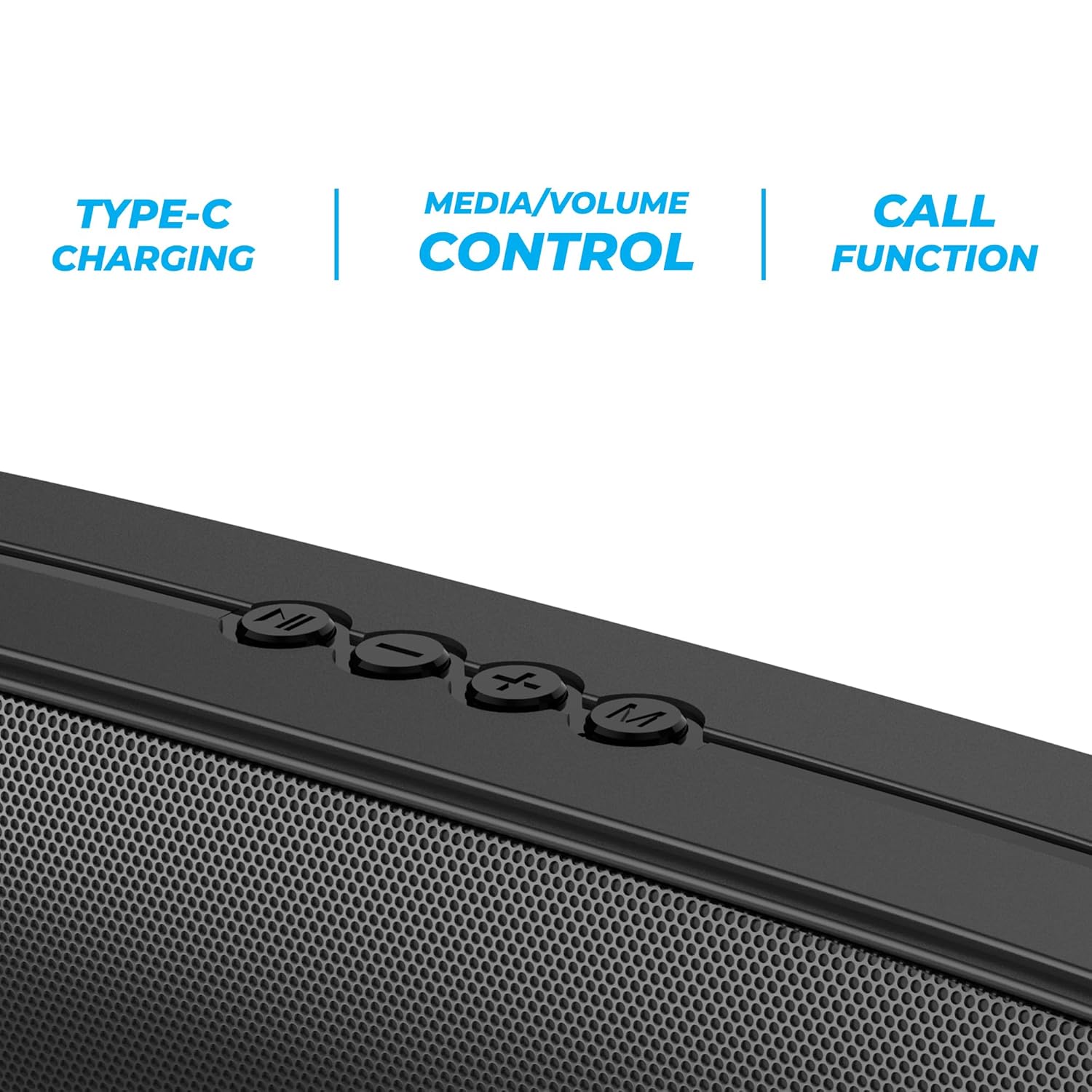
ภาพที่ 3.2: Close-up of the control panel buttons on the top of the speaker, including power, volume, and mode controls.

ภาพที่ 3.3: หลัง view of the speaker showing the multi-connectivity ports: USB, Micro SD slot, AUX input, and Type-C charging port.
4. การตั้งค่า
4.1 การชาร์จลำโพง
Before initial use, fully charge the speaker. The Zebronics Astra 30 features a built-in rechargeable battery with Type-C charging.
- Connect the provided Type-C charging cable to the charging port on the speaker.
- เชื่อมต่อปลายสายอีกด้านหนึ่งเข้ากับอะแดปเตอร์ไฟ USB (ไม่รวมอยู่ด้วย) หรือพอร์ต USB ของคอมพิวเตอร์
- The charging indicator will illuminate during charging and turn off once fully charged.
A full charge takes approximately 4 hours and provides up to 12 hours of playback time at 50% volume.

ภาพที่ 4.1: Illustration indicating the speaker's 12-hour playback capability on a single charge.
4.2 การเปิด/ปิดเครื่อง
To power on or off the speaker, press and hold the power button located on the control panel until you hear an audible prompt or see the indicator light change.
5. คู่มือการใช้งาน
5.1 การจับคู่บลูทูธ
The Zebronics Astra 30 uses Bluetooth v5.3 for wireless audio streaming.
- เปิดลำโพง ลำโพงจะเข้าสู่โหมดจับคู่บลูทูธโดยอัตโนมัติ ซึ่งจะแสดงด้วยไฟ LED กระพริบ
- เปิดใช้งานบลูทูธบนสมาร์ทโฟน แท็บเล็ต หรืออุปกรณ์อื่น ๆ ของคุณ
- ค้นหา "ZEB-ASTRA 30" in the list of available Bluetooth devices.
- Select "ZEB-ASTRA 30" to connect. Once paired, the speaker will confirm with an audible tone, and the LED will stop flashing.
- หากได้รับแจ้งให้ป้อนรหัสผ่าน ให้ป้อน "0000"
5.2 ฟังก์ชั่น True Wireless Stereo (TWS)
Connect two Zebronics Astra 30 speakers for a true wireless stereo experience.
- Ensure both ZEB-ASTRA 30 speakers are powered on and not connected to any Bluetooth device.
- On one of the speakers (this will be the primary speaker), press and hold the TWS button (often combined with the Mode button) until you hear a pairing tone.
- ลำโพงทั้งสองตัวจะเชื่อมต่อกันโดยอัตโนมัติ เมื่อเชื่อมต่อเสร็จแล้ว คุณจะได้ยินเสียงยืนยัน
- ตอนนี้ ให้เชื่อมต่ออุปกรณ์ของคุณกับลำโพงหลักผ่านบลูทูธตามที่อธิบายไว้ในหัวข้อ 5.1 เสียงจะเล่นในระบบสเตอริโอผ่านลำโพงทั้งสองตัว

ภาพที่ 5.1: Visual representation of two Zebronics Astra 30 speakers connected via TWS for stereo sound.
โหมดวิทยุ FM 5.3
วิธีใช้งานวิทยุ FM ในตัว:
- เปิดลำโพง
- Press the 'M' (Mode) button to switch to FM radio mode.
- หากต้องการสแกนหาและบันทึกสถานีวิทยุ FM ที่ใช้งานได้โดยอัตโนมัติ ให้กดปุ่มเล่น/หยุดชั่วคราวค้างไว้ ลำโพงจะสแกนและบันทึกสถานีโดยอัตโนมัติ
- ใช้ปุ่ม "ก่อนหน้า" และ "ถัดไป" เพื่อเลื่อนดูสถานีที่บันทึกไว้
- For optimal reception, ensure the charging cable is connected as an antenna.
5.4 โหมดอินพุต AUX
Connect external audio devices using the AUX input:
- เปิดลำโพง
- กดปุ่ม 'M' (โหมด) เพื่อเปลี่ยนเป็นโหมด AUX
- เชื่อมต่อปลายด้านหนึ่งของสายสัญญาณเสียงขนาด 3.5 มม. (ไม่ได้รวมอยู่ในชุด) เข้ากับพอร์ต AUX บนลำโพง
- ต่อปลายอีกด้านหนึ่งเข้ากับช่องสัญญาณเสียงออกของอุปกรณ์ของคุณ (เช่น สมาร์ทโฟน เครื่องเล่น MP3)
- ขณะนี้เสียงจะเล่นผ่านลำโพงจากอุปกรณ์ที่เชื่อมต่อของคุณแล้ว
5.5 USB and Micro SD Card Playback
เล่นเสียง files directly from a USB pen drive or Micro SD card:
- เปิดลำโพง
- Insert a USB pen drive (up to 32GB) or a Micro SD card into the respective slot.
- ลำโพงจะตรวจจับอุปกรณ์จัดเก็บข้อมูลโดยอัตโนมัติและเริ่มเล่นเสียง files. If not, press the 'M' (Mode) button to switch to USB or SD card mode.
- Use the Play/Pause and Previous/Next track buttons to control playback.
5.6 ฟังก์ชั่นการโทร
เมื่อเชื่อมต่อกับสมาร์ทโฟนผ่านบลูทูธ ลำโพงนี้สามารถใช้สำหรับการโทรแบบแฮนด์ฟรีได้
- รับ/วางสาย: กดปุ่มเล่น/หยุดชั่วคราวหนึ่งครั้ง
- ปฏิเสธสาย: กดปุ่มเล่น/หยุดชั่วคราว
- โทรซ้ำหมายเลขล่าสุด: กดปุ่มเล่น/หยุดชั่วคราวสองครั้ง
5.7 Volume and Media Control
The speaker features integrated controls for audio playback:
- ปรับระดับเสียงขึ้น: กดปุ่ม '+'
- ลดเสียงลง: กดปุ่ม '-'
- เพลงถัดไป: กดปุ่ม '+' ค้างไว้
- แทร็กก่อนหน้า: กดปุ่ม '-' ค้างไว้
- เล่น/หยุดชั่วคราว: กดปุ่มเล่น/หยุดชั่วคราว
6. การบำรุงรักษา
- เช็ดทำความสะอาดลำโพงด้วยผ้าแห้งเนื้อนุ่ม ห้ามใช้สารเคมีรุนแรงหรือน้ำยาทำความสะอาดที่มีฤทธิ์กัดกร่อน
- ควรเก็บลำโพงให้ห่างจากอุณหภูมิที่สูงจัด แสงแดดโดยตรง และความชื้น
- หลีกเลี่ยงการทำตกหรือให้ลำโพงได้รับแรงกระแทกรุนแรง
- เก็บลำโพงไว้ในที่แห้งและเย็นเมื่อไม่ได้ใช้งานเป็นเวลานาน
- The speaker is rated as waterproof. However, avoid submerging it in water for prolonged periods. Ensure the port cover is securely closed to maintain water resistance.
7 การแก้ไขปัญหา
| ปัญหา | วิธีแก้ปัญหาที่เป็นไปได้ |
|---|---|
| ลำโพงไม่เปิดเครื่อง | ตรวจสอบให้แน่ใจว่าแบตเตอรี่ชาร์จเต็มแล้ว เชื่อมต่อลำโพงเข้ากับแหล่งจ่ายไฟโดยใช้สาย Type-C |
| ไม่สามารถจับคู่ผ่านบลูทูธได้ |
|
| ไม่มีเสียงหรือเสียงเบา |
|
| การรับสัญญาณวิทยุ FM ไม่ดี | Ensure the Type-C charging cable is connected to act as an antenna. Try repositioning the speaker. |
| การจับคู่ TWS ล้มเหลว |
|
8. ข้อมูลจำเพาะ
| คุณสมบัติ | รายละเอียด |
|---|---|
| ชื่อรุ่น | เซ็บ-แอสตร้า 30 |
| กำลังขับ | 14 วัตต์ |
| ขนาดไดร์เวอร์ | 2 ตัว ขนาด 52 มม. |
| เวอร์ชันบลูทูธ | v5.3 |
| ตัวเลือกการเชื่อมต่อ | Bluetooth, FM, AUX, USB, Micro SD |
| USB/Micro SD Max Capacity | 32GB |
| อายุการใช้งานแบตเตอรี่ | สูงสุด 12 ชั่วโมง (ที่ระดับเสียง 50%) |
| เวลาในการชาร์จ | 4 ชั่วโมง |
| ประเภทการชาร์จ | ประเภทซี |
| ความต้านทานต่อน้ำ | กันน้ำ |
| ขนาดสินค้า (ลึก x กว้าง x สูง) | 5.7 x 35.4 x 6.5 เซนติเมตร |
| น้ำหนักสินค้า | 645 กรัม |
| อิมพีแดนซ์ | 3 โอห์ม |
| อัตราส่วนสัญญาณต่อเสียงรบกวน | 75 เดซิเบล |

ภาพที่ 8.1: Graphic highlighting the 14W RMS output and dual 52mm drivers of the Zebronics Astra 30 speaker.
9. การรับประกันและการสนับสนุน
The Zebronics Astra 30 speaker comes with a รับประกันจำกัด 1 ปี นับจากวันที่ซื้อ โปรดเก็บใบเสร็จรับเงินไว้เพื่อใช้ในการเคลมประกัน
For technical support, service, or warranty inquiries, please contact Zebronics customer service. Contact details can typically be found on the official Zebronics webไซต์หรือบนบรรจุภัณฑ์ผลิตภัณฑ์ของคุณ
Manufacturer: Zebronics India Private Limited
Address: 13/7, Smith Road, Royapettah, Chennai-600002


