1. บทนำ
This manual provides detailed instructions for the setup, operation, and maintenance of your boAt Aavante Bar 490 Bluetooth Soundbar. Please read this manual thoroughly before using the product to ensure proper functionality and to maximize your audio experience.

Image 1.1: The boAt Aavante Bar 490 Bluetooth Soundbar in Classic Black.
2. เนื้อหาบรรจุภัณฑ์
ตรวจสอบว่ารายการทั้งหมดที่ระบุไว้ด้านล่างนี้รวมอยู่ในแพ็คเกจของคุณ:
- โบที่ Aavante Bar 490 Soundbar
- สายชาร์จ
- คู่มือการใช้งาน (เอกสารนี้)
- บัตรรับประกัน
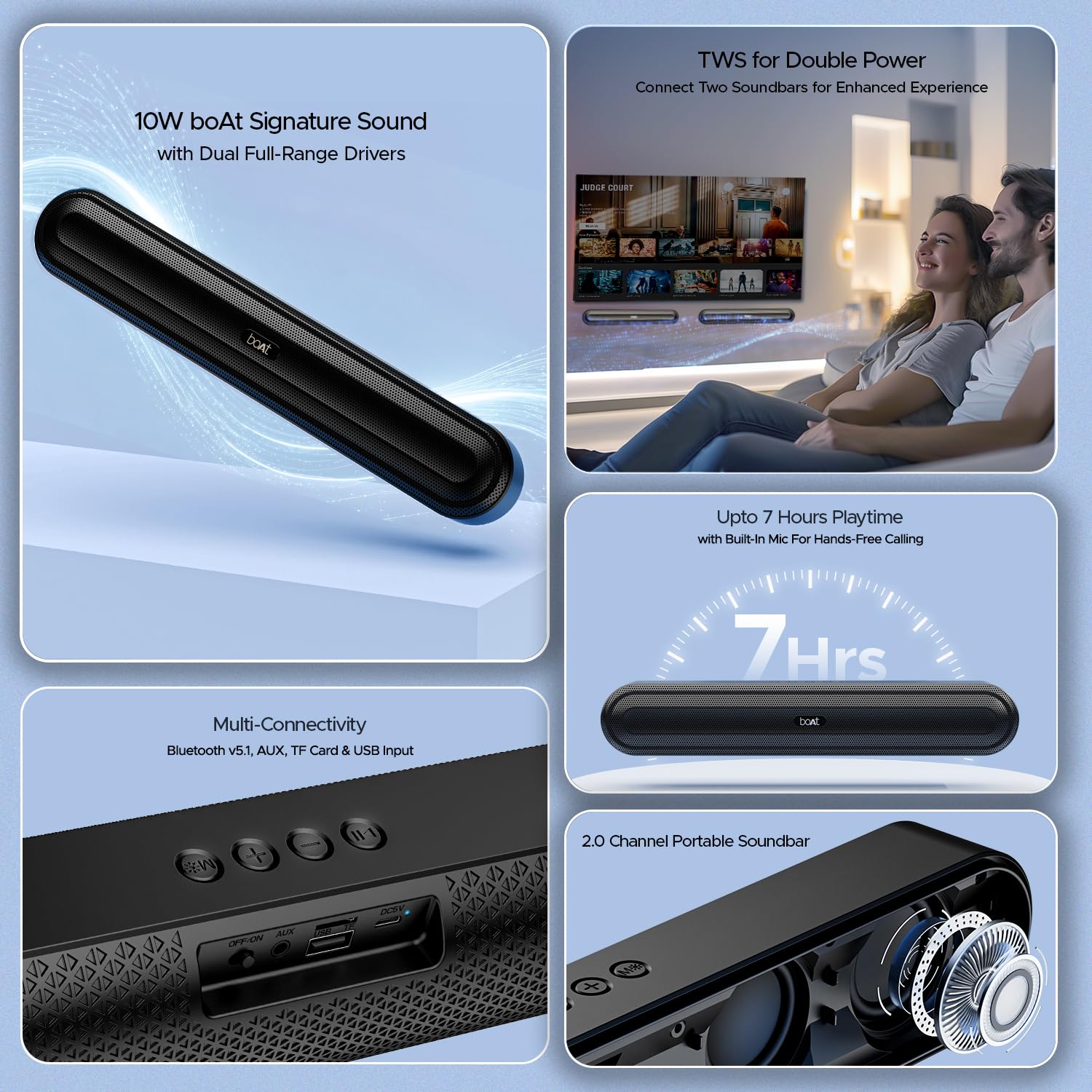
ภาพที่ 2.1: จบแล้วview of the boAt Aavante Bar 490 and its key features, including package contents.
3. สินค้าหมดview
3.1. การควบคุมและพอร์ต
Familiarize yourself with the control buttons and connectivity ports on your Aavante Bar 490.

ภาพที่ 3.1: ภาพระยะใกล้ view of the control buttons and multi-connectivity ports (Bluetooth v5.1, AUX, TF Card, USB Input) on the soundbar.
- ปุ่มเปิด/ปิด: กดค้างไว้เพื่อเปิด/ปิดเครื่อง กดสั้นๆ เพื่อเปลี่ยนโหมด
- ลดเสียงลง (-): ลดระดับเสียง.
- เพิ่มระดับเสียง (+): เพิ่มปริมาณ
- ปุ่มเล่น/หยุดชั่วคราว: เล่นหรือหยุดเพลง รับ/วางสาย
- ปุ่มโหมด (M): Switch between input modes (Bluetooth, AUX, USB, TF Card).
- สวิตช์ปิด/เปิด: สวิตช์ไฟหลัก
- พอร์ต AUX: สำหรับการเชื่อมต่อเสียงแบบมีสาย
- พอร์ต USB: สำหรับการเล่นไดรฟ์ USB
- ช่องเสียบการ์ด TF: สำหรับการเล่นไฟล์จากการ์ด TF
- พอร์ต DC5V: สำหรับการชาร์จอุปกรณ์
4. การตั้งค่า
4.1. Charging the Soundbar
Before first use, fully charge the soundbar. Connect the provided charging cable to the DC5V port on the soundbar and the other end to a compatible USB power adapter (not included). The LED indicator will show charging status and turn off when fully charged. A full charge provides up to 7 hours of playback.

Image 4.1: The boAt Aavante Bar 490 highlighting its up to 7 hours of playtime on a single charge.
4.2. เปิด/ปิดเครื่อง
- Ensure the OFF/ON switch at the back is in the "ON" position.
- Press and hold the Power button on the top panel for 3 seconds to power on the soundbar.
- To power off, press and hold the Power button again for 3 seconds.
4.3. การจับคู่บลูทู ธ
- เปิดใช้งานซาวด์บาร์ ระบบจะเข้าสู่โหมดจับคู่บลูทูธโดยอัตโนมัติ (โดยไฟ LED จะกะพริบ)
- บนอุปกรณ์ของคุณ (สมาร์ทโฟน แท็บเล็ต ฯลฯ) เปิดใช้งานบลูทูธและค้นหาอุปกรณ์ที่มีอยู่
- Select "Aavante Bar 490" from the list.
- เมื่อจับคู่เสร็จแล้ว ไฟ LED จะสว่างเป็นสีน้ำเงิน และคุณจะได้ยินเสียงยืนยัน
The soundbar supports Bluetooth v5.1 for stable and efficient wireless connection up to 10 meters.
4.4. การจับคู่ TWS (True Wireless Stereo)
For an enhanced stereo experience, you can pair two Aavante Bar 490 soundbars together.
- Ensure both Aavante Bar 490 units are powered on and in Bluetooth pairing mode (not yet connected to any device).
- On one of the soundbars, double-press the Mode button (M). It will search for the other unit.
- Once successfully paired, you will hear a confirmation tone, and the LED indicators on both units will synchronize.
- Now, connect your device to one of the paired soundbars via Bluetooth as described in Section 4.3. Both soundbars will play audio in stereo.

Image 4.2: Illustration of two boAt Aavante Bar 490 soundbars connected via TWS for an enhanced audio experience.
4.5. Other Connectivity Modes
Press the Mode button (M) to cycle through the following input options:
- โหมด AUX: Connect an audio device using a 3.5mm AUX cable to the AUX port.
- โหมด USB: Insert a USB flash drive into the USB port. The soundbar will automatically play audio files.
- โหมดการ์ด TF: Insert a TF (microSD) card into the TF card slot. The soundbar will automatically play audio files.
5. คู่มือการใช้งาน
5.1. การเล่นเพลง
- เล่น/หยุดชั่วคราว: กดปุ่มเล่น/หยุดชั่วคราว
- การปรับระดับเสียง: กดปุ่มเพิ่มเสียง (+) หรือปุ่มลดเสียง (-) สั้นๆ
- เพลงถัดไป: กดปุ่มเพิ่มระดับเสียง (+) ค้างไว้
- แทร็กก่อนหน้า: กดปุ่มลดระดับเสียง (-) ค้างไว้
5.2. การโทรแบบแฮนด์ฟรี
เมื่อเชื่อมต่อผ่านบลูทูธ ไมโครโฟนในตัวจะช่วยให้สามารถโทรแบบแฮนด์ฟรีได้
- รับสาย: กดปุ่มเล่น/หยุดชั่วคราว
- วางสาย: กดปุ่มเล่น/หยุดชั่วคราวสั้นๆ ในระหว่างการโทร
- ปฏิเสธสาย: กดปุ่มเล่น/หยุดชั่วคราวค้างไว้
6. การบำรุงรักษา
- Keep the soundbar away from water, moisture, and extreme temperatures.
- ทำความสะอาดอุปกรณ์ด้วยผ้านุ่มและแห้ง ห้ามใช้น้ำยาทำความสะอาดหรือสารละลายที่มีฤทธิ์กัดกร่อน
- อย่าทำลำโพงซาวด์บาร์ตกหรือกระแทกอย่างแรง
- เก็บไว้ในที่แห้งและเย็นเมื่อไม่ได้ใช้งานเป็นเวลานาน
7 การแก้ไขปัญหา
| ปัญหา | สาเหตุที่เป็นไปได้ | สารละลาย |
|---|---|---|
| Soundbar does not power on. | Low battery; OFF/ON switch is off. | Charge the soundbar; ensure OFF/ON switch is in the "ON" position. |
| ไม่สามารถจับคู่ผ่านบลูทูธได้ | Soundbar not in pairing mode; device Bluetooth is off; too far from device. | Ensure soundbar is in pairing mode; enable Bluetooth on your device; move closer to the soundbar (within 10m). |
| ไม่มีเสียง. | ระดับเสียงเบาเกินไป; โหมดอินพุตไม่ถูกต้อง; สายเคเบิลไม่ได้เชื่อมต่ออย่างถูกต้อง | Increase volume; switch to correct input mode (Bluetooth, AUX, USB, TF); check cable connections. |
| การจับคู่ TWS ล้มเหลว | One or both units already connected to a device; units too far apart. | Disconnect both units from any Bluetooth devices; ensure they are close to each other during TWS pairing. |
8. ข้อมูลจำเพาะ
- ชื่อรุ่น : อาวอนเต้ บาร์ 490
- ประเภทลำโพง: ซาวด์บาร์
- เอาต์พุตเสียง: 2.0 ช่อง
- กำลังขับ: กำลังไฟ 10 วัตต์ RMS
- ไดรเวอร์: Dual Full-Range Drivers
- เวอร์ชันบลูทูธ: v5.1
- ช่วงบลูทู ธ : สูงสุด 10 เมตร
- การเชื่อมต่อ: บลูทูธ, AUX, USB, การ์ด TF
- อายุการใช้งานแบตเตอรี่: นานถึง 7 ชั่วโมง
- ประเภทแบตเตอรี่: ลิเธียมโพลิเมอร์ (รวม 1 x 12V)
- ไมโครโฟนในตัว: Yes (for hands-free calling)
- วิธีการควบคุม: ปุ่มสัมผัส
- ขนาดสินค้า : 38.7D x 6.5W x 5.5H เซนติเมตร
- น้ำหนักสินค้า: 650 กรัม

Image 8.1: Dimensions of the boAt Aavante Bar 490 soundbar.
9. การรับประกันและการสนับสนุน
The boAt Aavante Bar 490 comes with a standard รับประกันจำกัด 1 ปี นับจากวันที่ซื้อ โปรดดูข้อกำหนดและเงื่อนไขโดยละเอียดในบัตรรับประกันที่ให้มา
สำหรับการขอรับการสนับสนุนทางเทคนิค บริการ หรือการเรียกร้องการรับประกัน โปรดติดต่อฝ่ายบริการลูกค้าของ boAt:
- อีเมล: info@imaginemarketingindia.com
- ผู้ผลิต: บริษัท อิเมจิน มาร์เก็ตติ้ง จำกัด
- ที่อยู่: หมายเลขหน่วย 204 & 205 ชั้น 2 D-wing & E-wing Corporate Avenue, Andheri Ghatkopar Link Road, มุมไบ, มหาราษฏระ-400093, อินเดีย
You can also download the boAt Hearables App for additional features and user guides. Scan the QR code below:

Image 9.1: QR code to download the boAt Hearables App for additional features and support.
10. วิดีโอผลิตภัณฑ์
วิดีโอ 10.1: บทนำสั้น ๆview แสดงasing the boAt Aavante Bar 490 Bluetooth Soundbar's features, including 10W RMS sound, dual full-range drivers, 7 hours playback, multi-connectivity, and hands-free calling. This video is provided by the seller.
วิดีโอ 10.2: สรุปสั้นๆview of the boAt Aavante Bar 490, highlighting its 10W RMS Signature Sound, dual drivers, and Bluetooth 5.1 connectivity. This video is provided by the seller.


