1. บทนำ
This manual provides essential information for the safe and efficient operation of your THOMSON 40FD2S13 40 Inch LED Full HD Easy TV. Please read it thoroughly before using the television and retain it for future reference.
Your THOMSON Easy TV is designed for straightforward entertainment, featuring a Full HD display, multiple connectivity options, and a triple tuner for versatile signal reception.

ภาพ: ด้านหน้า view of the THOMSON 40FD2S13 40 Inch LED Full HD Easy TV, showcasinด้วยการแสดงผลและการออกแบบที่เพรียวบาง
2. ข้อมูลด้านความปลอดภัย
ปฏิบัติตามข้อควรระวังด้านความปลอดภัยขั้นพื้นฐานเสมอเมื่อใช้โทรทัศน์เครื่องนี้เพื่อลดความเสี่ยงต่อการเกิดไฟไหม้ ไฟฟ้าช็อต และการบาดเจ็บ
- อย่าให้ทีวีโดนฝนหรือความชื้น
- ห้ามเปิดตู้ ให้ส่งการบริการทั้งหมดให้กับบุคลากรที่มีคุณสมบัติเหมาะสม
- ตรวจสอบให้แน่ใจว่ามีการระบายอากาศที่เหมาะสมรอบๆ ทีวี
- เก็บทีวีให้ห่างจากแสงแดดโดยตรงและแหล่งความร้อน
- ถอดปลั๊กทีวีในระหว่างที่มีพายุฝนฟ้าคะนองหรือเมื่อไม่ได้ใช้งานเป็นเวลานาน
- Position the TV on a stable, level surface or securely wall-mount it.
3. เนื้อหาบรรจุภัณฑ์
ตรวจสอบว่ามีรายการทั้งหมดอยู่ในแพ็คเกจ:
- THOMSON 40FD2S13 40 Inch LED Full HD Easy TV
- รีโมทคอนโทรล
- สายไฟ
- คู่มือการใช้งาน (เอกสารนี้)
- TV Stands (if applicable, check packaging)
- Screws for TV Stands (if applicable)
4. การตั้งค่า
4.1 การติดตั้งขาตั้งทีวี
If you are not wall-mounting the television, attach the included stands to the bottom of the TV. Ensure the stands are securely fastened with the provided screws to prevent the TV from tipping.

Image: Diagram showing the dimensions of the THOMSON 40FD2S13 TV, including stand measurements, to assist with placement.
4.2 การติดตั้งบนผนัง
For wall mounting, use a VESA-compatible wall mount kit (not included) that matches the TV's specifications. Follow the instructions provided with your wall mount kit carefully. Ensure the wall can support the weight of the TV.
4.3 การเชื่อมต่ออุปกรณ์ต่อพ่วง
Your THOMSON TV offers various connection ports for external devices. Refer to the image below for port locations and types.
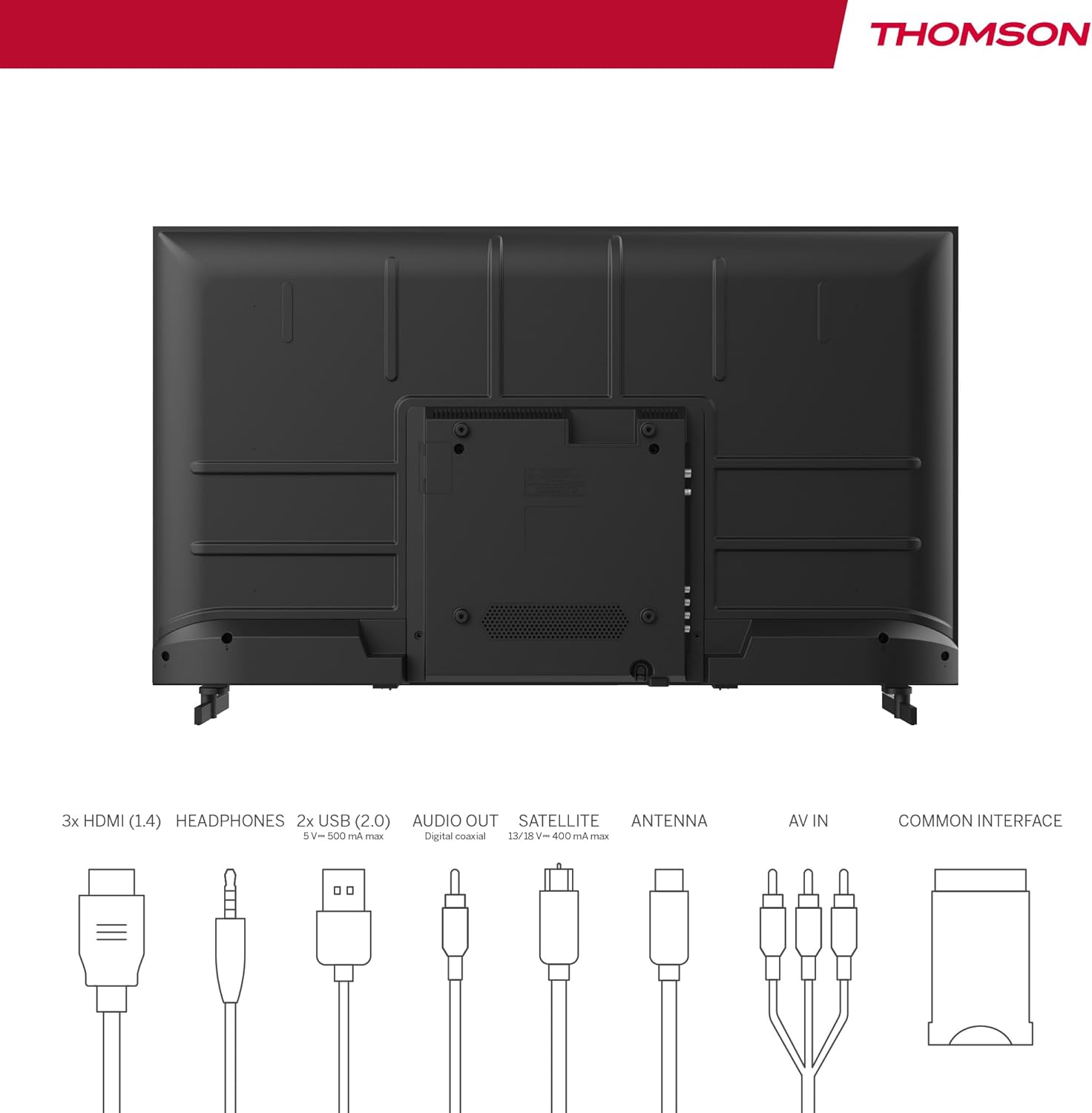
Image: Rear panel of the THOMSON 40FD2S13 TV, illustrating the location of all input and output ports, including HDMI, USB, Audio Out, Satellite, Antenna, AV IN, and Common Interface.
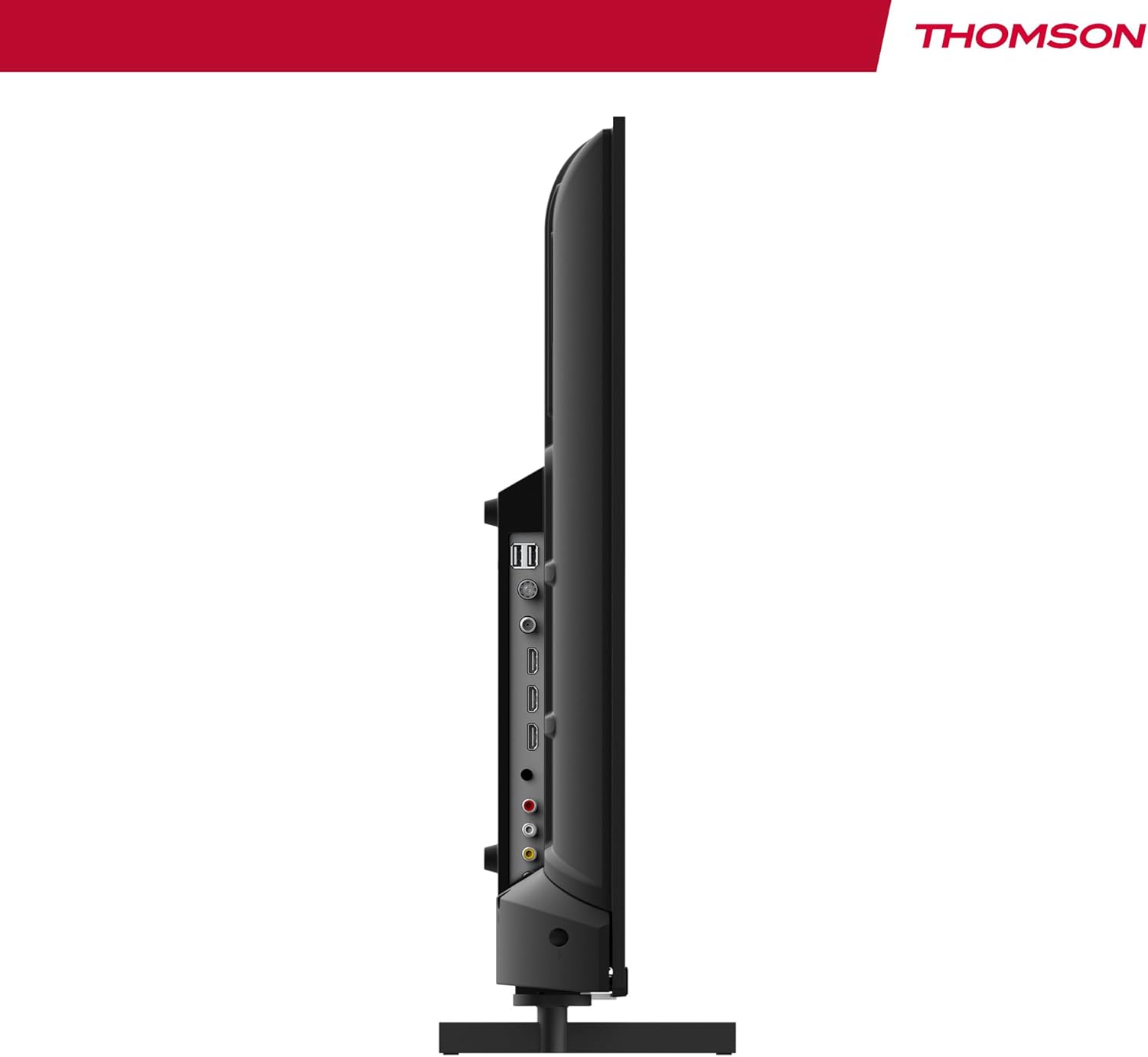
ภาพ: ด้านข้าง view of the THOMSON 40FD2S13 TV, highlighting the conveniently located side ports for easy access.
- HDMI (x3): เชื่อมต่อเครื่องเล่นบลูเรย์ เครื่องเล่นเกม กล่องรับสัญญาณ หรืออุปกรณ์อื่นๆ ที่รองรับ HDMI
- ยูเอสบี (x2): เชื่อมต่ออุปกรณ์จัดเก็บข้อมูล USB สำหรับการเล่นสื่อ
- AV ใน: เชื่อมต่ออุปกรณ์รุ่นเก่าโดยใช้สายวิดีโอคอมโพสิตและสายเสียงสเตอริโอ
- หูฟัง: เชื่อมต่อหูฟังเพื่อการฟังแบบส่วนตัว
- เอาต์พุตเสียงดิจิตอล: เชื่อมต่อกับระบบเสียงภายนอกเพื่อคุณภาพเสียงที่ดีขึ้น
- เสาอากาศ (DVB-T2): เชื่อมต่อเสาอากาศภาคพื้นดินเพื่อรับสัญญาณโทรทัศน์ดิจิทัล
- ดาวเทียม (DVB-S2): เชื่อมต่อจานรับสัญญาณดาวเทียมเพื่อรับชมรายการโทรทัศน์ผ่านดาวเทียม
- สล็อต CI+: Insert a Conditional Access Module (CAM) and smart card for encrypted channels.
4.4 การเชื่อมต่อสายไฟ
After connecting all necessary cables, plug the power cable into the TV's power input and then into a wall outlet. The TV will enter standby mode.
5. การใช้งานทีวี
5.1 การควบคุมระยะไกล
The included remote control allows you to access all TV functions. It features backlit buttons for easy navigation in dim lighting.

Image: The THOMSON TV remote control, highlighting its ergonomic design and backlit buttons for convenient use.
- ปุ่มเปิด/ปิด: เปิด/ปิดทีวีหรือเข้าสู่โหมดสแตนด์บาย
- ปุ่มตัวเลข: เลือกช่องได้โดยตรง
- ระดับเสียง +/-: ปรับระดับเสียง.
- ช่อง +/-: Change channels sequentially.
- ปุ่มเมนู: เข้าถึงเมนูหลักเพื่อการตั้งค่า
- ปุ่มนำทาง (ขึ้น/ลง/ซ้าย/ขวา/ตกลง): นำทางผ่านเมนูและยืนยันการเลือก
- ปุ่มต้นทาง: Select input sources (HDMI, AV, Tuner).
- ปุ่มข้อมูล: Display current channel information.
- GUIDE Button: Access the Electronic Program Guide (EPG).
- ปุ่ม REC: Initiate recording to a connected USB storage device (if supported and configured).
5.2 การตั้งค่าเริ่มต้นและการสแกนช่องสัญญาณ
Upon first power-on, the TV will guide you through the initial setup process, including language selection, country, and channel scanning. Select your preferred reception type (Antenna, Cable, or Satellite) and follow the on-screen instructions to scan for available channels.

Image: Close-up of the TV's tuner inputs, indicating compatibility with DVB-T2 (terrestrial antenna), DVB-C (cable), and DVB-S2 (satellite) signals.
5.3 เครื่องเล่นสื่อ
Connect a USB storage device to one of the USB ports to access photos, music, videos, and text files directly on your TV. Use the remote control to navigate the media player interface.
5.4 คุณสมบัติพิเศษ
- คู่มือโปรแกรมอิเล็กทรอนิกส์ (EPG): View upcoming program schedules and set reminders.
- เวลาหน่วง: Pause live TV broadcasts (requires a connected USB storage device).
- การควบคุมโดยผู้ปกครอง: Set restrictions on channels or programs based on age ratings.
- โหมดโรงแรม: Configure specific settings for use in hotel environments, such as default volume and input source.
- ระบบเสียง Dolby: Experience enhanced sound quality with Dolby Audio technology.

Image: A family enjoying content on the THOMSON TV, with the Dolby Audio logo indicating superior sound experience.
6. การบำรุงรักษา
To ensure the longevity and optimal performance of your THOMSON TV, follow these maintenance guidelines:
- การทำความสะอาดหน้าจอ: เช็ดหน้าจอเบาๆ ด้วยผ้านุ่มที่ไม่เป็นขุย สำหรับรอยฝังแน่น ให้เช็ดเบาๆampชุบผ้าด้วยน้ำหรือน้ำยาทำความสะอาดหน้าจอโดยเฉพาะ ห้ามฉีดน้ำยาลงบนหน้าจอโดยตรง
- ทำความสะอาดตู้: ใช้ผ้านุ่มและแห้งเช็ดตู้ทีวี หลีกเลี่ยงการใช้น้ำยาทำความสะอาดหรือตัวทำละลายที่มีฤทธิ์กัดกร่อน
- การระบายอากาศ : ตรวจสอบให้แน่ใจว่าช่องระบายอากาศด้านหลังทีวีไม่มีสิ่งกีดขวาง
- สายไฟ: ตรวจสอบสายไฟเป็นประจำว่ามีรอยชำรุดหรือไม่ หากพบรอยชำรุด โปรดติดต่อฝ่ายบริการลูกค้าเพื่อขอเปลี่ยนสินค้า
7 การแก้ไขปัญหา
If you encounter issues with your TV, consult the following common troubleshooting steps before contacting customer support.
| ปัญหา | สาเหตุที่เป็นไปได้ | สารละลาย |
|---|---|---|
| ไม่มีไฟฟ้า | ไม่ได้เสียบสายไฟ ปลั๊กไฟใช้งานไม่ได้ | Ensure the power cord is securely plugged into the TV and a working wall outlet. Check the power switch on the TV (if present). |
| ไม่มีภาพแต่มีเสียง | เลือกแหล่งอินพุตไม่ถูกต้อง มีปัญหาไฟแบ็คไลท์ | Press the "Source" button on the remote to select the correct input. Try adjusting brightness/contrast settings. |
| ไม่มีเสียงแต่มีภาพ | ปิดเสียงหรือเสียงเบาเกินไป; การตั้งค่าเอาต์พุตเสียงไม่ถูกต้อง | Press the "Volume +" button or unmute the TV. Check audio output settings in the TV menu. |
| รีโมตคอนโทรลไม่ทำงาน | แบตเตอรี่หมดหรือใส่ไม่ถูกต้อง มีสิ่งกีดขวางระหว่างรีโมทและทีวี | Replace batteries with new ones, ensuring correct polarity. Remove any obstructions. Point the remote directly at the TV's IR sensor. |
| Poor picture quality / No signal | Antenna/cable/satellite connection loose or damaged; incorrect tuner settings. | Check all antenna/cable/satellite connections. Perform a channel scan again. Ensure the correct tuner input is selected. |
8. ข้อมูลจำเพาะ
| คุณสมบัติ | รายละเอียด |
|---|---|
| ยี่ห้อ | ทอมสัน |
| แบบอย่าง | 40FD2S13 |
| ขนาดหน้าจอ | 40 นิ้ว (101 ซม.) |
| เทคโนโลยีการแสดงผล | นำ |
| ปณิธาน | 1920 x 1080 (ฟูลเอชดี) |
| อัตราการรีเฟรช | 60 เฮิรตซ์ |
| เทคโนโลยีจูนเนอร์ | DVB-C, DVB-S2, DVB-T2 |
| พอร์ต HDMI | 3 |
| พอร์ต USB | 2 |
| ส่วนติดต่ออื่น ๆ | AV IN, Headphone, Digital Audio Out, CI+ Slot |
| การถอดรหัสเสียง | DD (Dolby Digital) |
| การกำหนดค่าลำโพง | ระบบเสียงรอบทิศทาง 2.0 |
| เล่มที่tage | 230 โวลต์ |
| ระดับประสิทธิภาพการใช้พลังงาน | E |
| ขนาดผลิตภัณฑ์ (กว้าง x สูง x ลึก) | 72 x 42 x 8.2 cm (without stand, approx.) |
| น้ำหนัก | 6.9 กก. (โดยประมาณ) |
9. ข้อมูลการรับประกัน
Your THOMSON 40FD2S13 TV comes with a รับประกัน 3 ปี from the date of purchase. This warranty covers manufacturing defects and ensures that your product meets high-quality standards. Please retain your proof of purchase for warranty claims.
For detailed warranty terms and conditions, please refer to the warranty card included with your product or visit the official THOMSON webเว็บไซต์.
10. การสนับสนุนลูกค้า
If you require further assistance, have questions not covered in this manual, or need technical support, please contact THOMSON customer service.
- การสนับสนุนทางออนไลน์: เยี่ยมชมเว็บไซต์ฝ่ายสนับสนุนอย่างเป็นทางการของ THOMSON webไซต์สำหรับคำถามที่พบบ่อย คำแนะนำในการแก้ไขปัญหา และแบบฟอร์มติดต่อ
- การสนับสนุนทางโทรศัพท์: Refer to your product packaging or the THOMSON webเว็บไซต์สำหรับหมายเลขติดต่อฝ่ายบริการลูกค้าประจำภูมิภาค
When contacting support, please have your TV model number (40FD2S13) and serial number ready.


