
OLEVS XBC-G1106GH-HH
OLEVS XBC-G1106GH-HH Men's Chronograph Analog-Digital Watch Instruction Manual
Model: XBC-G1106GH-HH
การแนะนำ
Thank you for choosing the OLEVS XBC-G1106GH-HH Men's Chronograph Analog-Digital Watch. This timepiece combines a classic analog display with modern digital functions, including chronograph, alarm, day, and date. This manual provides detailed instructions for setting up and operating your watch to ensure optimal performance and longevity.

Image: The OLEVS XBC-G1106GH-HH watch featuring a black band and black dial, showcasing การออกแบบที่แข็งแกร่ง
สินค้าเกินview
Familiarize yourself with the main components and controls of your OLEVS watch.
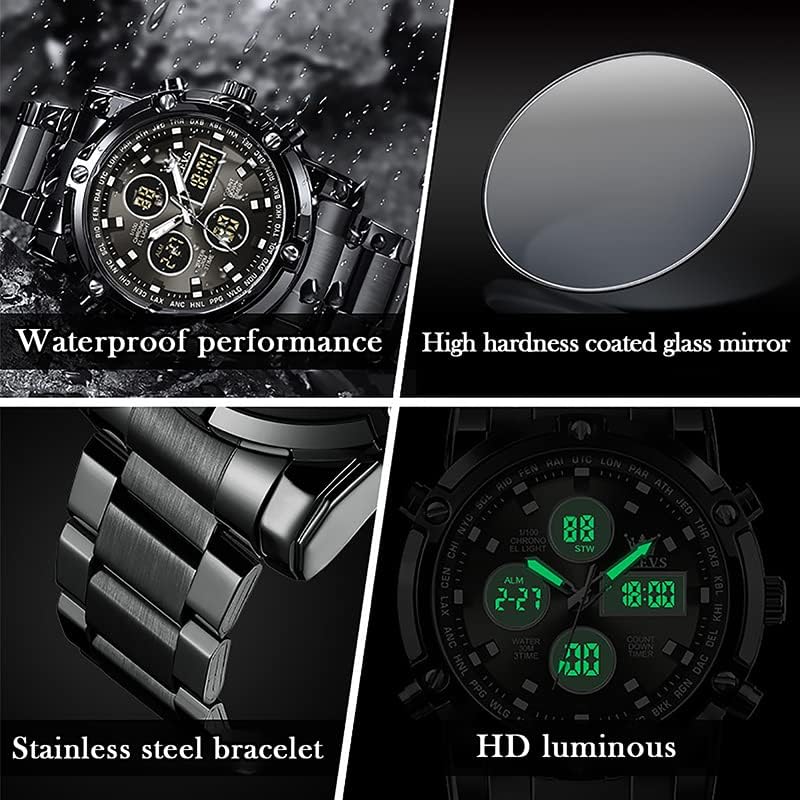
Image: Detailed diagram illustrating the various buttons and digital display functions of the OLEVS watch, including time, date, alarm, and chronograph indicators.
ส่วนประกอบและฟังก์ชันของนาฬิกา:
- มงกุฎ: Used for setting analog time (pull out to adjust).
- Buttons (Pushers): Control digital functions such as mode selection, setting adjustments, and chronograph operations.
- จอแสดงผลแบบอะนาล็อก: เข็มชั่วโมง นาที และวินาทีแบบดั้งเดิม
- จอแสดงผลดิจิทัล: Multiple digital screens showing time, date, day, alarm, stopwatch, and countdown timer.
- แสงไฟด้านหลัง: เพิ่มความสว่างให้กับจอแสดงผลดิจิทัลเพื่อให้มองเห็นได้ชัดเจนในสภาพแสงน้อย
- การแสดงสัปดาห์: ระบุวันปัจจุบันของสัปดาห์ (จันทร์ อังคาร พุธ พฤหัสบดี ศุกร์ เสาร์ อาทิตย์)
- ตัวบ่งชี้โหมด: AL (Alarm mode), ST (Stopwatch mode), TR (Countdown mode).
การตั้งค่า
1. การตั้งเวลาแบบอนาล็อก
- ดึงเม็ดมะยมที่อยู่ด้านขวาของนาฬิกาออกมา
- หมุนเม็ดมะยมเพื่อเลื่อนเข็มชั่วโมงและเข็มนาทีไปยังเวลาที่ต้องการ
- ดันเม็ดมะยมกลับเข้าไปเพื่อรักษาการตั้งเวลาไว้
2 การตั้งเวลาและวันที่แบบดิจิทัล
The digital display allows for precise time, date, and day settings. Refer to the product overview ภาพประกอบแสดงตำแหน่งปุ่มต่างๆ
- เข้าสู่โหมดการตั้งค่า: Press and hold the button labeled "Long press to enter settings" (typically bottom-right) until the digital display starts flashing.
- เลือกรายการที่ต้องการปรับแต่ง: Press the button labeled "Convert hours, minutes when setting week, month, day, etc." (typically top-left) to cycle through the settings: seconds, hours, minutes, year, month, day, and week.
- ปรับค่า: Use the button labeled "Increment value when setting" (typically top-right) to increase the selected value.
- ยืนยันและออก: Once all settings are correct, press the button labeled "Long press to enter settings" again to exit the setting mode.
3. การตั้งปลุก
- เข้าสู่โหมดเตือนภัย: Press the mode button (typically bottom-left, labeled "Convert seconds, timing Functions such as normal time" or similar) until "AL" (Alarm mode) is displayed on the digital screen.
- ป้อนการตั้งค่านาฬิกาปลุก: Press and hold the button labeled "Long press to enter settings" until the alarm time starts flashing.
- ปรับเวลาปลุก: Use the button labeled "Convert hours, minutes when setting week, month, day, etc." to select hours or minutes, and the button labeled "Increment value when setting" to adjust the values.
- เปิด/ปิดนาฬิกาปลุก: While in Alarm mode (AL), press the button labeled "Alarm on" (typically bottom-right) to toggle the alarm on or off. An alarm icon will appear when activated.
- Exit Alarm Setting: Press the button labeled "Long press to enter settings" to save and exit.
ฟังก์ชันการทำงาน
1. การใช้โครโนกราฟ (นาฬิกาจับเวลา)
ฟังก์ชันโครโนกราฟช่วยให้คุณสามารถวัดเวลาที่ผ่านไปได้
- Enter Stopwatch Mode: Press the mode button (typically bottom-left) until "ST" (Stopwatch mode) is displayed.
- เริ่ม/หยุด: Press the button labeled "Convert seconds, timing functions such as normal time" (typically bottom-left) to start the stopwatch. Press it again to stop.
- รีเซ็ต: While the stopwatch is stopped, press the button labeled "Increment value when setting" (typically top-right) to reset the stopwatch to zero.
2. การใช้ตัวจับเวลาถอยหลัง
The countdown timer allows you to set a specific duration and will alert you when it reaches zero.
- Enter Countdown Mode: Press the mode button (typically bottom-left) until "TR" (Countdown mode) is displayed.
- ตั้งเวลานับถอยหลัง: Press and hold the button labeled "Long press to enter settings" until the countdown time flashes. Use the button labeled "Convert hours, minutes when setting week, month, day, etc." to select hours or minutes, and the button labeled "Increment value when setting" to adjust the values. Press the button labeled "Long press to enter settings" again to save.
- เริ่ม/หยุด: Press the button labeled "Convert seconds, timing functions such as normal time" to start the countdown. Press it again to pause/resume.
- รีเซ็ต: While the countdown is paused, press the button labeled "Increment value when setting" to reset to the preset time.
3. ฟังก์ชั่นไฟแบ็คไลท์
To illuminate the digital display in dark conditions, press the button labeled "Backlit keys" (typically top-left). The backlight will typically stay on for a few seconds.
แนวทางการกันน้ำ
Your OLEVS XBC-G1106GH-HH watch is rated for 30 meters (3ATM) water resistance. This means it is suitable for daily use and can withstand splashes, rain, and brief immersion in water. However, it is ไม่ เหมาะสำหรับการว่ายน้ำ ดำน้ำ หรืออาบน้ำร้อน เนื่องจากไอน้ำและการเปลี่ยนแปลงอุณหภูมิอาจทำให้ซีลเสียหายได้
- อย่าทำ operate any buttons or pull out the crown while the watch is wet or submerged.
- ควรหลีกเลี่ยงการนำนาฬิกาไปสัมผัสกับอุณหภูมิที่เปลี่ยนแปลงอย่างรวดเร็ว
- หากนาฬิกาโดนน้ำเค็ม ให้ล้างออกด้วยน้ำจืดและเช็ดให้แห้งสนิท

Image: The OLEVS watch demonstrating its water-resistant capabilities, suitable for splashes and rain.
การซ่อมบำรุง
Proper care will extend the life and maintain the appearance of your watch.
- การทำความสะอาด: Wipe the watch case and strap regularly with a soft, dry cloth. For stainless steel, a slightly damp สามารถใช้ผ้าแล้วเช็ดให้แห้งทันที
- หลีกเลี่ยงสารเคมี: อย่าให้นาฬิกาสัมผัสกับตัวทำละลาย ผงซักฟอก น้ำหอม หรือสเปรย์เครื่องสำอาง เพราะสารเหล่านี้อาจทำให้ตัวเรือน สาย หรือซีลเสียหายได้
- อุณหภูมิ: ควรหลีกเลี่ยงการนำนาฬิกาไปวางไว้ในที่ที่มีอุณหภูมิสูงหรือต่ำเกินไป (สูงกว่า 60°C / 140°F หรือต่ำกว่า 0°C / 32°F) หรือการเปลี่ยนแปลงอุณหภูมิอย่างฉับพลัน
- สนามแม่เหล็ก: ควรเก็บนาฬิกาให้ห่างจากสนามแม่เหล็กแรงสูง เพราะอาจส่งผลต่อความแม่นยำของกลไกควอตซ์ได้
- การเปลี่ยนแบตเตอรี่: When the watch battery runs low, the digital display may dim or the watch may stop. Have the battery replaced by a qualified watch technician to ensure water resistance is maintained.
การแก้ไขปัญหา
| ปัญหา | สาเหตุที่เป็นไปได้ | สารละลาย |
|---|---|---|
| เข็มนาฬิกาแบบอนาล็อกไม่ขยับ | Battery depleted; Crown pulled out; Mechanical issue. | Check if crown is pushed in. Replace battery. Contact service if issue persists. |
| หน้าจอแสดงผลดิจิทัลว่างเปล่าหรือมืดสนิท | แบตเตอรี่หมด | เปลี่ยนแบตเตอรี่ |
| Incorrect time/date displayed | Time/date not set correctly; Watch exposed to strong magnetic fields. | Reset time and date according to instructions. Keep watch away from magnets. |
| ปุ่มไม่ตอบสนอง | นาฬิกาเปียกน้ำ; เกิดความผิดปกติภายใน | Ensure watch is dry before operating buttons. If issue persists, contact service. |
ข้อมูลจำเพาะ
- ยี่ห้อ: โอเลฟส์
- หมายเลขรุ่น: XBC-G1106GH-HH
- ประเภทจอภาพ: อะนาล็อกเป็นดิจิตอล
- ความเคลื่อนไหว: ควอตซ์
- แหล่งพลังงาน: ใช้พลังงานจากแบตเตอรี่
- วัสดุเคส: สแตนเลส
- วัสดุสาย: สแตนเลส
- คริสตัล: ฮาร์ดเดกซ์
- เส้นผ่านศูนย์กลางตัวเรือน: 48 มิล
- ความหนาของเคส: 16 มิล
- ความกว้างของแถบ: 23 มิล
- ความลึกของการต้านทานน้ำ: 30 Metres (3ATM)
- ประเภทตัวล็อค: ปุ่มกด Foldover Clasp พร้อมความปลอดภัย
- ฟังก์ชั่น: Chronograph, LED Backlight, Day, Date, Alarm, Stopwatch, Countdown Timer
การรับประกันและการสนับสนุน
For warranty information and customer support, please refer to the documentation provided with your purchase or contact the retailer where you purchased the OLEVS XBC-G1106GH-HH watch. Keep your proof of purchase for any warranty claims.
For further assistance, you may also visit the official OLEVS webหรือติดต่อฝ่ายบริการลูกค้าโดยตรง