การแนะนำ
The Coby Ultimate Wireless Speaker is designed to deliver a powerful and immersive audio experience, complemented by dynamic light-up modes. This portable speaker is engineered for high-fidelity sound, ensuring crisp highs, rich mids, and deep bass. With its travel-friendly design and extended battery life, it is suitable for various environments, from personal listening to social gatherings.

Image: The Coby Ultimate Wireless Speaker, showcasing its vibrant, multi-color light display on the front grille. The speaker is black with a robust, portable design.
สินค้าเกินview และการควบคุม
Familiarize yourself with the speaker's layout and controls for optimal use.
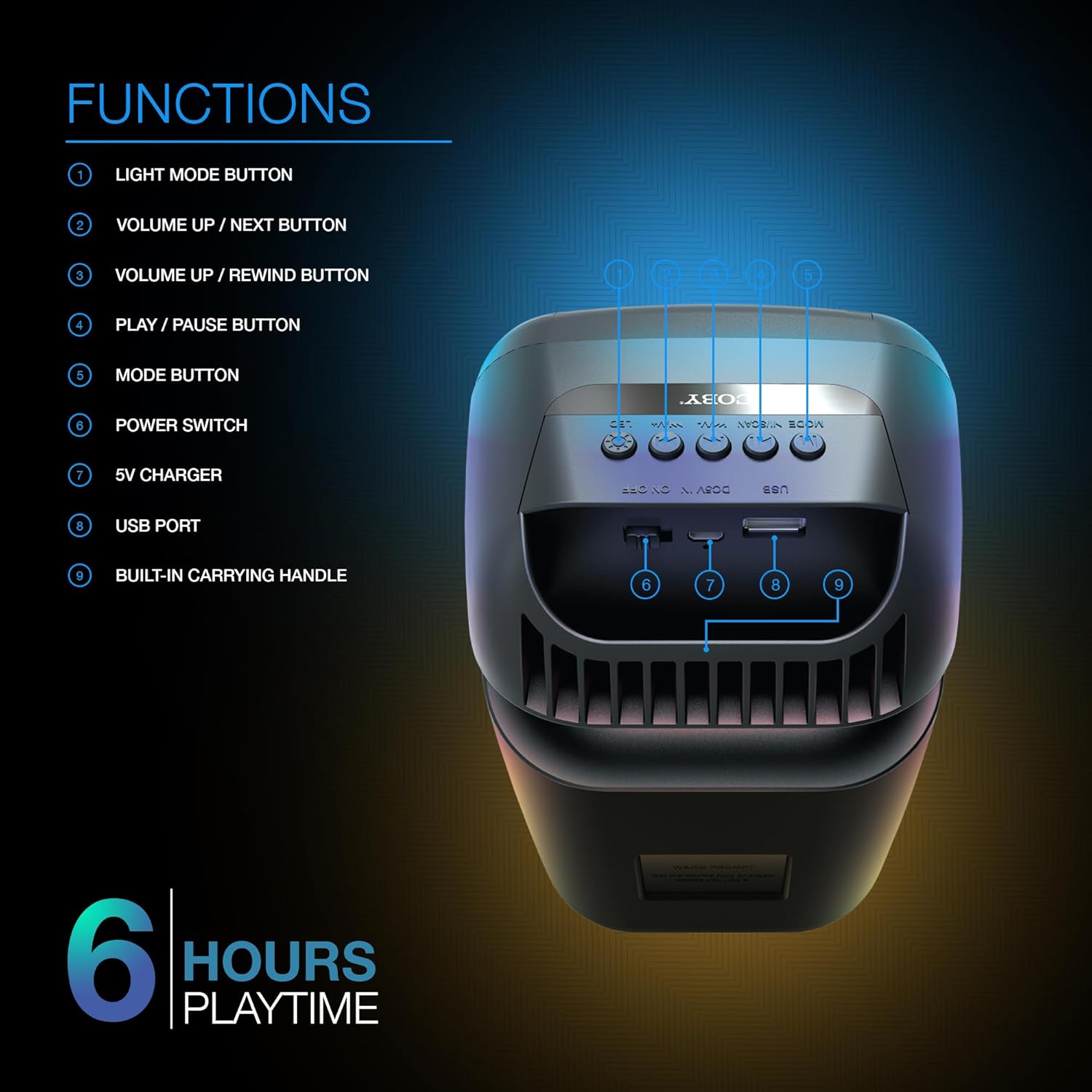
Image: A detailed diagram illustrating the top and rear controls of the Coby Ultimate Wireless Speaker. Numbered labels point to each function: Light Mode Button, Volume Up/Next, Volume Up/Rewind, Play/Pause, Mode Button, Power Switch, 5V Charger Port, USB Port, and Built-in Carrying Handle.
ฟังก์ชั่นการควบคุม:
- ปุ่มโหมดแสง: Cycles through the 5 dazzling light-up modes.
- Volume Up / Next Button: เพิ่มระดับเสียงหรือข้ามไปยังแทร็กถัดไป
- Volume Up / Rewind Button: Decreases volume or rewinds the current track.
- ปุ่มเล่น/หยุดชั่วคราว: เริ่มหรือหยุดการเล่นเสียงชั่วคราว
- ปุ่มโหมด: Switches between different input modes (e.g., Bluetooth, FM Radio).
- สวิตช์ไฟ: เปิดหรือปิดลำโพง
- เครื่องชาร์จ 5V: Port for connecting the charging cable.
- พอร์ต USB: For USB media playback or charging external devices (if supported).
- Built-in Carrying Handle: เพื่อการพกพาที่สะดวก
การตั้งค่า
1. ชาร์จลำโพง
Before first use, fully charge the speaker. Connect the provided 5V charging cable to the 5V Charger port on the speaker and plug the other end into a compatible USB power adapter (not included). The charging indicator light will show the charging status. A full charge provides up to 6 hours of playtime.
2. การเปิด/ปิดเครื่อง
Locate the Power Switch on the speaker. Slide the switch to the 'ON' position to power on the device. Slide it to the 'OFF' position to power off.
3. การจับคู่บลูทู ธ
- Ensure the speaker is powered on and in Bluetooth mode (indicated by the Mode button).
- บนอุปกรณ์เคลื่อนที่ของคุณ (สมาร์ทโฟน แท็บเล็ต ฯลฯ) เปิดใช้งานบลูทูธและค้นหาอุปกรณ์ที่มีอยู่
- Select "Coby CPA9000" or a similar name from the list of found devices.
- Once connected, the speaker will emit an audible confirmation, and you can begin streaming audio.
The speaker features Bluetooth version 5.3 for fast pairing and stable audio streaming.
การดำเนินการ
1. การเล่นเสียง
- เล่น/หยุดชั่วคราว: Press the Play/Pause button to start or pause the current track.
- การปรับระดับเสียง: Use the Volume Up / Next and Volume Up / Rewind buttons to adjust the playback volume.
- ติดตามการนำทาง: Briefly press the Volume Up / Next button to skip to the next track. Briefly press the Volume Up / Rewind button to go to the previous track.
2. Light-Up Modes
The speaker features 5 dazzling light-up modes that synchronize with your music. Press the Light Mode Button to cycle through the available light patterns and effects. Choose the mode that best suits your mood or environment.
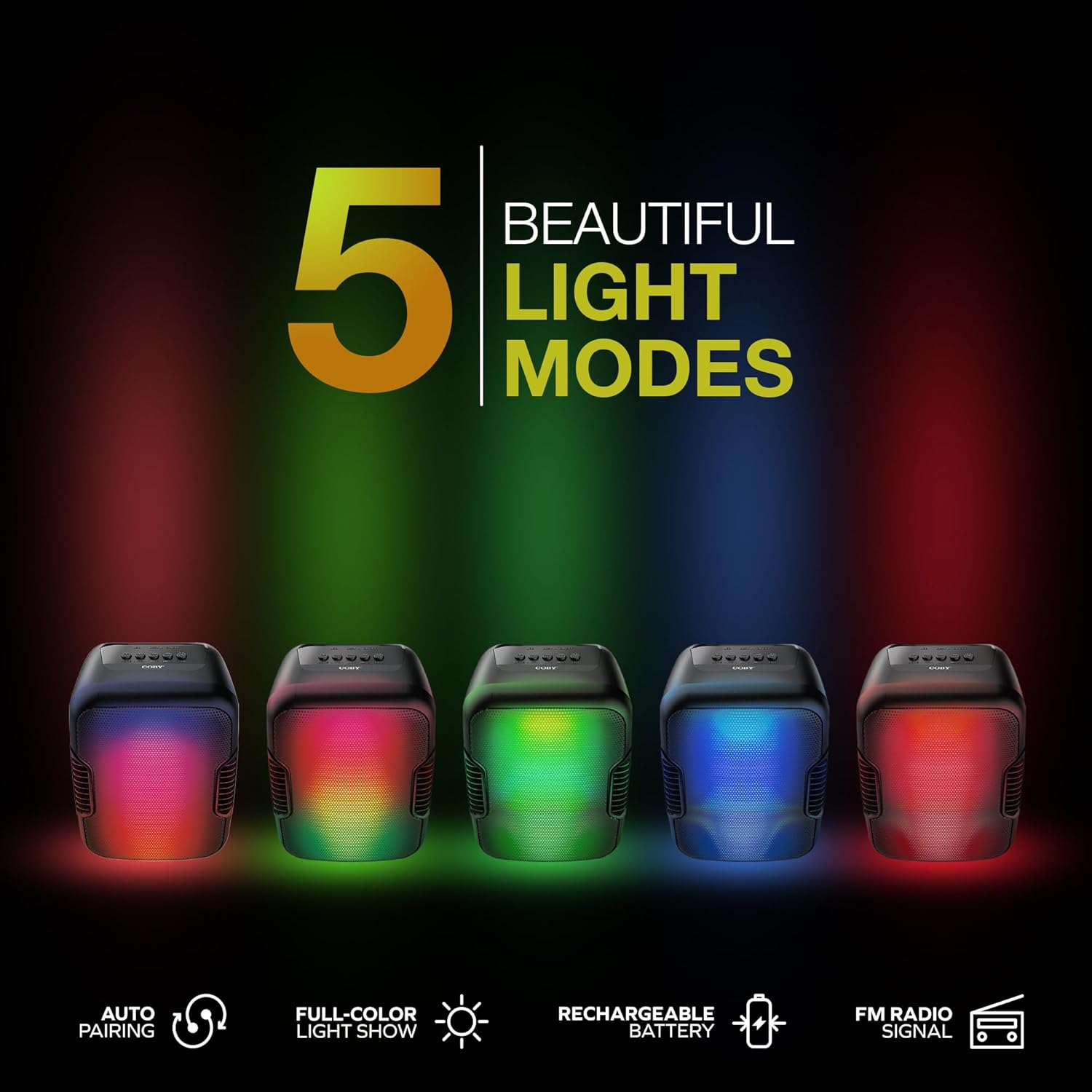
Image: Five Coby Ultimate Wireless Speakers arranged in a row, each displaying a different vibrant light mode, illustrating the variety of visual effects available.
3. ฟังก์ชั่นวิทยุ FM
To use the FM Radio, press the Mode button until you hear the FM radio signal. The speaker will automatically scan and tune into available stations. Use the Volume Up / Next and Volume Up / Rewind buttons to navigate between stations.
การซ่อมบำรุง
- การทำความสะอาด: ใช้ผ้าแห้งนุ่มเช็ดทำความสะอาดภายนอกลำโพง ห้ามใช้สารทำความสะอาดที่มีฤทธิ์กัดกร่อนหรือตัวทำละลาย
- พื้นที่จัดเก็บ: เก็บลำโพงไว้ในที่แห้งและเย็น หลีกเลี่ยงแสงแดดโดยตรงและอุณหภูมิที่สูงหรือต่ำเกินไปเมื่อไม่ได้ใช้งานเป็นเวลานาน
- การดูแลแบตเตอรี่ เพื่อยืดอายุการใช้งานแบตเตอรี่ ควรหลีกเลี่ยงการปล่อยให้แบตเตอรี่หมดจนเกลี้ยงบ่อยๆ ควรชาร์จลำโพงเป็นประจำ แม้ว่าจะไม่ได้ใช้งานตลอดเวลาก็ตาม
การแก้ไขปัญหา
| ปัญหา | สาเหตุที่เป็นไปได้ | สารละลาย |
|---|---|---|
| ลำโพงไม่เปิดเครื่อง | แบตเตอรี่หมด | ชาร์จลำโพงให้เต็มโดยใช้สายชาร์จที่ให้มา |
| ไม่มีเสียงจากลำโพง | Volume is too low or muted; Device not paired correctly; Incorrect mode selected. | Increase volume on both speaker and connected device. Re-pair Bluetooth. Press Mode button to select correct input. |
| การเชื่อมต่อบลูทูธไม่เสถียร | Device is out of range; Interference from other devices. | Move the connected device closer to the speaker. Avoid placing speaker near other wireless devices. |
| Light modes are not working. | Light mode feature is off. | Press the Light Mode Button to activate and cycle through modes. |
ข้อมูลจำเพาะ

Image: The Coby Ultimate Wireless Speaker shown with its dimensions: 9.46 inches height, 4.92 inches width, and 4.33 inches depth.
| คุณสมบัติ | รายละเอียด |
|---|---|
| ชื่อรุ่น | CPA9000 FLAME |
| ประเภทลำโพง | ซับวูฟเฟอร์ |
| เทคโนโลยีการเชื่อมต่อ | บลูทูธ |
| เทคโนโลยีการสื่อสารไร้สาย | บลูทูธ 5.3 |
| โหมดเอาต์พุตเสียง | สเตอริโอ |
| อายุการใช้งานแบตเตอรี่ | นานถึง 6 ชั่วโมง |
| แหล่งพลังงาน | ใช้พลังงานจากแบตเตอรี่ (รวมแบตเตอรี่ลิเธียมไอออน 1 ก้อน) |
| ขนาดสินค้า (ลึก x กว้าง x สูง) | 4.33" x 4.92" x 9.46" |
| น้ำหนักสินค้า | 14.1 ออนซ์ |
| คุณสมบัติพิเศษ | USB Port, Light-Up Modes, Built-in Handle, FM Radio |
| อุปกรณ์ที่รองรับ | สมาร์ทโฟน, แท็บเล็ต |
| วิธีการควบคุม | ปุ่มต่างๆ บนอุปกรณ์ |
| กันน้ำได้ | เท็จ |
| ยูพีซี | 810071493751 |
การรับประกันและการสนับสนุน
The Coby Ultimate Wireless Speaker comes with a limited warranty. For specific warranty terms and conditions, please refer to the documentation included with your purchase or visit the official Coby website. For technical support or further assistance, please contact Coby customer service.


