1. บทนำ
This manual provides detailed instructions for the installation, operation, and maintenance of your FSP Hydro G PRO 850W Power Supply. This unit is an 80 Plus Gold certified, fully modular power supply compliant with ATX 3.1 and PCIe 5.1 standards, featuring a native 12V-2X6 connector.

ภาพ: ด้านหน้า view of the FSP Hydro G PRO 850W Power Supply.
2. คุณสมบัติหลัก
- สอดคล้องกับ ATX 3.1 และ PCIe 5.1: Designed to meet the latest ATX 3.1 and PCIe 5.1 specifications, including a native 12V-2X6 connector and cable for next-generation hardware.
- ได้รับการรับรอง 80 Plus Gold: Ensures high power efficiency, operating at a minimum of 90% efficiency at 50% load, reducing electricity consumption and heat generation.
- การออกแบบแบบโมดูลาร์เต็มรูปแบบ: Allows for flexible cable management by connecting only the necessary cables, improving airflow and reducing clutter within the PC case.
- Off-Wet Technology (Conformal Coating): Features an exclusive conformal coating for enhanced reliability and performance in challenging environments, tested to function effectively in up to 95% relative humidity.
- ขนาดกระทัดรัด: With a length of 150mm, the power supply offers a smaller footprint, facilitating easier installation in various PC chassis.
- Exceptional Quiet Operation with Eco Switch: Includes an Eco switch that, when activated, optimizes power consumption and allows the fan to remain off under 30% load, providing a silent computing experience.
3. การตั้งค่าและการติดตั้ง
Before installation, ensure your system components are compatible with an 850W power supply and that your PC case has adequate space for the unit (dimensions: 150mm L x 150mm W x 86mm H).
3.1 การแกะบรรจุภัณฑ์และการตรวจสอบ
Carefully remove the power supply and all modular cables from the packaging. Inspect for any visible damage. If any damage is found, contact your retailer or FSP support immediately.
3.2 การติดตั้งพาวเวอร์ซัพพลาย
- Position the power supply in the designated PSU bay of your PC case. Ensure the fan is oriented correctly for optimal airflow (typically facing downwards if your case has a bottom vent, or upwards if not).
- ยึดแหล่งจ่ายไฟเข้ากับตัวเคสโดยใช้สกรูที่ให้มา
3.3 การเชื่อมต่อสายเคเบิลแบบโมดูลาร์
The FSP Hydro G PRO is fully modular, allowing you to connect only the cables required for your system. Refer to the image below for the connector layout on the power supply unit.
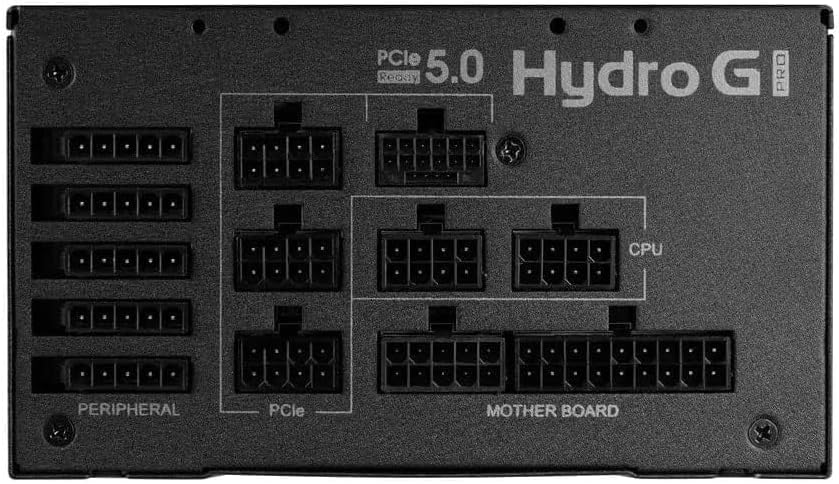
Image: Modular connector panel of the FSP Hydro G PRO power supply, showing clearly labeled ports for Motherboard, CPU, PCIe, and Peripheral connections.
- พลังงานเมนบอร์ด: ต่อสาย ATX แบบ 24 พินเข้ากับเมนบอร์ด
- พลังซีพียู: Connect the 8-pin (4+4 pin) EPS/CPU cables to your motherboard's CPU power connectors. Modern motherboards may require one or two such connectors.
- พลังงาน PCIe (การ์ดจอ): Use the appropriate PCIe cables for your graphics card(s). This unit includes a native 12V-2X6 connector for compatible PCIe 5.1 graphics cards. For older cards, use the standard 6+2 pin PCIe connectors.
- พลังงานต่อพ่วง: Connect SATA power cables for storage drives (SSDs, HDDs) and other peripherals. Use Molex connectors for older devices or case fans if needed.
Ensure all connections are secure and properly seated. Route cables neatly to improve airflow and aesthetics.
4. คู่มือการใช้งาน
4.1 การเปิดเครื่องครั้งแรก
- After all internal connections are made, connect the AC power cord to the power supply and then to a wall outlet.
- พลิกสวิตช์ไฟหลักที่ด้านหลังของแหล่งจ่ายไฟไปที่ตำแหน่ง 'เปิด'
- กดปุ่มเปิด/ปิดบนเคสคอมพิวเตอร์ของคุณเพื่อเริ่มระบบ
4.2 Eco Switch Functionality
The FSP Hydro G PRO features an Eco switch located on the rear panel. This switch controls the fan's operation based on load.

ภาพ: ด้านหลัง view of the FSP Hydro G PRO power supply, highlighting the Eco switch for fan control.
- When the Eco switch is ON, the power supply fan will not operate under low load (below 30%), providing a silent experience during low power consumption. The fan will automatically activate when the load exceeds 30% to maintain optimal cooling.
- When the Eco switch is ปิด, the power supply fan will operate continuously, regardless of the load, providing constant airflow.
5. การบำรุงรักษา
The FSP Hydro G PRO power supply is designed for long-term reliability with minimal maintenance.

Image: Illustration of internal components protected by conformal coating.
- การกำจัดฝุ่น: Periodically inspect the power supply's fan intake and exhaust vents for dust accumulation. Use compressed air to gently clear any dust to ensure proper airflow and cooling. Ensure the power supply is turned off and unplugged before cleaning.
- การเคลือบแบบคอนฟอร์มัล: The unit features an "Off-Wet Technology" conformal coating, providing protection against dust, moisture, and stains. This reduces the need for frequent internal cleaning in typical environments.
6 การแก้ไขปัญหา
If you encounter issues with your FSP Hydro G PRO power supply, consider the following steps:
- ไม่มีไฟฟ้า:
- ตรวจสอบให้แน่ใจว่าสายไฟ AC เชื่อมต่อกับแหล่งจ่ายไฟและเต้ารับที่ผนังอย่างแน่นหนา
- ตรวจสอบว่าสวิตช์ไฟหลักที่ด้านหลังของแหล่งจ่ายไฟอยู่ในตำแหน่ง "เปิด"
- Check all modular cables (24-pin ATX, CPU, PCIe, etc.) are firmly seated in both the power supply and the respective components.
- ทดสอบปลั๊กไฟกับอุปกรณ์อื่นเพื่อยืนยันว่ามีกระแสไฟไหลผ่าน
- ระบบไม่เสถียร/ปิดเครื่องเองโดยไม่ทราบสาเหตุ:
- ตรวจสอบให้แน่ใจว่าความต้องการพลังงานของระบบของคุณไม่เกินกำลังไฟ 850 วัตต์ของแหล่งจ่ายไฟ
- Check for proper ventilation around the power supply and within the PC case to prevent overheating.
- Verify that all power connectors are correctly installed and not loose.
- Fan Not Spinning (Eco Mode):
- If the Eco switch is ON, the fan is designed not to spin under low load (below 30%). This is normal operation. The fan will activate automatically when the system load increases.
- If the Eco switch is OFF and the fan is not spinning, ensure the power supply is receiving power and is not faulty.
If issues persist after performing these checks, contact FSP customer support or your retailer for further assistance.
7. ข้อมูลจำเพาะ
| คุณสมบัติ | รายละเอียด |
|---|---|
| ชื่อรุ่น | HG2-850-G5T |
| เอาท์พุต วัดtage | 850 วัตต์ |
| ใบรับรอง 80 Plus | ทอง |
| เวอร์ชั่น ATX | 3.1 |
| เวอร์ชัน PCIe | 5.1 (with 12V-2X6 connector) |
| ฟอร์มแฟกเตอร์ | เอทีเอ็กซ์ |
| ความเป็นโมดูลาร์ | โมดูลาร์เต็มรูปแบบ |
| วิธีการทำความเย็น | Air (with Eco fan control) |
| ขนาดสินค้า (กว้าง x ยาว x สูง) | 150 มม. x 150 มม. x 86 มม. (6 x 6 x 3.5 นิ้ว) |
| น้ำหนักสินค้า | 3.38 กิโลกรัม (7.44 ปอนด์) |
| ผู้ผลิต | FSP Group INC |
8. การรับประกันและการสนับสนุน
The FSP Hydro G PRO 850W Power Supply comes with a รับประกัน 10 ปี, ensuring long-term reliability and peace of mind. For warranty claims, technical support, or any product-related inquiries, please contact FSP customer service through their official webไซต์หรือจุดซื้อของคุณ
โปรดเก็บหลักฐานการซื้อไว้เพื่อใช้ยืนยันการรับประกัน


