การแนะนำ
This manual provides comprehensive instructions for the setup, operation, and maintenance of your Surfans F22 Portable HiFi MP3 Player. Please read this manual thoroughly before using the device to ensure proper functionality and to maximize your listening experience.
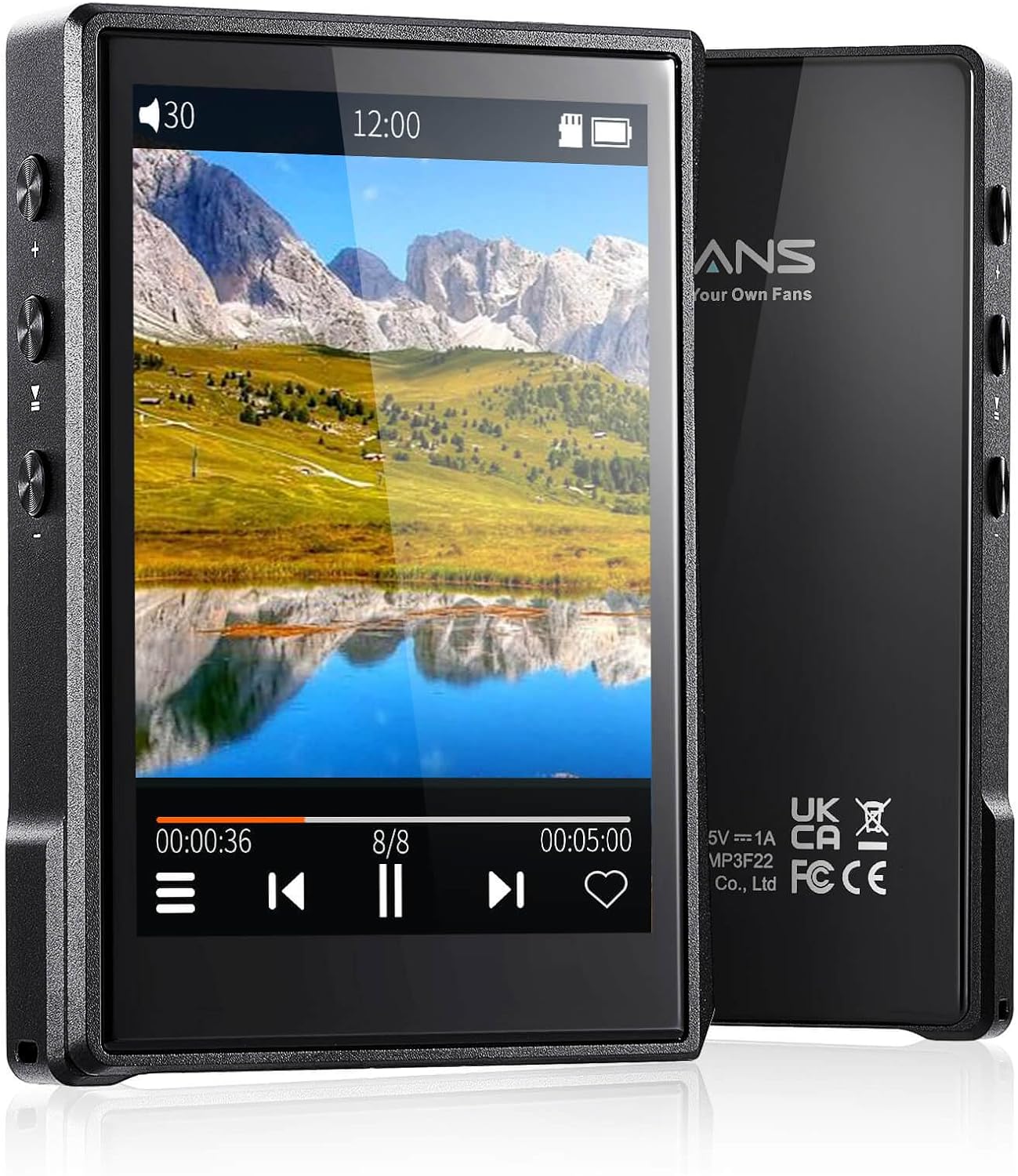
ภาพ: ด้านหน้าและด้านหลัง view of the Surfans F22 Portable HiFi MP3 Player, showcasing its 2.8-inch touchscreen and sleek design.
เนื้อหาแพ็คเกจ
ตรวจสอบว่ามีรายการทั้งหมดอยู่ในแพ็คเกจ:
- Surfans F22 HiFi Music Player
- คู่มือการใช้งาน (เอกสารนี้)
- สาย USB-C
- การ์ดหน่วยความจำ 32GB (ติดตั้งไว้ล่วงหน้าหรือรวมแยกต่างหาก)
อุปกรณ์โอเวอร์view
Familiarize yourself with the physical components of your F22 player.

Image: Diagram illustrating the various ports and buttons on the Surfans F22 MP3 Player, including the power button, volume controls, headphone jack, and USB-C port.
- 2.8-inch IPS TFT Full Touchscreen: Main interface for navigation and control.
- ปุ่มเปิด/ปิด: เปิด/ปิดอุปกรณ์ และล็อค/ปลดล็อคหน้าจอ
- ปุ่มปรับระดับเสียง: ปรับระดับเอาท์พุตเสียง
- แจ็คหูฟัง (3.5 มม.): เชื่อมต่อหูฟังแบบมีสาย
- พอร์ต USB-C: สำหรับการชาร์จและถ่ายโอนข้อมูล
- ช่องเสียบการ์ด Micro SD: สำหรับเพิ่มพื้นที่จัดเก็บข้อมูลได้สูงสุดถึง 1TB
การตั้งค่า
1. การชาร์จอุปกรณ์
Before first use, fully charge the F22 player. Connect the provided USB-C cable to the device's USB-C port and the other end to a USB power adapter (not included) or a computer's USB port. The charging indicator will show progress. A full charge typically takes approximately 2 hours and provides up to 10 hours of playback.
2. การใส่การ์ด Micro SD
The F22 comes with a 32GB memory card. For additional storage, you can insert a Micro SD card (up to 1TB) into the designated slot. Ensure the card is inserted correctly until it clicks into place.

Image: A Surfans F22 MP3 Player shown with a Micro SD card being inserted into its slot, illustrating the expandable storage capability.
3 การถ่ายโอนเพลง Files
Connect the F22 player to your computer using the USB-C cable. The device will appear as a removable storage drive. Drag and drop your music files (FLAC, WMA, WAV, DSF, DSD, MP3, etc.) into the appropriate folders on the player's internal storage or the Micro SD card.

Image: A Surfans F22 MP3 Player displaying music playback, with a person wearing headphones in the background, symbolizing the high-fidelity audio experience.
คำแนะนำการใช้งาน
1. Power On/Off and Screen Lock
- ในการเปิดเครื่อง ให้กดปุ่มเปิด/ปิดค้างไว้จนกว่าหน้าจอจะสว่างขึ้น
- To power off, press and hold the Power button, then select "Power Off" on the screen.
- To lock/unlock the screen, briefly press the Power button.
2. การนำทางอินเทอร์เฟซ
The F22 features a 2.8-inch touchscreen for navigation. Swipe left/right or up/down to browse menus and lists. Tap icons to select options or open applications.
3. การเล่นเพลง
- From the main menu, select "Music" to access your library.
- Browse by Artist, Album, Song, Genre, or Folder.
- แตะที่ชื่อเพลงเพื่อเริ่มเล่น
- During playback, use the on-screen controls for play/pause, skip track, and volume adjustment. Physical volume buttons also control volume.

Image: The Surfans F22 MP3 Player screen showing options for music playback modes: List play, Single play, List loop, and Random, indicating flexible listening options.
4. การเชื่อมต่อบลูทูธ
The F22 supports Bluetooth 4.2 for wireless audio output.
- ไปที่ "การตั้งค่า" แล้วเลือก "บลูทูธ"
- Turn Bluetooth on. The player will scan for available devices.
- เลือกหูฟังหรือลำโพงบลูทูธที่ต้องการจากรายการเพื่อทำการจับคู่
- Once paired, audio will stream wirelessly to the connected device.

Image: A visual representation of the Surfans F22 MP3 Player's Bluetooth 4.2 capabilities, showing connections to Bluetooth headphones, a Bluetooth speaker, and a car stereo system.
5. E-Book Functionality
The F22 also supports E-book reading.
- Transfer compatible E-book fileไปยังอุปกรณ์
- From the main menu, select "E-book".
- Browse and select a book to open and read.
การซ่อมบำรุง
- การทำความสะอาด: ใช้ผ้านุ่มและแห้งเช็ดทำความสะอาดอุปกรณ์ หลีกเลี่ยงการใช้น้ำยาทำความสะอาดหรือวัสดุที่มีฤทธิ์กัดกร่อน
- พื้นที่จัดเก็บ: เก็บเครื่องเล่นไว้ในที่แห้งและเย็น หลีกเลี่ยงแสงแดดโดยตรงและอุณหภูมิที่สูงหรือต่ำเกินไป
- การดูแลแบตเตอรี่ เพื่อยืดอายุการใช้งานแบตเตอรี่ ควรหลีกเลี่ยงการคายประจุแบตเตอรี่จนหมดบ่อยๆ ควรชาร์จอุปกรณ์เป็นประจำ แม้ว่าจะไม่ได้ใช้งานเป็นเวลานานก็ตาม
- การอัปเดตซอฟต์แวร์: ตรวจสอบของผู้ผลิต webโปรดตรวจสอบเว็บไซต์เป็นระยะเพื่ออัปเดตเฟิร์มแวร์ เพื่อให้มั่นใจได้ถึงประสิทธิภาพสูงสุดและคุณสมบัติใหม่ๆ
การแก้ไขปัญหา
| ปัญหา | สาเหตุที่เป็นไปได้ | สารละลาย |
|---|---|---|
| อุปกรณ์ไม่เปิดเครื่อง | แบตเตอรี่อ่อน | ชาร์จอุปกรณ์อย่างน้อย 30 นาที |
| ไม่มีเสียง. | Volume too low; headphones not connected properly; incorrect audio output. | Increase volume; ensure headphones are fully plugged in; check Bluetooth connection if using wireless. |
| ไม่สามารถโอนได้ files. | USB cable issue; device not recognized by computer. | Try a different USB port or cable; ensure the device is in data transfer mode if prompted. |
| การเชื่อมต่อบลูทูธไม่เสถียร | Interference; device too far from player. | Reduce distance between devices; avoid obstacles; try re-pairing. |
| หน้าจอไม่ตอบสนอง | ซอฟต์แวร์มีปัญหาชั่วคราว | Perform a soft reset by holding the Power button until the device restarts. |
ข้อมูลจำเพาะ
| คุณสมบัติ | รายละเอียด |
|---|---|
| แบบอย่าง | Surfans F22 Hi Res Music Player |
| โปรเซสเซอร์ | RK3308G 64-bit Quad-core ARM Cortex-A35 |
| แสดง | 2.8-inch IPS TFT Full Touchscreen (240*320 resolution) |
| ฟอร์แมตเสียงที่รองรับ | FLAC, WMA, WAV, DSF, DSD (Native DSD 128/256), PCM (up to 384kHz/32bit), DFF, DTS, APE, OGG, M4A, AIFF, AAC, MP3, Apple Lossless |
| บลูทูธ | เวอร์ชัน 4.2 |
| การจัดเก็บข้อมูลภายใน | หน่วยความจำ 32GB (รวมอยู่ด้วย) |
| พื้นที่เก็บข้อมูลแบบขยายได้ | การ์ด Micro SD ความจุสูงสุด 1TB |
| แบตเตอรี่ | 1500mAh ลิเธียมโพลิเมอร์ |
| อายุการใช้งานแบตเตอรี่ | เล่นได้นานสูงสุด 10 ชั่วโมง |
| เวลาในการชาร์จ | Approximately 2 hours (fast charge) |
| ขนาด | 4.72 x 3.15 x 1.77 นิ้ว |
| น้ำหนัก | 7.4 ออนซ์ |
| การเชื่อมต่อ | ยูเอสบี-ซี |
| คุณสมบัติพิเศษ | Equalizer, Hi-Res Audio, E-book function |
การรับประกันและการสนับสนุน
The Surfans F22 Portable HiFi MP3 Player comes with a one-year return and exchange guarantee from the date of purchase. This warranty covers manufacturing defects under normal use.
For technical support, warranty claims, or further assistance, please contact Surfans customer service through their official website or the retailer where the product was purchased. Please have your purchase receipt and product model number (F22) available when contacting support.
ผู้ผลิต: Surfans
Webเว็บไซต์: Surfans Official Store


