1. บทนำ
The Arlo Essential Indoor Security Camera 2K (2nd Generation) provides advanced home monitoring with crystal-clear 2K video resolution. Designed for indoor use, it features an automated privacy shield, two-way audio, night vision, and motion alerts to keep you connected to your home, family, and pets. This manual provides comprehensive instructions for setting up, operating, and maintaining your Arlo Essential Indoor Camera.

Figure 1: Arlo Essential Indoor Security Camera 2K (2nd Generation) - Two-pack.
วิดีโอ 1: จบview of Arlo Essential Indoor Camera 2K (2nd Generation) features and design.
2. อะไรอยู่ในกล่อง
Your Arlo Essential Indoor Security Camera 2K package includes the following items:
- 2x Arlo Essential Indoor Camera (2nd Generation)
- อะแดปเตอร์ไฟฟ้า 1x
- ชุดติดตั้งบนผนังและสกรู 2 ชุด
- 1x คู่มือเริ่มต้นใช้งานอย่างย่อ
3. สินค้าหมดview
3.1 คุณสมบัติหลัก
- ความละเอียดวิดีโอ 2K: จับภาพวิดีโอที่ชัดเจนและมีรายละเอียด footage.
- การคุ้มครองความเป็นส่วนตัวอัตโนมัติ: Physically cover the camera lens for privacy when needed, controlled via the Arlo Secure App.
- เสียงสองทาง: Hear and speak to visitors or family members through the camera.
- การมองเห็นตอนกลางคืน: Monitor your home even in low-light conditions.
- การตรวจจับการเคลื่อนไหวและการแจ้งเตือน: รับการแจ้งเตือนแบบเรียลไทม์บนสมาร์ทโฟนของคุณเมื่อตรวจพบการเคลื่อนไหว
- ไซเรนในตัว: Deter intruders with a remote-activated siren.
- ทุ่งกว้างของ View: 130 องศา viewing angle provides extensive coverage.
- ตั้งค่าได้ง่าย: Connects directly to Wi-Fi for quick installation.
- การรวมระบบบ้านอัจฉริยะ: ใช้งานได้กับ Amazon Alexa และ Google Home
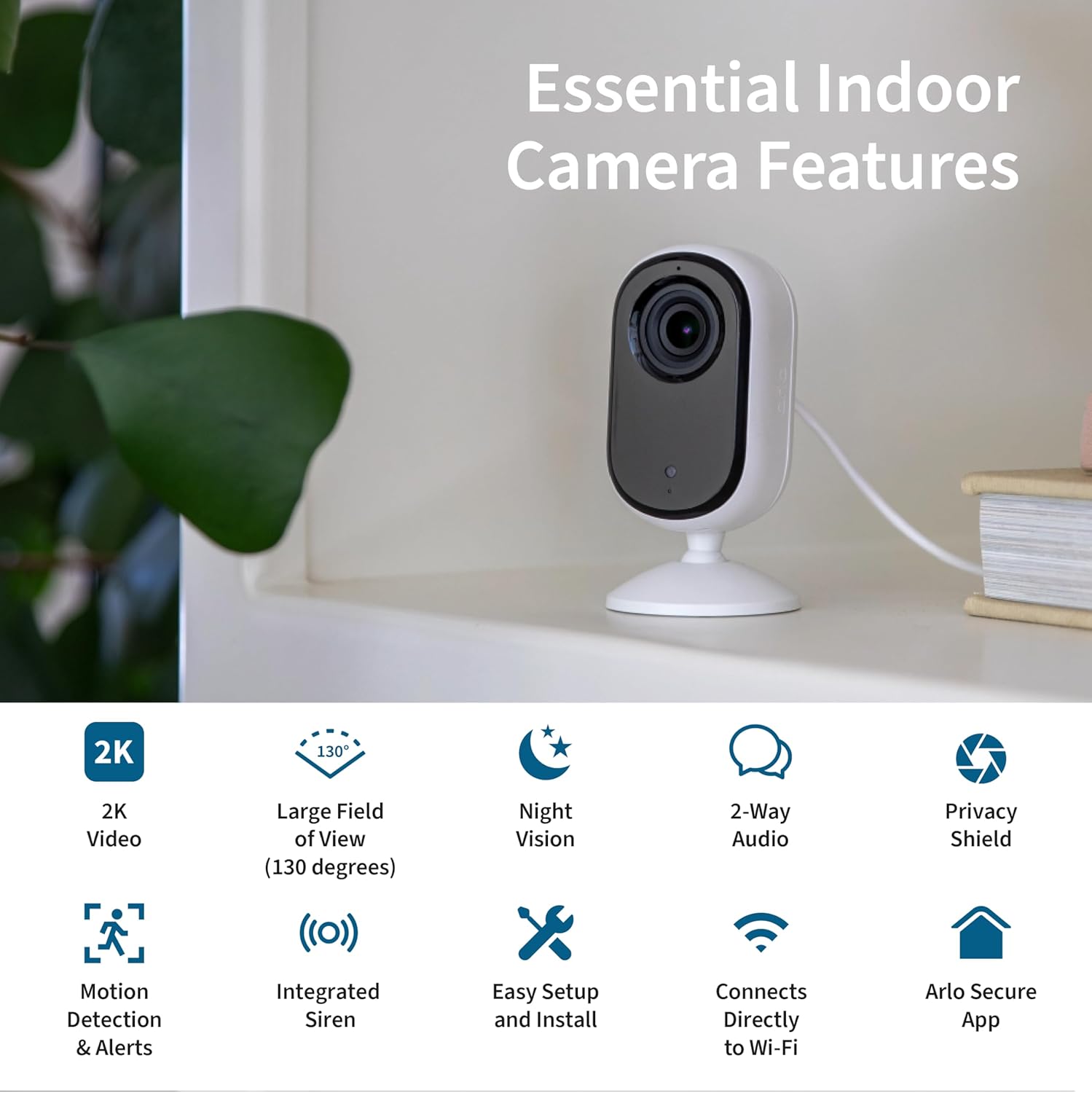
Figure 2: Essential Indoor Camera Key Features.
3.2 ส่วนประกอบ
The Arlo Essential Indoor Camera consists of the camera unit with an integrated stand and a power cable for continuous operation.

Figure 3: Arlo Essential Indoor Camera 2K.
4. การตั้งค่า
4.1 การเพิ่มพลังเริ่มต้น
- Connect the power cord to the included power adapter.
- Plug the power adapter into an electrical outlet at your desired camera location.
- The camera is powered on and ready when the automated privacy shield opens.
4.2 Arlo Secure App Installation and Pairing
- Download the Arlo Secure App from your device's app store (App Store for iOS, Google Play Store for Android).
- Create a new Arlo account or log in if you already have one. Ensure your app is updated to the latest version.
- เปิดใช้งานบลูทูธบนสมาร์ทโฟนของคุณ
- Open the Arlo Secure App and navigate to the "Devices" section.
- Tap the "+" icon in the upper right corner to add a new device.
- Select "Cameras" then "Essential Cameras 2nd Generation".
- To begin Bluetooth pairing, press and hold the pairing button on top of the camera for 3 seconds until the camera's LED flashes blue. The app will automatically detect your camera.
- Follow the on-screen prompts to name your camera and allow the app to check for firmware updates. This process may take a few minutes.
Video 2: Detailed guide on setting up your Arlo Essential Indoor 2K Camera.
4.3 การจัดวางและการติดตั้ง
Ensure your Wi-Fi signal strength is strong at the camera's mounting spot. You can verify the signal strength within the Arlo Secure App.
- ตำแหน่งพื้นผิวเรียบ: The camera can be placed on any flat surface, such as a shelf or table.
- การติดตั้งบนผนัง: If mounting on a wall, use the included wall plate and screw kit.
- Securely anchor the wall plate with the "UP" arrow facing upwards, using the provided hardware.
- Align the "UP" arrow on the camera's base with the arrow on the wall plate.
- Slide your camera downward onto the wall plate until it clicks into place.
- Adjust the camera's angle for the optimal viewพื้นที่ที่กำลังก่อสร้าง

Figure 4: Automated Privacy Shield in action.
5. Operating Your Arlo Essential Indoor Camera
5.1 สด View และเสียงสองทาง
- Open the Arlo Secure App to view live video from your camera.
- Use the microphone icon in the app to enable two-way audio and speak through the camera.

Figure 5: Arlo Secure App Interface for Live Monitoring.
5.2 การตรวจจับการเคลื่อนไหวและการแจ้งเตือน
- The camera automatically detects motion and sends alerts to your smartphone.
- Customize alert settings and activity zones within the Arlo Secure App to receive notifications for specific areas.
- Activate the integrated siren remotely from the app to deter unwanted visitors.
5.3 Privacy Shield Control
- Control the automated privacy shield via the Arlo Secure App.
- Close the shield when you desire privacy, ensuring the camera is not recording.
Video 3: Arlo's Privacy Pledge, detailing how your data is protected and controlled.
5.4 การรวมระบบบ้านอัจฉริยะ
- Integrate your Arlo camera with Amazon Alexa and Google Home for voice control and smart routines.
- Use IFTTT automations for enhanced functionality, such as receiving low battery notifications or turning on compatible lights when motion is detected.

Figure 6: Arlo Essential Indoor Camera 2K Smart Home Compatibility.
6. การบำรุงรักษา
- การทำความสะอาด: เช็ดเลนส์และตัวกล้องเบาๆ ด้วยผ้านุ่มและแห้ง หลีกเลี่ยงการใช้สารเคมีรุนแรงหรือวัสดุที่มีฤทธิ์กัดกร่อน
- อัพเดตเฟิร์มแวร์: Regularly check for and install firmware updates via the Arlo Secure App to ensure optimal performance and security.
- การเชื่อมต่อไฟฟ้า: ตรวจสอบให้แน่ใจว่าสายไฟเชื่อมต่อแน่นหนาและไม่มีความเสียหาย
7 การแก้ไขปัญหา
| ปัญหา | สาเหตุที่เป็นไปได้ | สารละลาย |
|---|---|---|
| กล้องไม่สามารถเปิดได้ | Power adapter not connected, outlet not working. | Ensure power adapter is securely connected and try a different outlet. |
| ไม่สามารถเชื่อมต่อ Wi-Fi ได้ | Weak Wi-Fi signal, incorrect password. | Move camera closer to router, re-enter Wi-Fi password, restart router. |
| ไม่ได้รับการแจ้งเตือนการเคลื่อนไหว | App notifications disabled, activity zones not configured. | Check app notification settings, configure activity zones in the app. |
| Privacy shield stuck. | Minor mechanical issue. | Restart the camera by unplugging and re-plugging the power. If issue persists, contact support. |
8. ข้อมูลจำเพาะ
| คุณสมบัติ | รายละเอียด |
|---|---|
| หมายเลขรุ่น | วีเอ็มซี3060 |
| การใช้งานภายใน/ภายนอกอาคาร | ในร่ม |
| ความละเอียดในการจับภาพวิดีโอ | 1440p (2K) |
| เทคโนโลยีการเชื่อมต่อ | Wi-Fi, แบบมีสาย |
| แหล่งพลังงาน | สายไฟ |
| ขนาด (กว้าง x ยาว x สูง) | 1.42 x 1.85 x 3.82 นิ้ว |
| น้ำหนักสินค้า | 3.36 ออนซ์ |
| ซูมออปติคอล | 12 เท่า |
| สี | สีขาว |
| ยูพีซี | 193108145435 |
9. การรับประกันและการสนับสนุน
For warranty information, technical support, and additional resources, please visit the official Arlo website or contact Arlo customer support. 24/7 chat support is available via the Arlo app or website. Product use and support are for the United States only.
For current information on features that require a paid subscription (Arlo Secure Plan), visit arlo.com/arlosecure.