การแนะนำ
This manual provides detailed instructions for the proper use, setup, and maintenance of your PATONA BG-R10 Power Grip. Please read this manual thoroughly before using the product to ensure optimal performance and longevity.
The PATONA BG-R10 Power Grip is designed to enhance camera handling in both horizontal and vertical positions, providing extended battery life and improved ergonomics. It includes a 2.4G wireless remote control for versatile shooting options.
สินค้าเกินview
The PATONA BG-R10 Power Grip is a high-quality replacement for the original BG-R10, compatible with Canon EOS R5, EOS R6, EOS R5 C, and EOS R6 Mark II cameras. It accommodates two LP-E6, LP-E6N, or LP-E6NH batteries (not included) for extended shooting sessions.

รูปที่ 1: PATONA BG-R10 Power Grip and 2.4G remote control, shown with its packaging. This image provides a general view ของผลิตภัณฑ์และอุปกรณ์เสริม

รูปที่ 2: The power grip detached from its battery tray, alongside the 2.4G wireless remote control. This view highlights the grip's structure and the separate battery compartment.

รูปที่ 3: จากบนลงล่าง view of the power grip, showing the main dial, shutter button, M.Fn button, quick selection dial, multi-controller, AF ON button, AE memory button, AF area selection button, magnifying button, and power switch. The battery compartment is open.
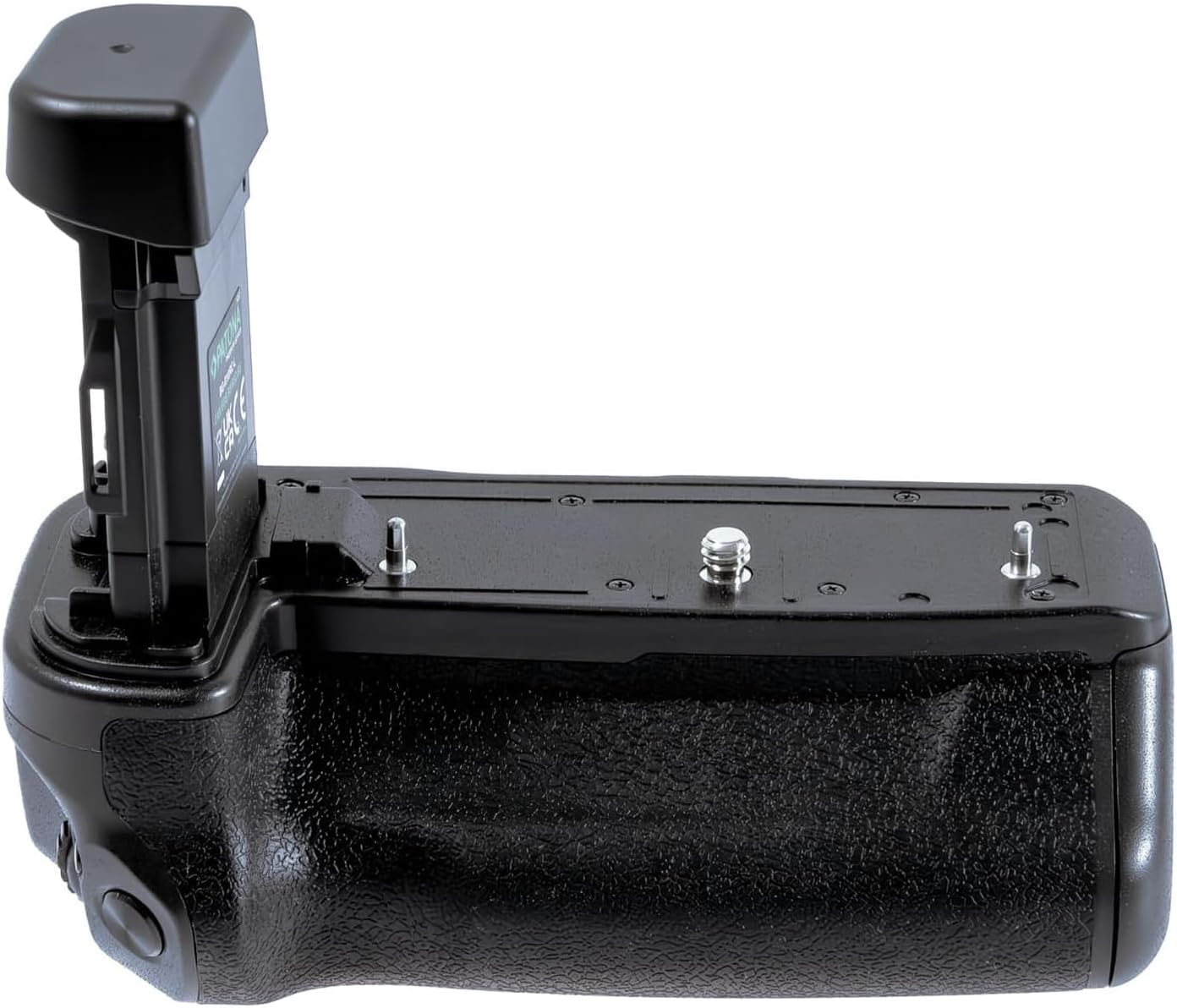
รูปที่ 4: ด้านข้าง view of the power grip, illustrating its ergonomic design and textured surface for a secure and comfortable grip. The battery compartment is closed.

รูปที่ 5: Close-up of the 2.4G wireless remote control, featuring an LCD screen and various control buttons for adjusting shooting parameters.
การตั้งค่า
Installing Batteries in the Power Grip
- ตรวจสอบให้แน่ใจว่าปิดกล้องแล้ว
- Open the battery compartment of the power grip by sliding the lock mechanism.
- Insert up to two compatible batteries (LP-E6, LP-E6N, or LP-E6NH) into the battery tray, ensuring correct polarity.
- ปิดช่องใส่แบตเตอรี่ให้แน่นจนกระทั่งคลิกเข้าที่
Attaching the Power Grip to the Camera
- Remove the battery from your camera's battery compartment.
- Align the power grip's mounting screw with the camera's tripod socket.
- Tighten the mounting screw securely by rotating the thumbwheel on the power grip until it is firmly attached to the camera.
- Ensure the electrical contacts on the grip align with those on the camera.
การติดตั้งแบตเตอรี่ในรีโมทคอนโทรล
The 2.4G remote control requires 2 AAA batteries (not included). Open the battery cover on the back of the remote and insert the batteries, observing correct polarity.
คำแนะนำการใช้งาน
Power Grip Controls
The power grip replicates essential camera controls for comfortable vertical shooting:
- หน้าปัดหลัก: Adjusts camera settings.
- ปุ่มชัตเตอร์: สำหรับการถ่ายรูป
- M.Fn Button: Multi-function button, customizable via camera settings.
- Quick Selection Dial 1: For quick adjustments.
- Multi-controller: สำหรับการนำทางและการเลือก
- AF ON Button: Activates autofocus.
- AE Memory Button: Locks exposure.
- AF Area Selection Button: Changes autofocus area.
- Magnifying Button: Zooms in on playback.
- สวิตช์ไฟ: Turns the power grip's controls on/off.
Note: The power grip does not feature a DC input. Therefore, the LEDs for the charge indicator are non-functional on this version.
Using the 2.4G Wireless Remote Control
The remote control offers advanced functionality for remote shooting:
- พิสัย: Up to 40 meters (approximately 130 feet).
- ฟังก์ชั่น:
- Select frame rate.
- Set shooting delay.
- Adjust exposure time.
- Configure intervals for time-lapse photography.
- หน้าจอ LCD: Provides visual confirmation of your settings.
Refer to the remote control's specific instructions for pairing and detailed operation of each function.
การบำรุงรักษาและการดูแล
- การทำความสะอาด: Use a soft, dry cloth to clean the power grip and remote control. Do not use liquid cleaners or solvents.
- พื้นที่จัดเก็บ: When not in use for extended periods, remove batteries from both the power grip and the remote control to prevent leakage. Store in a cool, dry place away from direct sunlight.
- การจัดการ: Avoid dropping the device or subjecting it to strong impacts. Protect it from extreme temperatures and humidity.
การแก้ไขปัญหา
| ปัญหา | สาเหตุที่เป็นไปได้ | สารละลาย |
|---|---|---|
| Power grip controls not responding. |
|
|
| รีโมทคอนโทรลไม่ทำงาน |
|
|
| Camera not recognizing the grip. |
|
|
ข้อมูลจำเพาะ
- แบบอย่าง: บีจี1463บี
- ความเข้ากันได้: Canon EOS R5, EOS R6, EOS R5 C, EOS R6 Mark II
- ความเข้ากันได้ของแบตเตอรี่: 2x LP-E6, LP-E6N, LP-E6NH (batteries not included)
- รีโมทคอนโทรล: 2.4G รีโมทคอนโทรลแบบไร้สาย
- ช่วงการควบคุมระยะไกล: สูงสุด 40 เมตร
- แบตเตอรี่รีโมทคอนโทรล: 2x AAA (ไม่รวม)
- ขนาด (ยาว x กว้าง x สูง): 14.3 x 8 x 11.7 ซม. (5.63 x 3.15 x 4.61 นิ้ว)
- น้ำหนัก: ประมาณ 280 กรัม (0.62 ปอนด์)
- การติดตั้ง: 1/4" tripod thread on bottom
การรับประกันและการสนับสนุน
สำหรับข้อมูลการรับประกันและการสนับสนุนทางเทคนิค โปรดดูที่เว็บไซต์อย่างเป็นทางการของ PATONA webหรือติดต่อตัวแทนจำหน่ายในพื้นที่ของคุณ เก็บใบเสร็จรับเงินไว้เป็นหลักฐานการซื้อสำหรับการเรียกร้องการรับประกัน
ผู้ผลิต: ปัตตานี


