1. สินค้าหมดview
The Vorago BSP-500-V2 is a portable Bluetooth speaker designed for robust performance and durability. It features IPX5 water resistance, making it suitable for various environments, including outdoor adventures and parties. This manual provides detailed instructions for setting up, operating, and maintaining your speaker.
คุณสมบัติหลัก:
- True Wireless Stereo (TWS) Connectivity: Connect two BSP-500-V2 speakers for an immersive stereo sound experience.
- อายุการใช้งานแบตเตอรี่ที่ยาวนานขึ้น: Enjoy up to 7 hours of music playback at 70% volume, thanks to its 2000 mAh battery.
- การชาร์จ USB Type-C: Convenient and modern USB-C port for charging.
- การเชื่อมต่อที่หลากหลาย: Supports Bluetooth for wireless streaming and a 3.5mm auxiliary input for wired connections.
- ความต้านทานน้ำ IPX5: ป้องกันน้ำแรงดันต่ำที่พุ่งมาจากทุกทิศทาง
เนื้อหาแพ็คเกจ:
- ลำโพงบลูทูธ Vorago BSP-500-V2
- สายชาร์จแบบ USB Type-C
- สายสัญญาณเสียงขนาด 3.5 มม.
- คู่มือการใช้งาน (เอกสารนี้)
แผนภาพผลิตภัณฑ์:

รูปที่ 1.1 : ด้านหน้า view of the Vorago BSP-500-V2 Bluetooth speaker, showcasing its mesh grille and central Vorago logo.

รูปที่ 1.2: มุม view of the speaker, highlighting its robust, rectangular design and integrated carrying strap.

รูปที่ 1.3: ด้านบน view showing the control panel with power, volume down, play/pause, and volume up buttons.
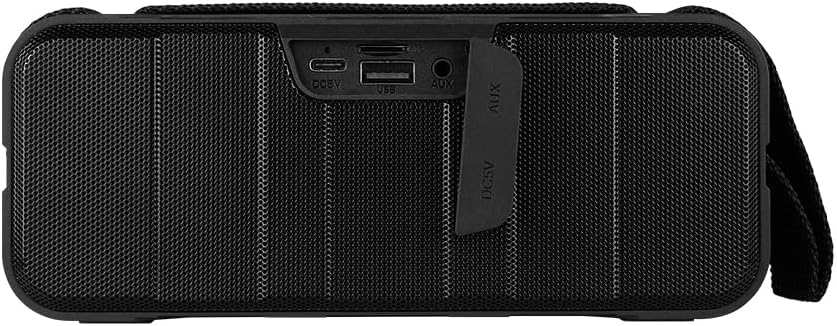
รูปที่ 1.4: ด้านหลัง view of the speaker, showing the protective flap covering the input ports.

Figure 1.5: Close-up of the input ports, including DC 5V (USB-C), USB-A, and AUX (3.5mm) inputs, protected by a rubber cover.
2. ข้อมูลด้านความปลอดภัย
- อย่านำลำโพงไปวางไว้ในที่ที่มีอุณหภูมิสูงหรือต่ำเกินไป
- หลีกเลี่ยงการทำตกหรือให้ลำโพงได้รับแรงกระแทกรุนแรง
- Keep the speaker away from direct sunlight and heat sources.
- ห้ามถอดประกอบ ซ่อมแซม หรือดัดแปลงลำโพงด้วยตนเอง การกระทำดังกล่าวจะทำให้การรับประกันเป็นโมฆะ
- Ensure the port cover is securely closed when using the speaker near water to maintain IPX5 water resistance.
- Do not immerse the speaker in water. IPX5 rating protects against splashes and light rain, not submersion.
- ใช้เฉพาะสายชาร์จที่ให้มาหรือสาย USB Type-C ที่ผ่านการรับรองสำหรับการชาร์จเท่านั้น
- ทำความสะอาดลำโพงด้วยผ้านุ่มและแห้ง ห้ามใช้น้ำยาทำความสะอาดหรือสารละลายที่มีฤทธิ์กัดกร่อน
3. การตั้งค่า
3.1 การชาร์จลำโพง
- Open the protective rubber cover on the rear of the speaker to access the charging port.
- Connect the USB Type-C end of the charging cable to the speaker's DC 5V port.
- เชื่อมต่อปลายอีกด้านหนึ่งของสาย USB เข้ากับอะแดปเตอร์ไฟ USB (ไม่รวมอยู่ด้วย) หรือพอร์ต USB ของคอมพิวเตอร์
- ไฟแสดงสถานะการชาร์จจะสว่างขึ้นในระหว่างการชาร์จ และดับลงเมื่อชาร์จเต็ม
- Once charging is complete, securely close the protective rubber cover to maintain water resistance.
3.2 การเปิด/ปิดเครื่อง
- การเปิดเครื่อง: กดปุ่มค้างไว้ ปุ่มเปิดปิด on the top panel for approximately 3 seconds until you hear an audible prompt.
- วิธีปิดเครื่อง: กดปุ่มค้างไว้ ปุ่มเปิดปิด for approximately 3 seconds until you hear an audible prompt.
3.3 การจับคู่บลูทูธ
- ตรวจสอบให้แน่ใจว่าลำโพงเปิดอยู่ ลำโพงจะเข้าสู่โหมดจับคู่บลูทูธโดยอัตโนมัติ ซึ่งจะแสดงด้วยไฟ LED กระพริบ
- บนอุปกรณ์ของคุณ (สมาร์ทโฟน แท็บเล็ต แล็ปท็อป) เปิดใช้งาน Bluetooth และค้นหาอุปกรณ์ที่มีอยู่
- Select "BSP-500-V2" from the list of found devices.
- Once successfully paired, the speaker will emit an audible confirmation, and the LED light will stop flashing and remain solid.
- ลำโพงจะเชื่อมต่อกับอุปกรณ์ที่จับคู่ไว้ล่าสุดโดยอัตโนมัติเมื่อเปิดเครื่อง หากอุปกรณ์อยู่ในระยะและเปิดใช้งาน Bluetooth ไว้
การจับคู่ระบบเสียงสเตอริโอไร้สาย 3.4 True Wireless Stereo (TWS)
TWS allows you to connect two BSP-500-V2 speakers together for a true stereo sound experience.
- Ensure both BSP-500-V2 speakers are powered on and not connected to any other Bluetooth device.
- On one of the speakers (this will be the primary speaker), double-press the ปุ่มเล่น/หยุดชั่วคราวลำโพงจะเข้าสู่โหมดจับคู่ TWS
- The two speakers will automatically search for and connect to each other. You will hear an audible confirmation once they are successfully paired.
- Once TWS is established, connect your device to the primary speaker via Bluetooth as described in Section 3.3.
- หากต้องการตัดการเชื่อมต่อ TWS ให้กดปุ่มสองครั้ง ปุ่มเล่น/หยุดชั่วคราว บนลำโพงทั้งสองตัว
3.5 การเชื่อมต่อเสริม (AUX)
For devices without Bluetooth, you can use the 3.5mm audio cable.
- Open the protective rubber cover on the rear of the speaker.
- Connect one end of the 3.5mm audio cable to the speaker's AUX port.
- ต่อปลายอีกด้านของสายเคเบิลเข้ากับช่องเสียบสัญญาณเสียงออกของอุปกรณ์ของคุณ
- ลำโพงจะเปลี่ยนเป็นโหมด AUX โดยอัตโนมัติ
- Once disconnected, securely close the protective rubber cover.
4. คู่มือการใช้งาน
4.1 ฟังก์ชันปุ่ม:
| ปุ่ม | ฟังก์ชั่น (กดสั้น) | ฟังก์ชั่น (กดค้าง) |
|---|---|---|
| ปุ่มเปิดปิด | ไม่มีข้อมูล | เปิด/ปิดเครื่อง |
| ปุ่มลดระดับเสียง | ลดระดับเสียง | เพลงก่อนหน้า |
| ปุ่มเล่น/หยุดชั่วคราว | เล่น/หยุดเพลง, รับ/วางสาย | Reject Call, Double-press for TWS Pairing |
| ปุ่มเพิ่มระดับเสียง | เพิ่มปริมาณ | เพลงถัดไป |
5. การบำรุงรักษา
- การทำความสะอาด: Use a soft, dry, lint-free cloth to clean the speaker's surface. For stubborn dirt, slightly dampชุบผ้าด้วยน้ำ ห้ามใช้สารเคมีรุนแรง น้ำยาทำความสะอาด หรือผงซักฟอกชนิดเข้มข้น
- การดูแลกันน้ำ: Always ensure the rubber port cover on the back of the speaker is fully and securely sealed when using the speaker outdoors or near water. This maintains its IPX5 water resistance. After exposure to water, wipe the speaker dry before opening the port cover for charging or auxiliary connections.
- พื้นที่จัดเก็บ: When not in use for extended periods, store the speaker in a cool, dry place, away from direct sunlight and extreme temperatures. It is recommended to charge the speaker fully before storing and to recharge it every few months to maintain battery health.
- การดูแลแบตเตอรี่ To prolong battery life, avoid fully discharging the battery frequently. Charge the speaker when the low battery indicator is active.
6 การแก้ไขปัญหา
| ปัญหา | สาเหตุที่เป็นไปได้ | สารละลาย |
|---|---|---|
| ลำโพงไม่เปิดเครื่อง | แบตเตอรี่อ่อน | Charge the speaker fully using the provided USB Type-C cable. |
| ไม่สามารถจับคู่ผ่านบลูทูธได้ | Speaker is not in pairing mode; Device's Bluetooth is off; Speaker is already connected to another device; Device is too far from speaker. | Ensure speaker is powered on and flashing (pairing mode). Turn on Bluetooth on your device. Disconnect from other devices. Move device closer to speaker (within 10 meters). |
| ไม่มีเสียงหรือเสียงเบา | ระดับเสียงลำโพงหรืออุปกรณ์เบาเกินไป; โหมดอินพุตไม่ถูกต้อง; ไม่ได้เชื่อมต่อลำโพง | Increase volume on both speaker and connected device. Ensure correct mode (Bluetooth or AUX) is active. Verify successful Bluetooth pairing or AUX cable connection. |
| ความผิดเพี้ยนของเสียง | ระดับเสียงดังเกินไป; อุปกรณ์อยู่ห่างจากลำโพงมากเกินไป; มีสัญญาณรบกวน | Reduce volume on speaker and/or device. Move device closer to speaker. Avoid obstacles between speaker and device. |
| การจับคู่ TWS ล้มเหลว | Speakers are already paired to a device; Speakers are too far apart. | Ensure both speakers are disconnected from any Bluetooth devices. Place speakers close to each other during TWS pairing. |
7. ข้อมูลจำเพาะ
| คุณสมบัติ | รายละเอียด |
|---|---|
| ชื่อรุ่น | BSP-500-V2 |
| ประเภทลำโพง | มัลติมีเดีย |
| คุณสมบัติพิเศษ | บลูทูธ |
| ข้อแนะนำการใช้ | For music players |
| อุปกรณ์ที่รองรับ | แล็ปท็อป, เครื่องเล่น MP3, สมาร์ทโฟน, แท็บเล็ต |
| ประเภทตัวควบคุม | ปุ่ม |
| การกำหนดค่าช่องเสียงรอบทิศทาง | 5.0 |
| อายุการใช้งานแบตเตอรี่ | 7 ชั่วโมง |
| รวมส่วนประกอบ | ลำโพง |
| ขนาดสินค้า | 5D x 15W x 18H cm |
| น้ำหนักผลิตภัณฑ์ | 1 กิโลกรัม |
| กันน้ำ | ใช่ (IPX5) |
| ความจุของแบตเตอรี่ | 2000 มิลลิแอมป์ |
| Amplifier ประเภท | คล่องแคล่ว |
| แหล่งพลังงาน | แบตเตอรี่ |
| การตอบสนองความถี่ | 180 เฮิรตซ์ |
| เทคโนโลยีการเชื่อมต่อ | บลูทูธ |
| โหมดเอาต์พุตเสียง | สเตอริโอ |
| ประเภทการติดตั้ง | ที่วางบนโต๊ะ |
8. การรับประกันและการสนับสนุน
The Vorago BSP-500-V2 Bluetooth Speaker comes with a limited warranty. Please refer to the warranty card included with your product for specific terms and conditions, or visit the official Vorago webเว็บไซต์เพื่อดูรายละเอียดเพิ่มเติม
For technical support, troubleshooting assistance, or warranty claims, please contact Vorago customer service through their official channels. You can find more information and contact details on the Vorago Brand Store on Amazon หรืออย่างเป็นทางการของพวกเขา webเว็บไซต์.
โปรดเก็บหลักฐานการซื้อไว้เพื่อวัตถุประสงค์การรับประกัน


