1. บทนำ
Thank you for choosing the ISE SY-6826-DE 2-in-1 Recumbent Exercise Bike. This manual provides essential information for the safe assembly, operation, and maintenance of your new fitness equipment. Please read it thoroughly before use and retain it for future reference.

รูปที่ 1: เกินview of the ISE SY-6826-DE Recumbent Exercise Bike.
2. คำแนะนำด้านความปลอดภัยที่สำคัญ
To reduce the risk of serious injury, please observe the following safety precautions:
- ปรึกษาแพทย์ก่อนเริ่มโปรแกรมการออกกำลังกาย
- เก็บเด็กและสัตว์เลี้ยงให้ห่างจากอุปกรณ์
- Place the exercise bike on a stable, level surface. Ensure adequate space around the equipment.
- ตรวจสอบอุปกรณ์ก่อนใช้งานทุกครั้งว่ามีชิ้นส่วนหลวมหรือมีร่องรอยการสึกหรอหรือไม่ ห้ามใช้หากอุปกรณ์ชำรุด
- น้ำหนักผู้ใช้สูงสุดสำหรับอุปกรณ์นี้คือ 100 กก. (220 ปอนด์)ห้ามเกินขีดจำกัดนี้
- Wear appropriate exercise clothing and footwear. Avoid loose clothing that could get caught.
- หยุดออกกำลังกายทันทีหากคุณรู้สึกจะเป็นลม เวียนศีรษะ หรือมีความเจ็บปวด
- ตรวจสอบให้แน่ใจว่าได้ขันน็อตและสกรูทั้งหมดแน่นสนิทก่อนใช้งาน
3. เนื้อหาบรรจุภัณฑ์
Please verify that all components are present before assembly. If any parts are missing or damaged, contact customer support.
- การประกอบเฟรมหลัก
- ที่นั่งและพนักพิง
- คันเหยียบ (ซ้ายและขวา)
- Handlebars with Pulse Sensors
- คอนโซลจอแสดงผล LCD
- เหล็กกันโคลง
- Assembly Hardware (screws, washers, nuts)
- Assembly Tools (wrenches, Allen keys)
- คู่มือการใช้งาน
4. คำแนะนำในการประกอบ
Assembly typically takes approximately 30 minutes. It is recommended to have a second person assist with certain steps. Follow the numbered steps below:
- ติดตั้งเหล็กค้ำยัน: Secure the front and rear stabilizer bars to the main frame using the provided bolts and washers. Ensure they are firmly tightened.
- ติดตั้งคันเหยียบ: Identify the left (L) and right (R) pedals. The left pedal screws counter-clockwise, and the right pedal screws clockwise. Tighten securely.
- ติดตั้งที่นั่งและพนักพิง: Attach the seat and backrest to the seat post. Then, slide the seat post into the main frame and secure it with the adjustment knob.
- Connect Handlebars and Console: Attach the handlebars to the upright post. Connect the sensor cables from the handlebars to the LCD display console. Mount the console onto the handlebar post.
- ใส่แบตเตอรี่: Open the battery compartment on the back of the LCD display and insert the required batteries (not included).
- การตรวจสอบขั้นสุดท้าย: Review all connections and ensure all bolts and nuts are tightened. Test the stability of the bike before first use.

Figure 2: Key components including comfortable seat, anti-slip footrests, heart rate sensors, removable seat, transport wheels, and electrolytic crank.
5. คู่มือการใช้งาน
5.1 การปรับเบาะนั่ง
The seat can be adjusted forward and backward to accommodate different user heights. Locate the adjustment lever or knob beneath the seat. Pull or turn it to release the seat, slide it to the desired position, and then secure it firmly.

Figure 3: Product dimensions and seat adjustment range (23 cm).
5.2 การปรับแนวต้าน
The exercise bike features 8 levels of magnetic resistance. To increase or decrease the workout intensity, turn the resistance adjustment knob located on the main frame. Turn clockwise for higher resistance and counter-clockwise for lower resistance.

Figure 4: Resistance adjustment knob with 8 levels.
5.3 การใช้จอแสดงผล LCD
The multifunctional LCD display tracks your workout data. It shows:
- ชีพจร: Your heart rate (measured via hand pulse sensors).
- เวลา: ระยะเวลาการออกกำลังกายของคุณ
- ความเร็ว: ความเร็วในการปั่นจักรยานปัจจุบัน
- ระยะทาง: ระยะทางรวมที่เดินทางในรอบปัจจุบัน
- แคลอรี่: แคลอรี่ที่เผาผลาญโดยประมาณ
- ODO (มาตรวัดระยะทาง): ระยะทางสะสมทั้งหมด
- สแกน: สลับการแสดงผลทุกฟังก์ชันโดยอัตโนมัติ
Use the three buttons (SET, MODE, RESET) below the display to navigate and control functions:
- เส้นทาง: Press to select a specific display function or to activate the SCAN mode.
- SET: Used to set target values for time, distance, or calories (if applicable).
- รีเซ็ต: Press and hold to clear all current workout data.
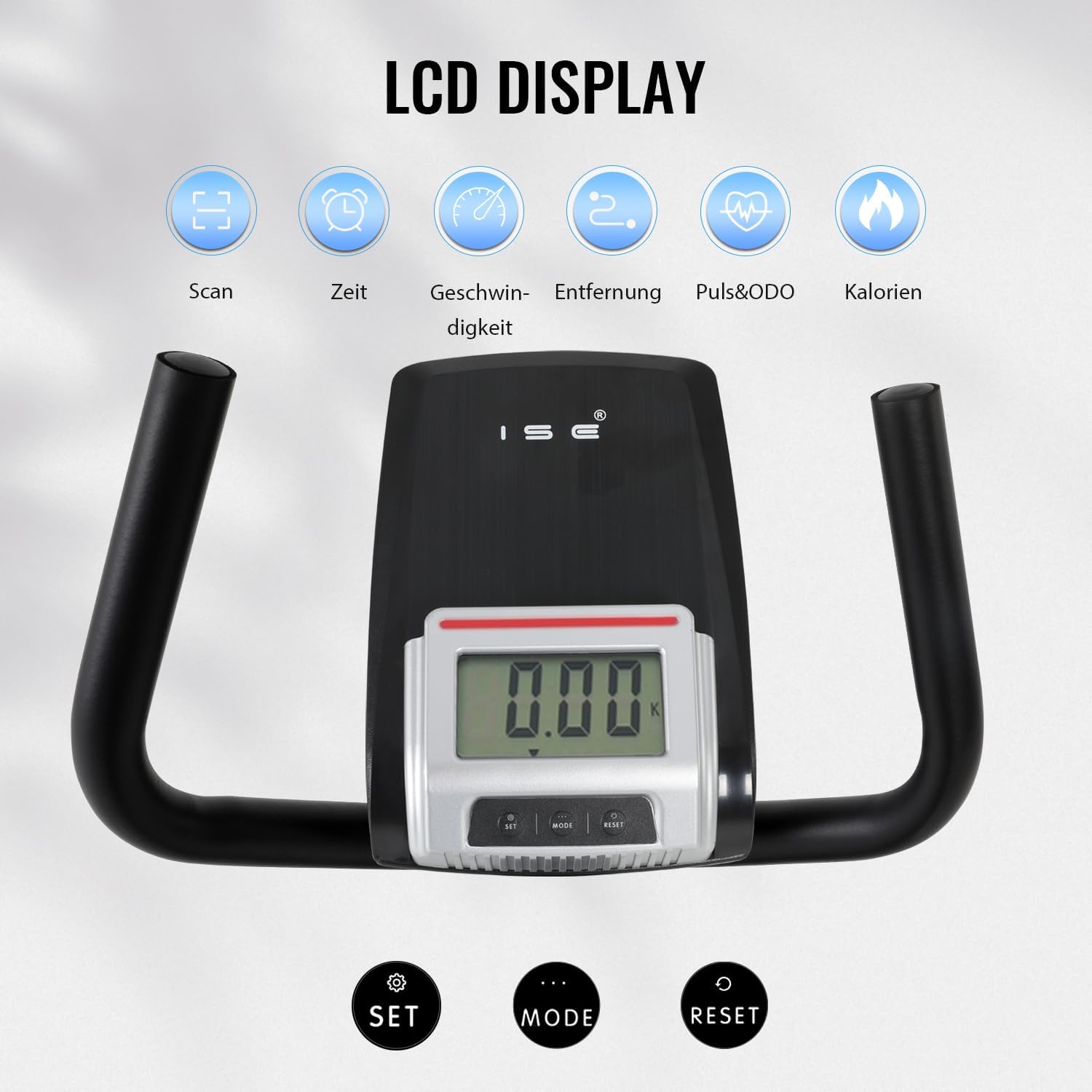
Figure 5: LCD display and control buttons.
5.4 Pulse Sensors
Grip the pulse sensors on the handlebars firmly with both hands to measure your heart rate. The PULSE reading will appear on the LCD display after a few seconds.
6. การบำรุงรักษา
การบำรุงรักษาอย่างสม่ำเสมอจะช่วยให้จักรยานออกกำลังกายของคุณใช้งานได้ยาวนานและปลอดภัย
- การทำความสะอาด: เช็ดอุปกรณ์ด้วยโฆษณาamp ใช้ผ้าเช็ดทำความสะอาดหลังการใช้งานทุกครั้งเพื่อขจัดเหงื่อและฝุ่นละออง ห้ามใช้สารทำความสะอาดที่มีฤทธิ์กัดกร่อน
- การตรวจสอบ: ตรวจสอบสลักเกลียว น็อต และชิ้นส่วนเคลื่อนไหวทั้งหมดเป็นระยะๆ เพื่อความแน่นหนาและการสึกหรอ ขันสกรูยึดที่หลวมให้แน่น
- การหล่อลื่น: The magnetic resistance system is generally maintenance-free. Do not lubricate internal components unless specifically instructed by customer support.
- พื้นที่จัดเก็บ: เก็บจักรยานออกกำลังกายไว้ในที่แห้งและเย็น หลีกเลี่ยงแสงแดดโดยตรงและอุณหภูมิที่สูงหรือต่ำเกินไป ล้อสำหรับเคลื่อนย้ายที่ติดตั้งมาด้วยช่วยให้เคลื่อนย้ายได้ง่าย

Figure 6: Transport wheels for convenient storage and movement.
7 การแก้ไขปัญหา
If you encounter issues with your exercise bike, refer to the following common problems and solutions:
| ปัญหา | สาเหตุที่เป็นไปได้ | สารละลาย |
|---|---|---|
| จอ LCD ไม่ทำงาน | แบตเตอรี่หมดหรือติดตั้งไม่ถูกต้อง | เปลี่ยนแบตเตอรี่หรือตรวจสอบให้แน่ใจว่าขั้วถูกต้อง |
| ไม่มีการวัดอัตราการเต้นของหัวใจ | Loose sensor connection, improper grip | Check sensor cables. Ensure both hands firmly grip the sensors. |
| Bike wobbles during use | Loose fasteners, uneven surface | Tighten all assembly bolts. Ensure the bike is on a level surface. Adjust foot levelers if present. |
| ความต้านทานไม่เปลี่ยนแปลง | ปัญหาของสายเคเบิลต้านทาน | Check if the resistance cable is properly connected and not obstructed. Contact customer support if the issue persists. |
8. ข้อมูลจำเพาะผลิตภัณฑ์
| คุณสมบัติ | ข้อมูลจำเพาะ |
|---|---|
| หมายเลขรุ่น | SY-6826-DE |
| ยี่ห้อ | สพฐ. |
| สี | สีดำ |
| วัสดุ | เหล็กอัลลอยด์ |
| ระบบขับเคลื่อน | เข็มขัด |
| กลไกต้านทาน Resistance | แม่เหล็ก |
| ระดับความต้านทาน | ปรับได้ 8 ระดับ |
| แหล่งพลังงาน | Battery-powered (for display) |
| ขนาดสินค้า (กว้าง x ยาว x สูง) | 140 x 58 x 110 ซม. (55.1 x 22.8 x 43.3 นิ้ว) |
| น้ำหนักสินค้า | 24 กก. (52.9 ปอนด์) |
| น้ำหนักผู้ใช้สูงสุด | 100 กก. (220 ปอนด์) |
| คุณสมบัติพิเศษ | Distance monitor, adjustable seat, pulse sensors, transport wheels |
9. การรับประกันและการสนับสนุน
For warranty information and customer support, please refer to the documentation included with your purchase or contact ISE GmbH directly. Keep your proof of purchase for any warranty claims.


