การแนะนำ
This manual provides comprehensive instructions for the setup, operation, and maintenance of your Brady M511 Portable Wireless Industrial Label Printer. The M511 is designed for industrial applications, offering robust performance and wireless connectivity for efficient label creation.
โปรดอ่านคู่มือนี้อย่างละเอียดก่อนใช้งานอุปกรณ์ เพื่อให้มั่นใจได้ว่าอุปกรณ์ทำงานได้อย่างถูกต้องและป้องกันความเสียหาย
สิ่งที่รวมอยู่
Upon unboxing, verify that all components listed below are present in your Brady M511 Printer Kit:
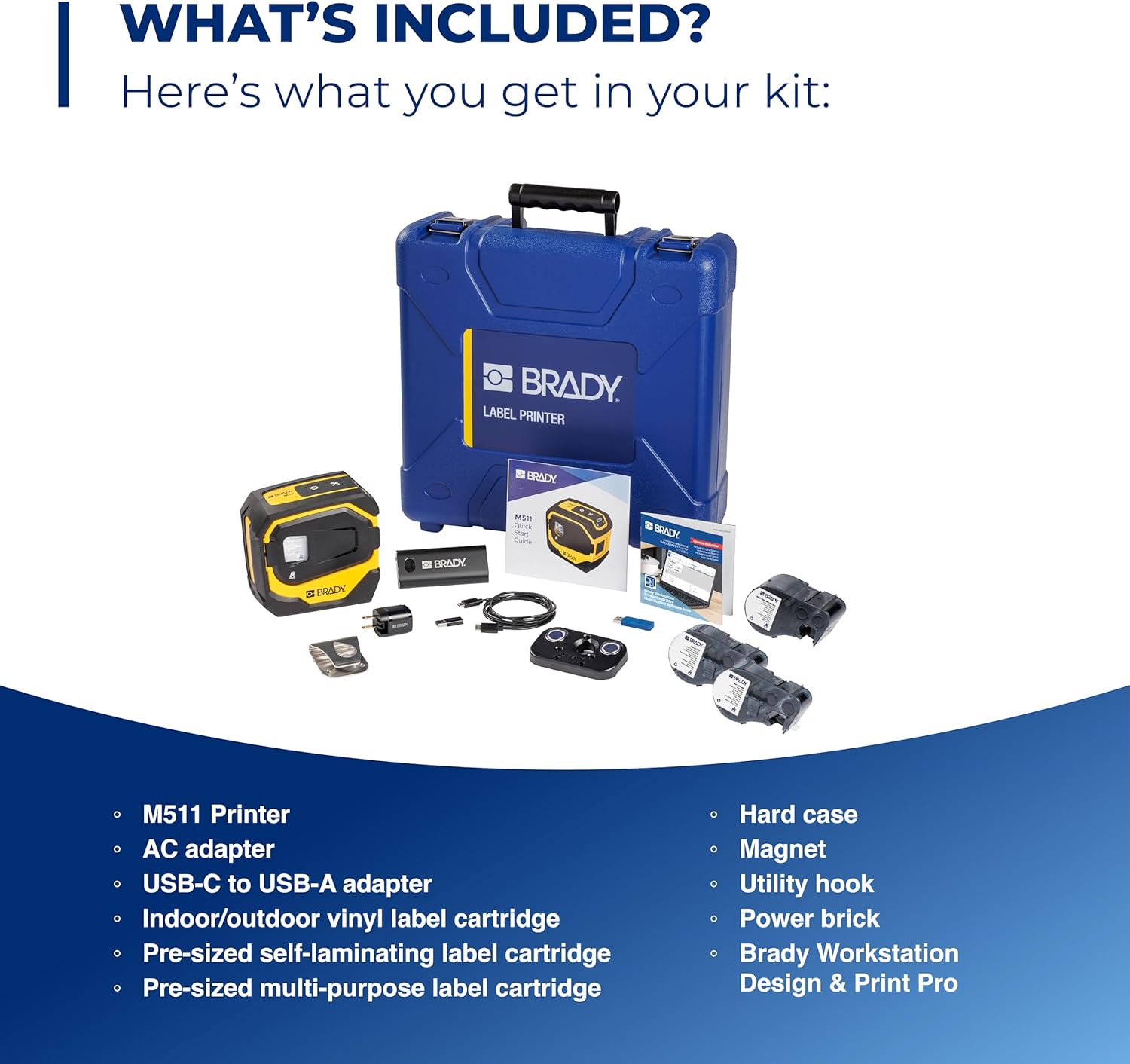
Image: Contents of the Brady M511 Printer Kit. This image displays the M511 printer, a blue hard case, an AC adapter, a USB-C to USB-A adapter, three label cartridges (indoor/outdoor vinyl, self-laminating, multi-purpose), a power brick, a magnet, and a utility hook.
- Brady M511 Printer
- กรณียาก
- อะแดปเตอร์ AC
- อะแดปเตอร์ USB-C ถึง USB-A
- อิฐพลัง
- Indoor/Outdoor Vinyl Label Cartridge
- Pre-sized Self-Laminating Label Cartridge
- Pre-sized Multi-Purpose Label Cartridge
- แม่เหล็ก
- ตะขอเกี่ยว
- Brady Workstation Design & Print Pro Software (download access)
คุณสมบัติหลัก
The Brady M511 printer is engineered with features to enhance efficiency and durability in industrial environments:

Image: A detailed diagram of the M511 printer, pointing out its key features including the convenient USB-C charger, internal Li-ION battery for longer life, ability to connect 5 users simultaneously, Bluetooth printing via mobile app or PC, automatic cutter, high-resolution print quality, less label waste, ability to print labels up to 1.5 inches wide, and military-grade shock resistance (withstands 6-foot drops).
- ความจุการพิมพ์: Ideal for larger applications, capable of printing labels up to 1.5 inches wide.
- การพิมพ์ที่มีประสิทธิภาพ: Designed for less waste, allowing edge-to-edge printing of text, graphics, and barcodes.
- อายุการใช้งานแบตเตอรี่: Equipped with an internal Li-ION battery providing over 8 hours of work or 1,000 labels on a single charge.
- ความทนทาน: Resists 6-foot drops, 250-pound crushes, and blowing sand and dust (MIL-STD-810G compliant), ensuring military-grade shock resistance.
- การเชื่อมต่อ: Features Bluetooth 5.0 with a 65-foot range, allowing connection for up to 5 users simultaneously.
- ความเข้ากันได้ของซอฟต์แวร์: Utilizes the Express Labels app via Bluetooth on a phone/tablet and Brady Workstation on a PC for label creation.
- ประสิทธิภาพการออกแบบ: Includes an auto label cutter and can print upright or on its side, saving time and space.

Image: This image showcases over 250 cartridge options available for the M511 printer, capable of printing labels up to 1.5 inches wide. Examples include self-laminating labels for wire identification, flag labels for cables, cryogenic labels for laboratory use, and multi-purpose labels for general industrial applications.

Image: The Brady M511 printer being used in different jobsite scenarios: for wire and asset identification, in a laboratory setting, for electrical labeling, and for safety and facility marking.
คู่มือการติดตั้ง
1. การชาร์จครั้งแรก
- Connect the provided AC adapter to the printer's USB-C port.
- เสียบอะแดปเตอร์เข้ากับเต้ารับไฟฟ้า
- Allow the printer to charge fully before first use. The battery indicator on the printer will show charging status.
2. การติดตั้งซอฟต์แวร์
- สำหรับอุปกรณ์พกพา (สมาร์ทโฟน/แท็บเล็ต): Download the "Express Labels" app from your device's app store (iOS App Store or Google Play Store).
- สำหรับพีซี: Install "Brady Workstation" software. Access to this software is included with your printer kit. Follow the instructions provided with your kit for download and installation.
3. การจับคู่บลูทู ธ
- Ensure the M511 printer is powered on.
- On your mobile device or PC, enable Bluetooth.
- Open the Express Labels app or Brady Workstation.
- Follow the on-screen prompts to search for and connect to your M511 printer. The printer will typically appear as "Brady M511" or similar in the list of available devices.
- หากระบบแจ้งให้ยืนยันการจับคู่บนอุปกรณ์ทั้งสอง ให้ยืนยันอีกครั้ง
คำแนะนำการใช้งาน
1. Loading Label Cartridges
The M511 printer features easy changeovers for label cartridges:

Image: A hand demonstrating the process of inserting a label cartridge into the open compartment of the Brady M511 printer. The image highlights the simplicity of the "Open. Insert. Close. Print." process.
- เปิด: Gently open the front cover of the printer.
- แทรก: Align the label cartridge with the slot and push it firmly until it clicks into place. Ensure the label material feeds correctly into the printer mechanism.
- ปิด: ปิดฝาครอบด้านหน้าอย่างแน่นหนา
- พิมพ์: The printer is now ready for printing.
2 การสร้างและการพิมพ์ฉลาก
- Using Express Labels App (Mobile):
- Open the Express Labels app and ensure it's connected to your M511 printer via Bluetooth.
- Select the desired label template or create a new label design.
- Enter your text, add symbols, barcodes, or graphics as needed.
- พรีview ติดฉลากเพื่อให้มั่นใจในความถูกต้อง
- Tap the print icon to send the job to the printer.
- Using Brady Workstation (PC):
- Launch Brady Workstation and confirm connection to your M511 printer.
- Choose the appropriate application (e.g., Custom Designer, Wire & Cable ID) for your label needs.
- Design your label using the available tools and features.
- Utilize the print preview การทำงาน.
- Click the print button to initiate printing.
3. Automatic Cutter
The M511 printer is equipped with an automatic cutter. After each print job, the printer will automatically cut the label, providing a clean and precise finish. No manual cutting is required.
การซ่อมบำรุง
1. การทำความสะอาดเครื่องพิมพ์
- ควรเช็ดทำความสะอาดภายนอกเครื่องพิมพ์เป็นระยะด้วยผ้าเนื้อนุ่มและแห้งamp ผ้า. อย่าใช้สารเคมีที่รุนแรงหรือน้ำยาทำความสะอาดที่มีฤทธิ์กัดกร่อน
- For the print head and platen roller, refer to the detailed cleaning instructions within the Brady Workstation software or the Express Labels app, or consult the Brady support webเว็บไซต์.
- โปรดตรวจสอบให้แน่ใจว่าเครื่องพิมพ์ปิดอยู่และถอดปลั๊กออกก่อนทำความสะอาด
2. การดูแลแบตเตอรี่
- เพื่อยืดอายุการใช้งานแบตเตอรี่ให้สูงสุด ควรหลีกเลี่ยงการปล่อยแบตเตอรี่จนหมดบ่อยครั้ง
- ควรเก็บเครื่องพิมพ์ไว้ในที่แห้งและเย็นเมื่อไม่ได้ใช้งานเป็นเวลานาน
- Recharge the battery regularly, even if the printer is not in active use, to maintain battery health.
3. การจัดเก็บ
When storing the M511 printer, especially for long durations, it is recommended to:
- Remove any label cartridges.
- Store the printer in its hard case to protect it from dust, moisture, and physical impact.
- เก็บให้ห่างจากอุณหภูมิที่สูงเกินไป
การแก้ไขปัญหา
This section addresses common issues you might encounter with your Brady M511 printer. For more complex problems, please refer to the Brady support webเว็บไซต์หรือติดต่อฝ่ายบริการลูกค้า
| ปัญหา | สาเหตุที่เป็นไปได้ | สารละลาย |
|---|---|---|
| เครื่องพิมพ์ไม่เชื่อมต่อผ่านบลูทูธ | Bluetooth is off on device; printer is off; out of range; interference. | Ensure Bluetooth is enabled. Turn printer off and on. Move closer to printer. Restart app/software. |
| Poor print quality (faded, lines, incomplete) | Low battery; dirty print head; incorrect label type; damaged cartridge. | Charge battery. Clean print head (refer to manual/app). Ensure correct label cartridge is used. Replace cartridge if damaged. |
| เครื่องพิมพ์ฉลากไม่ป้อนหรือติดขัด | Cartridge not inserted correctly; label path obstructed; incorrect label size. | Re-insert cartridge firmly. Check for debris in label path. Ensure label size is compatible with printer. |
| เครื่องพิมพ์ไม่เปิด | Battery fully discharged; power button issue. | Connect to power adapter and charge for at least 30 minutes. If still unresponsive, contact support. |
ข้อมูลจำเพาะ
Technical specifications for the Brady M511 Portable Wireless Industrial Label Printer:
| คุณลักษณะ | รายละเอียด |
|---|---|
| ยี่ห้อ | แบรดี้ |
| ชื่อรุ่น | M511 |
| เทคโนโลยีการเชื่อมต่อ | บลูทูธ 5.0 |
| เทคโนโลยีการพิมพ์ | ถ่ายโอนความร้อน |
| คุณสมบัติพิเศษ | Portable, Industrial-grade durability |
| สี | เหลือง/ดำ |
| เอาท์พุตเครื่องพิมพ์ | เอกรงค์ |
| ความเร็วในการพิมพ์สูงสุด (ขาวดำ) | 1.33 นิ้วต่อวินาที |
| ความกว้างฉลากสูงสุด | 1.5 นิ้ว |
| น้ำหนักสินค้า | 4 ปอนด์ |
| ประเภทแบตเตอรี่ | Internal Li-ION |
| มาตรฐานความทนทาน | MIL-STD-810G (6' drop, 250lb crush, blowing sand/dust) |
การรับประกันและการสนับสนุน
For information regarding product warranty, technical support, or service, please visit the official Brady website or contact Brady customer service directly. Keep your purchase receipt and product serial number handy for any warranty claims or support inquiries.
หมายเหตุ: ข้อกำหนดและเงื่อนไขการรับประกันเฉพาะอาจแตกต่างกันไปตามภูมิภาคและวันที่ซื้อ


