1. สินค้าหมดview
The CUBOT Note 21 is a feature-rich smartphone designed for a smooth and intuitive user experience. It operates on Android 13 and boasts a 6.56-inch HD+ display with a 90Hz refresh rate for fluid visuals. Equipped with a powerful Unisoc T606 processor, 6GB of RAM (expandable), and 128GB of internal storage, it handles multitasking and applications efficiently. Capture moments with its 50MP main camera, 2MP macro camera, and 8MP front camera. A large 5200mAh battery ensures extended usage throughout the day.

ภาพ: โอเวอร์view of the CUBOT Note 21 smartphone, showcasing its design and key features like RAM, ROM, camera, screen, battery, and Android 13.
2. การเริ่มต้น
2.1 เนื้อหาบรรจุภัณฑ์
ตรวจสอบว่าแพ็คเกจของคุณมีรายการต่อไปนี้:
- สมาร์ทโฟน CUBOT Note 21
- อะแดปเตอร์แปลงไฟ
- สาย USB
- เครื่องมือถอดซิม
- คู่มือการเริ่มต้นฉบับย่อ (คู่มือนี้)
2.2 การใส่ซิมการ์ดและการ์ด MicroSD
The CUBOT Note 21 supports Dual SIM functionality and a MicroSD card for expanded storage.
- ค้นหาถาดใส่การ์ด SIM ที่ด้านข้างของอุปกรณ์
- ใส่เครื่องมือถอดซิมเข้าไปในรูเล็ก ๆ ข้างถาดแล้วกดเบา ๆ จนกว่าถาดจะดีดออกมา
- Place your Nano-SIM cards and/or MicroSD card into the designated slots on the tray. Ensure the gold contacts face downwards.
- ค่อยๆ ดันถาดกลับเข้าไปในโทรศัพท์จนกระทั่งล็อคเข้าที่

Image: A visual guide showing the CUBOT Note 21's SIM card tray, illustrating how to insert SIM cards and a MicroSD card.
2.3 การชาร์จแบตเตอรี่
Before first use, fully charge the device battery. Use only the provided power adapter and USB cable.
- เชื่อมต่อสาย USB เข้ากับอะแดปเตอร์จ่ายไฟ
- เสียบอะแดปเตอร์ไฟฟ้าเข้ากับเต้ารับไฟฟ้าที่ผนัง
- เชื่อมต่อสาย USB เข้ากับพอร์ตชาร์จบนโทรศัพท์ของคุณ
- ไฟแสดงสถานะการชาร์จจะปรากฏบนหน้าจอ

Image: An illustration emphasizing the 5200mAh battery capacity of the CUBOT Note 21.
2.4 การเปิด/ปิดเครื่อง
- การเปิดเครื่อง: กดปุ่มเปิด/ปิดค้างไว้จนกว่าโลโก้ CUBOT จะปรากฏขึ้น
- วิธีปิดเครื่อง: กดปุ่มเปิด/ปิดค้างไว้ จากนั้นเลือก "ปิดเครื่อง" จากตัวเลือกบนหน้าจอ
3. Operating Your CUBOT Note 21
3.1 การแสดงผลและการนำทาง
The CUBOT Note 21 features a 6.56-inch HD+ IPS touchscreen with a 90Hz refresh rate for smooth scrolling and responsive interaction.

Image: The CUBOT Note 21 display showcasing its 6.56-inch size and immersive visual experience with a 90Hz refresh rate.
- ท่าทางสัมผัส: แตะ ปัด บีบเพื่อซูมสำหรับฟังก์ชั่นต่างๆ
- แผงการแจ้งเตือน: ปัดลงจากด้านบนของหน้าจอเพื่อเข้าถึงการตั้งค่าด่วนและการแจ้งเตือน
- หน้าจอหลัก: ปรับแต่งด้วยวิดเจ็ต ทางลัดแอป และวอลเปเปอร์
3.2 คุณสมบัติของ Android 13
Your device runs on Android 13, offering enhanced privacy controls, improved customization options, and a more intuitive user interface.

Image: A visual representation of the Android 13 interface on the CUBOT Note 21, highlighting its modern design and app icons.
- แดชบอร์ดความเป็นส่วนตัว: จัดการสิทธิ์การใช้งานแอปและการเข้าถึงข้อมูล
- Material You: Personalize your phone's theme to match your wallpaper.
- การอนุญาตการแจ้งเตือน: Control which apps can send you notifications.
3.3 การใช้งานกล้อง
The CUBOT Note 21 is equipped with a 50MP main camera, a 2MP macro camera, and an 8MP front camera for capturing photos and videos.
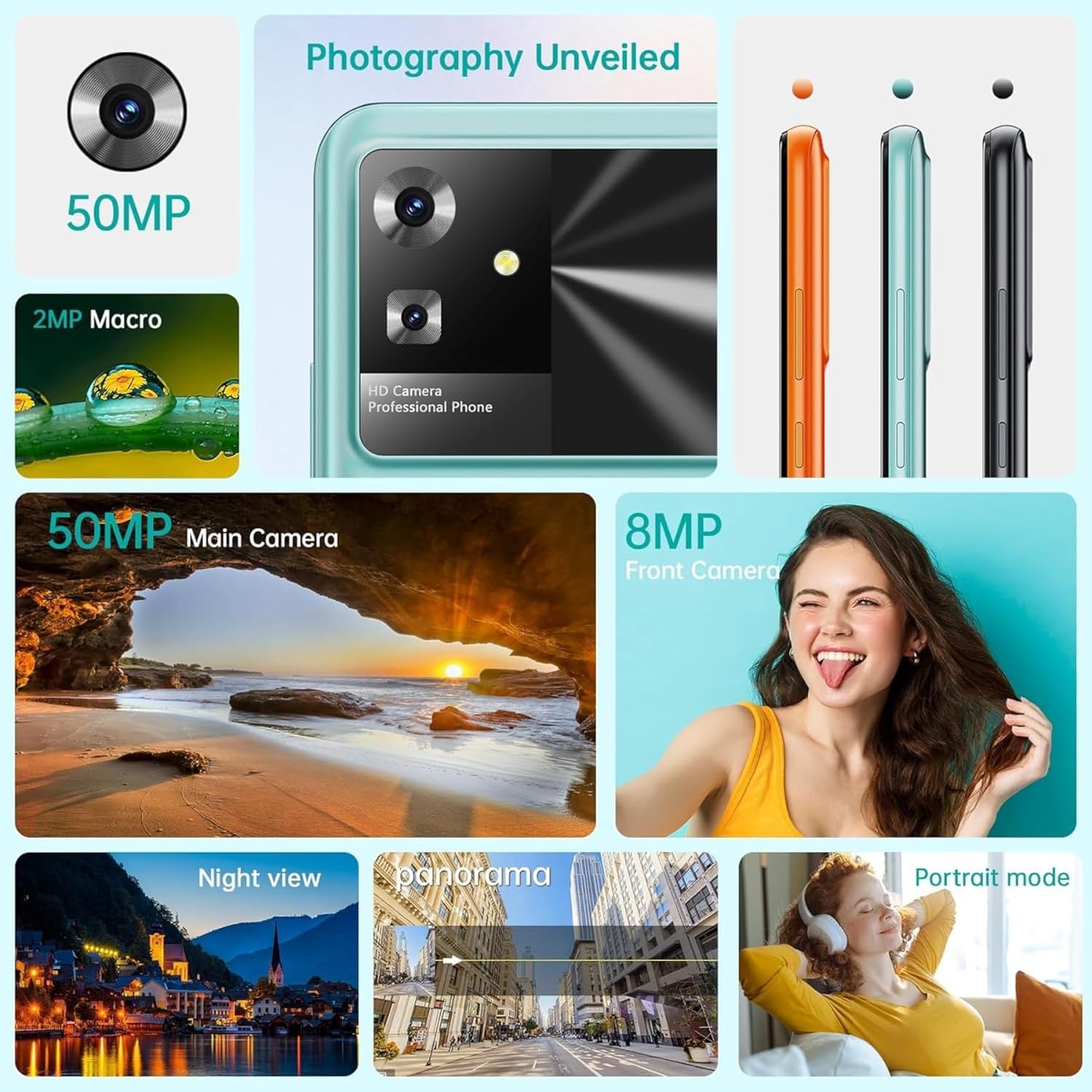
ภาพ: รายละเอียด view of the CUBOT Note 21's camera system, including the 50MP main and 8MP front cameras, along with various shooting modes.
- เปิดแอปกล้อง
- เลือกโหมดที่คุณต้องการ (ภาพถ่าย, วิดีโอ, ภาพบุคคล, มาโคร ฯลฯ)
- แตะปุ่มชัตเตอร์เพื่อถ่ายภาพหรือเริ่ม/หยุดบันทึกวิดีโอ
- Use the zoom gestures (pinch-to-zoom) or switch between front and rear cameras.
3.4 การจัดเก็บและหน่วยความจำ
The device comes with 6GB of RAM (expandable) and 128GB of internal storage, with support for up to 1TB TF card expansion.

Image: A diagram illustrating the 6GB RAM (with 6GB expansion) and 128GB ROM of the CUBOT Note 21, highlighting its memory capabilities.
- พื้นที่เก็บข้อมูลภายใน: 128GB for apps, photos, and files.
- แรม : 6GB for smooth multitasking, with virtual expansion capabilities.
- พื้นที่เก็บข้อมูลที่ขยายได้: Insert a MicroSD card (up to 1TB) into the SIM tray for additional storage.
4. การบำรุงรักษาและการดูแล
4.1 การดูแลแบตเตอรี่
เพื่อยืดอายุการใช้งานและประสิทธิภาพของแบตเตอรี่ให้สูงสุด:
- หลีกเลี่ยงอุณหภูมิที่สูงหรือต่ำเกินไป
- อย่าปล่อยให้แบตเตอรี่หมดจนหมดเป็นประจำ
- ใช้เฉพาะเครื่องชาร์จและสายชาร์จดั้งเดิมเท่านั้น
- ถอดปลั๊กเครื่องชาร์จเมื่อแบตเตอรี่เต็ม
4.2 การทำความสะอาดอุปกรณ์ของคุณ
- ใช้ผ้านุ่มไม่เป็นขุยทำความสะอาดหน้าจอและตัวเครื่อง
- หลีกเลี่ยงการใช้สารเคมีรุนแรงหรือวัสดุที่มีฤทธิ์กัดกร่อน
- อย่าให้อุปกรณ์สัมผัสกับความชื้นมากเกินไป
4.3 การอัปเดตซอฟต์แวร์
ตรวจสอบและติดตั้งการอัปเดตซอฟต์แวร์เป็นประจำเพื่อให้มั่นใจถึงประสิทธิภาพ ความปลอดภัย และการเข้าถึงฟีเจอร์ใหม่ๆ ที่เหมาะสมที่สุด
- ไปที่ การตั้งค่า > ระบบ > อัปเดตระบบ เพื่อตรวจสอบการอัปเดตที่มีอยู่
- โปรดตรวจสอบให้แน่ใจว่าอุปกรณ์ของคุณมีแบตเตอรี่เพียงพอและมีการเชื่อมต่อ Wi-Fi ที่เสถียร ก่อนเริ่มการอัปเดต
5 การแก้ไขปัญหา
If you encounter issues with your CUBOT Note 21, refer to the following common solutions:
| ปัญหา | วิธีแก้ปัญหาที่เป็นไปได้ |
|---|---|
| อุปกรณ์ไม่เปิดเครื่อง | ตรวจสอบให้แน่ใจว่าแบตเตอรี่ชาร์จเต็มแล้ว กดปุ่มเปิด/ปิดค้างไว้อย่างน้อย 10 วินาทีเพื่อบังคับให้รีสตาร์ท |
| แอปขัดข้องหรือค้าง | ล้างแคชของแอปที่มีปัญหา (การตั้งค่า > แอป > [ชื่อแอป] > พื้นที่เก็บข้อมูล > ล้างแคช) รีสตาร์ทอุปกรณ์ |
| สัญญาณเครือข่ายไม่ดี | Check if SIM card is properly inserted. Try restarting the device. Ensure you are in an area with network coverage. |
| แบตเตอรี่หมดเร็ว | ลดความสว่างหน้าจอ ปิดแอปที่ไม่ใช้งาน ปิด Wi-Fi/Bluetooth เมื่อไม่ได้ใช้งาน ตรวจสอบการใช้งานแบตเตอรี่ในการตั้งค่าเพื่อระบุแอปที่ใช้พลังงานมาก |
| กล้องไม่ทำงาน | Restart the device. Clear the Camera app's cache and data (Settings > Apps > Camera > Storage). Check app permissions. |
6. ข้อมูลจำเพาะทางเทคนิค
Detailed specifications for the CUBOT Note 21 smartphone:
| คุณสมบัติ | ข้อมูลจำเพาะ |
|---|---|
| ชื่อรุ่น | หมายเหตุ 21 |
| ระบบปฏิบัติการ | แอนดรอยด์ 13.0 |
| โปรเซสเซอร์ | โปรเซสเซอร์ Unisoc T606 แบบอ็อกตาคอร์ ความเร็ว 1.6 GHz |
| แรม | หน่วยความจำ 6 GB (สามารถเพิ่มได้) |
| การจัดเก็บข้อมูลภายใน | 128GB |
| พื้นที่เก็บข้อมูลแบบขยายได้ | Up to 1 TB via MicroSD (TF card) |
| ขนาดจอแสดงผล | 6.56 นิ้ว |
| ประเภทจอภาพ | LCD HD+ IPS Touch Screen |
| ความละเอียดการแสดงผล | ขนาด 720x1612 |
| อัตราการรีเฟรช | 90 เฮิรตซ์ |
| กล้องหลัง | กล้องหลัก 50 MP, กล้องมาโคร 2 MP |
| กล้องหน้า | 8 MP |
| ความจุของแบตเตอรี่ | 5200 มิลลิแอมป์ |
| อายุการใช้งานแบตเตอรี่โดยเฉลี่ย | 48 ชั่วโมง |
| เทคโนโลยีเซลลูล่าร์ | 4G |
| การเชื่อมต่อ | NFC, USB, Wi-Fi, Bluetooth |
| คุณสมบัติพิเศษ | Accelerometer, Camera, Front Camera, Dual SIM, GPS, Touch Screen, Light Sensor, WiFi |
| ขนาด | 16.57 x 7.59 x 1.05 ซม. |
| น้ำหนัก | 214 กรัม |
7. การรับประกันและการสนับสนุน
CUBOT products are designed for reliability and performance. For warranty information and technical support, please refer to the warranty card included in your product packaging or visit the official CUBOT webไซต์นี้ โปรดเก็บหลักฐานการซื้อไว้เพื่อใช้ยืนยันการรับประกัน
- การสนับสนุนทางออนไลน์: Visit the official CUBOT webเว็บไซต์นี้รวบรวมคำถามที่พบบ่อย (FAQ) ไฟล์ดาวน์โหลดซอฟต์แวร์ และข้อมูลการติดต่อ
- บริการลูกค้า: Contact CUBOT customer service for assistance with product issues or inquiries.


