1. บทนำ
Thank you for choosing the Havit PA304 Projector Ceiling and Wall Mount. This mount is designed to securely hold your projector, offering flexible positioning with 360-degree rotation and adjustable height. Please read this manual carefully before installation and use to ensure proper setup and safe operation.
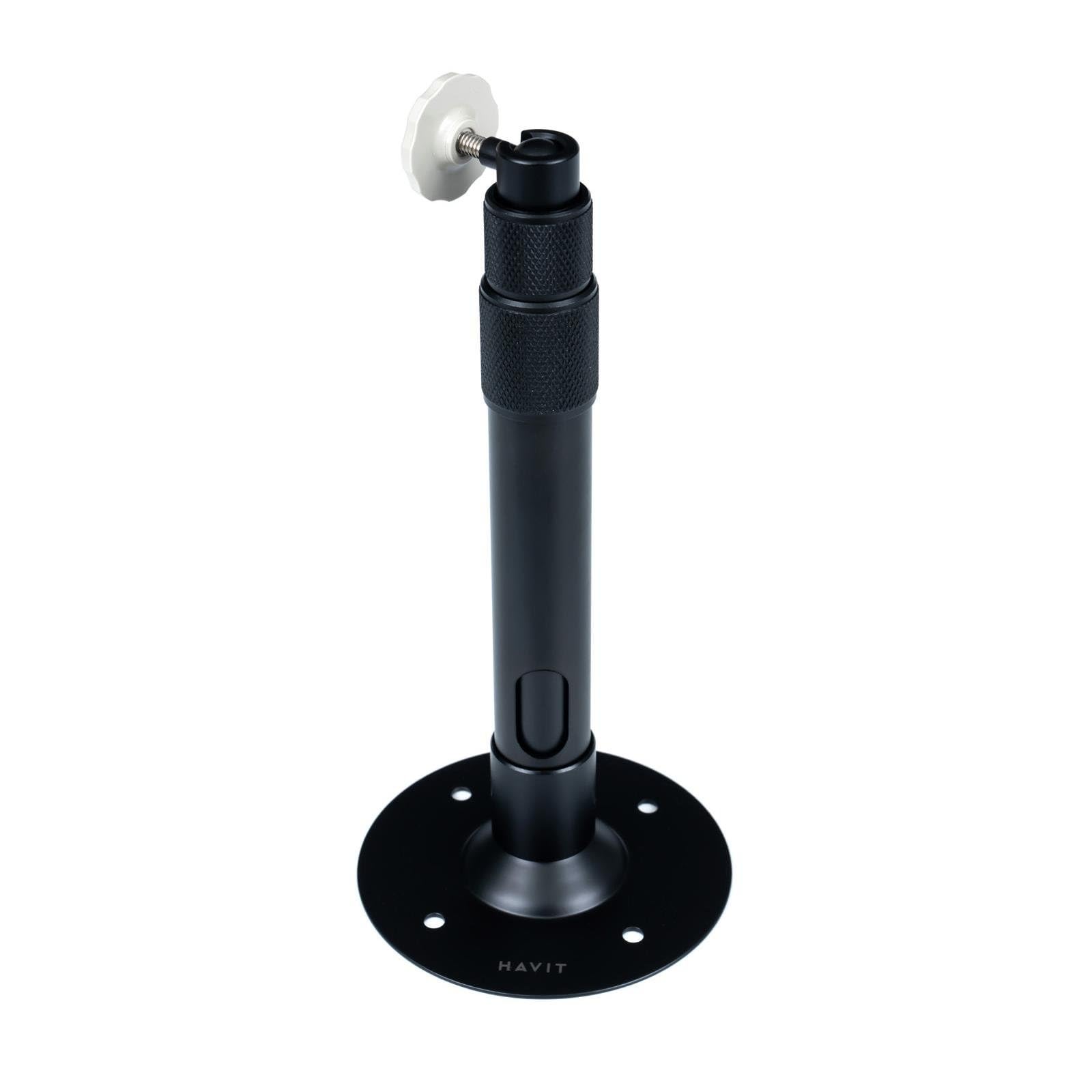
รูปที่ 1: Havit PA304 Projector Mount. This image displays the main components of the Havit PA304 mount, including the mounting plate, adjustable arm, and projector attachment head.
2. ข้อมูลด้านความปลอดภัย
- Ensure the mounting surface (ceiling or wall) can support the combined weight of the mount and your projector. The maximum load capacity for this mount is 3 kg.
- ไม่เกินความจุน้ำหนักสูงสุด 3 กก.
- Use appropriate tools and follow all installation steps carefully to prevent injury or damage to the product or property.
- หากคุณไม่แน่ใจเกี่ยวกับส่วนใดส่วนหนึ่งของกระบวนการติดตั้ง โปรดปรึกษาผู้เชี่ยวชาญที่มีคุณสมบัติเหมาะสม
- เก็บชิ้นส่วนขนาดเล็กและวัสดุบรรจุภัณฑ์ให้ห่างจากเด็ก
- ตรวจสอบสกรูและจุดเชื่อมต่อทั้งหมดอย่างสม่ำเสมอ เพื่อให้แน่ใจว่ายังคงแน่นหนาดีอยู่
3. เนื้อหาบรรจุภัณฑ์
โปรดตรวจสอบให้แน่ใจว่ามีอุปกรณ์ครบทุกชิ้นก่อนเริ่มการติดตั้ง
- Havit PA304 Projector Mount Assembly
- Screw Mounting Kit (includes screws and wall anchors)
บันทึก: Projector and installation tools (drill, screwdriver, pencil, measuring tape) are not included.
4. คำแนะนำในการติดตั้ง
The Havit PA304 mount can be installed on either a ceiling or a wall. Follow the steps below for your desired mounting location.
4.1. เครื่องมือที่จำเป็น (ไม่รวมอยู่ด้วย)
- เจาะ
- ไขควง (แนะนำหัวแฉก)
- ดินสอ
- สายวัด
4.2. Mounting the Bracket to the Ceiling or Wall
- เลือกสถานที่: Choose a suitable location on your ceiling or wall that is structurally sound and can support the weight. Ensure there are no electrical wires or pipes behind the drilling area.
- ทำเครื่องหมายรูเจาะ: Hold the mounting plate of the Havit PA304 mount against the desired surface. Use a pencil to mark the positions for the drill holes.
- เจาะรู: Using an appropriate drill bit for your wall/ceiling material, drill pilot holes at the marked positions. Insert the wall anchors (if required for your surface type) into the drilled holes.
- แผ่นยึดแบบปลอดภัย: Align the mounting plate with the drilled holes and secure it firmly using the provided screws and a screwdriver. Ensure the plate is level and tightly fastened.
Image for this step (e.g., "PA304_MountingPlate_Installation.jpg") is not available in the provided data.
4.3. Attaching the Projector to the Mount
- Identify Projector Mounting Point: Locate the universal mounting screw hole on the bottom of your projector.
- ติดตั้งโปรเจ็กเตอร์: Carefully align the projector's mounting hole with the screw on the projector attachment head of the Havit PA304 mount. Screw the projector onto the mount until it is secure. Do not overtighten.
- ตรวจสอบเสถียรภาพ: Gently test the projector's stability on the mount. It should feel firm and not wobble.
Image for this step (e.g., "PA304_Projector_Attachment.jpg") is not available in the provided data.
5. การใช้งานและการปรับแต่ง
The Havit PA304 mount offers flexibility for optimal projector positioning.
- การหมุน 360 องศา: The projector attachment head can rotate 360 degrees. Loosen the adjustment knob/screw on the head, position your projector to the desired angle, and then tighten the knob/screw to secure it.
- การปรับความสูง: The mount allows for height adjustment between 27.5 cm and 39 cm. Loosen the height adjustment mechanism (usually a collar or screw on the main pole), extend or retract the pole to the desired height, and then firmly tighten the mechanism to lock it in place.
- การปรับมุม: Some projectors may require slight tilting. The mount's head allows for minor tilt adjustments. Loosen the relevant screw, adjust the projector's vertical angle, and then retighten.
Image illustrating adjustment points (e.g., "PA304_Adjustment_Points.jpg") is not available in the provided data.
6. การบำรุงรักษา
- การทำความสะอาด: เช็ดฐานยึดด้วยผ้าแห้งเนื้อนุ่ม ห้ามใช้สารทำความสะอาดที่มีฤทธิ์กัดกร่อนหรือตัวทำละลาย เพราะอาจทำให้พื้นผิวเสียหายได้
- การตรวจสอบปกติ: Periodically inspect all screws and connections to ensure they are tight and secure. Over time, vibrations or adjustments can cause screws to loosen.
- น้ำหนักจำกัด: Always ensure that the total weight of your projector does not exceed the 3 kg maximum load capacity.
7 การแก้ไขปัญหา
| ปัญหา | สาเหตุที่เป็นไปได้ | สารละลาย |
|---|---|---|
| ฐานยึดดูไม่มั่นคงหรือโยกเยก | Screws are loose; mounting surface is not strong enough; projector weight exceeds limit. | Tighten all mounting screws. Ensure the mounting surface is solid. Verify projector weight is within 3 kg. |
| Cannot adjust height or rotation. | Adjustment mechanisms are too tight. | Loosen the relevant adjustment knob/screw before attempting to adjust. Retighten after positioning. |
| Projector does not fit the mount. | Projector lacks a universal mounting screw hole or has an unusual design. | Ensure your projector has a standard 1/4-inch screw hole for mounting. This mount is designed for projectors with a single mounting point. |
8. ข้อมูลจำเพาะ
| ชื่อรุ่น | Havit PA304 |
| หมายเลขรุ่น | PA304 |
| ยี่ห้อ | นิสัย |
| วัสดุ | โลหะ |
| ประเภทการติดตั้ง | ติดเพดาน ติดผนัง |
| ความจุน้ำหนักสูงสุด | 3 กก. (6.6 ปอนด์) |
| ช่วงความสูงที่สามารถปรับได้ | 27.5 ซม. - 39 ซม. (10.8 นิ้ว - 15.3 นิ้ว) |
| การหมุน | 360 องศา |
| ส่วนประกอบที่รวมอยู่ | Mount assembly, screw mounting kit |
9. การรับประกันและการสนับสนุน
The Havit PA304 Projector Mount comes with a รับประกัน 2 ปี from the date of purchase. This warranty covers manufacturing defects under normal use. It does not cover damage caused by improper installation, misuse, accidents, or unauthorized modifications.
For technical support, warranty claims, or further inquiries, please contact your local Havit dealer or visit the official Havit website for contact information. Please retain your proof of purchase for warranty service.


