1. บทนำ
The ALLWEI 300W Portable Power Station is a versatile 280Wh solar generator designed for various power needs, from emergency backup at home to outdoor activities like camping and RV trips. It features a silent cooling fan and a 3-level LED light with an SOS mode, making it a reliable power bank for diverse situations. This manual provides essential information for safe and efficient operation.
2. เนื้อหาบรรจุภัณฑ์
กรุณาตรวจสอบแพ็คเกจเพื่อให้แน่ใจว่ามีสินค้าครบทั้งหมด:
- 1x ALLWEI 300W 280Wh Portable Power Station
- อะแดปเตอร์ไฟ AC 1x
- 1x AC Power US Cord
- 1x Car Cable
- 1x คู่มือผู้ใช้

Figure 2.1: Package Contents of the ALLWEI 300W Portable Power Station.
3. สินค้าหมดview
The ALLWEI 300W Portable Power Station is designed with multiple output ports and safety features for reliable power delivery.

รูปที่ 3.1 : ด้านหน้า view of the ALLWEI 300W Portable Power Station.
3.1. พอร์ตเอาต์พุต
- เต้ารับไฟฟ้ากระแสสลับ: 2x 110V 60Hz AC output ports (300W continuous, 600W surge).
- เอาต์พุต DC: 3x DC 5521 output 12V 3A.
- พอร์ต USB-A: 2x USB-A QC3.0 fast charge ports.
- พอร์ต USB-C: 1x PD 60W USB-C port.
- ร้านขายรถยนต์: 1x DC car outlet.
3.2. พอร์ตอินพุต
- 1x 110V 60Hz DC 5521MM input for charging.
3.3. ความสามารถในการพกพา
The power station is designed for easy transport:
- น้ำหนักสุทธิ: ปอนด์ 6 ประมาณ
- ขนาดกระทัดรัด: 8.86 x 4.53 x 8.07 นิ้ว

Figure 3.2: The compact and lightweight design of the power station.
3.4. Protection System
Equipped with a built-in Battery Management System (BMS) and MPPT controller, the power station offers comprehensive protection for your devices:
- ระบบป้องกันไฟฟ้าลัดวงจร
- ระบบป้องกันกระแสไฟเกิน
- การป้องกันไฟเกิน
- ปริมาณต่ำtagการป้องกันอี
- เกินปริมาณtagการป้องกันอี
- ระบบป้องกันความร้อนสูงเกินไป
These protections are indicated by icon flashes on the LCD screen.

รูปที่ 3.3: เกินview of the BMS and MPPT controller protection features.
3.5. โหมดไฟ LED
The integrated LED light offers multiple modes for various situations:
- 3-level adjustable brightness (low, medium, high)
- SOS mode for emergencies
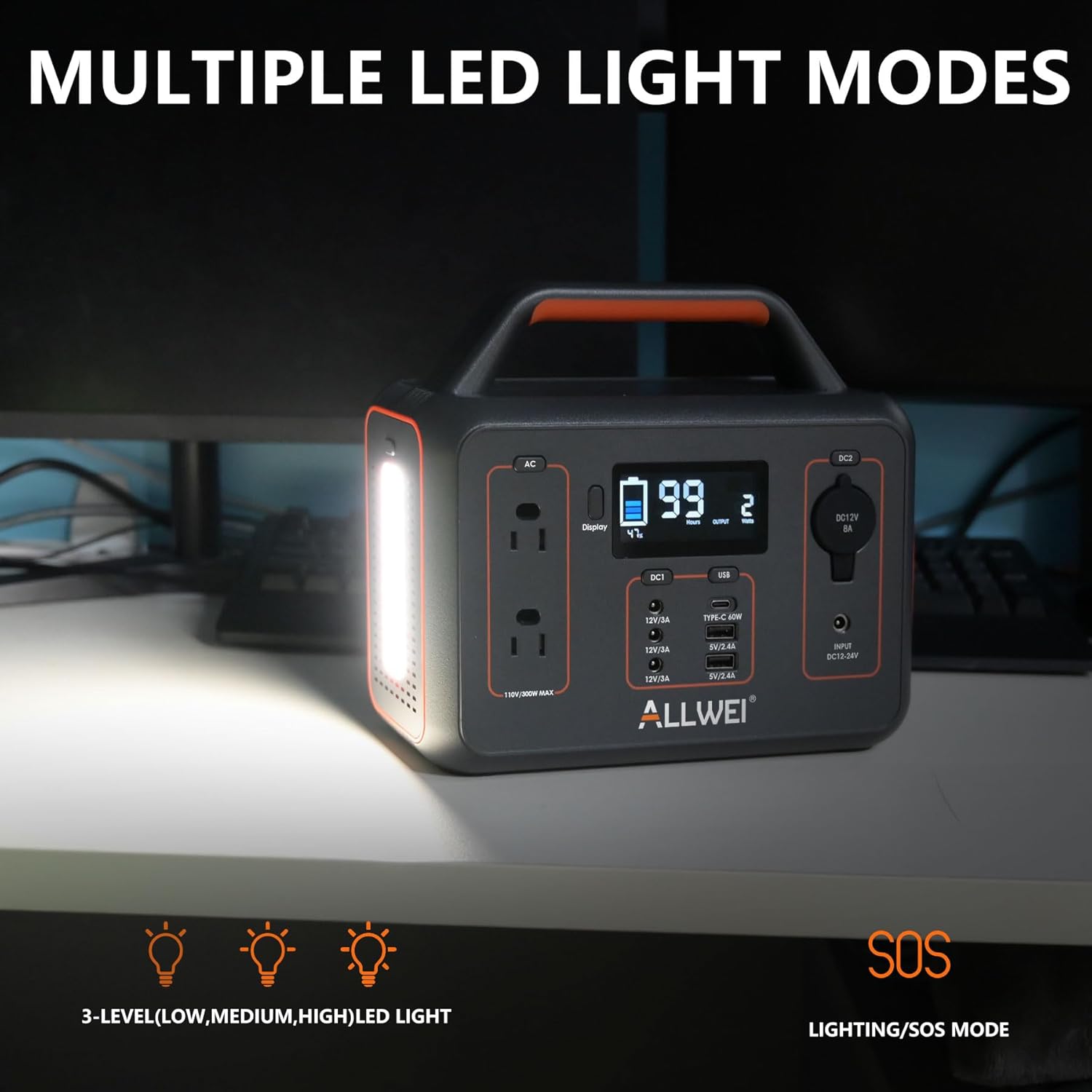
Figure 3.4: The power station's multiple LED light modes.
4. การตั้งค่า
Before using your ALLWEI Portable Power Station for the first time, it is recommended to fully charge it. This ensures optimal battery performance and longevity.
- Unpack the power station and all accessories from the box.
- Connect the AC power adapter to the DC input port on the power station.
- เสียบสายไฟ AC เข้ากับเต้ารับที่ผนังมาตรฐาน
- The LCD display will show charging progress. Once fully charged, the display will indicate 100%.
5. การชาร์จสถานีไฟฟ้า
The ALLWEI Portable Power Station offers multiple convenient charging methods:
- การชาร์จผนัง AC: Fully charged in approximately 5.5-6.5 hours.
- การชาร์จรถยนต์: Fully charged in approximately 4.5-5.5 hours using the included car cable.
- การชาร์จแผงโซลาร์เซลล์: Fully charged in approximately 3-4 hours with a 100W solar panel (solar panel not included).

Figure 5.1: Various methods for recharging the power station.
6. คู่มือการใช้งาน
To power your devices, connect them to the appropriate output ports on the power station. Ensure the total power consumption of your devices does not exceed the power station's rated output (300W continuous, 600W surge).
- เปิด: Press the main power button to activate the power station. The LCD display will light up.
- เลือกเอาท์พุต: Press the button corresponding to the desired output type (AC, DC, USB) to enable it.
- เชื่อมต่ออุปกรณ์: Plug your device's power cable into the activated port.
- ตรวจสอบการใช้งาน: The LCD display shows real-time input/output power, battery capacity, and remaining charge/discharge time.
- ปิด: After use, disconnect your devices and press the output buttons again to disable them, then press the main power button to turn off the power station.

Figure 6.1: The power station powering various devices in an outdoor setting.
7. การบำรุงรักษา
Proper maintenance ensures the longevity and optimal performance of your power station.
- พื้นที่จัดเก็บ: เก็บสถานีพลังงานไว้ในสถานที่แห้งและเย็น หลีกเลี่ยงแสงแดดโดยตรงและอุณหภูมิที่สูงหรือต่ำเกินไป
- การชาร์จไฟ: If not in regular use, recharge the power station every 3-6 months to maintain battery health and prevent deep discharge.
- การทำความสะอาด: ใช้ผ้าแห้งและนุ่มเช็ดทำความสะอาดภายนอก ห้ามใช้สารทำความสะอาดที่มีฤทธิ์กัดกร่อนหรือแช่เครื่องในน้ำ
- การระบายอากาศ : ตรวจสอบให้แน่ใจว่าช่องระบายอากาศไม่มีฝุ่นและเศษขยะเพื่อป้องกันความร้อนสูงเกินไป
8 การแก้ไขปัญหา
If you encounter issues with your ALLWEI Portable Power Station, refer to the following common problems and solutions:
| ปัญหา | สาเหตุที่เป็นไปได้ | สารละลาย |
|---|---|---|
| โรงไฟฟ้าไม่ทำงาน | แบตเตอรี่หมดเกลี้ยงเลย | Connect to an AC charger and allow it to charge for a few minutes before attempting to turn on. |
| อุปกรณ์ไม่ชาร์จ/ไม่ทำงาน | Output port not activated; device exceeds wattage limit; cable issue. | Ensure the specific output port (AC/DC/USB) is turned on. Check if the device's power consumption is within the 300W limit. Try a different cable or device. |
| LCD screen shows error icon. | Overload, over-temperature, or other protection activated. | Disconnect all devices. Allow the unit to cool down if it's hot. Restart the power station. If the issue persists, consult the full user manual for specific error codes. |
| Slow charging time. | Using a low-power charger; environmental factors (for solar). | Ensure you are using the original AC adapter. For solar charging, ensure the panel is in direct sunlight and properly angled. |
9. ข้อมูลจำเพาะ
Detailed technical specifications for the ALLWEI 300W Portable Power Station:
| คุณสมบัติ | ข้อมูลจำเพาะ |
|---|---|
| ยี่ห้อ | อัลเว |
| ชื่อรุ่น | สถานีพลังงานแบบพกพา |
| หมายเลขรุ่นสินค้า | SGR-PPS300-2 |
| วัดtage (วิ่ง) | 300 วัตต์ |
| วัดtage (Starting/Surge) | 600 วัตต์ |
| ความจุพลังงาน | 280 วัตต์ชั่วโมง |
| ชนิดเชื้อเพลิง | ไฟฟ้า |
| แหล่งพลังงาน | ใช้พลังงานจากแบตเตอรี่ |
| เล่มที่tage | 120 โวลต์ (AC) |
| ความถี่ | 60 เฮิรตซ์ |
| ปลั๊กไฟทั้งหมด | 9 |
| น้ำหนักสินค้า | 6.5 ปอนด์ |
| ขนาดสินค้า | ยาว 8.8 นิ้ว x กว้าง 4.5 นิ้ว x สูง 8 นิ้ว |
| วัสดุ | พีซี+เอบีเอส |
| สี | สีดำ |
| Charge Cycle Life | 1500 times (to 80% capacity) |
| การใช้ที่แนะนำ | Campอาคารพาณิชย์ ที่อยู่อาศัย |
10. การรับประกันและการสนับสนุน
The ALLWEI 300W Portable Power Station is designed for durability, offering over 1500 charge cycles before its capacity drops to 80%. This indicates an expected service life of approximately 5 years under normal usage conditions.
For warranty claims, technical support, or further assistance, please refer to the contact information provided in the physical user manual included with your product or visit the official ALLWEI website. Please have your model number (SGR-PPS300-2) and purchase details ready when contacting support.


