การแนะนำ
This user manual provides comprehensive instructions for the setup, operation, and maintenance of your YeeSite LED Stage Wash Light Bar. Designed for versatile lighting applications, this 2-pack 48W RGB DJ Light Bar features IP66 waterproof rating, smart app and remote control, making it ideal for garden lighting, stage events, home decoration, and wall displays.
The LED wash light bar fixture offers a 120° beam angle for widespread illumination and unlimited color mixing, enhancing any environment with dynamic lighting effects.
มีอะไรอยู่ในกล่อง
- Wash Light Bar x2
- รีโมตคอนโทรล x1
- ยืน x4
- คู่มือการใช้งาน x1

Image: Contents of the YeeSite LED Stage Wash Light Bar package, including two light bars, remote, and app interface.
การตั้งค่า
Follow these steps to set up your LED Stage Wash Light Bar:
- Mounting the Stands: Attach the provided stands to the light bars using the included hardware. The stands allow for adjustable positioning to direct the light as desired.
- การจัดวาง: Position the light bars in your desired location. Ensure they are placed on a stable surface or securely mounted. For outdoor use, ensure the power connection is protected from direct water exposure, as the light bar itself is IP66 waterproof but the power adapter may not be.
- การเชื่อมต่อไฟฟ้า: Connect the power cord to the light bar and then plug it into a standard electrical outlet (110 Volts).
- เปิดเครื่องครั้งแรก: The light bar will power on automatically or can be turned on using the remote control or the "FI Light" app.

ภาพ: รายละเอียด view of the light bar's dimensions and components, illustrating how the stands attach.
คำแนะนำการใช้งาน
Your YeeSite LED Stage Wash Light Bar can be controlled via the included remote control or a smart application on your smartphone.
การควบคุมแอพอัจฉริยะ
The "FI Light" app provides extensive control over your light bars:
- ดาวน์โหลดแอพ: Download the "FI Light" app from Google Play Store (for Android) or Apple App Store (for iOS).
- เปิดใช้งานบลูทูธ: ตรวจสอบให้แน่ใจว่าได้เปิดใช้งาน Bluetooth บนสมาร์ทโฟนของคุณแล้ว
- เชื่อมต่ออุปกรณ์: Open the "FI Light" app. The app will automatically search for and connect to your powered-on light bars.
- ตัวเลือกการควบคุม:
- การเลือกสี: เลือกจากสีต่างๆ กว่า 16 ล้านสี
- การปรับอุณหภูมิสี: Adjust white light from warm white (2700K) to cool white (6500K).
- การควบคุมความสว่าง: ปรับความสว่างของแสง
- Lighting Effect Modes: Select from 27 pre-set lighting effects.
- Separate/Group Control: Control individual light bars or group them for synchronized effects.

Image: Illustration of smart app control, demonstrating individual and group control capabilities.
รีโมทคอนโทรล
The included remote control offers convenient operation with a sensing distance of up to 98 ft (30 m):
- เปิด/ปิดเครื่อง
- การปรับความสว่าง
- การเปลี่ยนสี
- Lighting Modes Switching
ฟังก์ชั่นซิงค์เพลง
The light bars can synchronize with music, creating dynamic visual effects:
- In-App Music: Play music directly within the "FI Light" app using system music files.
- โหมดไมโครโฟน: The app can listen to music from the surrounding environment through your phone's microphone, and the lights will react to the rhythm.

Image: Lights fluctuating with music rhythm, demonstrating the music sync feature.
ฟังก์ชั่นจับเวลา
Set schedules for your light bars to turn on or off automatically:
- Access the timer settings within the "FI Light" app.
- Set specific times for the lights to turn on or off.
- The lights retain your last settings due to a memory function when turned on again.

Image: Illustration of the timer function, showing scheduled turn-on and turn-off times for the lights.
คุณสมบัติหลัก
- RGB + Warm White + Cool White: The LEDs provide a full spectrum of colors, including warm white (2700K) and cool white (6500K), allowing for versatile lighting effects that can smoothly illuminate surfaces and textures.
- 16 Million Colors & 27 Lighting Effects: Offers extensive customization to create the perfect ambiance for any event or setting.
- มุมลำแสง 120°: Provides a wide spread of light, ideal for wall washing and broad illumination.
- โครงสร้างทนทาน: Made from high-quality aluminum alloy, resistant to scratches and fading, with an efficient cooling structure.
- กันน้ำ IP66: Designed for outdoor use, capable of withstanding temperatures from -25°C to 50°C. Note: Do not immerse the light in water.
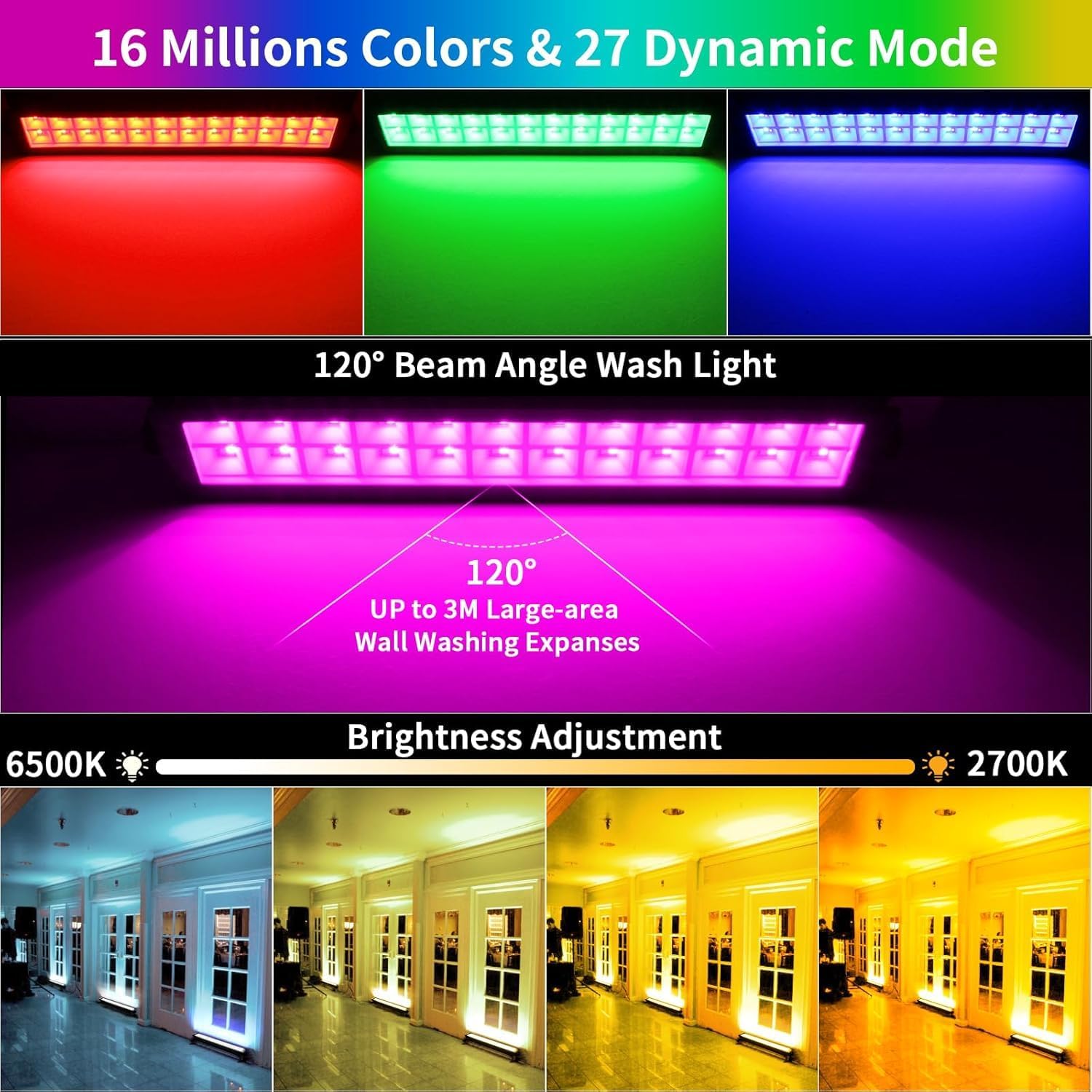
Image: Visual representation of the 16 million colors, 120° beam angle, and adjustable white light temperature.

Image: Demonstration of the light bar's IP66 waterproof and temperature resistance in various weather conditions.
Video: Official product video demonstrating the "APP Waterproof Wash Light 2 Pack" in action, showcasing คุณสมบัติและขีดความสามารถของมัน
การซ่อมบำรุง
To ensure the longevity and optimal performance of your YeeSite LED Stage Wash Light Bar, follow these maintenance guidelines:
- การทำความสะอาด: Regularly wipe the light bar's surface with a soft, damp ผ้าเช็ดทำความสะอาดฝุ่นและเศษผง หลีกเลี่ยงการใช้สารเคมีรุนแรงหรือน้ำยาทำความสะอาดที่มีฤทธิ์กัดกร่อน
- การตรวจสอบ: Periodically check the power cord and connections for any signs of damage. If any damage is found, discontinue use and contact customer support.
- พื้นที่จัดเก็บ: When not in use for extended periods, store the light bars in a cool, dry place, away from direct sunlight and extreme temperatures.
- การสัมผัสน้ำ: While the light bar is IP66 waterproof, it is designed to withstand rain and splashes, not submersion. Ensure proper drainage around outdoor installations.
การแก้ไขปัญหา
If you encounter any issues with your YeeSite LED Stage Wash Light Bar, please refer to the following common solutions:
| ปัญหา | สาเหตุที่เป็นไปได้ | สารละลาย |
|---|---|---|
| ไฟไม่เปิด | No power supply; loose connection; remote control battery low. | Check power outlet and connections. Replace remote control battery. |
| App cannot connect to the light bar. | Bluetooth is off; light bar is not powered on; app needs restart. | Ensure Bluetooth is on and light bar is powered. Close and reopen the app. Restart phone if necessary. |
| รีโมทคอนโทรลไม่ทำงาน | Battery low/dead; remote out of range; obstruction. | Replace remote battery. Ensure you are within 98 ft (30 m) and there are no major obstructions. |
| Lights not synchronizing with music. | Incorrect music mode selected; microphone access denied. | Ensure you are using the correct music mode (in-app or microphone). Check app permissions for microphone access. |
If the problem persists after trying these solutions, please contact YeeSite customer support for further assistance.
ข้อมูลจำเพาะ
| ยี่ห้อ | ยีไซต์ |
| หมายเลขรุ่น | YS-053-AWL2 |
| สี | RGB + Warm White + Cool White |
| วัสดุ | อลูมิเนียม |
| ประเภทแหล่งกำเนิดแสง | ไดโอดเปล่งแสง (LED) |
| แหล่งกำเนิดแสง วัดtage | 48 วัตต์ |
| ความสว่าง | 500 ลูเมน |
| เล่มที่tage | 110 โวลต์ |
| ขนาดสินค้า | 17"L x 7.5"W x 2"H (approx. 16.3" x 2.5" x 1.6" for the bar itself) |
| น้ำหนักสินค้า | 3.3 ปอนด์ |
| ระดับการกันน้ำ | IP66 |
| อุณหภูมิในการทำงาน | -25°C ถึง 50°C |
| อายุการใช้งาน | มากกว่า 50,000 ชั่วโมง |
| วิธีการควบคุม | Smart APP (FI Light), Remote Control |
การรับประกันและการสนับสนุน
YeeSite products are manufactured to high-quality standards. For warranty information or technical support, please refer to the contact details provided on the product packaging or visit the official YeeSite webเว็บไซต์.
โปรดเก็บใบเสร็จรับเงินของคุณไว้สำหรับการเรียกร้องการรับประกัน


