1. บทนำ
The CALEX Smart Home Indoor Ambiance Aroma Diffuser 590100500 is designed to enhance your indoor environment by improving air quality, diffusing pleasant aromas, and providing ambient lighting. This smart device integrates seamlessly into your smart home ecosystem, offering control through the Calex app, voice commands, and programmable features.
คุณสมบัติที่สำคัญ ได้แก่:
- Aroma diffusion with essential oils.
- Realistic flame effect for ambiance.
- Adjustable ambient lighting with 16 million color options.
- Smart control via Calex app (timers, programmable scenarios).
- Voice control compatibility with Google Assistant, Siri, and Amazon Alexa.
- 300ml water tank capacity with automatic shut-off.
2. ข้อมูลด้านความปลอดภัย
โปรดอ่านคำแนะนำด้านความปลอดภัยทั้งหมดก่อนใช้งานอุปกรณ์ เพื่อป้องกันการบาดเจ็บหรือความเสียหาย
- Always place the diffuser on a stable, flat surface away from direct sunlight, heat sources, and electronic devices.
- Do not exceed the maximum water fill line (300ml) to prevent overflow.
- ใช้น้ำประปาที่สะอาดหรือน้ำกลั่นเท่านั้น ห้ามใช้น้ำร้อน
- Only use 100% pure, water-soluble essential oils. Other oils or corrosive liquids may damage the device.
- เก็บอุปกรณ์ให้ห่างจากมือเด็กและสัตว์เลี้ยง
- Do not cover the mist outlet during operation.
- Unplug the device from the power outlet before cleaning or refilling.
- The device features an automatic shut-off function when the water tank is empty, and sends a notification to your phone.
- A built-in safety configuration will cause the diffuser to flash if the remaining water in the tank needs to cool down after a maximum of 72 hours of continuous operation.
- อย่าพยายามซ่อมแซมหรือดัดแปลงอุปกรณ์ด้วยตนเอง โปรดติดต่อฝ่ายสนับสนุนลูกค้าเพื่อขอความช่วยเหลือ
3. เนื้อหาบรรจุภัณฑ์
ตรวจสอบว่ามีรายการทั้งหมดอยู่ในแพ็คเกจ:
- CALEX Smart Home Indoor Ambiance Aroma Diffuser (Model 5901000500)
- อะแดปเตอร์แปลงไฟ
- คู่มือการใช้งาน
4. สินค้าหมดview
Familiarize yourself with the components of your aroma diffuser.
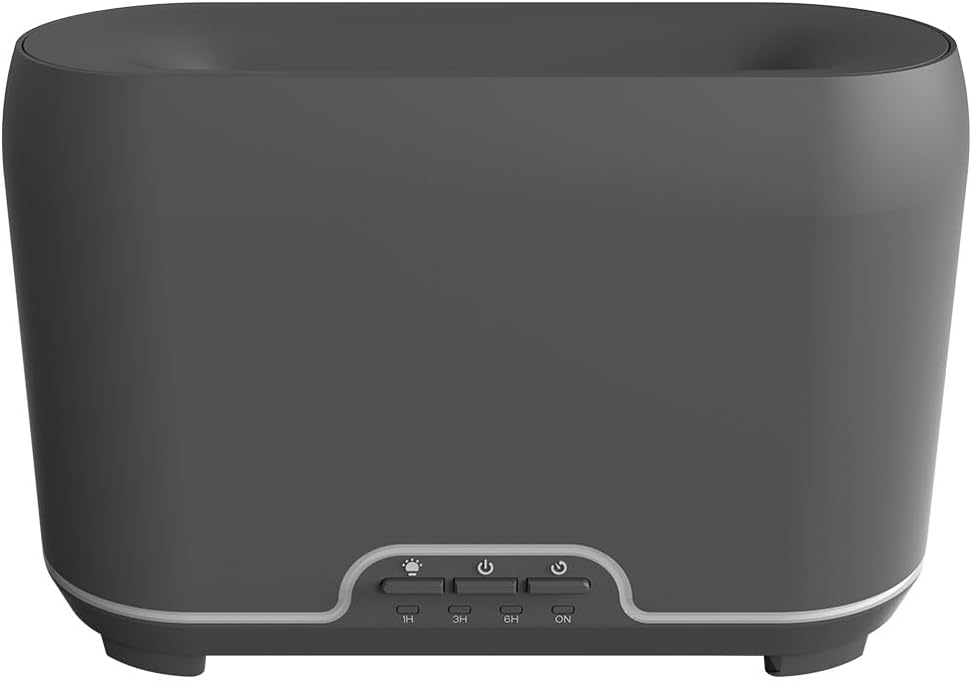
ภาพ: ด้านหน้า view of the CALEX Smart Home Aroma Diffuser, showing the control panel with buttons for light, power, and timer settings (1H, 3H, 6H, ON).

Image: The CALEX Smart Home Aroma Diffuser operating on a wooden table, displaying its ambient flame effect and mist output.
The diffuser typically consists of a water tank, an ultrasonic plate, a mist outlet, and a control panel with buttons for power, light, and timer functions. The power input port is usually located at the back or bottom of the device.
5. การตั้งค่า
ทำตามขั้นตอนเหล่านี้สำหรับการตั้งค่าเริ่มต้น:
- การจัดวาง: วางดิฟฟิวเซอร์ไว้บนพื้นผิวเรียบและมั่นคง
- ฝาเปิด: ค่อยๆ ถอดฝาครอบด้านบนของตัวกระจายอากาศออก
- เติมถังน้ำ: Fill the water tank with clean water up to the 300ml maximum fill line. Do not overfill.
- เพิ่มน้ำมันหอมระเหย: เติมน้ำมันหอมระเหยที่คุณชื่นชอบสองสามหยดลงในถังน้ำโดยตรง
- ปิดฝา: เปลี่ยนฝาครอบด้านบนอย่างแน่นหนา
- เชื่อมต่อพลังงาน: Plug the power adapter into the diffuser's power input port, then plug the adapter into a wall outlet.
- Download Calex App: Download the free Calex Smart app from your smartphone's app store (available for iOS and Android).
- เชื่อมต่อกับ WiFi: Follow the in-app instructions to connect your diffuser to your home WiFi network. Ensure your WiFi is 2.4GHz.
6. คู่มือการใช้งาน
The CALEX Smart Home Aroma Diffuser can be operated via the Calex app or its integrated control buttons.
6.1 Using the Calex Smart App
The Calex app provides full control over your diffuser's functions:
- เปิด/ปิดเครื่อง: Turn the diffuser on or off remotely.
- การควบคุมหมอก: Adjust the mist output level.
- การควบคุมแสง: Change the ambient light color from over 16 million options, adjust brightness, and select lighting modes.
- เอฟเฟกต์เปลวไฟ: Activate or deactivate the flame effect.
- ตัวจับเวลา: Set schedules for the diffuser to turn on or off automatically.
- Programmable Scenarios: Create custom scenarios based on time, weather, or other smart home triggers.
- การแจ้งเตือน: Receive alerts when the water tank is empty.
6.2 การควบคุมด้วยเสียง
Integrate your diffuser with voice assistants for hands-free control:
- ผู้ช่วย Google: Link your Calex account in the Google Home app. Use commands like "Hey Google, turn on the diffuser."
- สิริ: Create custom shortcuts in the Apple Home app or through the Calex app for Siri commands.
- อเมซอนอเล็กซ่า: Enable the Calex skill in the Alexa app. Use commands like "Alexa, set diffuser light to blue."
6.3 Manual Control Buttons
The control panel on the diffuser allows for basic operation:
- ปุ่มเปิด/ปิด: Press once to turn on/off the mist and flame effect.
- ปุ่มไฟ: Press to cycle through light colors or turn the light on/off.
- Timer Buttons (1H, 3H, 6H, ON): Select a desired operating duration. The diffuser will automatically shut off after the selected time. 'ON' typically means continuous operation until water runs out or manually turned off.
7. การบำรุงรักษา
การทำความสะอาดอย่างสม่ำเสมอจะช่วยให้เครื่องกระจายกลิ่นทำงานได้อย่างมีประสิทธิภาพสูงสุดและยืดอายุการใช้งาน
- การทำความสะอาดรายวัน: หลังการใช้งานทุกครั้ง ให้เทน้ำที่เหลืออยู่ในถังออกให้หมด แล้วเช็ดทำความสะอาดด้านในถังด้วยผ้าสะอาดนุ่มๆ
- การทำความสะอาดรายสัปดาห์: For a more thorough clean, unplug the device. Add a small amount of white vinegar (about 10ml) to the water tank and let it sit for 10-15 minutes to dissolve mineral buildup. Gently wipe the ultrasonic plate with a cotton swab or soft brush. Rinse the tank thoroughly with clean water, avoiding the air outlet.
- การทำความสะอาดภายนอก: เช็ดภายนอกเครื่องกระจายกลิ่นด้วยผ้านุ่มๆamp ผ้า ห้ามใช้สารทำความสะอาดที่มีฤทธิ์กัดกร่อนหรือตัวทำละลาย
- Ensure the device is completely dry before refilling or storing.
8 การแก้ไขปัญหา
หากคุณพบปัญหา โปรดดูปัญหาทั่วไปและวิธีแก้ไขต่อไปนี้:
| ปัญหา | สาเหตุที่เป็นไปได้ | สารละลาย |
|---|---|---|
| ไม่มีหมอกหรือหมอกจางๆ | ระดับน้ำต่ำ แผ่นอัลตราโซนิกสกปรก ช่องระบายหมอกอุดตัน | Refill water to the appropriate level. Clean the ultrasonic plate as per maintenance instructions. Ensure the mist outlet is clear. |
| เปิดเครื่องไม่ติด | ไม่มีไฟฟ้า ถังน้ำว่างเปล่า อุปกรณ์ทำงานผิดปกติ | ตรวจสอบการเชื่อมต่อไฟฟ้าและเต้ารับไฟฟ้าที่ผนัง เติมน้ำลงในถังน้ำ ติดต่อฝ่ายสนับสนุนลูกค้าหากปัญหายังคงมีอยู่ |
| ปัญหาการเชื่อมต่อแอพ | รหัสผ่าน WiFi ไม่ถูกต้อง เราเตอร์อยู่ไกลเกินไป 2.4GHz vs 5GHz WiFi | ตรวจสอบรหัสผ่าน WiFi Move diffuser closer to the router. Ensure your router is broadcasting a 2.4GHz network and connect to it. |
| เอฟเฟกต์เปลวไฟไม่ทำงาน | Feature deactivated in app อุปกรณ์ทำงานผิดปกติ | Check app settings to ensure flame effect is enabled. ติดต่อฝ่ายสนับสนุนลูกค้า |
9. ข้อมูลจำเพาะ
| คุณสมบัติ | ข้อมูลจำเพาะ |
|---|---|
| หมายเลขรุ่น | 5901000500 |
| ยี่ห้อ | นกเล็กซ์ |
| ความจุ | 300 มิลลิลิตร |
| วัสดุ | พลาสติก |
| ปิดเครื่องอัตโนมัติ | ใช่ |
| การเชื่อมต่อ | อินเตอร์เน็ตไร้สาย (2.4GHz) |
| วิธีการควบคุม | Calex Smart App, Voice Control (Google Assistant, Siri, Amazon Alexa), Manual Buttons |
| ตัวเลือกแสง | 16 ล้านสี |
| พื้นที่ใช้งานที่แนะนำ | Medium space |
| รหัสสินค้าสากล (EAN/UPC) | 08712879157090 |
10. การรับประกันและการสนับสนุน
สำหรับข้อมูลการรับประกันหรือการสนับสนุนทางเทคนิค โปรดดูเอกสารที่แนบมาพร้อมกับสินค้าที่ซื้อ หรือติดต่อผู้ค้าปลีก/ผู้ผลิตโดยตรง โปรดเก็บหลักฐานการซื้อไว้เพื่อใช้ในการเรียกร้องการรับประกัน


