คู่มือผู้ใช้ Amazon Echo Show 21
รุ่น: Echo Show 21
1. บทนำ
Welcome to your new Amazon Echo Show 21. This smart display is designed to be the central hub for your home, offering a large Full HD screen for entertainment, organization, and communication. With built-in Fire TV and Alexa, you can stream content, manage your smart home, make video calls, and keep your family organized with customizable widgets.

Figure 1.1: Amazon Echo Show 21 Overview
The Echo Show 21 integrates seamlessly into your daily life, providing a visual and interactive experience for all your Alexa commands.
2. การเริ่มต้น: การตั้งค่า
2.1 อะไรอยู่ในกล่อง
- อุปกรณ์ Echo Show 21
- Alexa Voice Remote with batteries (2 AAA included)
- Power adapter (30W) and 5 ft. cord (white)
- Wall mount, anchors, screws, mounting template
- คู่มือเริ่มต้นอย่างรวดเร็ว
2.2 การตั้งค่าเริ่มต้น
The Echo Show 21 is designed for simple setup. You will need a Wi-Fi connection.
- เปิดเครื่อง: เชื่อมต่ออะแดปเตอร์แปลงไฟเข้ากับ Echo Show 21 ของคุณ แล้วเสียบเข้ากับเต้ารับที่ผนัง อุปกรณ์จะเปิดเครื่องโดยอัตโนมัติ
- การเชื่อมต่อ Wi-Fi: Follow the on-screen instructions to connect your device to your Wi-Fi network. Amazon Wi-Fi simple setup can automatically connect your device if you are a Prime member and have previously saved your Wi-Fi credentials.
- การเข้าสู่ระบบบัญชี Amazon: เข้าสู่ระบบด้วยข้อมูลประจำตัวบัญชี Amazon ของคุณ
- การปรับแต่ง: Customize your home screen, set up profiles, and configure your preferred settings.
- การจับคู่ระยะไกล: The included Alexa Voice Remote should pair automatically. If not, follow the on-screen instructions or refer to the quick start guide for manual pairing.
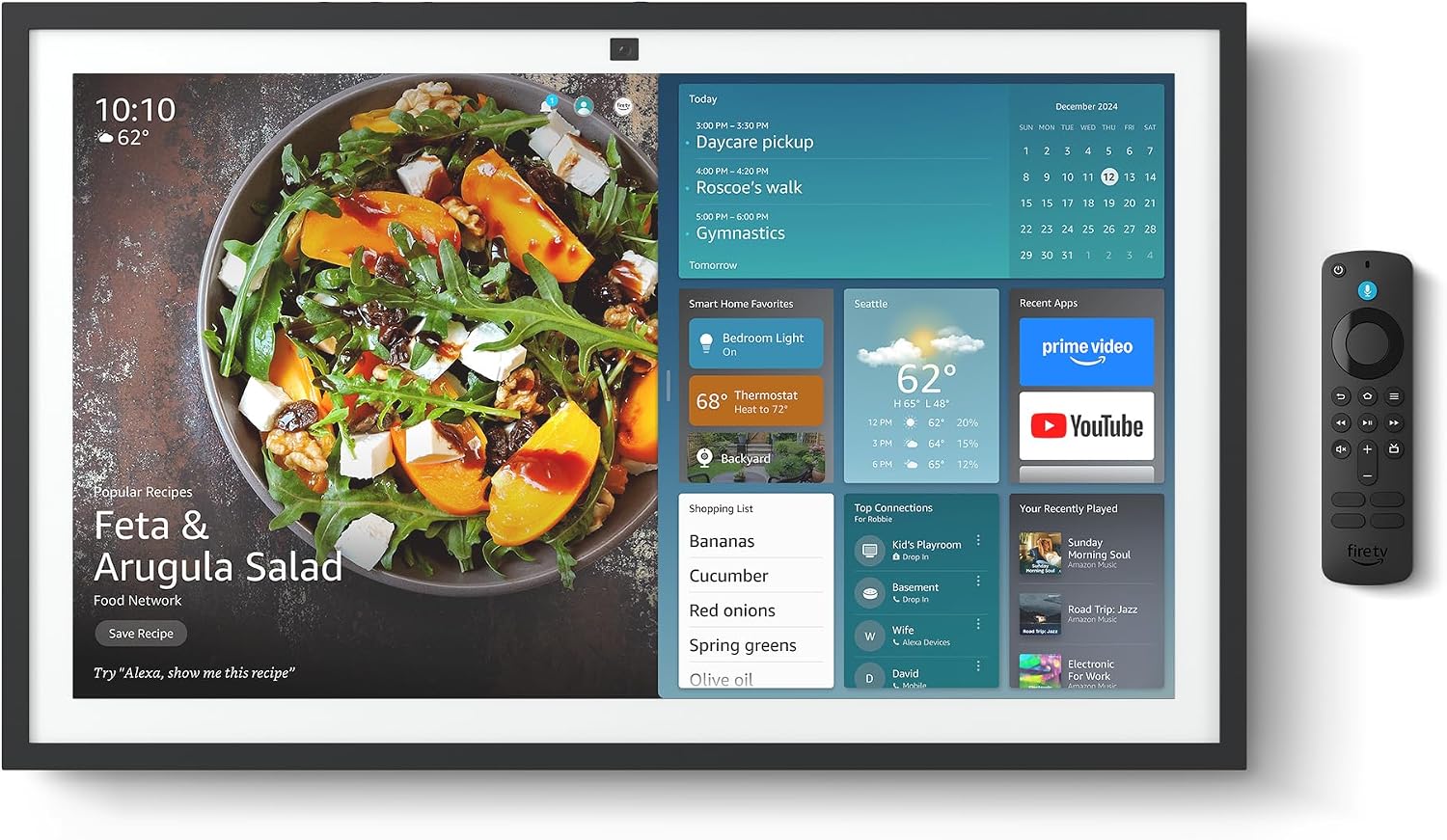
Figure 2.1: Echo Show 21 with Alexa Voice Remote
2.3 ตัวเลือกการติดตั้ง
The Echo Show 21 can be wall-mounted using the included hardware or placed on a stand (sold separately). Wall mounting requires an electric drill.
3. การใช้งาน Echo Show 21 ของคุณ
3.1 การควบคุมด้วยเสียงด้วย Alexa
Your Echo Show 21 is primarily controlled by voice using Alexa. Simply say the wake word "Alexa" followed by your command or question.
- คำสั่งทั่วไป: "Alexa, what's the weather?", "Alexa, set a timer for 10 minutes."
- เพลงและเสียง: "Alexa, play pop music," "Alexa, play my morning playlist."
- Video & Entertainment: "Alexa, open Prime Video," "Alexa, play The Boys on Netflix."
3.2 การผสานรวม Fire TV
Enjoy endless entertainment with built-in Fire TV. Use the included Alexa Voice Remote or voice commands to navigate.

Figure 3.1: Fire TV Interface
- Access thousands of apps like Prime Video, Netflix, YouTube, Apple TV.
- Stream movies, TV shows, and live content.
- The Fire TV remote allows for traditional navigation and playback control.
3.3 Home Screen & Widgets
The 21-inch display is ideal for organizing your day with customizable widgets.

Figure 3.2: Customizable Home Screen Widgets
- Keep important information like calendars, shopping lists, and weather in view.
- Personalize your home screen with family photos.
3.4 การควบคุมบ้านอัจฉริยะ
Control compatible smart devices using your voice or the smart home dashboard.

Figure 3.3: Smart Home Dashboard
- Turn lights on/off, adjust thermostats, or view ฟีดกล้องสด
- Supports Zigbee, Matter, and Thread Border Router for broad compatibility.
3.5 Video Calling
Connect with family and friends using the 13 MP camera with auto-framing, wide field of vision, 3.3x zoom, and noise reduction.

Figure 3.4: Echo Show 21 as a Digital Photo Frame
The camera can also be used to display your favorite memories as a digital photo frame.
4. การบำรุงรักษา
เพื่อให้มั่นใจถึงอายุการใช้งานที่ยาวนานและประสิทธิภาพสูงสุดของ Echo Show 21 โปรดปฏิบัติตามคำแนะนำการบำรุงรักษาดังต่อไปนี้:
- การทำความสะอาดหน้าจอ: ใช้ผ้านุ่มไม่เป็นขุยเช็ดหน้าจอเบาๆ สำหรับรอยเปื้อนฝังแน่น ให้เช็ดเบาๆampชุบผ้าด้วยน้ำ หลีกเลี่ยงการใช้น้ำยาทำความสะอาดที่มีฤทธิ์กัดกร่อนหรือสเปรย์ลงบนหน้าจอโดยตรง
- การทำความสะอาดตัวเครื่อง: Wipe the exterior surfaces with a dry, soft cloth. Do not use harsh chemicals or solvents.
- การระบายอากาศ : ตรวจสอบให้แน่ใจว่าช่องระบายอากาศของอุปกรณ์ไม่ถูกปิดกั้น เพื่อป้องกันความร้อนสูงเกินไป
- การอัปเดตซอฟต์แวร์: Your Echo Show 21 receives automatic software security updates. Ensure your device is connected to Wi-Fi to receive these updates.
5 การแก้ไขปัญหา
If you encounter issues with your Echo Show 21, try the following common solutions:
- อุปกรณ์ไม่ตอบสนอง: Try saying "Alexa" again clearly. If unresponsive, unplug the power adapter for a few seconds and then plug it back in to restart the device.
- ไม่มีการเชื่อมต่อ Wi-Fi: Check your router and modem to ensure they are working correctly. Restart your router. On the Echo Show 21, go to Settings > Network to re-select your Wi-Fi network and re-enter the password.
- ปัญหาเกี่ยวกับเสียง: Ensure the volume is not muted or too low. Say "Alexa, turn up the volume." Check audio settings in the device menu.
- กล้องไม่ทำงาน: Ensure the physical camera shutter is open and the mic/camera-off button is not activated (red light indicates off).
- รีโมตไม่ตอบสนอง: Check the batteries in the Alexa Voice Remote. If necessary, replace them. Re-pair the remote if it becomes disconnected.
6. ข้อมูลจำเพาะทางเทคนิค
| คุณสมบัติ | ข้อมูลจำเพาะ |
|---|---|
| ขนาด | กว้าง 21.4 นิ้ว x สูง 13.2 นิ้ว x ลึก 1.5 นิ้ว |
| น้ำหนัก | 10.7 ปอนด์ |
| แสดง | 21” with 1920 x 1080 resolution (landscape or portrait) |
| กล้อง | 13 MP + Shutter |
| เสียง | Two 2” woofers + two 0.6” tweeters |
| การเชื่อมต่อ Wi-Fi | Wi-Fi 6E (802.1ax), Tri-band, dual-antenna (MIMO). Supports 802.11a/b/g/n/ac. |
| ฮับบ้านอัจฉริยะ | Zigbee + Matter + Thread Border Router |
| โปรเซสเซอร์ | Octa-core SoC with Amazon AZ2 neural network engine |
| เซ็นเซอร์ | ALS RGB + Accelerometer |
| ภาษา | ภาษาอังกฤษและภาษาสเปน |

Figure 6.1: Echo Show 15 vs. Echo Show 21 Dimensions
7. คุณสมบัติความเป็นส่วนตัว
Echo Show 21 ได้รับการออกแบบมาพร้อมระบบควบคุมความเป็นส่วนตัวหลายชั้น:
- Mic/Camera-Off Button: ปุ่มทางกายภาพสำหรับตัดการเชื่อมต่อไมโครโฟนและกล้องด้วยระบบอิเล็กทรอนิกส์
- ชัตเตอร์กล้อง: A built-in physical shutter to cover the camera lens.
- เทคโนโลยี Wake Word: Alexa devices only begin recording and sending audio to the cloud after detecting the wake word.
- ตัวบ่งชี้การสตรีมมิ่ง: ตัวบ่งชี้ภาพจะแสดงเมื่อเสียงหรือวิดีโอกำลังถูกสตรีมไปยังคลาวด์
- Voice Recording Control: ความสามารถในการ view และลบบันทึกเสียงของคุณ

Figure 7.1: Mic/Camera-Off Button and Camera Shutter
For more details, visit the Alexa Privacy Hub.
8. คุณสมบัติการเข้าถึง
The Echo Show 21 includes various accessibility features to personalize Alexa to your abilities:
- แตะเพื่อ Alexa: Access Alexa via touch through on-screen tiles or a keyboard.
- การฟังแบบปรับตัว: เพิ่มเวลาให้พูดจบก่อนที่ Alexa จะตอบกลับ
- อัตราการพูดที่ต้องการ: ควบคุมความเร็วในการพูดของ Alexa ได้ตามต้องการ
- คำบรรยายภาพ: ฟีเจอร์ Alexa Captioning, Call Captioning และ Closed Captioning จะแสดงข้อความสำหรับเนื้อหาที่รองรับ
- แสดงและบอกเล่า: Helps users who are blind or visually impaired identify products.
- เสียงView โปรแกรมอ่านหน้าจอ: Enables access for customers who are blind or visually impaired.
- แว่นขยายหน้าจอ: ซูมเข้า/ออกและเลื่อนไปรอบๆ หน้าจอ
- Kindle อ่านออกเสียง: ให้ Alexa อ่านหนังสือ Kindle ของคุณออกเสียงดังๆ
- ข้อความเรียลไทม์: พิมพ์ข้อความสดระหว่างการสนทนาทางวิดีโอ
These features can be enabled via Settings > Accessibility on your device.
9. การรับประกันและการสนับสนุน
9.1 การรับประกันสินค้า
Your Echo Show 21 comes with a การรับประกันและบริการแบบ จำกัด 1 ปี. Optional 1-year, 2-year, and 3-year extended warranties are available for U.S. customers, sold separately.
Use of Echo Show 21 and Fire TV on Echo Show 21 is subject to their respective terms of service.
9.2 การสนับสนุนลูกค้า
For further assistance, troubleshooting, or to learn more about your device, please visit the Amazon support webไซต์หรือติดต่อฝ่ายบริการลูกค้าของ Amazon


