1. บทนำ
This manual provides essential information for the safe and efficient use of your FLEXISPOT 42-inch Sit-to-Stand Desk Riser. This height-adjustable computer workstation is designed to promote a healthy balance between sitting and standing throughout your workday. Please read these instructions thoroughly before assembly and operation.
2. ข้อมูลด้านความปลอดภัย
- ตรวจสอบให้แน่ใจว่าส่วนประกอบทั้งหมดได้รับการยึดอย่างแน่นหนาก่อนการใช้งาน
- Do not exceed the maximum weight capacity of 33 lbs for the desktop and 4.4 lbs for the keyboard tray.
- Keep hands and fingers clear of moving parts during height adjustment to prevent injury.
- Place the desk riser on a stable, level surface.
- Distribute weight evenly on the desktop to maintain stability.
- ให้เด็กและสัตว์เลี้ยงอยู่ห่างจากเครื่องขณะใช้งาน
3. เนื้อหาบรรจุภัณฑ์
ตรวจสอบให้แน่ใจว่ามีชิ้นส่วนครบทุกชิ้นก่อนเริ่มประกอบ หากมีชิ้นส่วนใดขาดหายหรือเสียหาย โปรดติดต่อฝ่ายบริการลูกค้า
- Main Desk Riser Unit
- Removable Keyboard Tray
- Assembly Hardware (screws for keyboard tray)
- คู่มือการใช้งาน
4. คำแนะนำในการตั้งค่า
The FLEXISPOT Sit-to-Stand Desk Riser is designed for quick and straightforward assembly. Two people are recommended for easier setup.
- แกะกล่องอุปกรณ์: นำส่วนประกอบทั้งหมดออกจากบรรจุภัณฑ์อย่างระมัดระวัง
- ตำแหน่งหน่วยหลัก: Place the main desk riser unit on your existing desk or workstation. Ensure it is centered and stable.
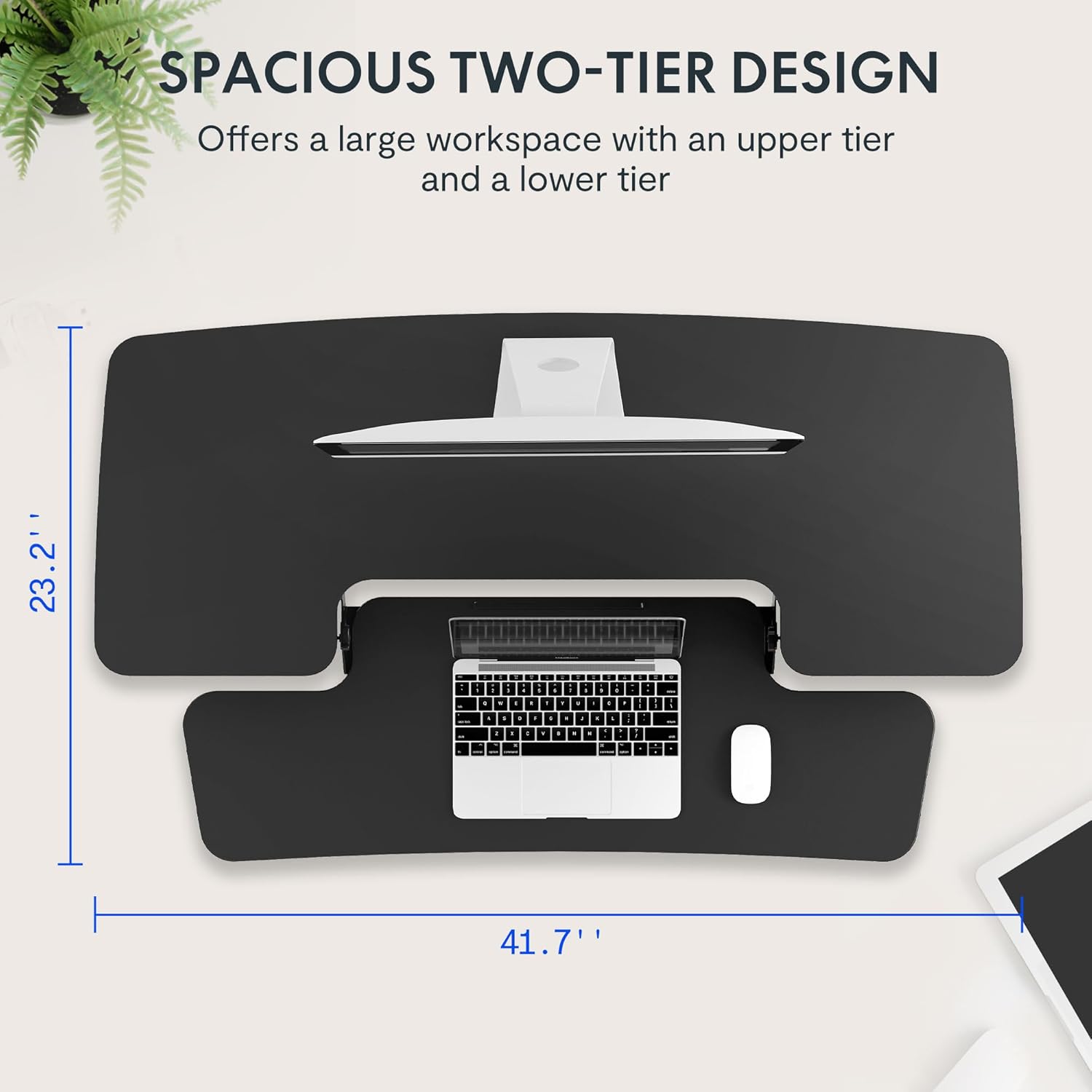
- Attach the Keyboard Tray: Align the removable keyboard tray with the designated slots on the underside of the main unit. Slide the tray into place until it clicks securely. Use a Phillips screwdriver (not included) to fasten any provided screws for additional stability.
- จัดระเบียบสายเคเบิล: Utilize the included cable management loops to organize your monitor, keyboard, and mouse cables. Ensure cables have enough slack to accommodate the full range of height adjustment.


5. คู่มือการใช้งาน
The desk riser features a spring-assisted lifting mechanism for smooth and effortless height adjustments.
- ปรับความสูง: To raise or lower the desk, locate the lever on the right side of the main unit. Squeeze the lever firmly.
- การยกโต๊ะทำงานให้สูงขึ้น: While squeezing the lever, gently lift the desktop to your desired standing height. The spring-assisted mechanism will help elevate the unit. Release the lever to lock the desk in place.
- การลดระดับโต๊ะ: While squeezing the lever, gently push down on the desktop to lower it to your desired sitting height. Release the lever to lock the desk in place.
- การเคลื่อนที่ในแนวดิ่ง: The desk riser moves straight up and down within its own footprint, requiring no additional spatial accommodations. The height can be adjusted between 4.7 inches (minimum) and 19.7 inches (maximum).


6. การบำรุงรักษา
Regular maintenance ensures the longevity and optimal performance of your desk riser.
- การทำความสะอาด: เช็ดพื้นผิวด้วย d . ที่อ่อนนุ่มamp ผ้า. หลีกเลี่ยงน้ำยาทำความสะอาดที่มีฤทธิ์กัดกร่อนหรือสารเคมีรุนแรงที่อาจสร้างความเสียหายให้กับพื้นผิว
- การตรวจสอบ: ตรวจสอบสกรูและข้อต่อทั้งหมดเป็นระยะ เพื่อให้แน่ใจว่ายังแน่นอยู่ ขันให้แน่นหากจำเป็น
- ชิ้นส่วนที่เคลื่อนไหว: The lifting mechanism is designed to be maintenance-free. Do not attempt to lubricate or disassemble it.
7 การแก้ไขปัญหา
If you encounter any issues with your desk riser, refer to the following common solutions:
- Desk is difficult to adjust: Ensure no objects are obstructing the lifting mechanism. Verify that the weight on the desktop does not exceed the maximum capacity.
- Desk feels unstable: Check that the unit is placed on a flat, stable surface. Ensure all components, especially the keyboard tray, are securely attached. Redistribute weight evenly on the desktop.
- Keyboard tray is loose: Re-check the connection points of the keyboard tray and ensure any fastening screws are tightened.
If problems persist, please contact FLEXISPOT customer support for assistance.
8. ข้อมูลจำเพาะ
| คุณสมบัติ | ข้อมูลจำเพาะ |
|---|---|
| ยี่ห้อ | เฟล็กซิสพอท |
| แบบอย่าง | B0CDWSPYKQ |
| ขนาดสินค้า (ลึก x กว้าง x สูง) | ลึก 24 นิ้ว x กว้าง 42 นิ้ว x สูง 19.7 นิ้ว |
| สี | สีดำ |
| ประเภทวัสดุยอดนิยม | ไม้แปรรูป |
| น้ำหนักสินค้า | 52 ปอนด์ |
| ความสูงขั้นต่ำ | 4.7 นิ้ว |
| ความสูงสูงสุด | 19.7 นิ้ว |
| ความสามารถในการรับน้ำหนักของเดสก์ท็อป | 33 ปอนด์ |
| Keyboard Tray Load Capacity | 4.4 ปอนด์ |
| การประกอบที่จำเป็น | Yes (Keyboard Tray) |
| จำนวนคนที่แนะนำให้เข้าร่วมการชุมนุม | 2 |

9. การรับประกันและการสนับสนุน
Your FLEXISPOT Sit-to-Stand Desk Riser comes with a limited warranty. For specific details regarding warranty coverage, please refer to the warranty documentation included with your purchase or visit the official FLEXISPOT webเว็บไซต์.
For technical support, troubleshooting assistance, or warranty claims, please contact FLEXISPOT customer service. You can typically find contact information on the manufacturer's webเว็บไซต์หรือผ่านแพลตฟอร์มการซื้อของคุณ
การสนับสนุนทางออนไลน์: เยี่ยมชม ร้าน FLEXISPOT บน Amazon สำหรับข้อมูลผลิตภัณฑ์และทรัพยากรสนับสนุน


