1. บทนำ
This manual provides detailed instructions for the safe and effective use of the UNI-T UT121A Mini Smart Digital Multimeter. The UT121A is a compact, True RMS digital multimeter designed for various electrical measurements, featuring automatic range selection, non-contact voltage (NCV) detection, and a clear LCD display. Please read this manual thoroughly before operation to ensure proper usage and to prevent potential hazards.
2. ข้อมูลด้านความปลอดภัย
Always adhere to the following safety precautions when using the multimeter:
- อ่านและทำความเข้าใจคำแนะนำทั้งหมดก่อนใช้งาน
- ไม่ต้องสมัครวอลุ่มtagหรือกระแสไฟฟ้าที่เกินขีดจำกัดสูงสุดที่กำหนดไว้
- Always ensure the test leads are in good condition and properly connected.
- Do not use the meter if it appears damaged or if the battery cover is not properly closed.
- Exercise extreme caution when working with live circuits. Wear appropriate personal protective equipment (PPE).
- ระหว่างการวัด ให้วางนิ้วมือไว้ด้านหลังที่ครอบนิ้วบนหัววัดทดสอบ
- ควรเปลี่ยนแบตเตอรี่ทันทีเมื่อไฟแสดงสถานะแบตเตอรี่ต่ำปรากฏขึ้น
3. สินค้าหมดview
The UNI-T UT121A is a portable and user-friendly digital multimeter. Below is an illustration of its main components and controls.

Figure 3.1: UT121A Interface Introduction. This diagram highlights the LCD display, function switch key, On/Off button, NCV sensing terminal, flashlight, battery cover, and the black and red probe jacks.
The device features a large LCD screen for clear readings, intuitive buttons for function selection, and a compact design for easy portability.
4. การตั้งค่า
4.1 การติดตั้งแบตเตอรี่
The UT121A model requires two 1.5V AAA batteries. To install or replace batteries:
- ตรวจสอบให้แน่ใจว่ามัลติมิเตอร์ปิดอยู่ และถอดสายวัดทั้งหมดออก
- ค้นหาช่องใส่แบตเตอรี่ที่ด้านหลังของอุปกรณ์
- ใช้ไขควงเปิดฝาครอบแบตเตอรี่
- Insert two 1.5V AAA batteries, observing the correct polarity.
- ปิดฝาครอบแบตเตอรี่อย่างแน่นหนา

Figure 4.1: Battery Compartment. The UT121A uses two 1.5V AAA batteries, easily accessible via an independent battery compartment for convenient replacement.
4.2 พื้นที่ใช้งาน
The UT121A is suitable for various applications, including electrical school training, electrical maintenance, circuit maintenance, automobile maintenance, and general equipment maintenance.

Figure 4.2: Multimeter Application Areas. This image shows the versatility of the UT121A across different fields, along with a visual of its battery configuration.
5. คู่มือการใช้งาน
5.1 เปิด/ปิดเครื่อง
Press the power button (usually marked with a power symbol) to turn the multimeter on or off. The device will typically enter Auto mode upon startup.
5.2 Auto Mode and Function Selection
In Auto mode, the multimeter intelligently identifies the measurement type (voltage, resistance, continuity) and automatically selects the appropriate range. To manually select or cycle through functions (e.g., DC Voltage, AC ฉบับที่tage, Resistance, Capacitance, Frequency, Diode, Continuity, NCV, LIVE), press the 'SEL' button or the dedicated function buttons as indicated on the device.
5.3 ไฟแบ็คไลท์และไฟฉาย
The UT121A features a backlit display for improved visibility in low-light conditions and a built-in flashlight for illuminating the work area.

Figure 5.1: Backlit Display. The clear backlit display ensures readability even in dark environments.
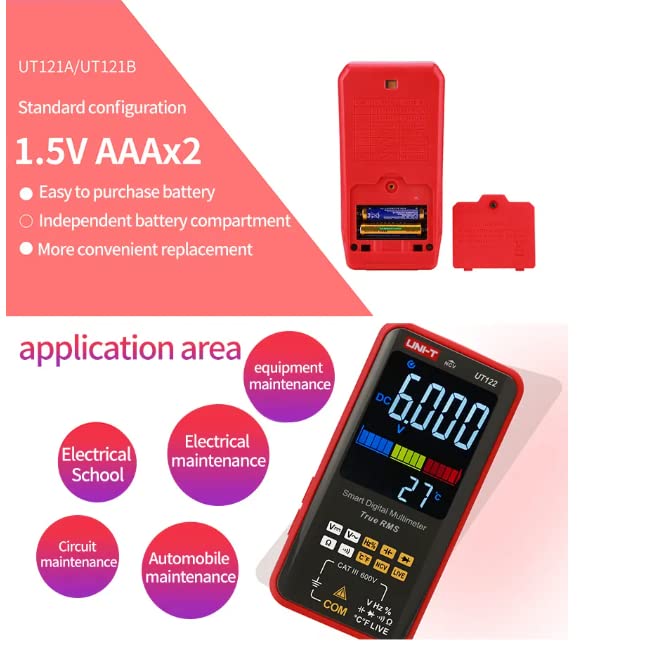
Figure 5.2: Flashlight Lighting. The integrated flashlight assists in working in poorly lit areas.
5.4 การวัด
Connect the test leads to the appropriate input jacks (COM and VΩHz for most measurements). Select the desired function and range (if not in Auto mode) before making contact with the circuit.

รูปที่ 5.3: ฉบับที่tage and Frequency Display. The multimeter can simultaneously display voltage and frequency, as shown here with AC 388.9V and 50Hz.
5.5 NCV (เครื่องวัดปริมาณสารแบบไม่สัมผัส)tage) and LIVE Wire Detection
ฟังก์ชัน NCV ช่วยให้ตรวจจับปริมาณไฟฟ้ากระแสสลับได้โดยไม่ต้องสัมผัสtage, providing an audible and visual indication of live wires without direct contact. The LIVE function helps identify live and neutral wires in a circuit.
Video 5.1: NCV Function Demonstration. This video demonstrates the non-contact voltage detection feature of the UNI-T UT122 multimeter, showing how it alerts the user to the presence of AC voltagอยู่ใกล้ปลั๊กพ่วง
6. ข้อมูลจำเพาะ
The UT121A offers a range of measurement capabilities. Key specifications include True RMS measurement, AC/DC 600V voltage measurement, and a 6000-count display. For a comprehensive list of specifications, refer to the table below.

Figure 6.1: Detailed Specifications Table. This table provides a comprehensive overview of the technical specifications for the UT121A, UT121B, and UT122 models, including measurement ranges, accuracy, and special features like True RMS, Auto Range, Dual Display, and NCV/LIVE.
7. การบำรุงรักษา
7.1 การทำความสะอาด
ในการทำความสะอาดมัลติมิเตอร์ ให้เช็ดตัวเครื่องด้วยผ้าamp ผ้าและผงซักฟอกอ่อนๆ ห้ามใช้สารกัดกร่อนหรือตัวทำละลาย ตรวจสอบให้แน่ใจว่าอุปกรณ์แห้งสนิทก่อนใช้งาน
7.2 การเปลี่ยนแบตเตอรี่
Refer to Section 4.1 for instructions on battery replacement. Always use new batteries of the specified type (1.5V AAA) and dispose of old batteries responsibly.
8 การแก้ไขปัญหา
If the multimeter does not function correctly, consider the following common issues:
- ไม่มีจอแสดงผล: ตรวจสอบว่าติดตั้งแบตเตอรี่อย่างถูกต้องและมีประจุเพียงพอ เปลี่ยนแบตเตอรี่หากจำเป็น
- จอแสดงผล "OL": This indicates an overload or out-of-range measurement. Ensure the correct function and range are selected, or that the measured value is within the device's limits.
- การอ่านค่าที่ไม่ถูกต้อง: Verify that the test leads are properly connected and not damaged. Ensure the correct measurement function is selected.
หากมีปัญหาเกิดขึ้นอย่างต่อเนื่อง โปรดติดต่อฝ่ายสนับสนุนลูกค้า
9. การรับประกันและการสนับสนุน
For warranty information and technical support, please refer to the documentation included with your purchase or visit the official UNI-T webไซต์ โปรดเก็บใบเสร็จรับเงินของคุณไว้เป็นหลักฐานการซื้อสำหรับการเรียกร้องการรับประกันใดๆ


