1. บทนำ
This manual provides detailed instructions for the installation, setup, and operation of your SONOFF Matter Smart Light Switch M5-3C-120W 3-Gang. This smart wall switch integrates with Matter, allowing seamless control through various smart home ecosystems including Alexa, Google Home, and SmartThings. It features 2.4GHz WiFi connectivity, requiring a neutral wire for installation. Please read this manual thoroughly before installation and use to ensure proper function and safety.

ภาพที่ 1.1: ด้านหน้า view of the SONOFF Matter Smart Light Switch M5-3C-120W 3-Gang.

ภาพที่ 1.2: จบแล้วview of Matter compatibility with various smart home platforms.
2. ข้อมูลด้านความปลอดภัย
คำเตือน: Risk of electric shock. Installation should be performed by a qualified electrician. Always turn off power at the circuit breaker before installing or servicing the switch. Ensure all wiring is compliant with local electrical codes.
- อุปกรณ์นี้ได้รับการออกแบบสำหรับใช้ภายในอาคารเท่านั้น
- ห้ามติดตั้งขณะมือเปียกหรือยืนอยู่บนพื้นเปียกหรือแห้งamp พื้นผิว
- Ensure the power supply is disconnected before any installation, maintenance, or removal procedures.
- A neutral wire is required for the operation of this smart switch. Verify its presence in your electrical box before proceeding.
- The device is FCC certified, ensuring safety and reliability.

Image 2.1: Illustration of the switch's internal design, highlighting high temperature resistance and safe disassembly features.
3. เนื้อหาบรรจุภัณฑ์
เมื่อเปิดบรรจุภัณฑ์ ตรวจสอบว่ามีสินค้าทั้งหมดอยู่ครบถ้วนและไม่ได้รับความเสียหาย:
- SONOFF Matter Smart Light Switch (M5-3C-120W) x 1
- คู่มือฉบับย่อ x 1
- สกรู x 2

ภาพที่ 3.1: ด้านหน้า view of the product packaging.

ภาพที่ 3.2: ด้านหลัง view of the product packaging, detailing specifications and features.
4. การติดตั้ง
สำคัญ: Installation requires working with electrical wiring. If you are not comfortable with electrical work, consult a qualified electrician.
4.1 การตรวจสอบก่อนการติดตั้ง
- ตรวจสอบสายกลาง: This smart switch requires a neutral wire (typically white or gray) in your electrical box. Without a neutral wire, the switch cannot be installed.
- หมดแรง: Locate your circuit breaker panel and turn off the power to the switch you are replacing. Confirm the power is off using a voltagอีผู้ทดสอบ
- Existing Switch Removal: Carefully remove the faceplate and unscrew the existing switch from the wall box. Disconnect the wires, noting their connections.
4.2 คำแนะนำในการเดินสายไฟ
The SONOFF M5-3C-120W switch has terminals for Line (Live), Load, and Neutral wires. Refer to the diagram below for typical wiring connections.
- Line (L): Connect the incoming live wire from your electrical supply.
- Load (L1, L2, L3): Connect the wires going to your light fixtures. Each gang corresponds to a load terminal.
- ความเป็นกลาง (N): Connect the neutral wire from your electrical supply.
- กราวด์ (GND): Connect the ground wire (if present in your wall box) to the switch's ground terminal.
4.3 การติดตั้งทางกายภาพ
- หลังจากเดินสายไฟแล้ว ให้ดันสวิตช์เข้าไปในกล่องที่ผนังอย่างระมัดระวัง
- ยึดสวิตช์เข้ากับกล่องที่ผนังโดยใช้สกรูที่ให้มา
- ติดแผงหน้าปัดเข้ากับสวิตช์
- Restore power at the circuit breaker. The switch's indicator light should illuminate.

Image 4.1: Compatibility with standard US wall boxes and detailed product dimensions.
5. การตั้งค่าและการจับคู่
The SONOFF M5-3C-120W supports Matter protocol for broad compatibility.
5.1 Initial Setup with eWeLink App (Optional)
While Matter allows direct integration, you can also use the eWeLink app for initial setup or additional features.
- ดาวน์โหลดแอป eWeLink: ค้นหา "eWeLink" in your smartphone's app store (Google Play Store or Apple App Store) and install it.
- ลงทะเบียน/เข้าสู่ระบบ: เปิดแอปและสร้างบัญชีหรือเข้าสู่ระบบหากคุณมีอยู่แล้ว
- เพิ่มอุปกรณ์: Follow the in-app instructions to add a new device. The switch should enter pairing mode automatically after power-up.
5.2 Pairing with Matter Ecosystems
To integrate with Matter-compatible hubs (e.g., Apple Home, Google Home, Alexa, SmartThings), follow these general steps:
- Ensure your Matter-compatible hub (e.g., HomePod, Apple TV 4K, Google Nest Hub, Amazon Echo device) is set up and online.
- Open the respective smart home app (Apple Home, Google Home, Alexa, SmartThings).
- Initiate the "Add Device" or "Add Accessory" process within the app.
- Scan the Matter QR code located on the device or its packaging, or manually enter the pairing code.
- ทำตามคำแนะนำบนหน้าจอเพื่อดำเนินการจับคู่ให้เสร็จสมบูรณ์
6. คู่มือการใช้งาน
6.1 การควบคุมด้วยตนเอง
Press the physical buttons on the switch to manually turn connected lights on or off.
6.2 การควบคุมระยะไกลผ่านแอป
Use the eWeLink app or your preferred Matter-compatible smart home app to control the switch remotely.
- การควบคุมการเปิด/ปิด: Tap the respective button in the app to toggle the light on or off.
- การกำหนดตารางเวลา: Set custom schedules and timers for automatic light control.
- ตัวจับเวลาแบบวนซ้ำ: Configure lights to cycle on and off at specified intervals.
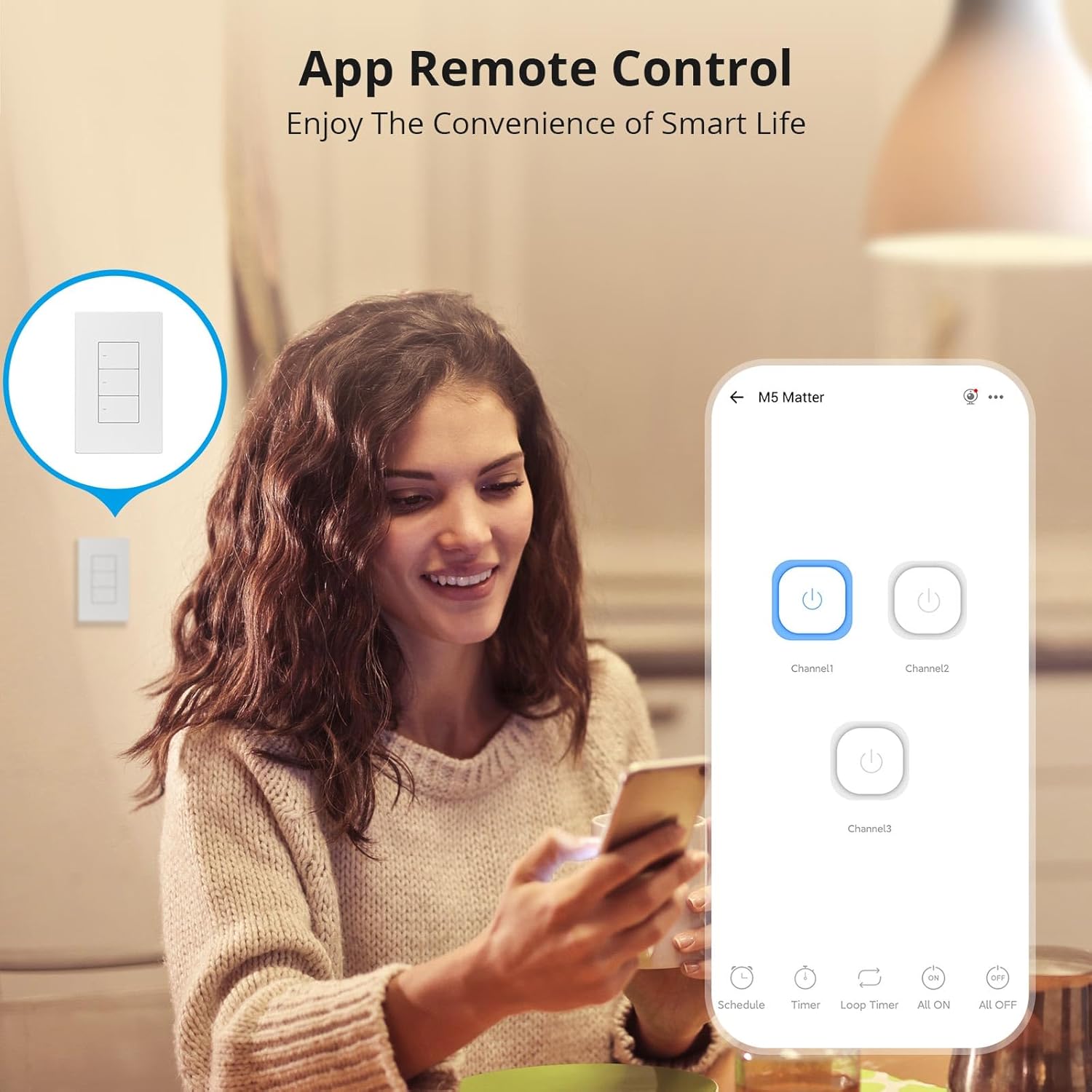
Image 6.1: Remote control via the eWeLink app interface.

ภาพที่ 6.2: อดีตample of setting scheduled on/off times for automated lighting.
6.3 การควบคุมด้วยเสียง
Once integrated with Alexa, Google Home, or other voice assistants, you can control your lights using voice commands.
- Example: "Alexa, turn off the living room light."
- Example: "Hey Google, turn on the kitchen lights."

Image 6.3: Voice control in action with a smart speaker.
6.4 ฉากอัจฉริยะ
Create smart scenes to automate actions based on specific conditions or other smart devices.
- Example: Link with a door sensor (e.g., SONOFF DW2-WiFi) to automatically turn on lights when a door opens.

Image 6.4: Smart scene example: lights activate upon door opening.
6.5 Two-Way Control (with SONOFF R5)
The SONOFF M5 switch can be paired with a SONOFF R5 Scene Controller for two-way or multi-way control without complex wiring.

Image 6.5: Two-way control setup using an M5 switch and an R5 scene controller.
6.6 LED Indicator Adjustment
The LED indicator on the switch buttons can be adjusted for brightness via the eWeLink app to suit your preference, especially for locating the switch in the dark or minimizing disturbance during sleep.

Image 6.6: App interface for adjusting LED indicator brightness.
7. การบำรุงรักษา
To maintain the performance and appearance of your smart switch:
- ทำความสะอาดพื้นผิวด้วยผ้านุ่มและแห้ง ห้ามใช้น้ำยาทำความสะอาดที่มีฤทธิ์กัดกร่อนหรือตัวทำละลาย
- Ensure the switch is kept free from dust and moisture.
- Do not attempt to disassemble the switch beyond what is described in the safety section, as this may void the warranty and pose a safety risk.
8 การแก้ไขปัญหา
If you encounter issues with your SONOFF Matter Smart Light Switch, refer to the following common problems and solutions:
- Switch is unresponsive / No power:
- Check the circuit breaker to ensure power is restored to the switch.
- ตรวจสอบว่าสายกลางเชื่อมต่ออย่างถูกต้อง
- ตรวจสอบให้แน่ใจว่าการเชื่อมต่อสายไฟทั้งหมดมีความปลอดภัย
- Cannot connect to WiFi / Drops connection frequently:
- Ensure your WiFi network is 2.4GHz. This device does not support 5GHz WiFi.
- Check the distance between the switch and your WiFi router. Obstructions can weaken the signal.
- รีสตาร์ทเราเตอร์ WiFi ของคุณ
- Perform a factory reset on the switch (refer to the quick guide for specific steps) and attempt pairing again.
- Cannot pair with Matter / Smart Home App:
- Ensure your Matter-compatible hub is online and within range.
- Verify that the Matter QR code or pairing code is entered correctly.
- Check for any firmware updates for your Matter hub or the smart switch.
- Try resetting the switch and initiating the pairing process again.
- ไฟกระพริบหรือไม่ดับสนิท:
- บางครั้งสิ่งนี้อาจเกิดขึ้นได้กับน้ำต่ำtage LED bulbs. Ensure your bulbs are compatible with smart switches.
- Verify the load connected does not exceed the maximum wattage ระบุไว้ในข้อกำหนด
9. ข้อมูลจำเพาะ
| คุณสมบัติ | รายละเอียด |
|---|---|
| แบบอย่าง | M5-3C-120W |
| ขนาดสินค้า | 4.72 x 2.91 x 1.63 นิ้ว |
| น้ำหนักสินค้า | 8.08 ออนซ์ |
| โหมดการทำงาน | เปิดปิด |
| คะแนนปัจจุบัน | 6 Amps |
| ปฏิบัติการฉบับที่tage | 100-240 โวลต์ AC |
| ประเภทการติดต่อ | ปิดปกติ |
| ประเภทขั้วต่อ | Clamp |
| เทอร์มินัล | สกรู |
| ประเภทวงจร | 1 ทาง |
| ประเภทตัวกระตุ้น | ปุ่มกด |
| ไวไฟ | IEEE 802.11 b / g / n 2.4GHz |
| Casinวัสดุ g | พีซี วีโอ + ซีอาร์เอส |
| อุณหภูมิในการทำงาน | -10°C ถึง 40°C |
| การรับรอง | CE/FCC/ISED |
| Max. Load (per gang) | 3-Gang: 1320W (440W/Gang) |
10. การรับประกันและการสนับสนุน
SONOFF products are designed and manufactured to the highest quality standards. For warranty information and technical support, please refer to the official SONOFF webหรือติดต่อฝ่ายบริการลูกค้าโดยตรง โปรดเก็บใบเสร็จรับเงินไว้เป็นหลักฐานการซื้อสำหรับการเรียกร้องการรับประกัน
ผู้ผลิต: ซอนอฟ
Webเว็บไซต์: sonoff.tech
อีเมลบริการ: support@itead.cc


