1. บทนำ
The SCHUBERTH SC2 communication system represents a new standard for motorcycle communication, designed for seamless integration with your Schuberth C5, E2, and S3 helmets. This advanced system offers superior connectivity and audio quality, enhancing your riding experience with reliable intercom and multimedia capabilities.
This manual provides essential information for the installation, operation, and maintenance of your SC2 system, ensuring optimal performance and user satisfaction.
2. สินค้าหมดview
The SCHUBERTH SC2 system consists of a main communication unit, a remote control, and a microphone, all designed for easy integration into compatible Schuberth helmets.
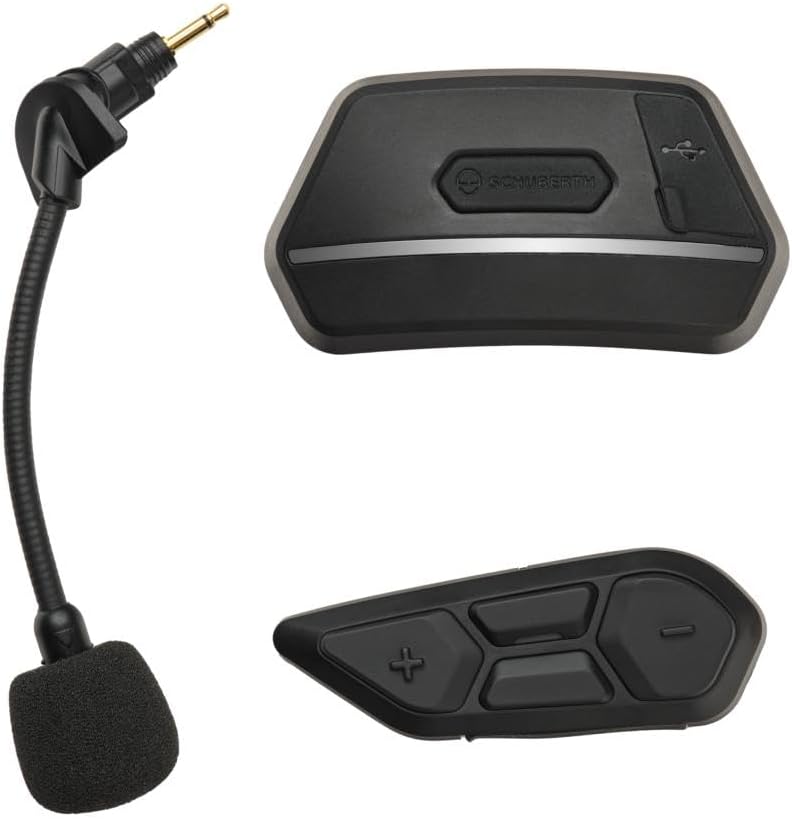
Figure 1: SCHUBERTH SC2 Communication System components. Shown are the main communication unit (top right), the remote control (bottom right), and the flexible boom microphone (left).
คุณสมบัติหลัก:
- Bluetooth 5.0: เพื่อการเชื่อมต่อไร้สายที่เสถียรและมีประสิทธิภาพ
- Multi-Way Intercom: Connect with multiple riders.
- อินเตอร์คอมแบบตาข่าย™: Supports up to 24 participants in Group Mesh mode, with multi-channel communication allowing users to switch between 9 communication channels in Open Mesh mode.
- ระยะขยาย: Intercom range of up to 2 km in open terrain.
- Audio Multitasking: Listen to music or GPS instructions while communicating.
- คำสั่งเสียง: Multi-language voice command support for hands-free operation.
- การผสานรวมผู้ช่วยอัจฉริยะ: รองรับ Siri และ Google Assistant
- อินเตอร์คอมสากล: Connect with headsets from other brands.
3. การตั้งค่าและการติดตั้ง
The SCHUBERTH SC2 is designed for extremely easy installation into compatible Schuberth C5, E2, and S3 helmets. These helmets come with pre-installed antennas for FM-Radio, Bluetooth Intercom, and Mesh Intercom, as well as HD speakers, simplifying the setup process.
ขั้นตอนการติดตั้ง:
- เตรียมหมวกนิรภัย: Locate the designated slots for the SC2 Main Unit and the remote control on your Schuberth C5, E2, or S3 helmet. Remove any pre-installed covers from these slots.
- ใส่ชุดหลัก: Carefully insert the SC2 Main Unit into its designated receptacle in the helmet. Ensure it clicks securely into place.
- เสียบรีโมทคอนโทรล: Insert the remote control into its corresponding slot. This unit typically requires a separate coin cell battery (not powered by the main system).
- เชื่อมต่อไมโครโฟน: Connect the flexible boom microphone to the appropriate port on the SC2 Main Unit. Position the microphone correctly inside the helmet for optimal voice pickup.
- เปิดเครื่อง: Once both units are securely installed, power on the system according to the operating instructions.
Important Warning: Ensure that you install the device and its antennas correctly to ensure stable and reliable communication. Improper installation may affect performance.
4. Operating the SC2 System
The SCHUBERTH SC2 system is designed for intuitive operation, allowing riders to manage communication and audio functions easily while on the road.
ฟังก์ชั่นพื้นฐาน:
- เปิด/ปิดเครื่อง: Refer to the specific button combinations on the remote control for powering the system on or off.
- การควบคุมระดับเสียง: Use the dedicated buttons on the remote control to adjust the audio volume.
- Intercom Activation: Initiate or end intercom conversations with other riders. The system supports Group Intercom for up to 4 SCHUBERTH communication systems and Universal Intercom for connecting with other brands.
- ตาข่ายอินเตอร์คอม: Activate Mesh Intercom for large group communication. The system automatically adapts to the number of participants.
- Audio Multitasking: The system allows for simultaneous audio playback (e.g., music, GPS) while maintaining intercom communication.
- คำสั่งเสียง: Utilize multi-language voice commands to control various functions without taking your hands off the handlebars. Simply activate your preferred voice assistant (Siri or Google Assistant) and speak your command.
For detailed instructions on specific button functions and advanced features, please refer to the comprehensive digital manual available on the SCHUBERTH webเว็บไซต์.
5. การบำรุงรักษาและการดูแล
Proper maintenance ensures the longevity and optimal performance of your SCHUBERTH SC2 communication system.
- การทำความสะอาด: ใช้แบบนุ่มๆamp cloth to clean the exterior of the main unit and remote control. Avoid using harsh chemicals or abrasive cleaners.
- พื้นที่จัดเก็บ: Store the system in a dry place, away from extreme temperatures and direct sunlight, when not in use for extended periods.
- การดูแลแบตเตอรี่ Ensure the remote control's coin cell battery is replaced as needed. For the main unit's rechargeable battery, avoid fully discharging it frequently to prolong its lifespan.
- การดูแลไมโครโฟน: Keep the microphone foam cover clean and free from debris.
6 การแก้ไขปัญหา
If you encounter issues with your SCHUBERTH SC2 system, try the following troubleshooting steps:
- ไม่มีไฟฟ้า:
- Ensure the main unit is fully charged.
- Check the remote control's coin cell battery and replace if necessary.
- Intercom Connection Issues:
- Verify that the device and its antennas are correctly installed and securely connected within the helmet.
- Ensure both devices are within range and properly paired.
- ลองเชื่อมต่ออุปกรณ์ใหม่อีกครั้ง
- คุณภาพเสียงไม่ดี:
- ตรวจสอบตำแหน่งของไมโครโฟน
- Ensure speakers are correctly seated in the helmet.
- ปรับระดับเสียง
- คำสั่งเสียงไม่ตอบสนอง:
- ตรวจสอบให้แน่ใจว่าไมโครโฟนเชื่อมต่อและวางตำแหน่งอย่างถูกต้อง
- พูดให้ชัดเจนและระดับเสียงปกติ
- Check if the voice command feature is enabled.
If problems persist, please consult the full digital manual or contact SCHUBERTH customer support.
7. ข้อมูลจำเพาะ
| คุณสมบัติ | รายละเอียด |
|---|---|
| ยี่ห้อ | ชูเบอร์ธ |
| หมายเลขรุ่น | สป.127, สป.106 |
| เทคโนโลยีการเชื่อมต่อ | บลูทูธ 5.0 |
| แหล่งพลังงาน | ใช้พลังงานจากแบตเตอรี่ |
| สี | สีดำ |
| คุณสมบัติพิเศษ | เครื่องส่งสัญญาณบลูทูธ FM |
| ช่วงอินเตอร์คอม | Up to 2 km (in open terrain) |
| Mesh Intercom Participants | Up to 24 (Group Mesh) |
8. การรับประกันและการสนับสนุน
Information regarding the product warranty is not provided within this manual. Please refer to the warranty card included with your product packaging or visit the official SCHUBERTH webเว็บไซต์สำหรับข้อกำหนดและเงื่อนไขการรับประกันโดยละเอียด
For technical support, troubleshooting assistance, or further inquiries, please contact SCHUBERTH customer service through their official webเว็บไซต์หรือข้อมูลการติดต่อที่ให้มาพร้อมกับการซื้อของคุณ


