1. บทนำ
The Gemini GMU-M100 is a handheld UHF wireless microphone system designed for a variety of audio applications. This system provides wireless freedom, allowing users to move without cable restrictions, and is suitable for performances, presentations, karaoke, and more. The system operates within the 512 to 541.7 MHz frequency range (for the US market) and offers a stable signal transmission.
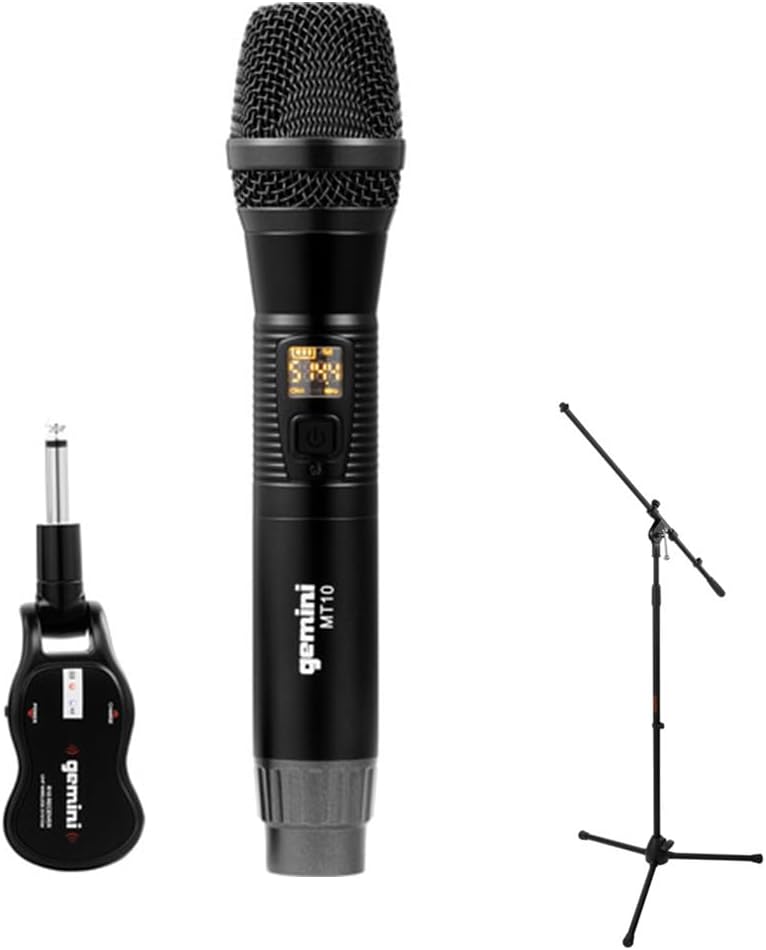
Image 1.1: The Gemini GMU-M100 Handheld UHF Wireless Microphone System, including the handheld microphone, plug-in receiver, and an optional microphone stand.
2. เนื้อหาบรรจุภัณฑ์
Please inspect the package contents to ensure all items are present and in good condition:
- GMU-M100 Handheld Wireless Microphone
- GMU-M100 Plug-in Wireless Receiver
- Rechargeable Lithium Batteries (pre-installed or included for both units)
- สายชาร์จไมโคร USB
- คู่มือการใช้งาน (เอกสารนี้)
Note: Additional accessories such as a microphone stand may be included if purchased as part of a bundle.
3. สินค้าหมดview
3.1 Handheld Microphone (MT10)
The handheld microphone features a dynamic capsule with a cardioid pickup pattern, designed to focus on the sound source while minimizing background noise. It includes an LED screen for displaying battery life and frequency information, and a SET button for frequency adjustment.
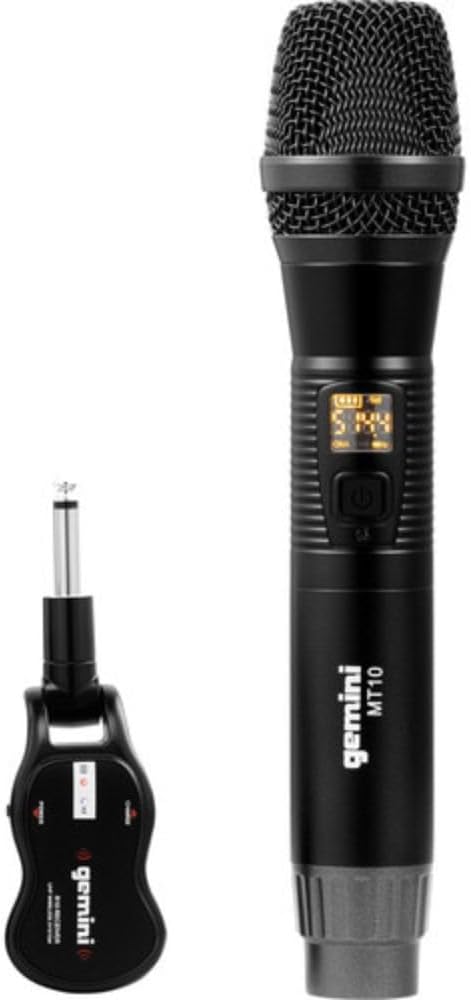
Image 3.1: The GMU-M100 handheld microphone and its compact plug-in receiver.
3.2 Plug-in Receiver (R10)
The compact receiver connects directly to your audio equipment via a standard 1/4" TS plug. It receives the wireless signal from the microphone and outputs it to your PA system, amplifier, or mixer.

ภาพที่ 3.2: มุม view highlighting the design of the microphone and receiver.
4. การตั้งค่า
4.1 การชาร์จอุปกรณ์
Both the microphone and receiver are powered by rechargeable lithium batteries. Before first use, ensure both units are fully charged.
- Locate the Micro-USB charging port on the bottom of the microphone and on the side of the receiver.
- Connect the included Micro-USB cable to the charging port of each unit and plug the other end into a USB power source (e.g., computer USB port, USB wall adapter).
- The LED indicator on each unit will show charging status (refer to the unit's specific LED behavior for full charge indication).

Image 4.1: Close-up of the microphone's Micro-USB charging port (DC-5V).

Image 4.2: The Micro-USB charging cable provided for both units.
4.2 Battery Installation (Microphone)
The microphone uses a user-replaceable 18650 1200mAh battery. If the battery needs replacement or initial installation:
- Unscrew the bottom cap of the microphone.
- Insert the 18650 battery, ensuring correct polarity (+/-).
- Screw the bottom cap back on securely.

Image 4.3: The microphone with its battery compartment open, revealing the 18650 battery.
4.3 การเชื่อมต่อเครื่องรับ
The receiver connects directly to your audio input device.
- Plug the 1/4" TS connector of the receiver into an available 1/4" input jack on your PA speaker, amplifier, mixer, or other audio equipment.
- Ensure the audio equipment is powered off before connecting the receiver.
4.4 การเปิดเครื่องและการจับคู่
ไมโครโฟนและตัวรับสัญญาณได้รับการออกแบบให้จับคู่กันโดยอัตโนมัติ
- Power on your audio equipment.
- Press and hold the power button on the handheld microphone until the LED screen illuminates.
- Press and hold the power button on the plug-in receiver.
- The units will automatically pair. A successful connection is typically indicated by a stable signal icon on the microphone's LED screen.
5. คู่มือการใช้งาน
5.1 การควบคุมระดับเสียง
The output volume can be controlled directly from the handheld microphone using the designated volume buttons (if present) or through the connected audio equipment's input gain/volume controls.
5.2 การปรับความถี่
If you experience interference, you can change the operating frequency of the microphone system:
- With the microphone powered on, press the ชุด ปุ่ม.
- The microphone will cycle through available UHF frequencies. The receiver will automatically sync to the new frequency.
- Select a clear frequency to ensure optimal performance.
5.3 ระยะสัญญาณไร้สาย
The GMU-M100 system offers a wireless range of over 164 feet (50 meters) in optimal conditions. Obstacles, other wireless devices, and environmental factors can affect this range.
6. การบำรุงรักษา
6.1 การดูแลแบตเตอรี่
- ชาร์จแบตเตอรี่ให้เต็มก่อนเก็บรักษาเป็นเวลานาน
- หลีกเลี่ยงการให้แบตเตอรี่สัมผัสกับอุณหภูมิที่สูงหรือต่ำเกินไป
- If the microphone will not be used for a long period, remove the 18650 battery.
6.2 การทำความสะอาด
- เช็ดไมโครโฟนและเครื่องรับด้วยผ้าแห้งและนุ่ม
- อย่าใช้สารเคมีรุนแรงหรือน้ำยาทำความสะอาดที่มีฤทธิ์กัดกร่อน
- Avoid moisture contact with electronic components.
7 การแก้ไขปัญหา
| ปัญหา | สาเหตุที่เป็นไปได้ | สารละลาย |
|---|---|---|
| ไม่มีเสียงออก | Microphone or receiver not powered on; low battery; incorrect connection; receiver not paired. | Ensure both units are charged and powered on. Check all cable connections. Verify pairing (power cycle both units). Adjust volume on microphone and audio equipment. |
| สัญญาณรบกวนหรือไฟฟ้าสถิต | Operating on a crowded frequency; proximity to other wireless devices; environmental interference. | กดปุ่ม ชุด button on the microphone to change to a different frequency. Move away from other wireless devices or sources of electromagnetic interference. |
| ช่วงไร้สายสั้น | Obstacles between microphone and receiver; low battery; environmental factors. | Ensure a clear line of sight between microphone and receiver. Fully charge batteries. Reduce distance between units. |
| Microphone LED screen off | Microphone is off; battery is depleted. | Press the power button to turn on. Charge the microphone battery. |
8. ข้อมูลจำเพาะ
| คุณสมบัติ | ข้อมูลจำเพาะ |
|---|---|
| แบบอย่าง | GMU-M100 |
| ปัจจัยรูปแบบไมโครโฟน | ระบบไมโครโฟนแบบใช้มือถือ |
| ช่วงความถี่ (สหรัฐอเมริกา) | 512 - 541.7 เมกะเฮิรตซ์ |
| ช่วงสาย | Over 164 feet (50 meters) |
| แหล่งพลังงาน | Rechargeable Lithium Battery (USB Powered) |
| แบตเตอรี่ไมโครโฟน | 18650 1200mAh (user-replaceable) |
| ขั้วต่อตัวรับสัญญาณ | 1/4" TS Plug |
| วัสดุ | โลหะ |
| รูปแบบขั้ว | ทิศทางเดียว (Cardioid) |
| จำนวนช่องสัญญาณ | 16 |
| น้ำหนักสินค้า | 15.7 ออนซ์ (ประมาณ 445 กรัม) |
| ขนาดแพ็คเกจ | 13 x 5.6 x 2.6 นิ้ว (ประมาณ 33 x 14.2 x 6.6 ซม.) |
9. การรับประกันและการสนับสนุน
For warranty information, technical support, or service inquiries, please refer to the official Gemini webเข้าชมเว็บไซต์หรือติดต่อฝ่ายบริการลูกค้าโดยตรง เก็บหลักฐานการซื้อไว้สำหรับการเคลมประกันใดๆ
Gemini Customer Support: กรุณาเข้าเยี่ยมชม www.geminisound.com/support for the latest support information and contact details.


