1. สินค้าหมดview
The MATRIX MPS-3010H-3C is a high-precision, 3-channel adjustable DC power supply designed for various applications including laboratory work, electronic repair, and DIY projects. It features two adjustable channels (CH1 and CH2) providing 0-30V / 0-10A each, and one fixed 5V / 3A channel (CH3), with a total power output of up to 615W. The unit offers a 4-digit bright screen display for voltage and current, independent control for CH1 and CH2, and supports 110V/220V input voltagอี การสลับ
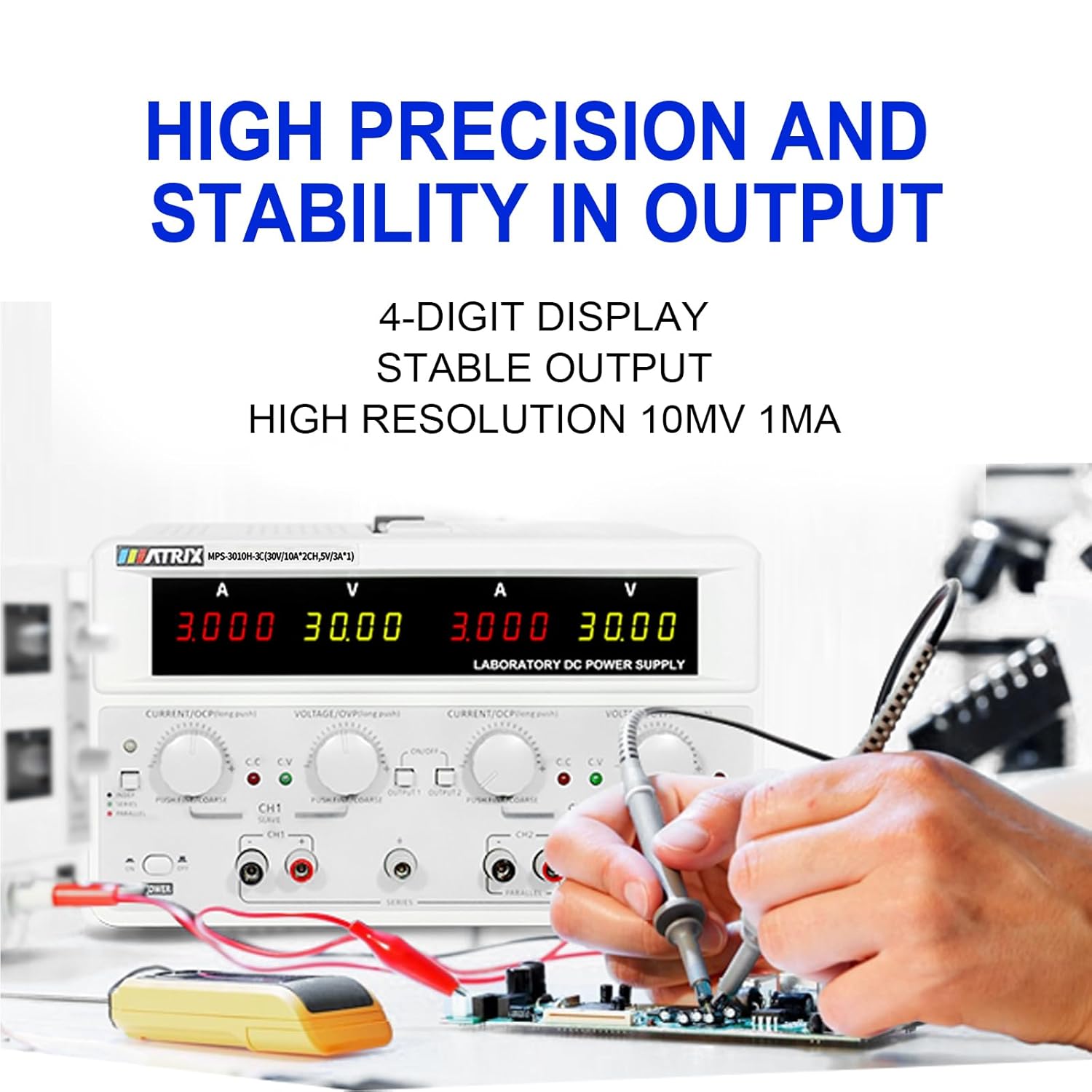
Key features include high precision (0.03% + 10 mV, 0.1% + 5 mA) and stability with 10 mV, 1 mA resolution and low ripple (2 mVrms, 5 mArms). It incorporates a power-on slow-start circuit for stable and accurate DC output. The power supply allows for easy switching between independent, series, and parallel modes with a single button, eliminating the need for manual wire reconnection. It also supports presetting current and voltage without short circuits. User-friendly features include precision encoder adjustment knobs for accurate value changes, OCP/OVP/OTP protection, an intelligent fan system, and USB, RS-232, and RS-485 interfaces for computer or automated device connectivity.

2. คำแนะนำด้านความปลอดภัย
โปรดอ่านและทำความเข้าใจคำแนะนำด้านความปลอดภัยทั้งหมดก่อนใช้งานอุปกรณ์ การไม่ปฏิบัติตามคำแนะนำเหล่านี้อาจส่งผลให้เกิดไฟฟ้าช็อต ไฟไหม้ หรือความเสียหายต่อผลิตภัณฑ์ได้
- ควรต่อแหล่งจ่ายไฟเข้ากับเต้ารับที่มีสายดินเสมอ
- ห้ามใช้งานอุปกรณ์ในสภาพเปียกหรืองamp เงื่อนไข.
- ต้องแน่ใจว่ามีการระบายอากาศที่เหมาะสมเพื่อป้องกันความร้อนสูงเกินไป อย่าปิดกั้นช่องระบายอากาศ
- อย่าเปิดcasing ของแหล่งจ่ายไฟ ไม่มีชิ้นส่วนใดที่ผู้ใช้สามารถซ่อมแซมได้เอง โปรดส่งซ่อมโดยช่างผู้ชำนาญการ
- ตรวจสอบปริมาณอินพุตtage selector (110V/220V) is set correctly for your region before connecting to AC power.
- Use only the provided power cord and test leads, or equivalent replacements that meet safety standards.
- Avoid touching output terminals when the device is powered on.
- Disconnect power before making or changing connections to the output terminals.
3. เนื้อหาบรรจุภัณฑ์
Carefully unpack the power supply and check for any damage. Retain the packaging for future transport or storage. Verify that all items listed below are included:
- MATRIX MPS-3010H-3C DC Power Supply Unit
- สายไฟ AC
- สายทดสอบ (สีแดงและสีดำ)
- คู่มือการใช้งาน (เอกสารนี้)
4. คุณสมบัติของผลิตภัณฑ์
- เอาต์พุต 3 ช่อง: Two adjustable channels (0-30V/0-10A) and one fixed channel (5V/3A).
- High Precision & Resolution: 10mV / 1mA resolution with 0.03% + 10mV voltage accuracy and 0.1% + 5mA current accuracy.
- Low Ripple & Noise: ≤2mVrms and ≤5mArms for stable output.
- จอแสดงผล 4 หลัก: Clear and bright display for voltage และการอ่านปัจจุบัน
- Series/Parallel Mode: One-button switching for series or parallel operation without manual rewiring.
- ฟังก์ชั่นที่ตั้งไว้ล่วงหน้า: Ability to preset current and voltage without short-circuiting the output.
- กลไกการป้องกัน: Over Current Protection (OCP), Over Voltagระบบป้องกันอิเล็กทรอนิกส์ (OVP) และระบบป้องกันอุณหภูมิสูงเกิน (OTP)
- ระบบระบายความร้อนอัจฉริยะ: Fan system adjusts speed based on temperature to maintain optimal performance.
- การเชื่อมต่อ: Equipped with USB, RS-232, and RS-485 interfaces for remote control and automation.
- ฟังก์ชั่นหน่วยความจำ: Saves output status and values before shutdown.
- การควบคุมออด: Buzzer sound can be turned on or off.


5. คู่มือการติดตั้ง
5.1 การแกะและการจัดวาง
Remove the power supply from its packaging. Place the unit on a stable, level surface with adequate space around it for ventilation. Ensure that the front and rear panels are easily accessible.
5.2 การเชื่อมต่อไฟ AC
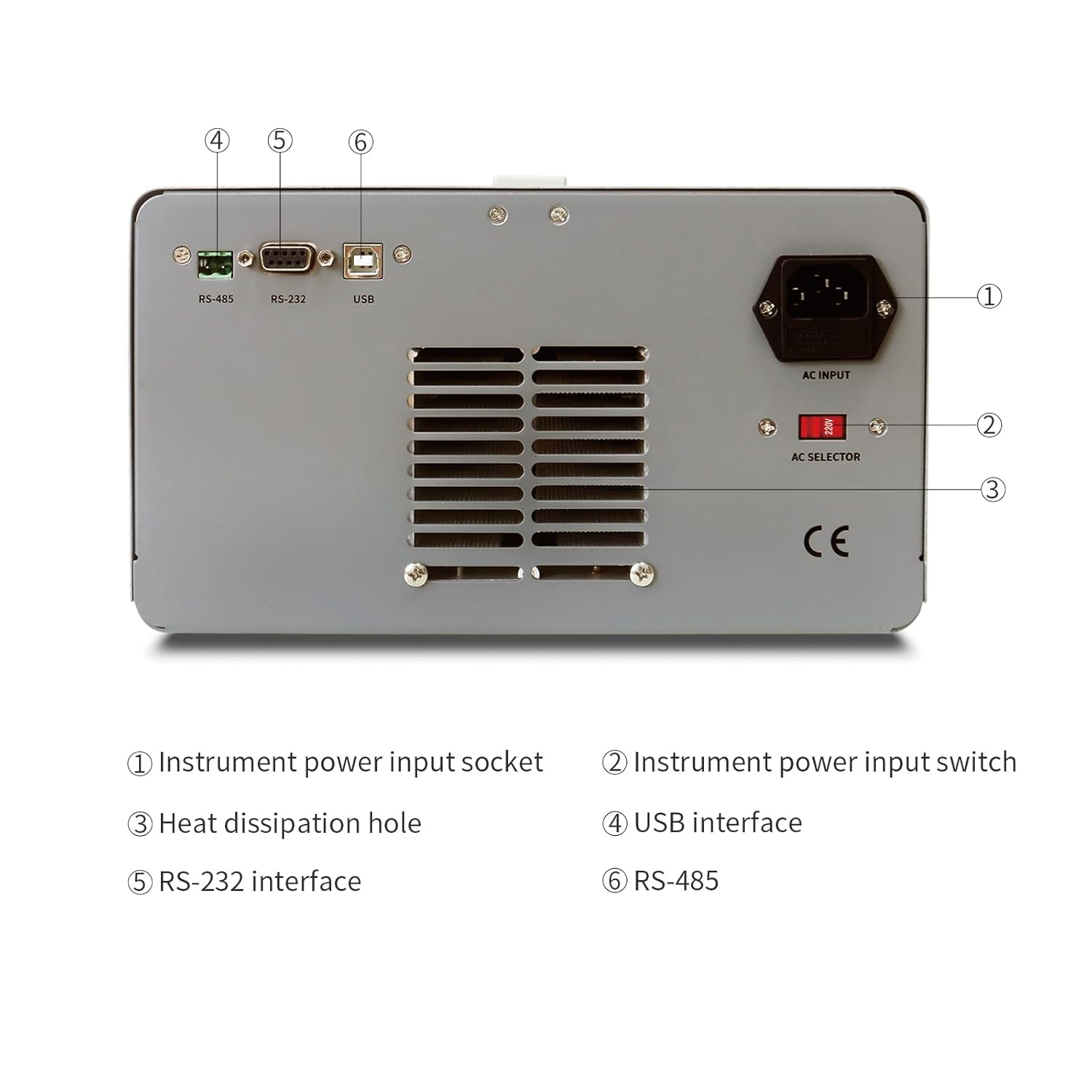
- Locate the AC input socket and the AC selector switch on the rear panel of the power supply.
- สำคัญ: Before connecting the power cord, ensure the AC selector switch is set to the correct voltage (110V or 220V) for your local power grid. Incorrect setting can damage the unit.
- Connect the provided AC power cord to the AC input socket on the rear panel.
- เสียบปลายอีกด้านของสายไฟ AC เข้ากับเต้ารับไฟฟ้าที่มีสายดิน
5.3 Connecting Load
Use the provided test leads to connect your load to the output terminals. Ensure correct polarity (red for positive, black for negative). For CH1 and CH2, use the corresponding output terminals. CH3 (fixed 5V) also has dedicated output terminals.
6. คู่มือการใช้งาน
6.1 โอเวอร์แผงด้านหน้าview
The front panel provides all necessary controls and displays for operating the power supply.

- CH1 V, A display: Digital displays for Voltage and Current of Channel 1.
- CH2 V, A display: Digital displays for Voltage and Current of Channel 2.
- CH1 Adjustment knob: Encoder knob for setting Voltage and Current for Channel 1. Push to switch between coarse/fine adjustment.
- CH2 Adjustment knob: Encoder knob for setting Voltage and Current for Channel 2. Push to switch between coarse/fine adjustment.
- ตัวบ่งชี้โหมด: Lights indicating CC (Constant Current) or CV (Constant Voltage) mode.
- เมนู: Button for accessing menu options.
- CH1, CH2 Output switch: Buttons to enable/disable output for Channel 1 and Channel 2 independently.
- ขั้วเอาท์พุท: Binding posts for connecting test leads (Red for positive, Black for negative).
- สวิตช์ไฟ: สวิตช์เปิด/ปิดหลักของตัวเครื่อง
6.2 Basic Operation (Independent Mode)
- Ensure the power supply is connected to AC power and the AC selector is correct.
- กดปุ่มหลัก พลัง switch to turn on the unit. The displays will illuminate.
- For CH1 or CH2, rotate the respective เล่มที่TAGE knob to set the desired output voltage. Push the knob to toggle between coarse and fine adjustment.
- Rotate the respective ปัจจุบัน knob to set the desired current limit. This acts as a maximum current the channel will supply.
- Connect your load to the corresponding output terminals (CH1, CH2, or CH3).
- กดปุ่ม ผลลัพธ์ 1 or ผลลัพธ์ 2 switch to enable the output for the selected channel. The output indicator will light up.
- The display will show the actual output voltagอีและปัจจุบัน
- To disable an output, press its respective เอาท์พุต เปลี่ยนอีกครั้ง
6.3 Series and Parallel Mode
The MPS-3010H-3C allows for easy configuration of CH1 and CH2 in series or parallel mode.
- โหมดอนุกรม: Connect the positive terminal of CH1 to the negative terminal of CH2 using a short wire. Then, use the negative terminal of CH1 and the positive terminal of CH2 as the combined output. Press the ชุด ปุ่มปรับระดับเสียงtage will be the sum of CH1 and CH2 voltages, while the current limit will be that of the lower-set channel.
- โหมดคู่ขนาน: Connect the positive terminals of CH1 and CH2 together, and the negative terminals of CH1 and CH2 together. Press the ขนาน button. The current will be the sum of CH1 and CH2 currents, while the voltage will be that of the lower-set channel.
In both series and parallel modes, the display will show the combined current and voltage values, providing intuitive readings.
6.4 Fixed 5V Output (CH3)
The CH3 output provides a fixed 5V at 3A. This channel is always active when the power supply is on and does not have independent ON/OFF control or adjustable settings.
6.5 คุณสมบัติการป้องกัน
- OCP (การป้องกันกระแสเกิน): If the output current exceeds the set limit, the power supply will enter constant current mode (CC) or shut down the output, depending on the setting.
- OVP (มากกว่าVoltagอี การป้องกัน): หากปริมาณเอาต์พุตtage exceeds a preset limit, the output will be shut down to protect the connected load.
- OTP (การป้องกันอุณหภูมิเกิน): The unit will automatically shut down if its internal temperature exceeds a safe operating limit.
7 การเชื่อมต่อและการควบคุมระยะไกล
The MPS-3010H-3C offers multiple interfaces for remote control and integration into automated systems.
7.1 อินเทอร์เฟซเกินview

- อินเทอร์เฟซ USB: For direct connection to a personal computer.
- อินเตอร์เฟซ RS-232: A standard serial communication port.
- อินเตอร์เฟซ RS-485: A robust serial communication standard suitable for longer distances and multi-drop networks.
7.2 การเชื่อมต่อกับคอมพิวเตอร์
To control the power supply remotely, connect the appropriate cable (USB, RS-232, or RS-485) from the power supply to your computer. You will need to install the necessary drivers and control software, typically available from the MATRIX product support website. Refer to the software documentation for detailed instructions on remote operation and programming.
8. การบำรุงรักษา
การบำรุงรักษาอย่างเหมาะสมจะช่วยให้แหล่งจ่ายไฟของคุณมีอายุการใช้งานยาวนานและทำงานได้อย่างน่าเชื่อถือ
- การทำความสะอาด: Disconnect the power supply from all power sources and loads before cleaning. Use a soft, dry cloth to wipe the exterior. Do not use abrasive cleaners or solvents.
- การระบายอากาศ : Regularly check that the ventilation openings on the sides and rear of the unit are clear of dust and obstructions.
- พื้นที่จัดเก็บ: When not in use for extended periods, store the power supply in a dry, dust-free environment.
- การสอบเทียบ: For applications requiring high accuracy, periodic calibration by a qualified service center is recommended.
9 การแก้ไขปัญหา
ส่วนนี้จะกล่าวถึงปัญหาทั่วไปที่คุณอาจพบเจอ หากปัญหายังคงอยู่ โปรดติดต่อฝ่ายบริการลูกค้า
| ปัญหา | สาเหตุที่เป็นไปได้ | สารละลาย |
|---|---|---|
| ไม่มีไฟฟ้าเมื่อเปิดเครื่อง | Power cord not connected; AC selector incorrect; Blown fuse | Check power cord connection; Verify AC selector setting; Replace fuse (refer to service manual or contact support). |
| ไม่มีเอาต์พุต voltagอี/กระแส | Output switch OFF; OVP/OCP triggered; Load disconnected or faulty | Press output switch ON; Check OVP/OCP settings and reset if necessary; Verify load connection and functionality. |
| ปริมาตรไม่ถูกต้องtage/current reading | Poor connection; Device malfunction | Check test lead connections; Contact customer support for calibration or repair. |
| เครื่องร้อนเกินไป | Blocked ventilation; Excessive load | Ensure ventilation openings are clear; Reduce load or operate within specified limits. |
10. ข้อมูลจำเพาะทางเทคนิค
The following table details the technical specifications of the MATRIX MPS-3010H-3C DC Power Supply.

| พารามิเตอร์ | ข้อมูลจำเพาะ |
|---|---|
| แบบอย่าง | MPS-3010H-3C |
| จัดอันดับอินพุตVoltage | AC220V/110V ±10% |
| ช่อง 1 เอาท์พุท | 0-30V / 0-10A |
| ช่อง 2 เอาท์พุท | 0-30V / 0-10A |
| ช่อง 3 เอาท์พุท | 5V / 3A |
| พลังรวม | 615วัตต์ |
| เล่มที่tage Set Resolution | 10mV |
| Current Set Resolution | 1มิลลิแอมป์ |
| เล่มที่tage Set Accuracy | ≤0.03% + 10มิลลิโวลต์ |
| Current Set Accuracy | ≤0.1% + 5mA |
| ระลอกคลื่นและเสียงรบกวน (ระดับเสียง)tage) | ≤2mVrms |
| Ripple & Noise (Current) | ≤5mแขน |
| อุณหภูมิในการทำงาน | 0-40°C, ≤80%RH |
| ขนาดสินค้า (กว้าง x ยาว x สูง) | 9.8 x 5.9 x 13 นิ้ว |
| น้ำหนักสินค้า | 26.4 ปอนด์ (12 กก.) |
| อินเทอร์เฟซ | RS-232, RS-485, USB |
11. การรับประกันและการสนับสนุนลูกค้า
MATRIX TECHNOLOGY INC. provides a 3-year after-sales service for all MATRIX-branded products. For technical assistance, warranty claims, or general inquiries, please contact MATRIX customer support through the official website or your point of purchase. Please have your model number (MPS-3010H-3C) and purchase date available when contacting support.


