ข้อมูลด้านความปลอดภัยที่สำคัญ
Read all instructions before operating the TV. Keep this manual for future reference. Follow all warnings and instructions marked on the product.
- อย่าปิดกั้นช่องระบายอากาศ
- อย่าติดตั้งใกล้แหล่งความร้อน
- ปกป้องสายไฟจากการถูกเหยียบหรือถูกหนีบ
- ใช้เฉพาะอุปกรณ์เสริม/สิ่งที่แนบตามที่ผู้ผลิตกำหนดเท่านั้น
- ถอดปลั๊กในระหว่างที่มีพายุฝนฟ้าคะนองหรือเมื่อไม่ได้ใช้งานเป็นเวลานาน
- ส่งต่อการบริการทั้งหมดไปยังบุคลากรบริการที่มีคุณสมบัติเหมาะสม
สินค้าเกินview
The THOMSON 24HA2S13C is a 24-inch HD Smart Android TV designed for versatile use, including camping with its 12V power supply. It features Google Assistant, Wi-Fi, Bluetooth, Dolby Digital audio, and a triple-tuner for various signal reception.

ภาพ: ด้านหน้า view of the THOMSON 24HA2S13C 24-inch Smart Android TV, showing the screen displaying streaming service logos and a family enjoying the TV in a campกำลังตั้งค่า
เนื้อหาแพ็คเกจ
ตรวจสอบว่ามีรายการทั้งหมดรวมอยู่ในแพ็คเกจ:
- THOMSON 24HA2S13C Smart Android TV
- รีโมทคอนโทรล
- Power Adapter (12V compatible)
- ชั้นวางทีวี (2)
- สกรูสำหรับขาตั้งทีวี
- คู่มือการใช้งาน (เอกสารนี้)
- คู่มือเริ่มต้นอย่างรวดเร็ว
การตั้งค่า
1. การติดตั้งขาตั้งทีวี
- วางทีวีคว่ำหน้าลงบนพื้นผิวเรียบและนุ่มอย่างระมัดระวังเพื่อป้องกันไม่ให้หน้าจอเสียหาย
- Align the TV stands with the mounting holes on the bottom of the TV.
- ยึดขาตั้งด้วยสกรูที่ให้มา ตรวจสอบให้แน่ใจว่าขันแน่นสนิท

Image: The THOMSON 24HA2S13C TV showing two possible stand positions for different furniture widths. The image highlights the flexibility in stand placement.
2. การเชื่อมต่อพลังงาน
Connect the 12V power adapter to the TV's power input and then to a suitable power source. For camping or mobile use, connect to a 12V DC power outlet.

Image: The THOMSON 24HA2S13C TV mounted in a caravan, with a 12V power adapter shown, illustrating its suitability for mobile use.
3. การเชื่อมต่ออุปกรณ์ภายนอก
ทีวีมีพอร์ตต่างๆ สำหรับเชื่อมต่ออุปกรณ์ภายนอก:
- ช่องต่อ HDMI: For high-definition audio and video devices (e.g., game consoles, Blu-ray players).
- ยูเอสบี: สำหรับเชื่อมต่ออุปกรณ์จัดเก็บข้อมูล USB เพื่อเล่นสื่อ
- LAN: สำหรับการเชื่อมต่ออินเตอร์เน็ตแบบใช้สาย
- เสาอากาศ/ดาวเทียม: For receiving broadcast signals.
- AV ใน: สำหรับอุปกรณ์อนาล็อกรุ่นเก่า
- เอาต์พุตเสียง (ออปติคอล): สำหรับเชื่อมต่อกับระบบเสียงภายนอก
- ซีไอ+: สำหรับโมดูลการเข้าถึงแบบมีเงื่อนไข

ภาพ: ด้านหลัง view of the THOMSON 24HA2S13C TV, detailing the various input and output ports available for connectivity.
การใช้งานทีวี
1. ตัวช่วยการตั้งค่าเริ่มต้น
เมื่อเปิดเครื่องครั้งแรก ทีวีจะแนะนำคุณตามขั้นตอนการตั้งค่าเบื้องต้น ซึ่งรวมถึง:
- การเลือกภาษา
- การเชื่อมต่อเครือข่าย (Wi-Fi หรือ Ethernet)
- การลงชื่อเข้าใช้บัญชี Google (ไม่บังคับ แต่แนะนำเพื่อใช้งานฟีเจอร์ Smart TV อย่างเต็มรูปแบบ)
- Channel scanning (for DVB-T2/C/S2).
2. ฟังก์ชั่นการควบคุมระยะไกล
The included remote control provides access to all TV functions. It features backlit buttons for use in low light and a dedicated "Favorite" button for quick access to your preferred app.

Image: The remote control for the THOMSON 24HA2S13C TV, highlighting its ergonomic design, backlit buttons, and voice control capabilities.
3. คุณสมบัติของสมาร์ททีวี (แอนดรอยด์ทีวี)
This TV runs on Android TV, providing access to a wide range of applications and services:
- บริการสตรีมมิ่ง: Access Netflix, Prime Video, YouTube, Disney+, and more.
- ผู้ช่วย Google: Use voice commands to search for content, control playback, and get information. Activate by pressing the Google Assistant button on the remote.
- Chromecast ในตัว: Cast content from compatible smartphones, tablets, or computers directly to your TV.
- ร้านค้า Google Play: ดาวน์โหลดแอพและเกมเพิ่มเติม

Image: The THOMSON 24HA2S13C TV screen showing the Android TV home interface with popular streaming applications and content recommendations.
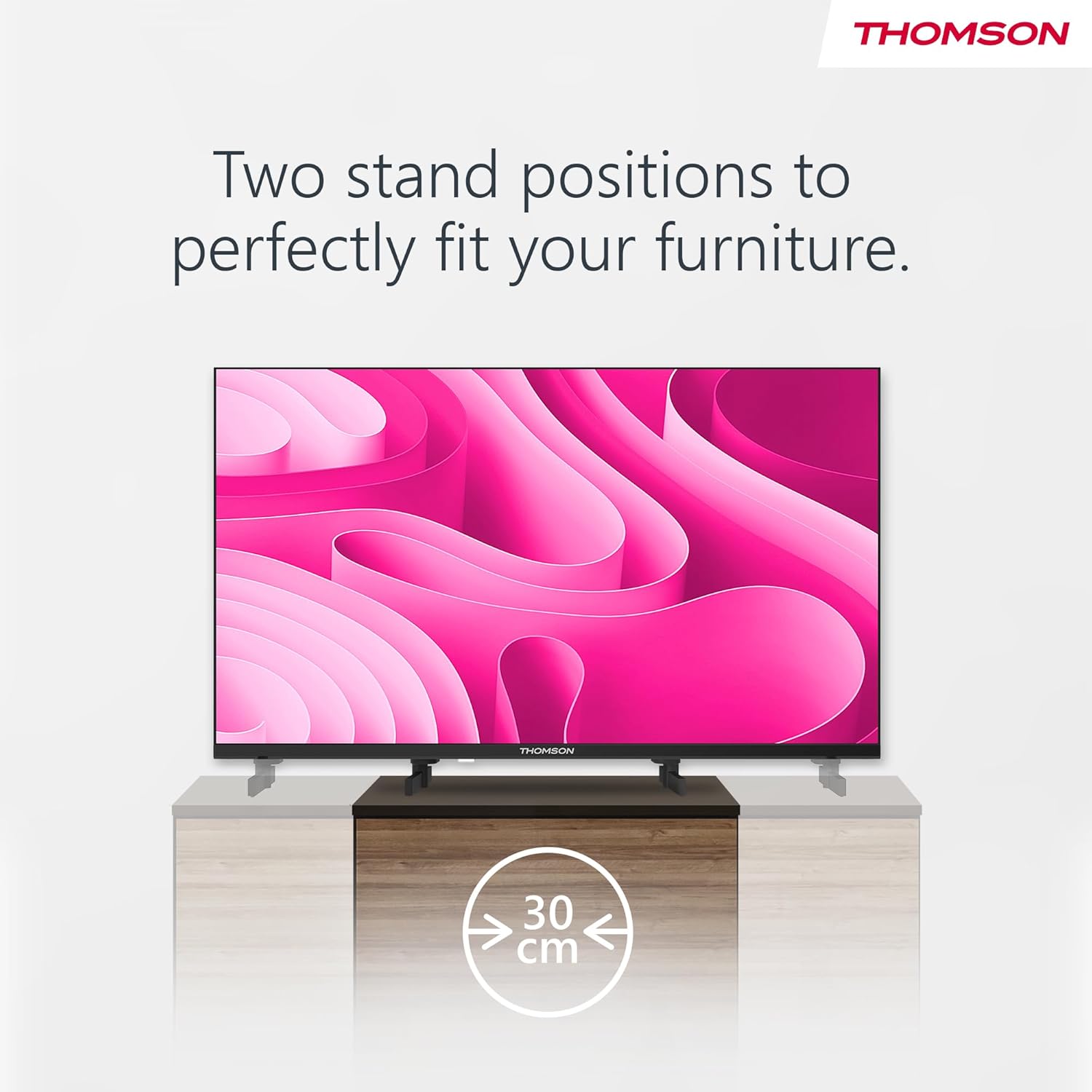
Image: A person using the voice control feature of the THOMSON TV remote, demonstrating interaction with Google Assistant.
การซ่อมบำรุง
การทำความสะอาดทีวี
- ควรถอดปลั๊กทีวีทุกครั้งก่อนทำความสะอาด
- Use a soft, dry cloth to wipe the screen and cabinet. Do not use liquid cleaners or aerosol sprays.
- สำหรับรอยฝังแน่น ให้เช็ดเบาๆampen a microfiber cloth with water and gently wipe. Avoid excessive moisture.
การอัพเดตซอฟต์แวร์
ทีวีอาจได้รับการอัปเดตซอฟต์แวร์เพื่อปรับปรุงประสิทธิภาพและเพิ่มคุณสมบัติใหม่ ๆ โปรดตรวจสอบให้แน่ใจว่าทีวีของคุณเชื่อมต่อกับอินเทอร์เน็ตเพื่อรับการอัปเดตเหล่านี้ โดยปกติคุณสามารถตรวจสอบการอัปเดตได้ในเมนูการตั้งค่าของทีวี
การแก้ไขปัญหา
| ปัญหา | สาเหตุที่เป็นไปได้ | สารละลาย |
|---|---|---|
| ไม่มีไฟฟ้า | สายไฟไม่ได้เชื่อมต่อ เต้าเสียบไฟฟ้าไม่ทำงาน | ตรวจสอบการเชื่อมต่อสายไฟ ทดสอบเต้ารับกับอุปกรณ์อื่น |
| ไม่มีภาพแต่มีเสียง | เลือกแหล่งอินพุตไม่ถูกต้อง มีปัญหาไฟแบ็คไลท์ | Press the "Input" button on the remote to select the correct source. Contact support if issue persists. |
| ไม่มีเสียงแต่มีภาพ | Volume too low or muted; audio cables loose. | Increase volume. Check mute status. Ensure audio cables are securely connected. |
| รีโมตคอนโทรลไม่ทำงาน | แบตเตอรี่หมด; มีสิ่งกีดขวางระหว่างรีโมทกับทีวี | เปลี่ยนแบตเตอรี่ นำสิ่งกีดขวางออก ตรวจสอบให้แน่ใจว่ารีโมทชี้ไปที่เซ็นเซอร์อินฟราเรดของทีวี |
| ไม่สามารถเชื่อมต่อ Wi-Fi ได้ | รหัสผ่านไม่ถูกต้อง ปัญหาเกี่ยวกับเราเตอร์ ทีวีอยู่ห่างจากเราเตอร์มากเกินไป | ตรวจสอบรหัสผ่าน Wi-Fi รีสตาร์ทเราเตอร์ ย้ายทีวีไปไว้ใกล้เราเตอร์มากขึ้น หรือใช้การเชื่อมต่อแบบใช้สาย |
ข้อมูลจำเพาะ
| คุณสมบัติ | รายละเอียด |
|---|---|
| ยี่ห้อ | ทอมสัน |
| แบบอย่าง | 24HA2S13C |
| ขนาดหน้าจอ | 24 นิ้ว (60 ซม.) |
| เทคโนโลยีการแสดงผล | นำ |
| ปณิธาน | 1366 x 768 (ความคมชัดสูง) |
| ระบบปฏิบัติการ | แอนดรอยด์ทีวี |
| คุณสมบัติพิเศษ | Google Assistant, Chromecast Built-in, 12V Power Supply, Dolby Audio, Triple Tuner (DVB-T2/C/S2) |
| การเชื่อมต่อ | Wi-Fi, Bluetooth, HDMI (x3), USB (x2), LAN, Optical Audio Out, AV In, CI+ |
| เล่มที่tage | 12 โวลต์ (กระแสตรง) |
| ขนาดสินค้า (กว้าง x ลึก x สูง) | 53.5 x 15.1 x 35.3 ซม. (พร้อมขาตั้ง) |
| น้ำหนัก | 3.5 กก. |
For detailed energy efficiency information, please refer to the EU EPREL database: https://eprel.ec.europa.eu/qr/1456673

Image: The EU Energy Label for the THOMSON 24HA2S13C TV, showing an energy efficiency rating of E and power consumption of 18 kWh/1000h.
การรับประกันและการสนับสนุน
This Thomson TV comes with a 3-year guarantee. For technical support, warranty claims, or service inquiries, please contact your local Thomson service provider or refer to the manufacturer's webเว็บไซต์.
Manufacturer: STREAMVIEW บริษัท จีเอ็มบีเอช
Webเว็บไซต์: www.สตรีมview.คอม
อีเมล: ติดต่อ@streamview.คอม
วิดีโอผลิตภัณฑ์อย่างเป็นทางการ
ชมวิดีโอนี้เพื่อดูภาพรวมview of the Thomson 24-inch Easy TV.
วิดีโอ: สั้นๆ สั้นๆview of the Thomson 24-inch Easy TV, showcasing its design and features. This video is provided by the vendor Streamview บริษัท จีเอ็มบีเอช


